[Release notes] Finlayson 5.2.0.15 - Jolla Phone only

This is the “first” release in Sailfish OS 5.2 series. Technically there has been already two releases, .11 and .13, but due to all the hassle we haven’t had time to write proper release notes. The fact that we already got two different releases on the Jolla Phones that were handed out in the launch event probably shows how tight the schedule has been :slight_smile:

These notes cover first the changes and fixes in the .13 and .15 updates, and then in general what has changed since 5.1.0.11.

Known issues

Currently this release is only published to the Jolla Phone. Due to certain changes required in audio routing for the new Jolla Phone, audio does not work correctly on other devices. So do not manually update other devices, unless you are fine with things like call audio being always on the speaker.

On the Jolla Phone there are some other known issues:

5.2.0.15 update highlights

5.2.0.13 update highlights

  • Fix random boot failures on Jolla Phone
  • Improve boot and shutdown times
  • Reduce UI stuttering in certain situations
  • Improve Android app window handling in AppSupport

5.2 Release highlights since 5.1.0.11

The main focus has of course been on getting Sailfish running smoothly on the new Jolla Phone, and improving the out-of-the-box user experience. A lot of effort has also gone into device testing and QA improvement, to streamline the process on the final assembly line. Although getting a completely new device out involves a lot work that is not so visible to the user (apart from the actual device), we still managed to get some quite substantial updates in :slight_smile:

First of all the browser engine was updated to Firefox ESR 115 level. It is still quite some way from the latest and greatest, but nevertheless improves the compatibility with many web sites. This also means that we are now on a version that is still supported by the upstream Firefox project, which is nice.

AppSupport was updated to Android 15. This was mainly a requirement to get nice hardware accelerated graphics for Android apps on the Jolla Phone, but of course brings other benefits as well. Another great usability improvement is that microG (a free-as-in-freedom re-implementation of Google’s Android user space apps and libraries) is now installable straight from the Sailfish
startup wizard (or from the Store). So those Android apps that expect Google services, and are in some case difficult to avoid, are now considerably easier to get working.

Other features and fixes include:

  • First boot StartUp Wizard flow improvements
  • Noticeably improved camera startup times
  • VoNR / Vo5G calls support (still has issues on some network providers)
  • Cell Broadcast Service emergency alert support and settings
  • Connectivity
    • Handle invalid password on WPA2+3 and WPA3 SAE
    • Fix DNS leak with VPN and two connected devices
    • OpenConnect VPN plugin 2 password support
  • Hunspell based virtual keyboard text correction
    • Will be made installable from store later
  • Mastodon account support
  • USB audio device support in calls
  • Torch/Flashlight uses direct hardware controls if available, for much faster on/off toggle
  • New languages; Catalan, Flemish, and Japanese. Thanks to our community translators :heart:

… and many more bigger and smaller fixes and updates.

Changelog

Full Changelog_from_5.1.0.11_to_5.2.0.15.md (69.0 KB)

How did the upgrade go?

  • I had no issues during the upgrade process
  • I had small issues, but was able to handle them
  • I got into serious trouble when upgrading my device (please help!)
  • I did not dare or want to update
0 voters

Version history of the Sailfish 5.2.0 releases

2026-07-20 5.2.0.15 Jolla Phone only
2026-06-16 5.1.0.11

All recent Sailfish OS release notes can be found here.

Help articles

The Sailfish OS help articles are available at Sailfish OS Documentation.

65 Likes

Amazing work, you sailors have really pushed Jolla and SailfishOS forward in stunning speed! Keep rocking🔥

11 Likes

Will this option be available/shown only to users with the Inari Blue TOH (like the toggle appears as an option only after attaching the TOH once to the phone), or will it be there provoking everyone outside of the first three batches sold?

1 Like

I mean we just received the phones and are getting already a second update and third one promised soon :smiley:

Thank you Jolla for your hard work :saluting_face:

15 Likes

It seems that the option is available with or without TOH attached. Works only with the corrcet one attached ofc (activate/deactivate light)

Download speed of SFOS 5.2.0.15 update is very slow now (2026-07-20, 19.00 EET) on Finnish Elisa network. :frowning:
Edit: Update downloaded eventually and actual update went smoothly. Now my BT plugs started to play music at least - not tested calling. Great work Jolla!
Edit2: Calling with BT earplugs (B&W Pi7) is working too.

1 Like

That is quite normal when updating. Maybe Jolla’s server is busy. I’ve had it a lot of times that progress bar doesn’t move for long time but suddenly jumps to finish line.

2 Likes

Update went smoothly on the JP2! Mailbox.org mail account successfully added! Thank you to Jolla in general and also to @dcaliste for the fix!

4 Likes

Updated.
Update went ok. So far no side effects.
The Whatsap crash with location shared is gone.
Eufy app which crashed now starts ok.

Still Here we go and also Google maps work really sluggish, freezing after each move/ menu , like something is holding. Not usable .
On the other hand no deal braker. Pure maps with here api key is nice.

Not tested audio autput selections yet.

Edit:
Tested with usb-c /3.5 mm adapter and BT hands free ( swapping on the fly ) I had no failures, audio was redirected where it shoud and back to speaker . Used spotify as test source.

4 Likes

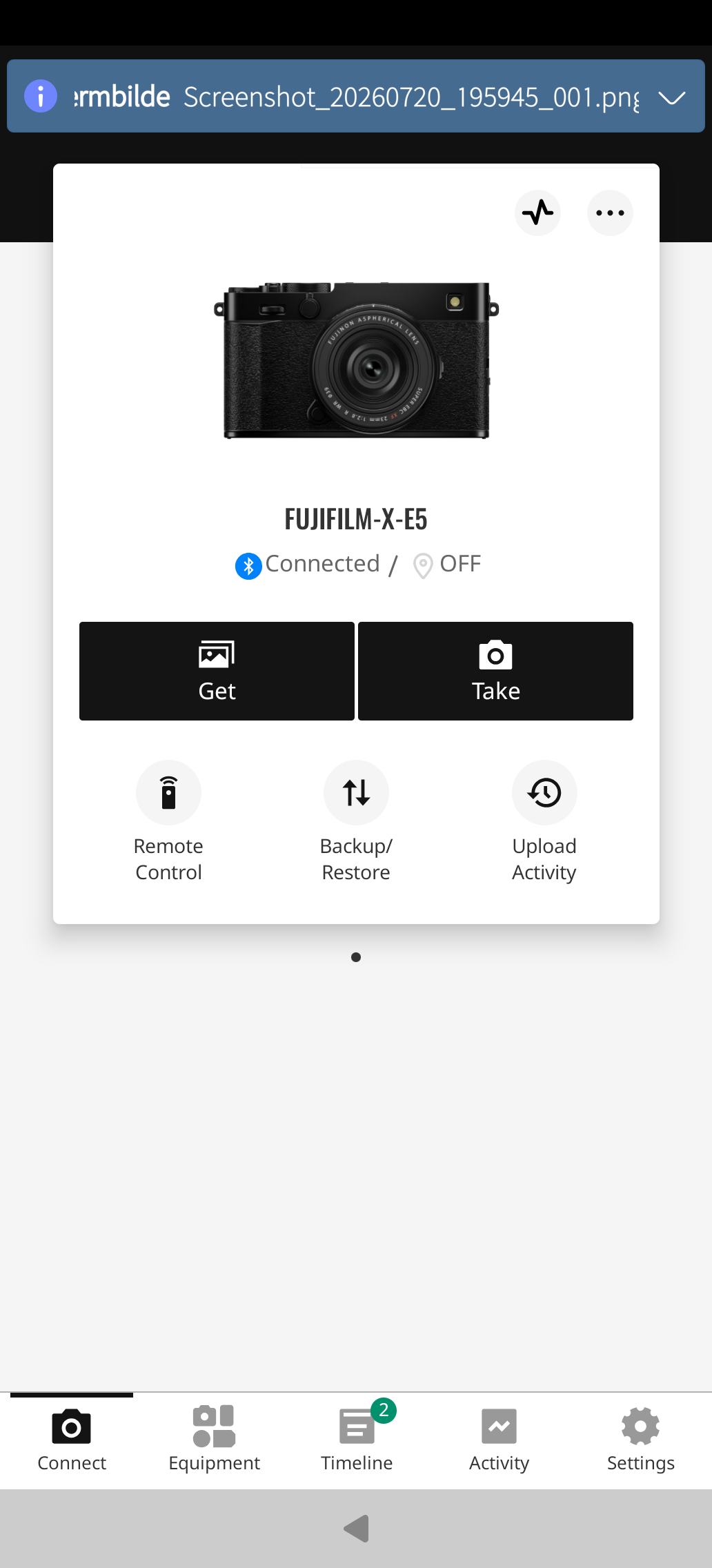
Woah! My Fuji Xapp actually connected now with 5.2.0.15 improvements to my Fuji X-E5 camera!!! :partying_face::partying_face::partying_face: I can use the the app already for remote actuating shutter! :partying_face::partying_face::partying_face:
(and share location to camera and adjust clock it seems)

I remember posting about camera connection already during 2015 to TJC back in the days… and lost hope at some point that this day would actually come :smiley: But here we are :star_struck: :birthday_cake:

The way seems to stop there because the “Get” and “Take” on the app will try to connect to camera’s WiFi and that doesn’t seem to work. Couldn’t make Wi-Fi settings find the camera’s Wi-Fi. Buuuuut….maybe some day in distant future :grin:

10 Likes

Since on the Xperia 10 III we nowadays have to remove a lot of apps to make enough room to update (which is a PITA) I was wondering if the partition needed for that is larger on the new Jolla Phone?

3 Likes

Update went great. I can finally use my yahoo email, but it does seem that the same fix wasn’t applied to the separate yahoo account thing that will allow contact/calendar sync. hopefully it will be merged to the next update

1 Like
nemo@PGJolla26-I:~/ $ df -h /
Filesystem          Size  Used Avail Use% Mounted on
/dev/sailfish/root  9.6G  5.8G  3.7G  62% /
nemo@PGJolla26-I:~/ $ df -h /home/
Filesystem                                             Size  Used Avail Use% Mounted on
/dev/mapper/luks-c4e9d6d4-22c1-4cbf-be09-9e31a8abb582  219G   30G  177G  15% /home

Not huge but better I’d say.

4 Likes

Can someone tell me what a „social media account support“ in an OS would mean?

I can not figure out?

3 Likes

It could mean or did historically mean that you 'd enter your (Mastodon) social media account credentials in the “accounts” section under “settings” options provided by the (Sailfish) OS

This to enjoy a more integrated functionality of the said social media platform within the standard OS interface and without relying on a 3rd party client. It could be full or limited functionality.

For example only initiate (Mastadon) direct messaging under default contacts or (SMS) messaging software already in the phone.

OS Maker takes care of updates to guarantee compatibility with the latest server side software (of Mastadon)

1 Like

Thanks a lot for this quick and unexpected update.

Update download and installation: fast and smooth.

My withings ScanWatchDC now connects and syncs much better via bluetooth with Android App.

The small useful Inari Blue light toggle is welcome, hope this will evolve further.

Didn’t check other improvements, but so far so good, you, Jolla team rocks!

Chris

5 Likes

The Update went fine. But unfortunately my bluetooth earplugs (Bose) now won’t work any longer with Android Apps & Sailfish Browser. Connection is etablished as normal but no sound at all. From Sailfish Media App sound connction works fine.

Edit: Sound is back. Unsure which step was successful. Done multiple rebinding of theearplugs, multiple reboots of bluetooth service, System reboot.

1 Like

Thank you for the hard work! The phone is just amazing and I love it! Phone is fast, camera is really nice, and apps work well and can have few of them in the background without any problems!
Phone gets pretty hot when using PipePipe and playing a game at the same time, but that’s to be expected. Every phone I’ve had does that, even the flagship ones.

The browser works really well! Only problem has been some android apps not recognizing verification done through it, so have had to use Firefox for that to succeed, but that’s small thing and I think it’s about the AAS not knowing much what happens on Sailfish side. That’s a good thing in my eyes.

The phone just keeps getting better, thanks to hard work of everyone there! Can really see the devotion and love you all have for your product’s and the community.

13 Likes

Bluetooth support came a while back, indeed nice to have! AppSupport Bluetooth feedback thread

Looking forward to testing the audio and bluez update. Bluetooth has been crashing frequently for me, or getting stuck in some way when pairing and unpairing my earbuds. Restarting BT stack via Utilities sorts it :person_shrugging:

1 Like

If now really there is hardware acceleration used in AAS, is it noticeable better? Any experience welcome

2 Likes