REPRODUCIBILITY: 100%
OS VERSION: 5.0.0.72
HARDWARE: Xperia 10 III
UI LANGUAGE: English
REGRESSION: Yes
DESCRIPTION:
UPDATE: added screenshots of a working environment and of mine, at the end.
I have been using the Molly app for quite a time; no issues until yesterday. I was using the app normally, when all of a sudden it closed. I tried to reopen it, but it has always “collapsed” since.
I started following the usual way, and looked for app updates. There were none related to Molly, but other updates were ready both on F-Droid and on Aurora (telling this if the presence or update of other apps has any influence whatsoever): I installed them.
Then I tried to open Molly again: no success. I thought about re-installing it, I downloaded the APK from the website, installed the app over the running installation, but with no success, again.
Today, I went a few steps further. I uninstalled the app, and installed it again. It made me hopeful, because it did in fact open: it allowed me to restore my backup, and to type in my details (the phone number, the PIN number, and the encryption password of choice, in the order it asks for it). It went all well until it had to actually open up with the usual main screen. It stopped and closed itself there and then. Again, if I tried to open it, it would close immediately.
I decided to drop Molly, and I downloaded Signal itself. And it was just the same: I put all the details in, I was even able to use the Molly backups on Signal app, but also the main Signal app collapses at the end.
Last thing, I thought about using Whisperfish (which I had to drop for some do-not-remember reason time ago), and tried to go that way. Unfortunately, WF “failed to setup Signal client”, but that might be me, because I secured my Signal account with a PIN, and AFAIR someone mentioned that PINs are not implemented on WF.
PRECONDITIONS:
Have a working Signal account, use it with an Android app.
STEPS TO REPRODUCE:
-
Click on the corresponding icon
-
Wait for the app to start
-
See the “boot” screen of the app start
EXPECTED RESULT:
App normally starting.
ACTUAL RESULT:
App maybe starts, but stops immediately, before any interaction is possible.
MODIFICATIONS:
None related, to our knowledge.
ADDITIONAL INFORMATION:
0- all other Android apps work normally.
1- I had noticed something odd recently. The app would work, but if I would swipe it to a side and get to the home screen, I would see the actual silica cover with the icon spinning, rather than the ready app. In fact, to call the app back, I would have to tap on the icon in the icon menu.
2- I know that this issue has probably been covered previously here, here, and here.
But this has happened now, and my phone is on 5.0.0.72.
3- I read those bug reports and before going the re-install way, I also tried the suggested workarounds. I did try to open from Android Settings (same result), I also opened the apkd-launcher…desktop file in a file manager (same result, works with other apps), and I tried to use the lca-tool (same old).
I might also know someone who has the same phone, on 5.0.0.71 I think, with Molly running, if need be.
And I have this log from journalctl. For the context, I open Terminal first, launched journalctl -f and then swiped to the menu. I waited for the app to stop, and ctrl-c’ed journalctl.
13:30:45 Xperia10III invoker[60797]: Launching Android I
ntent android.intent.action.MAIN im.molly.app/org.thoughtcrime.
securesms.RoutingActivity
Dec 10 13:30:45 Xperia10III booster-generic[3587]: *** signal=1
7 pid=3587
Dec 10 13:30:45 Xperia10III /usr/libexec/mapplauncherd/booster-
generic[3587]: warning: Daemon: sending exit(0) to invoker(6079
7)
Dec 10 13:30:45 Xperia10III d-bridge[5362]: Discarding parcel w
ith 100 bytes unread
Dec 10 13:30:45 Xperia10III [3903]: [W] unknown:0 - An inactive
plugin is misbehaving - tried to show a window!
Dec 10 13:30:45 Xperia10III [3903]: [W] unknown:0 - requestActi
vate() called for  QQuickView(0x34264aa0)  which has Qt::Window
DoesNotAcceptFocus set.
Dec 10 13:30:46 Xperia10III [3903]: [W] unknown:0 - requestActi
vate() called for  QQuickView(0x34264aa0)  which has Qt::Window
DoesNotAcceptFocus set.
Dec 10 13:30:46 Xperia10III xt9-server[3646]: Starting loading
dynamic keyboard
Dec 10 13:30:46 Xperia10III xt9-server[3646]: [2B blob data]
Dec 10 13:30:46 Xperia10III xt9-server[3646]: Error adding a dy
namic key: 71
Dec 10 13:30:46 Xperia10III xt9-server[3646]: coords: 213 680 3
09 860
Dec 10 13:30:46 Xperia10III xt9-server[3646]: Content: ,
Dec 10 13:30:46 Xperia10III xt9-server[3646]: Error adding a dy
namic key: 71
Dec 10 13:30:46 Xperia10III xt9-server[3646]: coords: 771 680 8
67 860
Dec 10 13:30:46 Xperia10III xt9-server[3646]: Content: .
Dec 10 13:30:46 Xperia10III xt9-server[3646]: ET9STATUS ET9Hand
le_KDB_Request(ET9KDBInfo*, ET9WordSymbInfo*, ET9KDB_Request*):
2
Dec 10 13:30:47 Xperia10III ofonod[1434]: not roaming based on
spdi
Dec 10 13:30:47 Xperia10III ofonod[1434]: not roaming based on
spdi
Dec 10 13:30:47 Xperia10III ofonod[1434]: not roaming based on
spdi
Dec 10 13:30:48 Xperia10III d-bridge[5362]: Discarding parcel w
ith 4 bytes unread
Dec 10 13:30:49 Xperia10III kernel: qcom_rpmh DRV:apps_rsc TCS
Busy, retrying RPMH message send: addr=0x30010
Dec 10 13:30:50 Xperia10III kernel: qcom_rpmh DRV:apps_rsc TCS
Busy, retrying RPMH message send: addr=0x30010
Dec 10 13:30:52 Xperia10III mce[1103]: tklock.c: tklock_dbus_no
tification_beg_cb(): notification begin from name=:1.78 owner=:
1.78 pid=3761 uid=100000 gid=996 priv=1 cmd=/usr/bin/lipstick -
plugin evdevtouch -plugin evdevmouse -plugin
Dec 10 13:30:52 Xperia10III mce[1103]: tklock.c: tklock_datapip
e_uiexception_type_cb(): uiexception_type = none -> notif
Dec 10 13:30:52 Xperia10III kernel: binder: release 61005:61026
transaction 3480145 in, still active
Dec 10 13:30:52 Xperia10III kernel: binder: send failed reply f
or transaction 3480145 to 60595:60987
Dec 10 13:30:52 Xperia10III kernel: binder: release 61035:61053
transaction 3480445 in, still active
Dec 10 13:30:52 Xperia10III kernel: binder: send failed reply f
or transaction 3480445 to 60595:60987
Dec 10 13:30:52 Xperia10III kernel: binder: undelivered transac
tion 3480497, process died.
Dec 10 13:30:52 Xperia10III kernel: binder: undelivered TRANSAC
TION_COMPLETE
Dec 10 13:30:52 Xperia10III kernel: binder: undelivered transac
tion 3480511, process died.
Dec 10 13:30:52 Xperia10III d-bridge[5362]: Discarding parcel w
ith 44 bytes unread
Dec 10 13:30:52 Xperia10III kernel: binder: 6421:6421 transacti
on failed 29189/-22, size 96-0 line 3103
Dec 10 13:30:52 Xperia10III mce[1103]: modules/proximity.c: mp_
datapipe_set_proximity_sensor_actual(): state: UNDEF -> OPEN
Dec 10 13:30:54 Xperia10III [3903]: [W] unknown:0 - An inactive
plugin is misbehaving - tried to show a window!
Dec 10 13:30:54 Xperia10III [3903]: [W] unknown:0 - requestActi
vate() called for  QQuickView(0x34264aa0)  which has Qt::Window
DoesNotAcceptFocus set.
Dec 10 13:30:56 Xperia10III ngfd[3654]: [67703.978] WARNING: co
re: no sinks that can handle the request 'feedback_press_weak'
Dec 10 13:30:56 Xperia10III fingerterm[60161]: [D] unknown:0 -
unknown special key:  67108864
Dec 10 13:30:57 Xperia10III kernel: qcom_rpmh DRV:apps_rsc TCS
Busy, retrying RPMH message send: addr=0x30010
^C
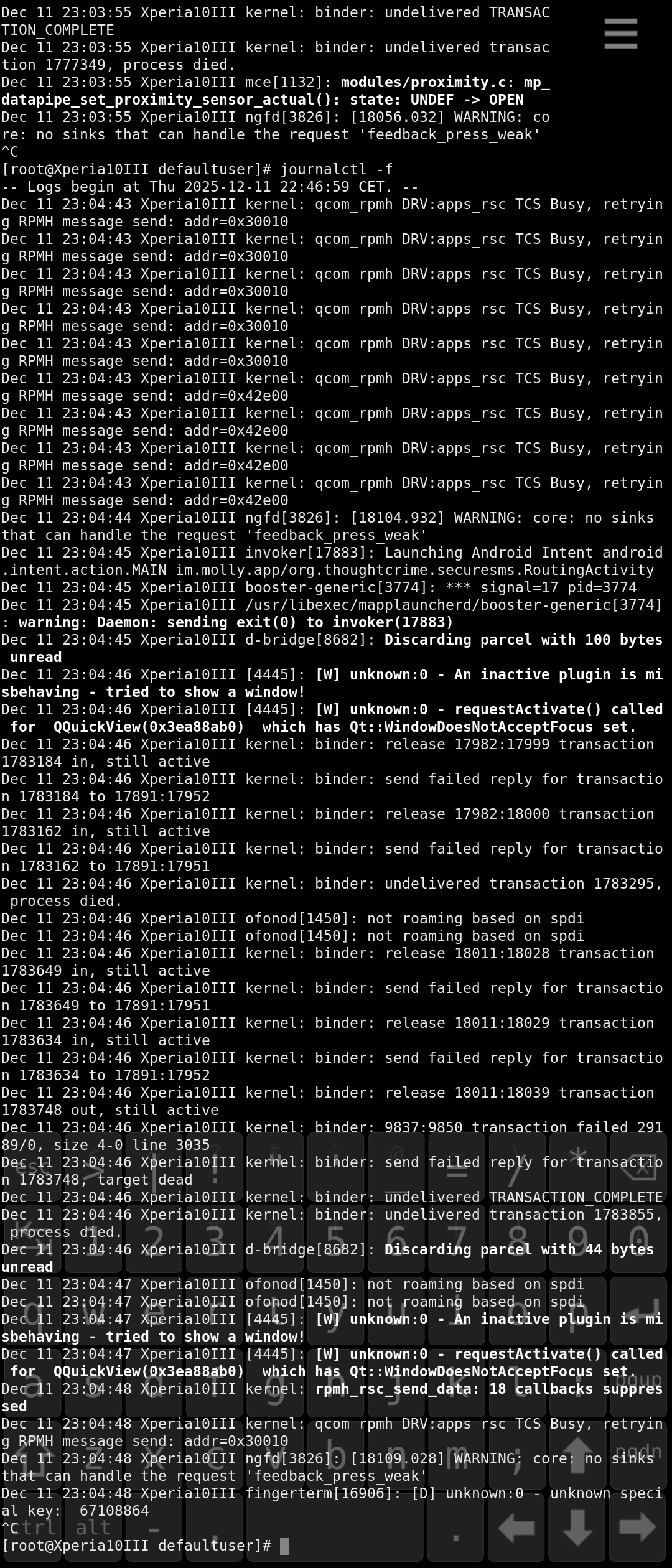
COMPARISON SCREENSHOTS
Working environment: launched journalctl -f, swiped out, launched Molly (successfully), closed Molly, stopped journalctl.
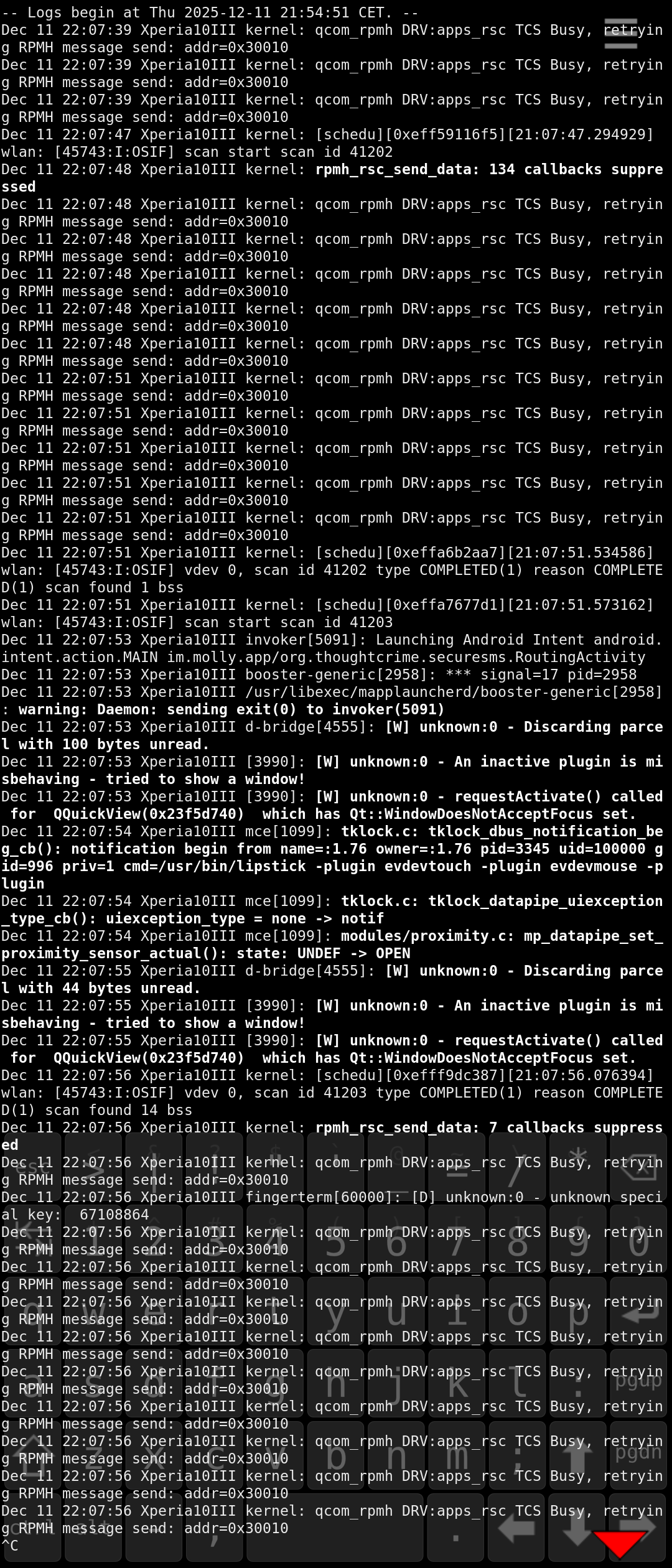
Not working environment: launched journalctl -f, swiped out, launched Molly (Molly starts and stops right away), stopped journalctl.