Yes, this raises another question: where are the widgets in Sailfish OS? Notes, my daily photo memories, my music widgets, my clock widgets, calendar event widgets—most importantly, these are very popular on Android and iOS nowadays. Honestly, app widgets give a phone’s screen a great look, but where would they be placed in Sailfish OS? I’m curious about that too, or I suppose they will never exist.
There is the weather widget and calendar on the Notifications view, rest can be done as cover actions in the Home view and media controls are also in the lock screen.
Those weren’t the widgets I was talking about. The widgets you mentioned remain in a fixed layout. On the iPhone, the screen is filled with widgets of different sizes, from small to large, rectangular or square, and many applications have their own widgets as well.
I was wondering where those would be placed, but it seems like there is nowhere to put them. But that’s not a problem. At the very least, it still would have been nice to have small widgets on the lock screen. Let’s look on the bright side.
It’s not what exactly you want, but you can make an SFOS application that minimizes itself into the appearance of small squares that look like widgets.
There is also the screenshot top menu toggle Sailfish Camera app wishlist - #28 by rainemak . It looks like a badge that you can move around the screen. I guess you could make a set of them, each displaying some useful information.
1 Like
The covers themselves work as widgets, both displaying info (can be real time, or even live video like browser cover with yt playing) and giving an interaction option where it makes sense (inb4 but I need my widget to span the whole width etc)
Frankly the whole widget discussion is pointless, as usual with that poster, if you want a homescreen with few predefined widgets, go ios/android, we’re not dropping the multitasking view for your notes widget, write a notes app that offers that in its cover and keep it open
4 Likes
Yes the cover is what I was referring to, I didn’t know it was the name for the concept. I was suggesting one could write an app called “widgets” which one could keep open, that had a cover that looks like 2×2 or 2×3 matrix of small squares, using the cover to emulate the aspect of the widget things.
You probably can, but for what, that one person that still misses his weather widget and clock widget? Just have meecast open and you have live weather tile with live info, open clock app and you have bigger clock widget…
The whole argument is:
Notes, my daily photo memories, my music widgets, my clock widgets, calendar event widgets—most importantly, these are very popular on Android and iOS nowadays.
Nah, widgets were popular during n900 times (which had some widgets yay), noone cares about them nowadays, it’s mostly a clock with hands instead of digital and weather (maybe some news?)
Your music app cover works as widget for next/pause, your gallery widget rotates latest photos, calendar cover covers next event just like eventview, literally no good example except: they are supposedly popular now, kek
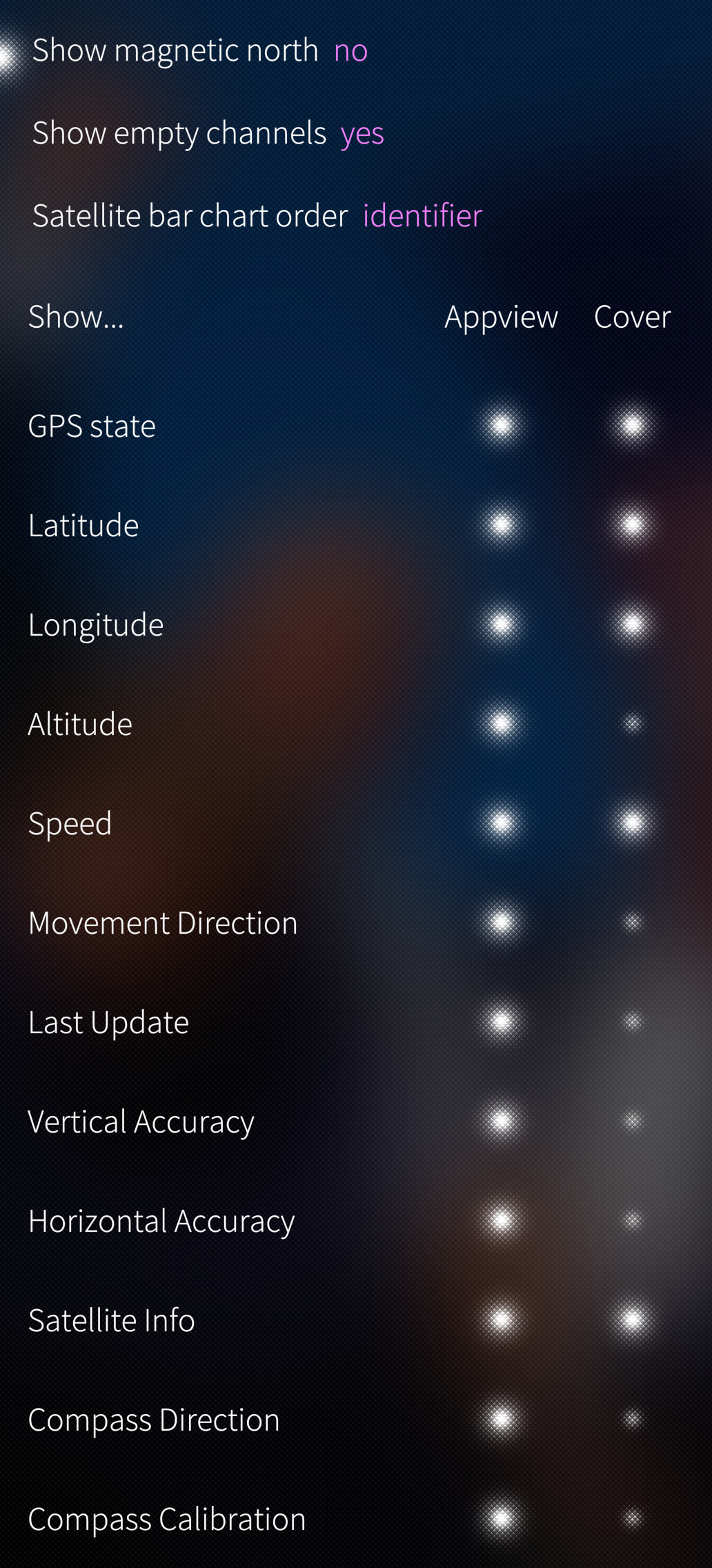
Edit: and you can turn this argument around: where is iOS gps widget? I can run gpsinfo and define which out of 20 or so data points are displayed on the cover, ios is so backwards man, with widgets being SOOO popular
2 Likes
I’m already someone who uses iOS. In that post, you can only defend your own self-criticism; in a way, this is a hidden sign of belittlement. Anyway, if you look at many operating systems, they present widgets in a grid-like form and show the user shorter, more summarized information. And I honestly laughed a lot at you seeing the app boxes that appear when an app is sent to the background as some kind of widget. My only request from you is this: use a latest-model iOS device for one month, and then you will pretty much understand what I mean.
What a ridiculous thing to say. “For that one person?” So that means I must be very important. Right now, all the most famous operating systems in the world are full of widgets. I simply wanted to make the point: why shouldn’t SFOS have them too? Why are you looking for ill intent and bad intentions in that, hmm? Speak plainly so we can understand your intention.
Where’s the iOS gps widget bro? Why is iOS so behind times, normal operating systems like sfos offer it by default
Here’s how much tweakability you get from a single app/cover vs your argument: remove multitasking screen to have 3-4 widgets (they’re popular and even if the covers provide same exact functionality, we neeed to be more like ios for some reason)
Stop changing the subject. Where are the widgets I mentioned on SFOS? Should I ask it like that too? This is very ridiculous…
I don’t believe that iOS has fallen behind the times. I only see that Apple has recently been unable to bring anything new in terms of design. If I were going to criticize it, that is what I would criticize. But that does not mean it has fallen behind the times. And that is only your opinion.
What does SFOS offer? I can clearly see that SFOS does not really have its own special widget style. You are trying to shove app boxes at me as “a kind of widget.”  Anyway.
Literally no gps widget, such a bad look for apple, we get it for free and supper adjustable. Pretty much every app with its cover is a widget, but no, abandon multitasking view to get a daily photo widget and uhhh notes app widget?
HAHAHAH, you’re still going on about the same thing. Fine, let me say this then: SFOS still has no widgets on the lock screen. Not even a single app has a widget, and you’re trying to force the app tiles on me as “widgets.” Oh, Apple GPS, whatever at this point; I’m sure it probably exists anyway.
I just want to say this: before all these things, a lot of prototype ideas belonged to Nokia, and then Apple evolved them and presented them in a much better way. After that, you can see many operating systems trying to imitate Apple. So there’s no need to drag this out too much.
You can look down on Apple as much as you want, but anyway, I’m not going to talk. If I talk, a lot of people are going to get hurt, and that’s not something I enjoy either, considering the things Apple has done. So don’t press on that wound; you’ll be the one who gets damaged.
ADDITIONALLY: No one is saying that SFOS is completely bad just because it doesn’t have widgets. Your intentions are bad. After I write criticism, you immediately try to divert the subject to other people with a different sentence. Stop trying to fool someone here.
If you look properly, I criticize SFOS with both its good and bad sides; from the swipe issue to many other things, I criticize both the good and the bad. So stop looking for malicious intent in my sentences. Or if there is malicious intent, then mark that sentence too so I can see why I supposedly have malicious intent on this subject.
Because I check my own writing, and I made a good criticism with both the good and the bad included. I am definitely not saying that the whole operating system is terrible just because something is missing. Make sure of that.
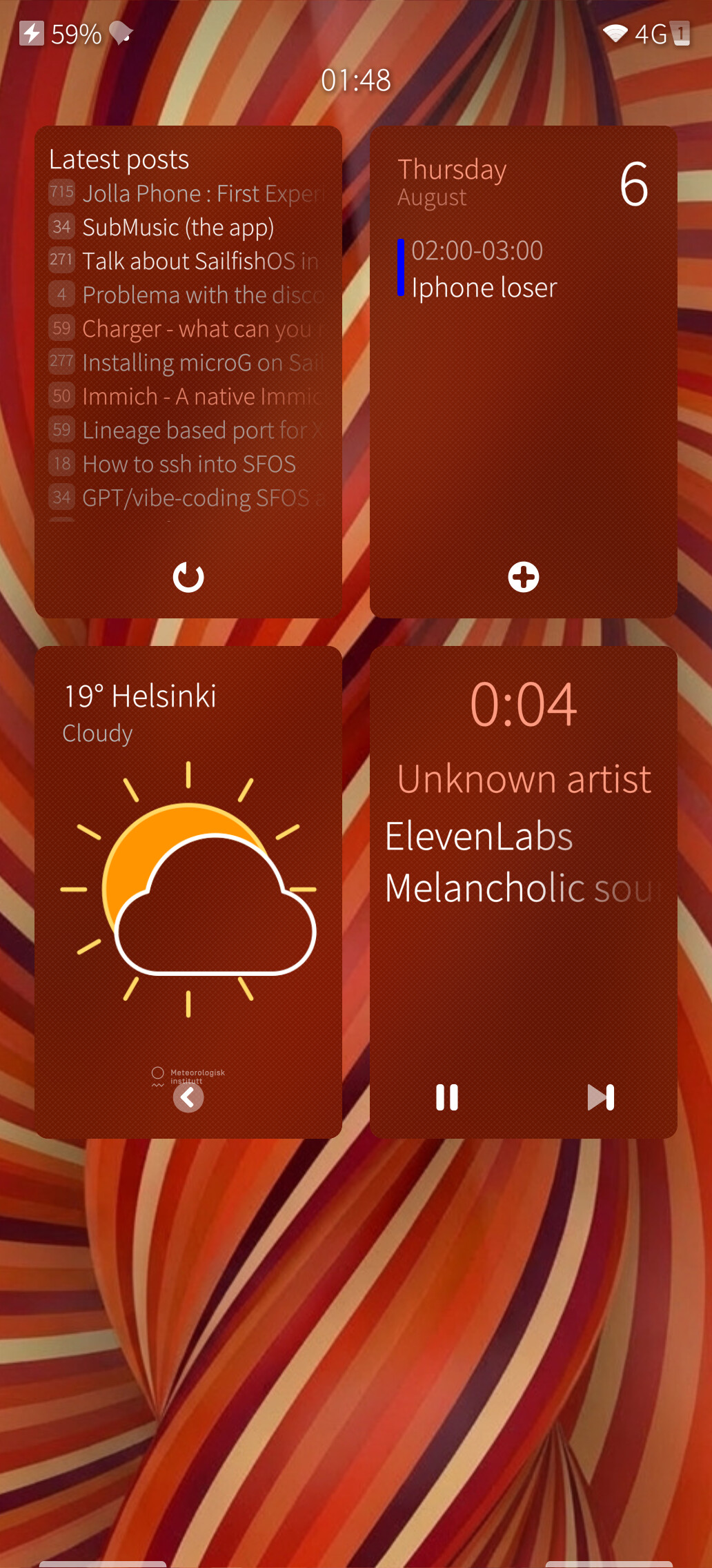
Here’s 4 widgets, calendar with next event, weather, and media player and one that you can’t for sure find in appstore sfos forum viewer, all interactable, you can rearrange them, you can refresh sfv to see if the troll replied to you, show us how that works on iOS, as sfos widgets (covers) seem to work great and as any app can register whatever it wants on it’s cover are much more customizable than predefined few widgets in iOS
Edit: again, just what a basic sfos gps widget gets you as you probably missed the edit:
Show us the ios gps widget
You still insist on not understanding, over and over again, because I guess you believe that if you do understand, you’ll end up realizing that you were wrong. I understood the things you were showing from the very beginning while I was writing; these are not widgets.
For that reason, use the latest version of iOS for one month and understand some of the design elements in certain app interfaces. The things shown in the apps you are showing are not widgets.
Even when the Nokia N950 Sailfish demo was being introduced, the former CEO Marc did not even describe this feature as a widget. He added it so that there would be shortcut buttons when exiting each app. So in short, most of the things you are showing are actually not widgets in a way. They were introduced so you would not have to go back into the app, and if you notice, there are certain action buttons there so you can quickly handle your tasks with a single tap without entering that app. That is how it was explained back in those years when the demo was introduced.
And yet, amusingly, from the very beginning you keep praising this by saying, “I see this as a widget.” Like I said, stop being old-fashioned. Try experiencing innovation and that fluidity. A widget is a very different thing. You are calling something that shows quick actions for an app a widget. Maybe the purpose of the two is almost similar, but if you examine them a little, you will see that the two lead in different directions. Think of it like not having widgets on the lock screen.
If you pay attention, iOS users who come here always make substantial criticisms. Why do you think that is? Because in some placements, something feels lacking. Do you understand now?
Also, I’m not an iPhone fanboy. You’re approaching me a bit like you understood it that way. I’m not one of those kids who argues with you about whether Samsung is better or Apple is better. In an operating system, what I care about most is the special substance/feeling it wants to make you feel.
MeeGo had really impressed me back in the day, but many people know how that ended. So stop trying to have that disgusting Reddit-style “Samsung is so good, Apple is so good” competition with me in this day and age.
SFOS has points where it is good, and it has points where it is lacking. There are topics that can be criticized at length.
What has n950 to do with sfos??? It still had old maemo/meego ui, not silica?
These are functionally widgets, they display information and allow interaction without going into an app, you can reee all you want, but covers provide same functionality and if you start adding arbitrary limits: widgets need to be on a desktop not multitaskig view, just because
Doesn’t change that fact, sfos has all the usability of widgets with app developers having much more freedom thanks to cover concept, iOS still has no gps widget btw, such a backward os
What does that have to do with it? Let me put it this way: the feature you have been trying to write to me about and explain from the very beginning has existed since the early days of Sailfish OS. Back then, when the demo version of Sailfish OS was being introduced, the former CEO installed it on a Nokia N950 and presented it. If you search YouTube for “Nokia N950 Sailfish demo UI,” you will understand. He explains a lot of things there, and I am bringing this up based on what he explained.
In other words, the guy there says that the original purpose of these things was to let you handle something by tapping those controls without going back into the application. For example, as far as I remember, in that video, you start playing music from the music app, and then without entering the app again, you swipe on it to change the song. Look, in short, it is something like a shortcut button. It is not actually a widget.
A widget is, in a way, a visual design element. It is not something that disappears when you close it, like it does on SFOS. Do you understand?
iOS is not bad just because it still does not have a GPS widget. I have been saying that from the beginning. Anyway, if you do not understand, then do not understand. With that mindset, because you cannot understand many of the innovations coming from outside, you cannot grasp what is actually going on. That is where the problem is.
Well, you can just delete a widget then it disappears from homescreen, literally same as closing the app, oh and:
Like I said, stop being old-fashioned. Try experiencing innovation and that fluidity. A widget is a very different thing. You are calling something that shows quick actions for an app a widget. Maybe the purpose of the two is almost similar, but if you examine them a little, you will see that the two lead in different directions. Think of it like not having widgets on the lock screen.
Can you be a little less apple fanboi’y, muh innovation and fluidity, widgets were on n900 before first iPhone came around, so pls stop licking steve jobs’s balls with muh ‘fluidity and innovation’, it’s embarrassing
I am not an Apple fan; I have told you this before too. You are saying these things just to annoy me because I made a sentence like that. Anyway, I know myself, my friend. Do I really need to make a presentation to prove something to you?
I explained the widget issue perfectly well, keep that in mind. A widget is visual status information; it does not disappear when you close something. The feature you showed is basically shortcut buttons, so you do not have to go back into the app. It is already clearly visible in the screenshot you showed. When you close it, the widget disappears, HAHAHA.
Anyway, what I mean is this: by the way, it seems like you took my last sentence a bit personally. What I wanted to say is this: the difference between us is that while I am exploring the SFOS adventure on one hand, I am also researching what the changes made in iOS are trying to do, and what they bring in order to keep you inside that ecosystem.
That is why you are missing something in situations like this, because you do not even try outside competitors. You think of yourself as a king. To bring down a king, first you have to get inside it, just like Steve Jobs stealing patents back in the day. =) That is why you need to go outside, look at what people are doing, try it, and then come back and say what we are lacking.
Otherwise, I never had any malicious intent toward you. Your only problem is that you do not try the outside world. You need to try it, test it, and see it. You criticize without testing, without seeing, without getting the impression yourself. I use both of them in my daily life and follow both of them, so I see certain things accordingly. Most of the time I do not even need to explain it, because someone else brings it up from time to time too. Today we saw one example of that.