If the app displays something like “No eSIM chip found” at startup, it wasn’t able to find any eUICC, so downloading can’t work because there is nowhere to save the SIM image to.
I guess the only option would be to use an eUICC card, such as 9eSIM, together with an external USB-C card reader, which 9eSIM also sell as a combo.
Hi, any news on when SailfishOS will be available on the Fairphone 6? I tried it before on a different device and really liked it. And would like to install it on my FP6
In case anyone else is running into the same problem: I was having problems with the browser sometimes crashing. Removing the gecko-camera-droid-plugin package solved the crashes for me.
@mal, by way of a bug report, opening this link and scrolling down to the video segfaults the browser pretty reliably for me. I ran GDB and got the following backtrace involving gecko::codec::DroidVideoDecoder::dataAvailable:
Backtrace
#0  0x0000007ff21a65a0 in mozilla::layers::copyData<unsigned char> (aChannelSrc=...,
    aSrc=0x7ed925b000 "\037\035 /CG7(%#\"#$&\037\036\062<+(CX?\036\035\"\"!!!   \037\036\036\035\037#)-))/+\033\023\033$%%$&*252% \034\032\032\032\032\032\033\033\034\034\034\034\034 !!!!!\"\"#\037\032\032/<.&\"#\"\"#$%''')-/,)'&&.)\037\036!\"\"\"!!!\"! \037\037\037\035\035\036\036\036\035\035\035\034\033\037 \"\"! \036%61\034\030\037\032\026+?(\025\034$,8;6)\034\036\036\035$6B?-\032\033\035\034\033\033\033\033\033\033\033\033", '\034' <repeats 20 times>..., aChannelDst=..., aDst=0x7eee6e7b98 "")
    at /usr/src/debug/xulrunner-qt5-91.13.1+git3-1.25.1.jolla.aarch64/gfx/layers/client/TextureClient.cpp:1851
#1  mozilla::layers::MappedYCbCrChannelData::CopyInto (this=this@entry=0x7e5c34fc28, aDst=...)
    at /usr/src/debug/xulrunner-qt5-91.13.1+git3-1.25.1.jolla.aarch64/gfx/layers/client/TextureClient.cpp:1887
#2  0x0000007ff21a6804 in mozilla::layers::MappedYCbCrTextureData::CopyInto (aDst=..., this=0x7e5c34fc08)
    at /home/abuild/rpmbuild/BUILD/xulrunner-qt5-91.13.1+git3/obj-build-mer-qt-xr/dist/include/mozilla/layers/TextureClient.h:159
#3  mozilla::layers::UpdateYCbCrTextureClient (aTexture=0x7eee7ec000, aData=...)
    at /usr/src/debug/xulrunner-qt5-91.13.1+git3-1.25.1.jolla.aarch64/gfx/layers/client/TextureClient.cpp:1819
#4  0x0000007ff22122ac in mozilla::layers::SharedPlanarYCbCrImage::CopyData (this=0x7eee3eff00, aData=...)
    at /usr/src/debug/xulrunner-qt5-91.13.1+git3-1.25.1.jolla.aarch64/gfx/layers/ipc/SharedPlanarYCbCrImage.cpp:98
#5  0x0000007ff346b730 in mozilla::VideoData::SetVideoDataToImage (aVideoImage=0x7eee3eff00, aInfo=..., aBuffer=..., aPicture=...,
    aCopyData=aCopyData@entry=true) at /usr/src/debug/xulrunner-qt5-91.13.1+git3-1.25.1.jolla.aarch64/dom/media/MediaData.cpp:296
#6  0x0000007ff348a16c in mozilla::VideoData::SetVideoDataToImage (aCopyData=true, aPicture=..., aBuffer=..., aInfo=...,
    aVideoImage=<optimized out>) at /usr/src/debug/xulrunner-qt5-91.13.1+git3-1.25.1.jolla.aarch64/dom/media/MediaData.cpp:288
#7  mozilla::VideoData::CreateAndCopyData (aInfo=..., aContainer=0x7e50fb6f20, aOffset=297126, aTime=..., aDuration=..., aBuffer=...,
    aKeyframe=false, aTimecode=..., aPicture=..., aAllocator=0x7e7e12ca80)
    at /usr/src/debug/xulrunner-qt5-91.13.1+git3-1.25.1.jolla.aarch64/dom/media/MediaData.cpp:367
#8  0x0000007ff36a4c10 in mozilla::GeckoCameraVideoDecoder::onDecodedYCbCrFrame (this=0x7ed04cd960, frame=0x7e5c34fef0)
    at /usr/src/debug/xulrunner-qt5-91.13.1+git3-1.25.1.jolla.aarch64/dom/media/platforms/gecko-camera/GeckoCameraVideoDecoder.cpp:185
#9  0x0000007e7591576c in gecko::codec::DroidVideoDecoder::dataAvailable(DroidMediaCodecData*) ()
   from /usr/lib64/gecko-camera/plugins/libgeckocamera-droid.so
#10 0x0000007e5fbac32c in ?? ()
#11 0x0000000000000001 in ?? ()
``
I small update on FP6 porting. I managed to get camera and video recording working. Also audio seems to work but I haven’t yet verified call audio. Also vibrator works. I need to make sure device suspends well enough before I can do a release.
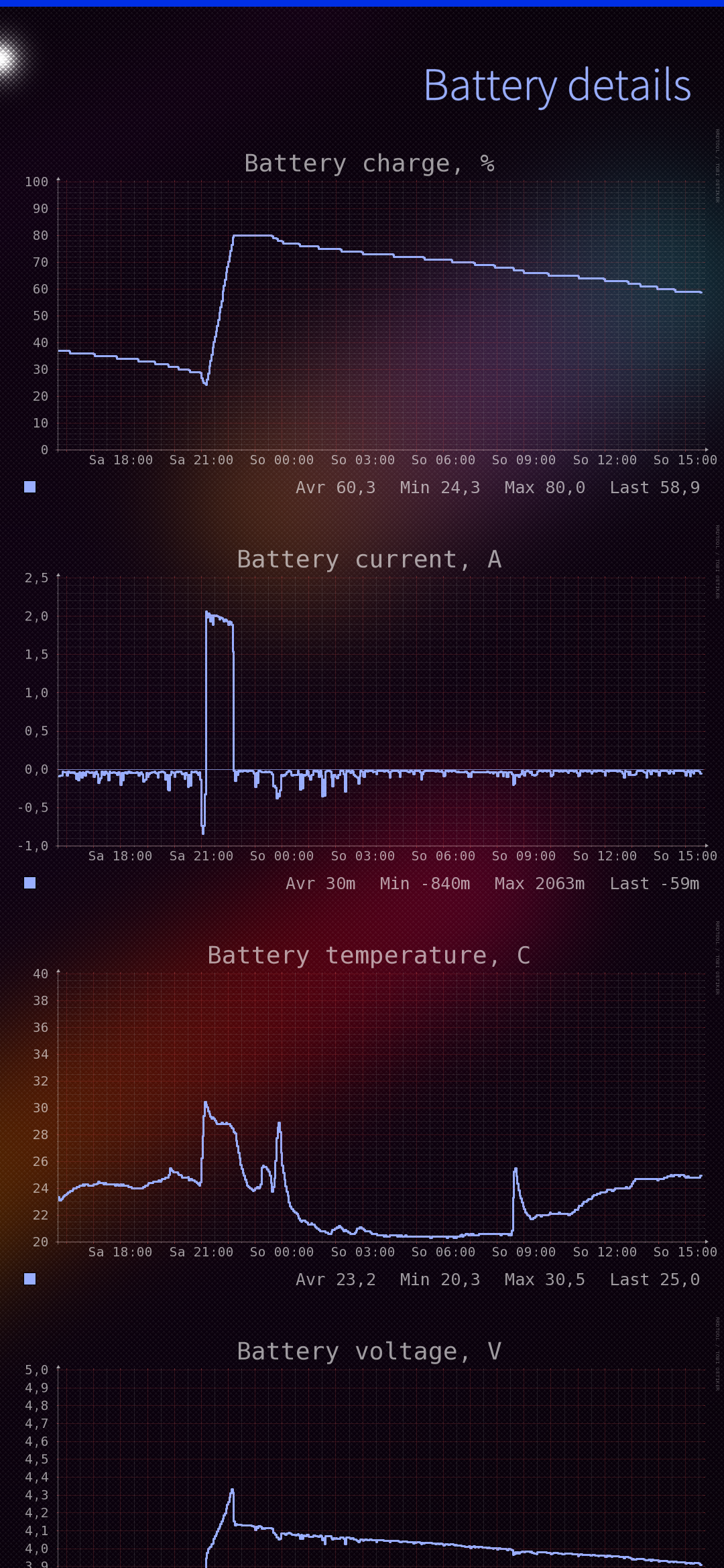
I notice that on the Fairphone with SailfishOs the battery drain quickly. Anyone any idea why? Very basic install with not a lot apps. And no 4 or 5 G yet nut just Wifi.
Which Fairphone? My FP5 seems to keep going all day with 4G turned on. I’ve never seen it below 50% on the battery gauge when I plug it in at night, which is my yardstick of “lasts long enough” for a smartphone in the 2020s.
I found a way to fix wlan on FP2 in 5.0 but it needs changes to wpa_supplicant package. I’ll see if I’ll manage to get one more official bugfix release of 5.0 done to include that, if not I will build that in adaptation repo instead. I’ll mention here which way I’ll do it once I have decided it.