The Jolla Phone’s screen was too bright for me at night, even at minimum brightness, so I made Owlfish: a Night Light + Extra Dim in one.
Warm colour tint, optionally on a schedule
Dims below the minimum backlight, optionally only in the dark (light sensor)
Settings page + top menu switch
No system files modified; uninstall and it’s gone
Tested on the Jolla Phone (5.2.0.17) and Xperia 10 III (5.1.0.11).
To be honest, I vibecoded it with Claude in half a day. I’m a software developer, but I don’t have time to code outside my job. Contributions are welcome!
Cool thing, thanks for your work / time to create this feature.
But I’m still no fan of AI. Maybe because my knowledge in IT is too low.
Question, how can it be that claude can code this for sailfish infrastructure in a half day, which real old-school and trustable developer couldn’t do all that time before. Night lights are asked for a very long time.
I would like to use it.
Is there a possibility to integrate it in some next official update?
I don’t want to use a vibcoded rpm, as long as I don’t understand it.
How ist this possible in half a day? It is not that you tell the ai I want that feature x on sailfish and ai does the rest. You should have an idea about programming, concepts and so on and tell the ai to do the things right but then ai does a great job for you. I see it as a helpful companion
Sounds great. If been looking for a wait to dim the screen too. Do you plan on publishing in OpenRepos / Chum (or even jolla store (harbour) if its compliant)?
Fair enough, and that’s why I preferred to be clear about that.
However, the fact that I vibecoded it, doesn’t mean that I don’t know how it works, just that I didn’t write the code.
If you want to know more, you can read the implementation details here: owlfish/DEVELOPMENT.md at main · ccontino84/owlfish · GitHub
A bit more of background. I already tried to implement a similar feature many years ago, but I failed because the only known approach was the one used by Tint Overlay.
I’m lucky enough to have learned how to use AI effectively at work, the way industry leaders do, and I put all of this at work to solve this problem.
Since I knew that the Tint Overlay approach wouldn’t work, I asked Claude to analyze the source code of lipstick to find a better solution. It would have taken weeks if I had to do it myself, but luckily Claude found the proper way of doing it. The rest of the time was me telling it what the app should do and how it should look.
It works for me, and I hope other people will find it useful.
Could be done yes, but it requires adding code to connect to the internet, which is something I wanted to avoid at least for v1. I’ll look into it as soon as I find the time
Very well possible. Technically you can apply any color transformation to the screen by using the same technique (I’m thinking about color profiles). The only limitation is that you can connect only one plugin at a time, so either OwlFish or the other transformation.
Would be nice if Jolla could provide a standard plugin that people can extend with custom transformations. It would certainly make things like blue filter or color profiles more “upstreamable” imho
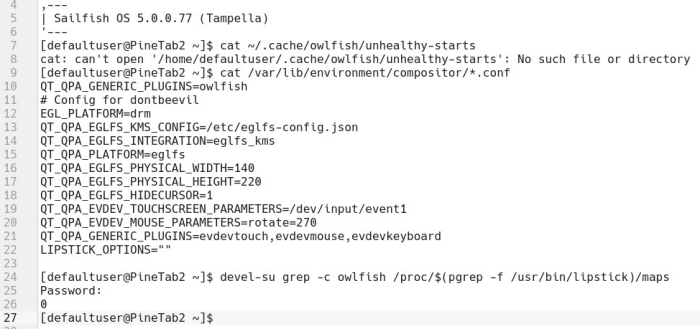
I installed this on the Pinetab2 running sfos 5.0.0.77 but it doesn’t work. Maybe the version is too old….it’s already a bit unstable so I don’t want to upgrade it. Pity, because I read a lot of old books in pdf format and there’s no way to change the background colour, as you can with Slava’s excellent Books app.
sunrise/sunset detection does not need internet. this can be computed locally on-device with the current system date/time and current coordinates as input. coordinates can be provided manually (user input) or via the GPS sensor.
I think KDE Night Light also computes this locally when using static user-provided coordinates.
EDIT: the NOAA Solar Calculator algorithm is one way to compute this locally, but there are multiple algorithms to choose from with varying degree of accuracy.
Thanks for trying! Unfortunately I can’t test that scenario, but if you provide some logs I could take a look to see if it’s easy to solve. When you say it doesn’t work you mean that it crashes or it does nothing to the screen color/brightness?
Could you run these commands in the terminal and past the output?
Hi, no change in screen colour. It occurred to me it might conflict with other patches I have installed: combined launcher and force cover size. I’ll try that first, then the logs after