Anyone have problems with car bluetooth? I can play music via bluetooth, but not calls.
Yes, its part of the “known issues”.
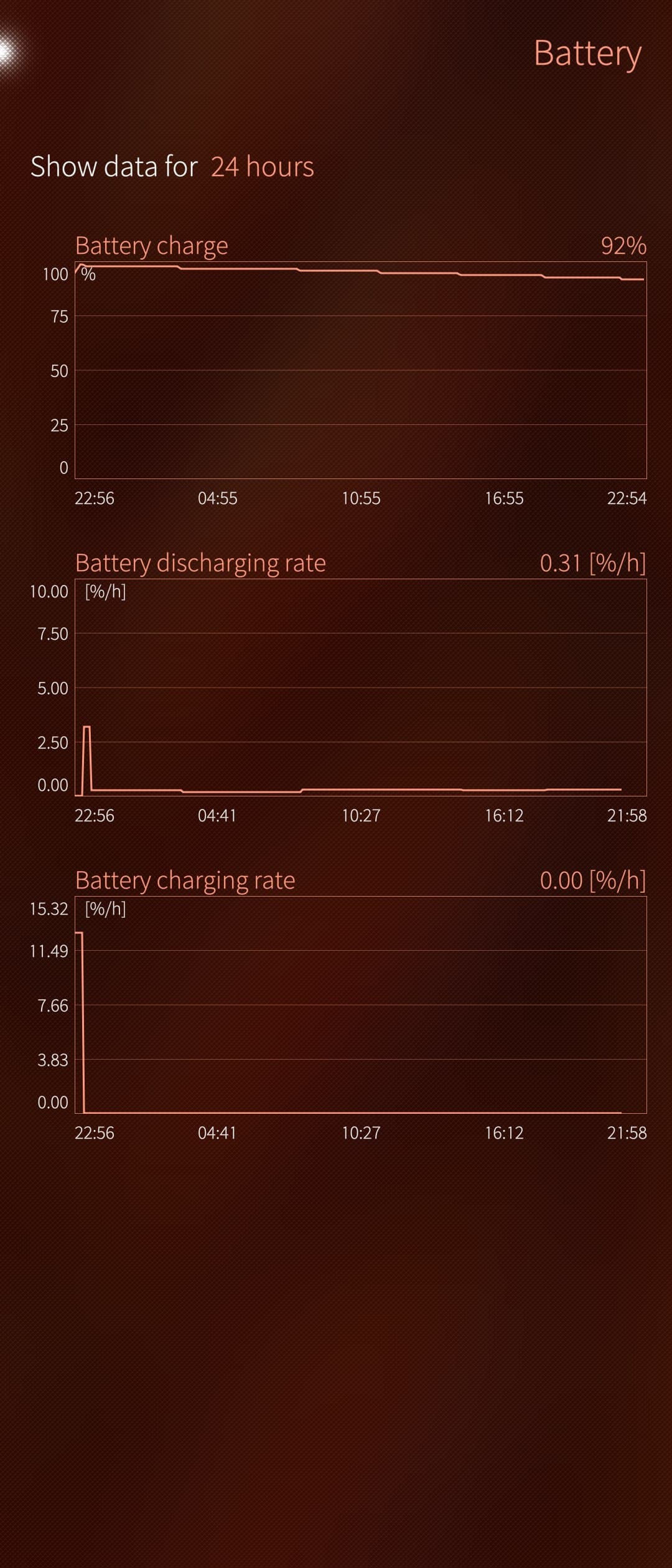
Guys don’t install this port, it’s broken. It’s been whole day (ON WIFI) and the battery is still above 90%! Clearly broken smh. @Sharks fix yer port!
New updates available for Murray and Zambezi
- Add SailfishOS boot logo (with Verdanditeam banner)
- Add /home encryption capability
- Fixed droid-bthelper and bluez5 requirements - now phone calls work over bluetooth! Thanks to @Mister_Magister
- Fixed wifi battery drain (see post above by @Mister_Magister, and thanks again)
- Fingerprint subsystem on Murray updated to AIDL, matching Zambezi implementation by @zerocal. This fixes the single fingerprint limitation on Murray, however there have been some reports of the fingerprint daemon crashing on Zambezi so I need to look into that still.
- Reduced default pixel_ratio by somewhat popular demand. Can be restored to 1.75 by following the instructions in this thread
Please zypper ref && zypper dup and reboot to enjoy these changes.
Can confirm, that fingerprint is working much more reliable and also with more than one fingerprint.
Bluetooth-fix not tested, but highly appreciated!
Another zypper ref && zypper dup and a reboot, dual sim is now enabled and appears to be working. Note that I only have one SIM so haven’t tested extensively yet, but my single sim works in both slots. I’d appreciate further feedback. One thing I have noticed is it appears a reboot might be required between enabling / disabling the secondary modem in Settings → Connectivity → Sim cards.
I’d also like some feedback if esim works on the XQ-xC54 variants (eg. using SimPro)?
Simply incredible, it works!
eSIM works on Sony Xperia 10 V (zambezi) XQ-DC54 on the regular internal SIM2 slot with the latest Sailfish 5.2.0.22 port by VendandiTeam
EDIT: Instead of below manual steps, just run SimPro with LPAC_CUSTOM_ES10X_MSS=220 /usr/bin/sailfish-qml harbour-simproThen scanning and subsequent downloading work from the GUI.
I did the following steps:
- Buy a eSIM from esim4travel.com starting from 0.40 EUR.
- Install SimPro from SimPro | OpenRepos.net — Community Repository System
- Start SimPro via ssh by:
/usr/bin/sailfish-qml harbour-simpro - Use SimPro to scan the QR code on esim4travel.com
- Watch in ssh:
[D] onResultChanged:102 - QR found: LPA:1$esiminfra.toprsp.com$************************************ - Enter via ssh or in a terminal on the phone:
LPAC_APDU=gbinder LPAC_HTTP=curl LPAC_CUSTOM_ES10X_MSS=220 lpac profile download -s esiminfra.toprsp.com -m ************************************ - Enter:
LPAC_APDU=gbinder lpac profile list - Use the iccid (*******) from the list to do a:
LPAC_APDU=gbinder lpac profile enable ******* - Restart the phone.
- Enable roaming for SIM2.
- Enjoy.
SimPro refuses to download the eSIM from the server, so the key tweak is to use LPAC_CUSTOM_ES10X_MSS=220 in step 6.
Probably this can be further simplified or integrated into SimPro. @cypherpunks
I am genuinely impressed and grateful. @Sharks
Thankyou for confirming, @a.zak! And thanks also for posting such detailed instructions for those who wish to follow in your footsteps.
I’ve messed up my Xperia 10 IV’s screen after following the instructions in this thread: UI-Themer missing from OpenRepos - #63 by deprecated
The lock-screen “Approve” button has moved off-screen, so I can’t unlock the phone. Developer mode wasn’t enabled, and I can’t SSH into it. It looks like my only option is to use Recovery Mode. Which recovery image should I use to restore the phone without wiping my data?
Hey @Gen,
sorry to hear it - the most up-to-date recovery image can be found inside this package:
https://repo.sailfishos.org/obs/nemo:/testing:/hw:/sony:/murray:/5.2/sailfishos_5.2_aarch64/aarch64/droid-hal-pdx225-img-recovery-0.0.1-1.2.5.bso.aarch64.rpm
Extract the *.rpm file with an archive manager of your choice and flash hybris-recovery.img