Jolla Phone : First Experiences, Pros and Cons

I forgot to say this to the cons compared to my previous phones:

  • the sideswipes are not so pleasurable on this phone compared to my previous phones. I think it’s the small gap between the frame and the “factory” installed screenprotector. It kinda irritates my finger but I think it’s something I get used to.
1 Like

What is the issue here? You login using your username anyway, and if you later notice you’ve mistyped your email address, you can change it in your account settings as many times as you need to get it right.

1 Like

Teams can be accessed in Firefox with Linux desktop user agent. :smiling_face_with_tear:

This! I’m hoping that once the edge gets filled with dust and grease from fingers it would become less noticeable :sweat_smile: I have the (rubber) protective cover and that adds another edge to the swiping.

Note that you can adjust the area that is sensitive to edge swipes.

You can do it with dconf, or use Edge Swipe Control to do it from Settings.

14 Likes

Not my teams work account. Same with microsoft authenticator. They want ms intune or whatever installed. I tried desktop mode on different browsers, same result.

2 Likes

(I’m not competent with MS products…) Wikipedia says Microsoft Intune works on linux (as a web portal). Would you be able to check if you can make the Teams web access work on a linux laptop/desktop?

Received my Jolla Phone 2026 yesterday, so it took 8 days from the shipping notification until delivery. That’s acceptable from Finland to Germany. Other orders from the Jolla Store (Jolla C2, accessories) always took 10 days in the past.

Setup was very smooth and straightforward. I inserted the SIM card, booted up, and completed the initial setup and perform the latest update. I then downloaded the apps that are mandatory for me (mostly Jolla apps). I also set up IMAP email, CalDAV and CardDAV, and installed rclone. Finally, I copied over my music collection and downloaded the OSM maps. GPS reception is very fast. Under free sky, it only took 1–2 seconds to get the first GPS-Fix.

The fingerprint reader is a real relief compared to my Jolla C2. However, it seems I can add only five fingerprints—when I try to add more, it says the memory is full. I tried this several times, but if it’s limited to five, that could be okay.

It doesn’t feel too big. That might be because I’m used to the size of the C2, and my eyes are getting worse, so I sometimes need reading glasses. System font on big :wink:

On my first tests, energy consumption looks good. Overnight, I got around −0.25% per hour in flight mode. For comparison, the best my Jolla C2 could achieve in my setup was −0.19% per hour.

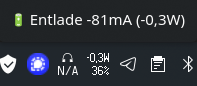
My daily consumption on a workday, when using mobile data only (with Bluetooth connected to my Sony in-ear headphones and playing music), is about −81 mA (−0.3 W), i.e. −2.5% per hour:
grafik

In the same configuration, the Jolla C2 uses −160 mA (−0.6 W), i.e. −4% per hour. So, the Jolla Phone 2026 uses about half the energy of the Jolla C2 in the same environment, which is a very good value.

Stereo speakers sound good so far. It’s nice to have stereo again. The 90 Hz display is smooth and a welcome addition, even though I could live with 60 Hz. My first camera tests look promising and are an improvement over the C2. I see a lot of potential, especially when using Open Camera for HDR shots.

I ordered the Jolla Phone 2026 with a white back cover, and Jolla told customers that the white back covers were delayed and that the phones would ship with an orange back cover, with the white back cover to be sent later. It seems they received the white back covers in time before the shipments—in my case, they delivered the phone with a black back cover instead of the orange one, which is fine for me. The white and Inari Blue covers were also included in the parcel. Thanks for the Kaamos Black back cover gift, Jolla! Kaamos Black is better than expected!

The ringtones and the whole project around it is awesome, too.


And in the end, I’d like to thank all the individuals who make this possible:

:heart::heart::heart: The entire Jolla staff :heart::heart::heart:

41 Likes

For Linux desktop this exists: GitHub - IsmaelMartinez/teams-for-linux: Unofficial Microsoft Teams for Linux client · GitHub

But for mobile I don’t know.

3 Likes

Can I ask what problem you face with the Teams? For me it has worked without any problems in Xperia 10 III

1 Like

Privacy glass applicator is just perfect! Thanks @Jolla :slight_smile:

After 3hours of display up at 100%, installing apps, downloading offline osm scout maps, patches, trying camera.., internet speedtest… 10% of batt

Phone has no scratches, perfect condition. No dust, no finger prints…

Noticed little lower wifi5 signal at same position compared to old iPhone SE, but still usable with good speed.

For the first time chum complained that can not install some apps because missing depencies but after some time tried again and no problems with installing puremaps and osm scout server

Now going to adjust my backup from jolla1 running SF1 - it needs a little manual work to fit new backup format to be able to import it into recent SF

Loving kaamos black theme background i may keep it instead my custom what i have on all devices

9 Likes

>Some platforms can require specific apps to install other apps, such as Outlook or Teams. For example, on iOS devices, users must install a broker app, such as the Microsoft Authenticator app. On Android devices, users must install the Company Portal app.

Check if Company Portal app works, but doubtful

1 Like

First Impressions here too after phone arrived yesterday in Germany.

  1. Form Factor is okay, but a little bit smaller would have been nice. Feels like the length of Xperia 10 III and the width of iPhone Xr.
  2. Speed itself is good, but startup time for apps is still to long. Two seconds for a simple app like calculator isn’t understandable.
  3. I still dislike the notch (as on all devices…), I also don’t like that rounded corners on the screen. Especially as the space left and right from the notch is mostly just black and unused…
  4. Screen resulotion ist strange as it’s 2272 x 1032. It was said FullHD if I remember right, so 1080 was what I expected. Playing Videos from Disney+ doesn’t work smooth and shutters, maybe because of that vertical resolution? (Will try other streaming services soon…
  5. Camera has a maybe hardware bug as the 0.5 camera cause a fisheye effect. (already created a seperate topic on that). Colours on 1.0 camera are not good and miss intensity.
  6. Text prediction stopped working, even restart of keyboard via sailfish utilities solved that.
  7. Heaphone sound is nice, use my old Sony 3.5 jack headphones with a uGreen adapter that also allows charging at the same time.
  8. Android App Support works mostly well. MicroG works out of the box, including adding a Google Account (didn’t work on my Xperia 10 III). But one thing worries me as my favourite and only mobile game (Star Wars Galaxy of Heroes) loads really slow and get’s finally stucked - I never had this before, it worked on Xperia XA2 and Xperia 10 III and if I remember right also on Jolla C1 without problems under SFOS with AAS, just the new Jolla Phone does work right.
  9. Browser is fast, and websites that were impossible to use before on 10 III now work with the native browser! Now WepApp/PWA and Service Worker support please… Nevertheless Jolla/Sailfish Forum here still complains about an outdated browser…
  10. Location service are much better than on the Xperias, but I needed to go outside to get a first fix. GPSinfo needs 4-5 seconds to get a first rough fix, and 20 seconds for the concrete position. Still to long for geotagged photos to my mind, maybe the usual tweaks from SevenOfNine will improve that.
  11. Fingerprint sensor works without problems - and double tap to wake…
  12. WLAN just uses WPA2 connection, while my Fritz.Box offers WPA2+WPA3…

Need to play around some more now, I also did use it without SIM so far. Battery is good so far. More maybe in a few days.

And I really fear a camera hardware bug with that fisheye effect… :confused:

16 Likes

I would always expect a fisheye distortion (barrel distortion) at the focal length of the 0.5 optics. I guess this is typically compensated by software in other phones.

4 Likes

Try it yourself and then come back..

Schön geschrieben. :victory_hand: Darf ich fragen was mit Online-Klon gemeint ist? :face_with_open_eyes_and_hand_over_mouth:

1 Like

Got my J2 today.

First impressions;

  • phone feels good quality-wise. It doesn’t feel cheap at all
  • it is a bit heavy (I’m used to google pixel 5 so this feels significantly heavier)
  • screen is great! really nice panel, I find default text size is too small. “Huge” setting looks perfect for me
  • camera app is still basic (as I expected), however I feel we can finally do something software-wise to make pictures taken much better
  • microG integration OOTB is truly fantastic! got whatsapp running in no time!
  • browser is much much better than before but there are still compatibility problems (e.g. facebook says “This device is not compatible”)
  • I have noticed phone gets quite hot with protective cover on with moderate usage (it is quite hot outside so take this into account)

All in all a GREAT step forward for Jolla!

12 Likes

Maybe a bit off topic, but has anyone tried installing and using a GCam port on a new Jolla phone? I know it’s not everyone’s cup of tea, but it should improve camera quality and apply some modern standards like HDR, etc.
I remember it did wonders for my 10 II and 10 III back in the day.

2 Likes