My point is that it is reducing - not eliminating.
For example; android-keyboard-based autofill of passwords, and VPN management will just not happen. If people still expect that, they are just setting themselves up for disappointment.
Since Bluetooth was already running on Android ipc drivers, it could be plumbed in. NFC should be similar - possibly fingerprint.
Also; if an app doesn’t work on any non-google Android distribution - complaining to Jolla that it doesn’t work here is unfair and unproductive. Complain to the app maker.
If you want something that is exactly like Android and cannot compromise, go use Android.
I think Jolla should be transparent about the limitations of their product at purchase time. At a minimum, list the major features that won’t work, as you listed them (some autofill and VPN features, NFC). Maybe it’s there and I haven’t noticed?
They claim “99% apps work” (seen on the Commodore ad), it means they have a workflow to test automatically and gather statistics. There could be as well a page (thinking of appdb.winehq.org), that lists apps known to not work (that don’t even install, or install but don’t launch), something that does not need manual work.
NB I only use AppSupport for one thing, so it’s not much a pain for me personally. I’m just discussing.
To be fair; It’s community based, and still misses a lot of apps. But that will only change, if more people use and edit it. I like to think about it as the ProtonDB pendant of SailfishOS.
People already made a compromise in favor of Jolla Phone and SailfishOS because of promoted selling points and customer assumptions. Its rude to tell people to go to deal with inconvieniences for yourself or go back to android. Attah if you would be Spokesman of Jolla it would be simply unprofessional.
Nothing personal, sorry. The power of Android lays in Google’s customer care. If Jolla want to stay forever a life raft, not becoming an Ocean Class Vessel then it will be just fine to continue as it is now…
That’s rude. Attah never wrote that words. He simply pointed out that it’s helpfull to not expect exact experiance of the big 2. If you expect such experience you’ll simply be dissapointed.
For comparison let’s see desktop OSes. If you’re used any of the big two and go for Linux and expect the same experience without some manual fidling or big differences of aproaches or even some frustrating inconviniances now and then you’lll likely have hard time.
And climbing from life raft to an ocean vessel takes some time. Any growth is not easy.
Guys, I admire your work very much.Just a little bit emotional because it’s not a flawless experience even for technically educated people. Wishing only the great achievements for Jolla Crew!
I tried to give my most honest feedback from a day of usage from my personal point of view. I’m not a ‘salesman’ from Jolla but I must admit that I do like this community & Jolla, especially when discussing with people in the waiting line at the Helsinki event. It’s clear that most people a sick of Android-Apple and the overwhelming power of these data suckers. Let’s get back to the topic. Now I’m using this new Jolla since almost a week and very much like it. However some apps, I’m still struggling to get them properly working e.g. one of them ‘SystemDataScope’ shows the measurement graphs but no data. I set up the collectd folders correctly as documented (and subfolders show recorded data content) but something prevents showing up the data after generating the definitions. Anyhow, I struggled a while with this on C2, so I just need some more time.
I know I’ll try some apps that did work on an old LineageOS phone (Android 7, I think) with Google Play Services and at least one that did not work here (or in the virtual machine provided by Android SDK).
If they work on JP2601 (possibly with microg), then it’s fine.
If they don’t, well, they just lost (or didn’t gain) a user. Not my problem.
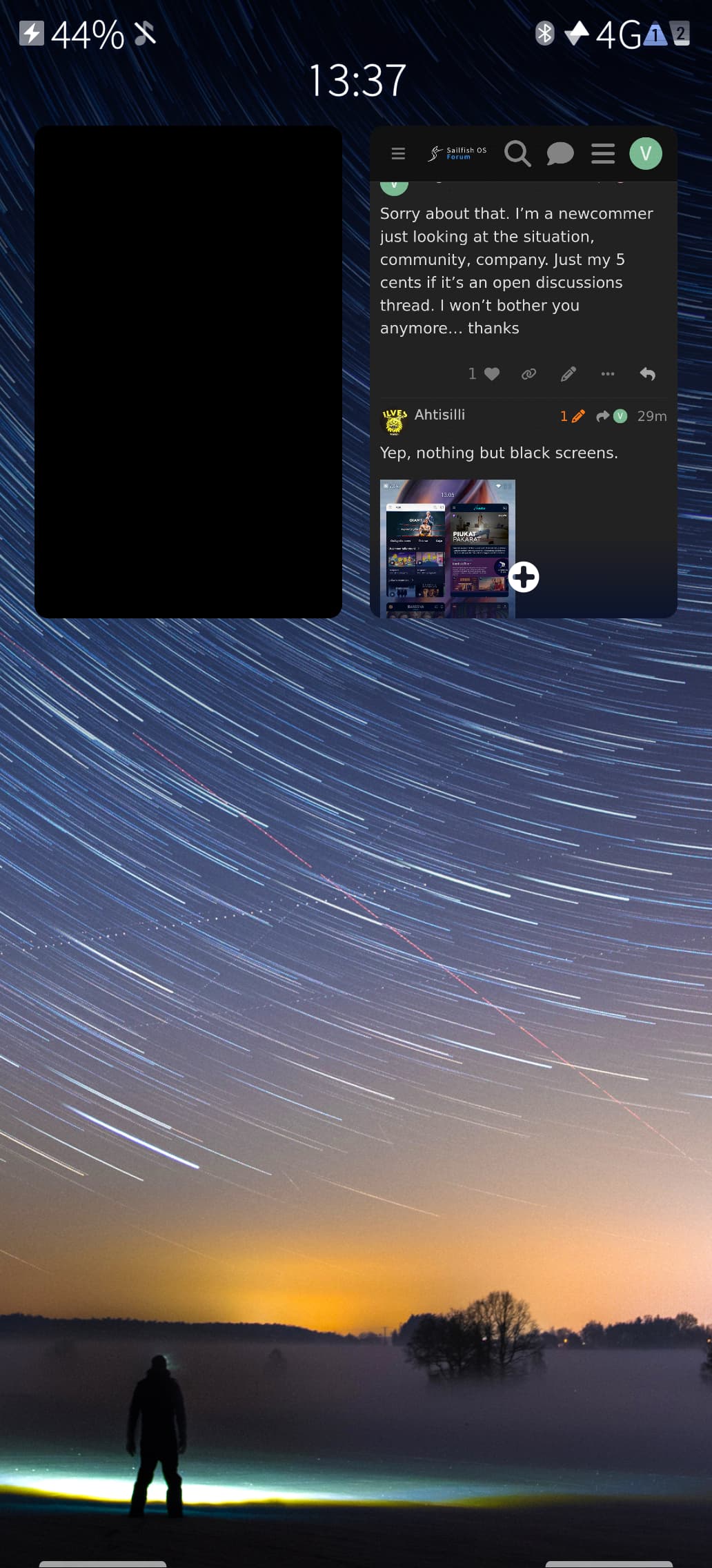
Also AppSupport is a commercial product. Some bugs simply can’t be fixed by community and it just lives with that, making a “compromise”. A small example: why app tiles in opened apps screen for android apps are just black rectangles and not active like they are in native apps. I would expect at least a small screenshot of android app current state instead of just a black emptyness. I clearly see it as a bug not a feature of that specific product. It requires handling by a team.
Sorry about that. I’m a newcommer just looking at the situation, community, company. Just my 5 cents if it’s an open discussions thread. I won’t bother you anymore… thanks
if you open from login dialog another app, such as browser edge to read information from rovio site by clicking a link on the dialog. Looks like repaint thread is blocked by a modal dialog…
Another example: Install an app from Aurora store. When it is installed you will see installed button on app page in Aurora store. Open an App by clicking on that button. The app will be opened.Now look at the SailfishOS ribbon with opened Apps. You will see black rectangle.
This is exactly why I needed an Linux phone. Fuck Monopoly. I love the fact that you will be able to use more stores than just the “native" one which comes preinstalled. Then you’ll also be able to use other platforms apps, like ubuntu touch, etc. It’s a great and “healthy" eco-system, compared to what I always hated with Apple.
As a new sailor myself, at least in terms of that i now have my first device. I have found this forum very useful, and even after 6months of actively following this forum i only recently had a look on https://forum.sailfishos.org/faq
Found it as a nice guideline on how to come forth with things here.
 I like to think about it as the ProtonDB pendant of SailfishOS.
 This.
This.