REPRODUCIBILITY: always
OS VERSION: 5.1.0.8
HARDWARE: Sony Xperia XA2 Plus Dual SIM
UI LANGUAGE: ENG
REGRESSION: yes
DESCRIPTION:
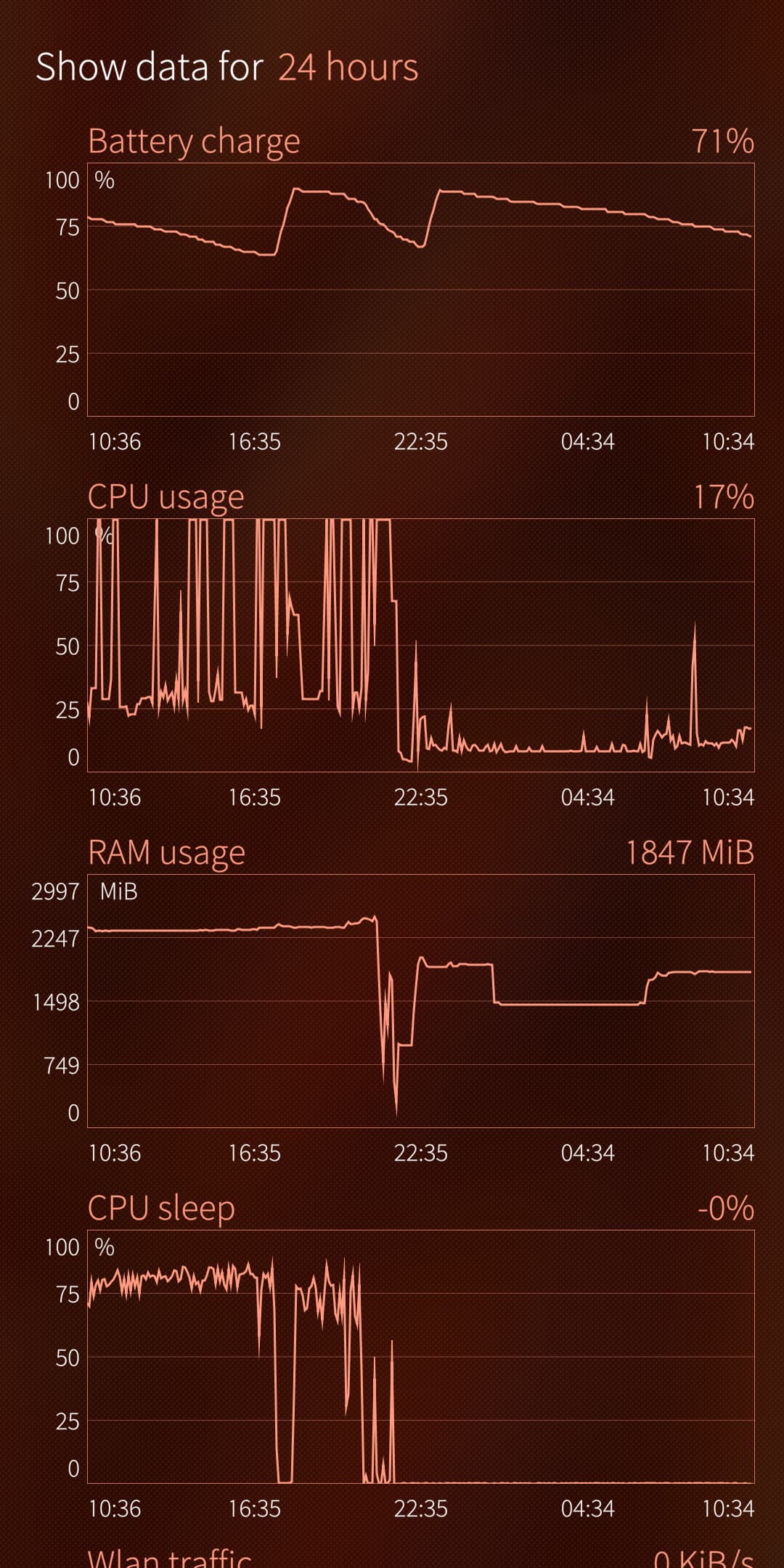
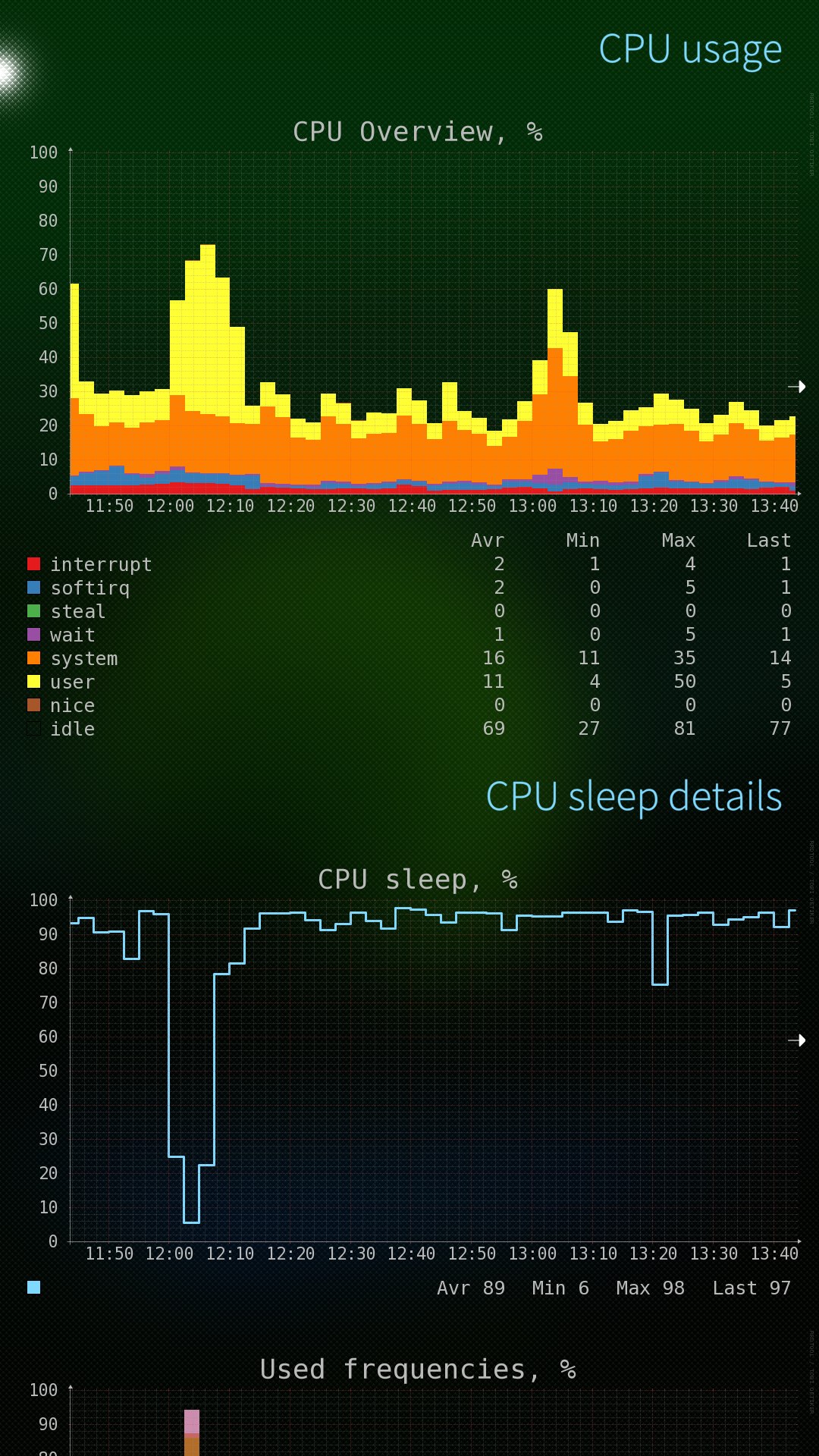
After the upgrade from SFOS 5.0 to 5.1, harbour-systemmonitor shows me a totally different picture on my XA2 dual SIM.
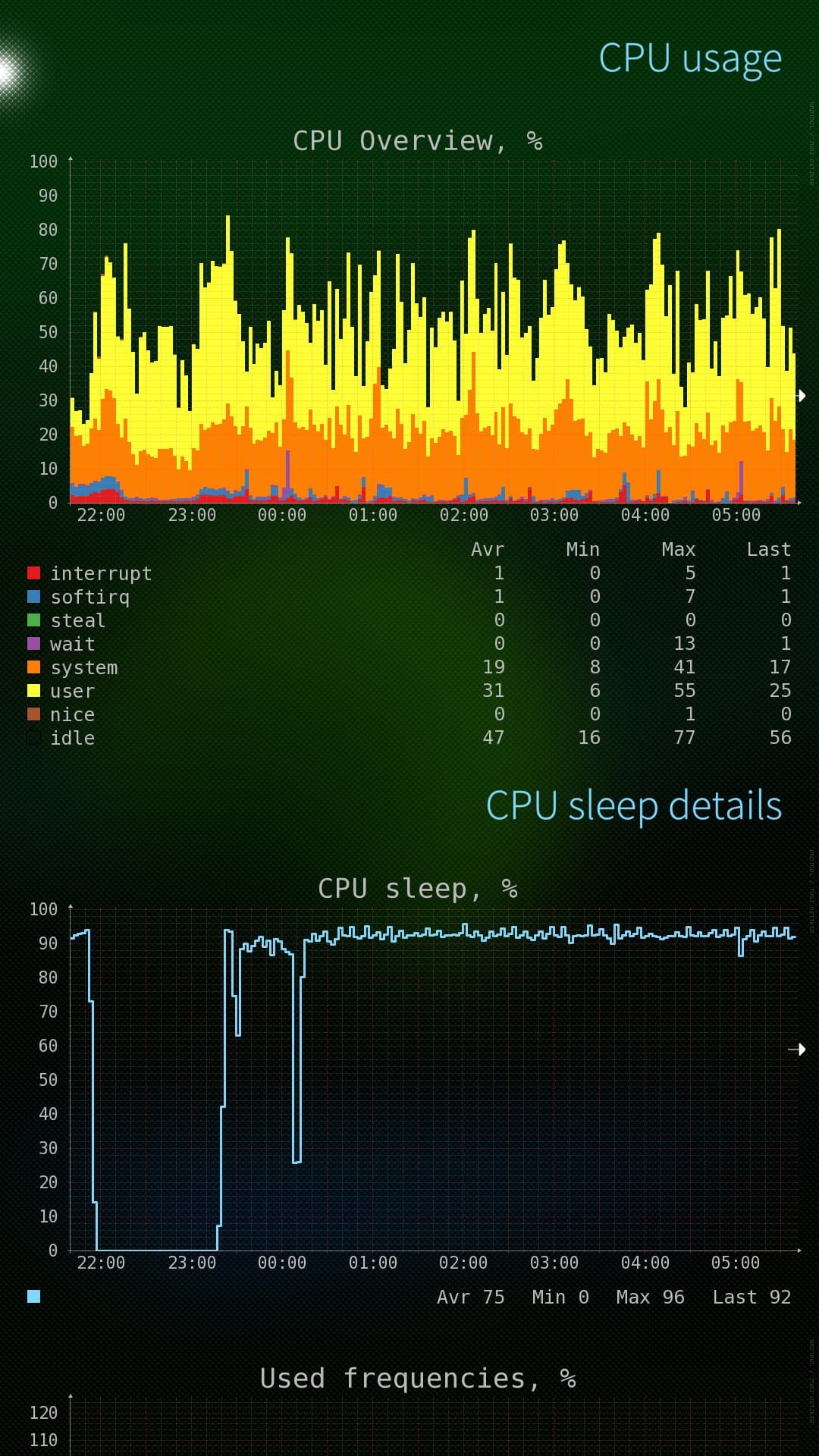
Before (and as long I can remember on this phone), the CPU usage was always jumping from 25% to 100%. After the SFOS 5.1 upgrade, the CPU load dropped to about 10% all of a sudden. That sounds like very good news, but something else also changed: CPU sleep is also no longer detected. Technically, it is calculated as a difference between CLOCK_MONOTONIC and CLOCK_BOOTTIME. But chose values now report as identical. Does that mean something changed so those values are no longer filled correctly, or is there some other sleep related change? I can’t imagine there is no suspending at all, else the battery drain would be much bigger.
But about battery impact: it has gotten a bit worse. The device/battery is quite old, and I could always save some battery life with switching off android support at night and use 2G when on WiFi. But now this makes hardly any difference. Reboots did not change the new pattern. Do other people have similar experiences and on what devices?
The screenshot shows the change after the 5.1 update executed on 22:35.
Found the reason why my device no longer goes into sleep mode. The Android init script that acquires a system wake lock for the Zygote process is not released. Might be a 32-bit AppSupport issue only, as I have seen no reports about 64-bits battery drain issues.
zygote_kwl ends up in /sys/power/wake_lock and will never leave this place, not even if you stop AppSupport. Result is that the system is never ready for deep sleep.
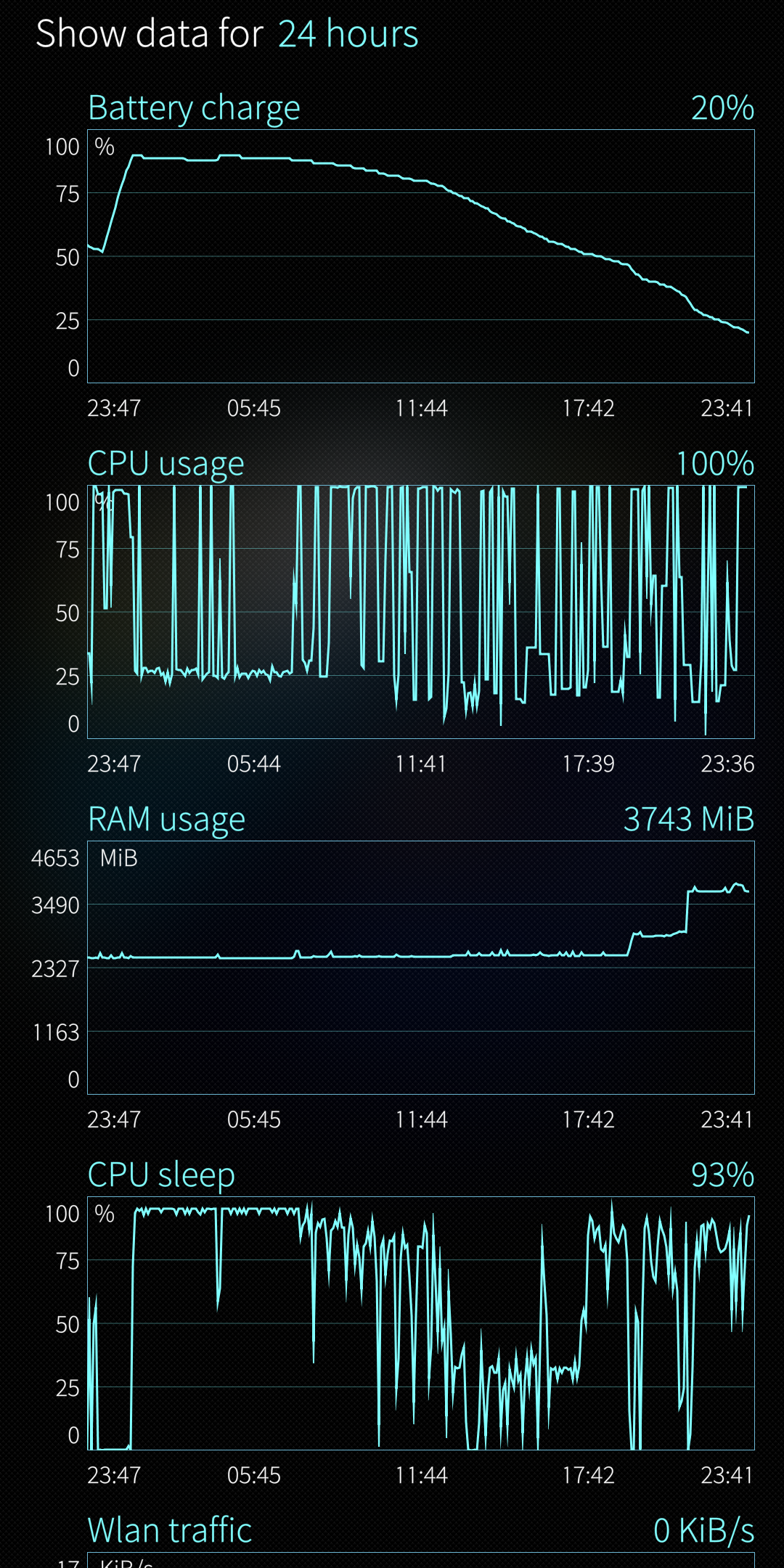
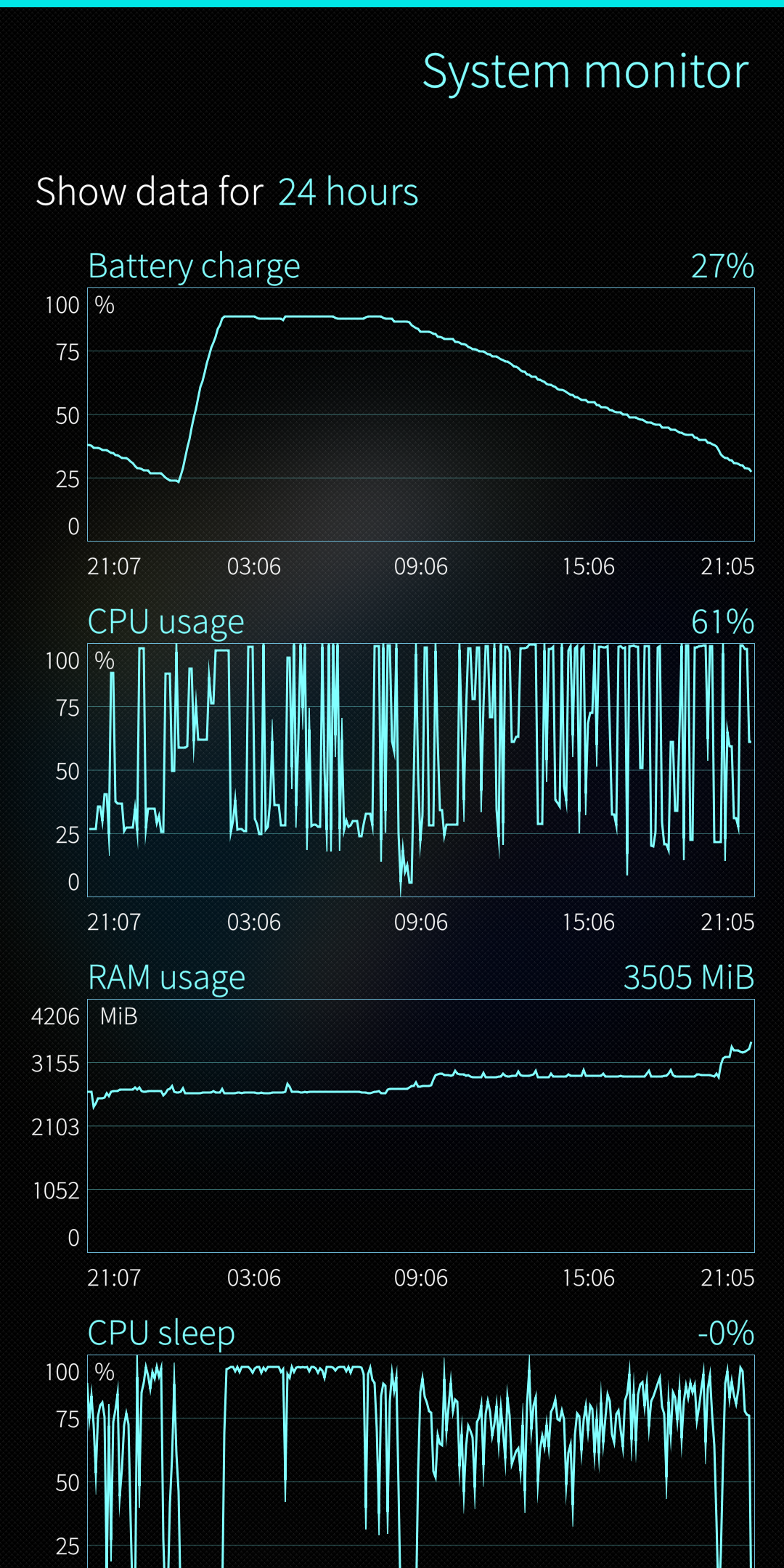
Once I removed this lock, sleep started to return on the device! Funny thing is the CPU load also increases, that looks related. The sleep percentage is still a bit low (60% average, sometimes dropping close to zero, it was about 85% as you can see in the image above). mce_bluez_wait regularly blocks sleep, could be related to the new bluetooth support in Android. But a lot better than 0% sleep.
For now, I have added this line in my (root) crontab for mitigating the issue: @reboot /bin/sleep 120;/usr/bin/printf “zygote_kwl” > /sys/power/wake_unlock
This means it will wait a while for appsupport processes to start after a reboot, and then removes the actual (persistent) lock.
Will see how the battery drain level develops for me the coming day, to be continued…
For whatever reason, the situation gets worse after about 2 hours. Suspending starts to fail, in combination with higher CPU load. After rebooting the same scenario repeats, so I don’t think it is a coincidence. So removing the zygote lock might restore sleep for a while, but there looks to be a sight suspend effect after a while I can’t explain for now. Better not remove the lock is my advice right now.
One thing coming to my mind: do you have AAS set to auto-start?
I do have not. For some reason I cannot remember anymore (something one needs to love SFOS for: establishing habits for workarounds until a new release comes out and you do ask yourself why you did that for months…)
I was just investigating AAS without autostart. In that case there is never a zygote_kwl sleep lock, even if an android app is started later. But that situation is still sub-optimal: rather high cpu-load and a sleep of about only 25%. With 0% sleep because of AAS autostart, the battery life is still better.
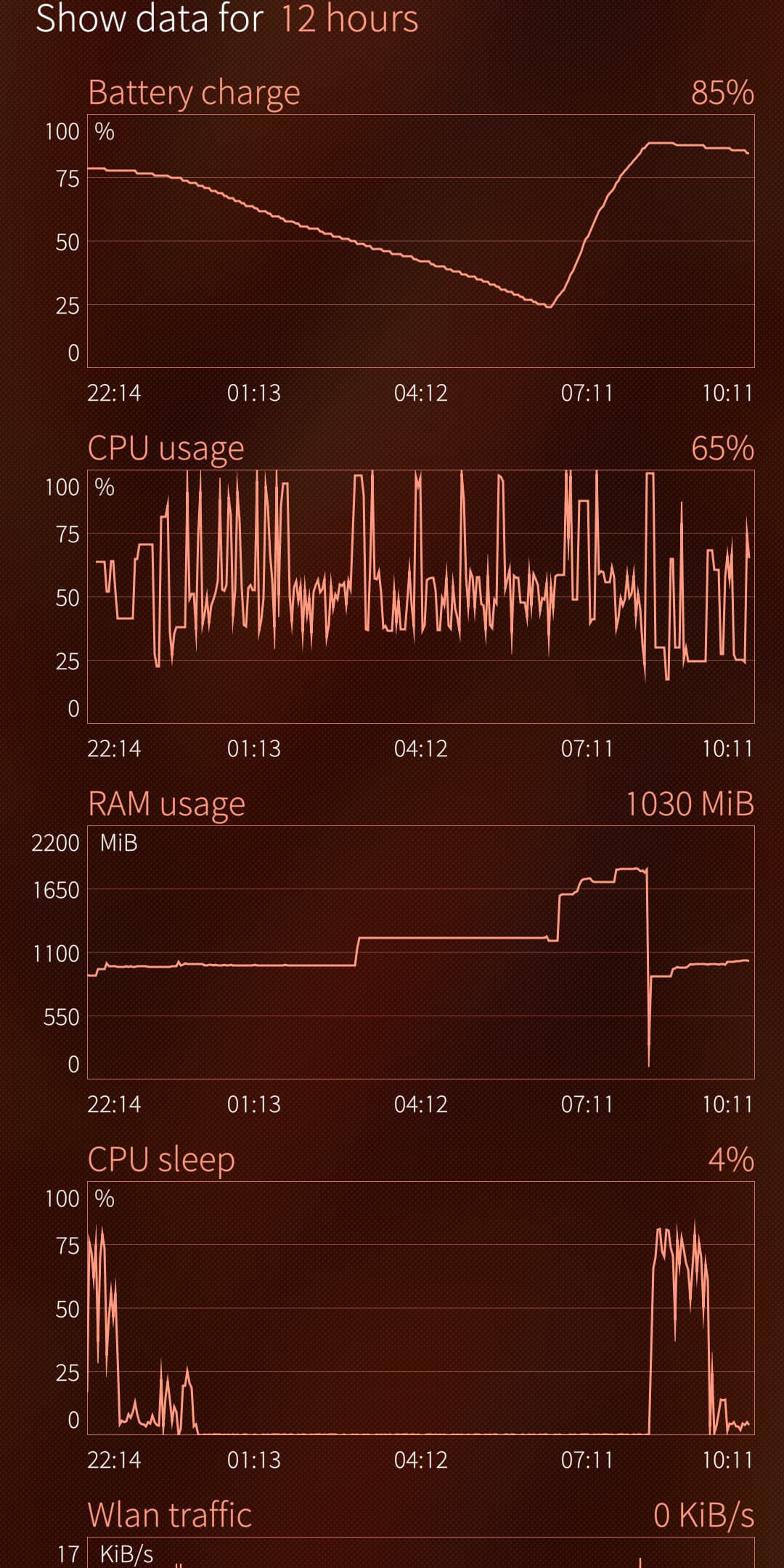
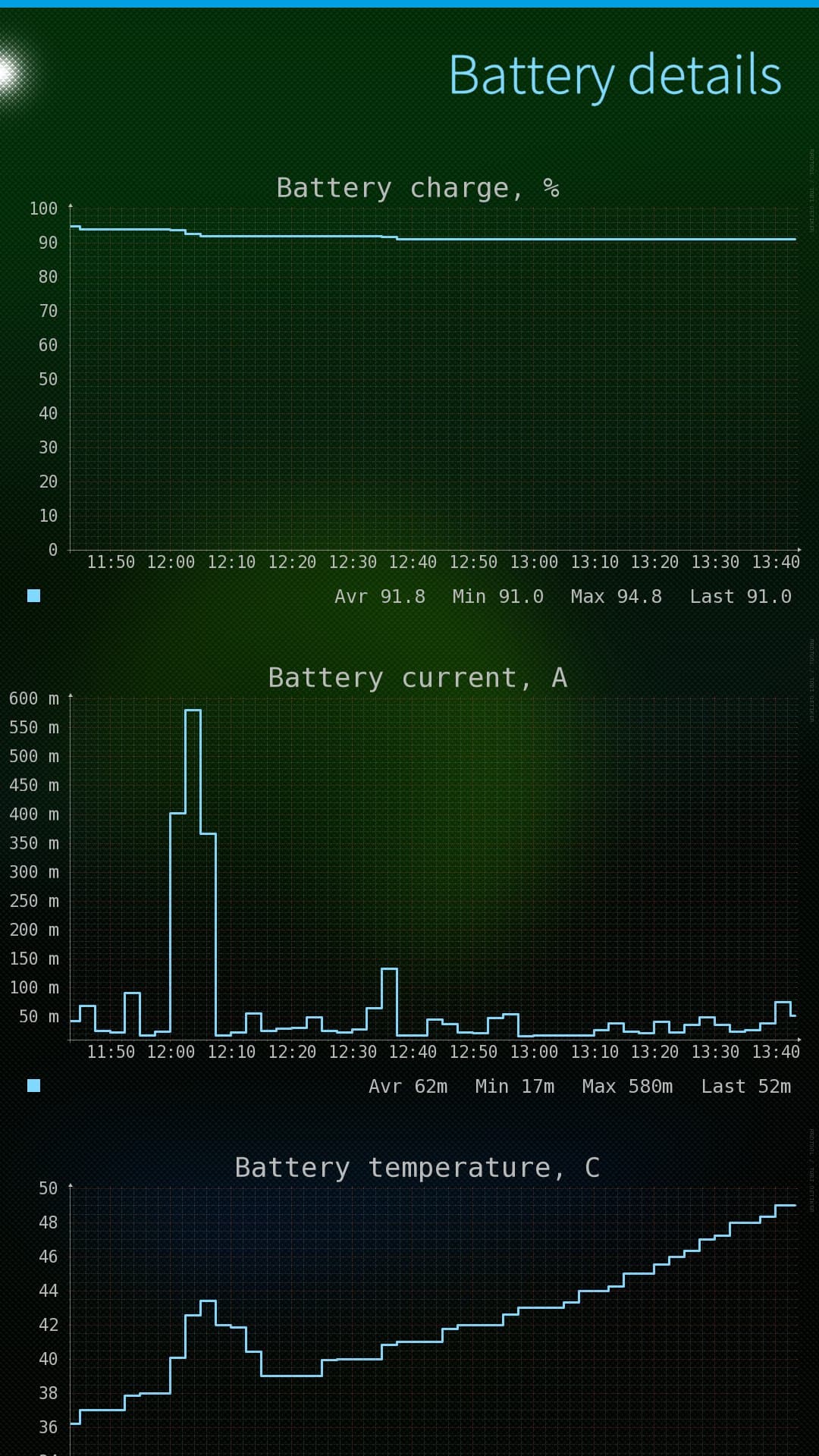
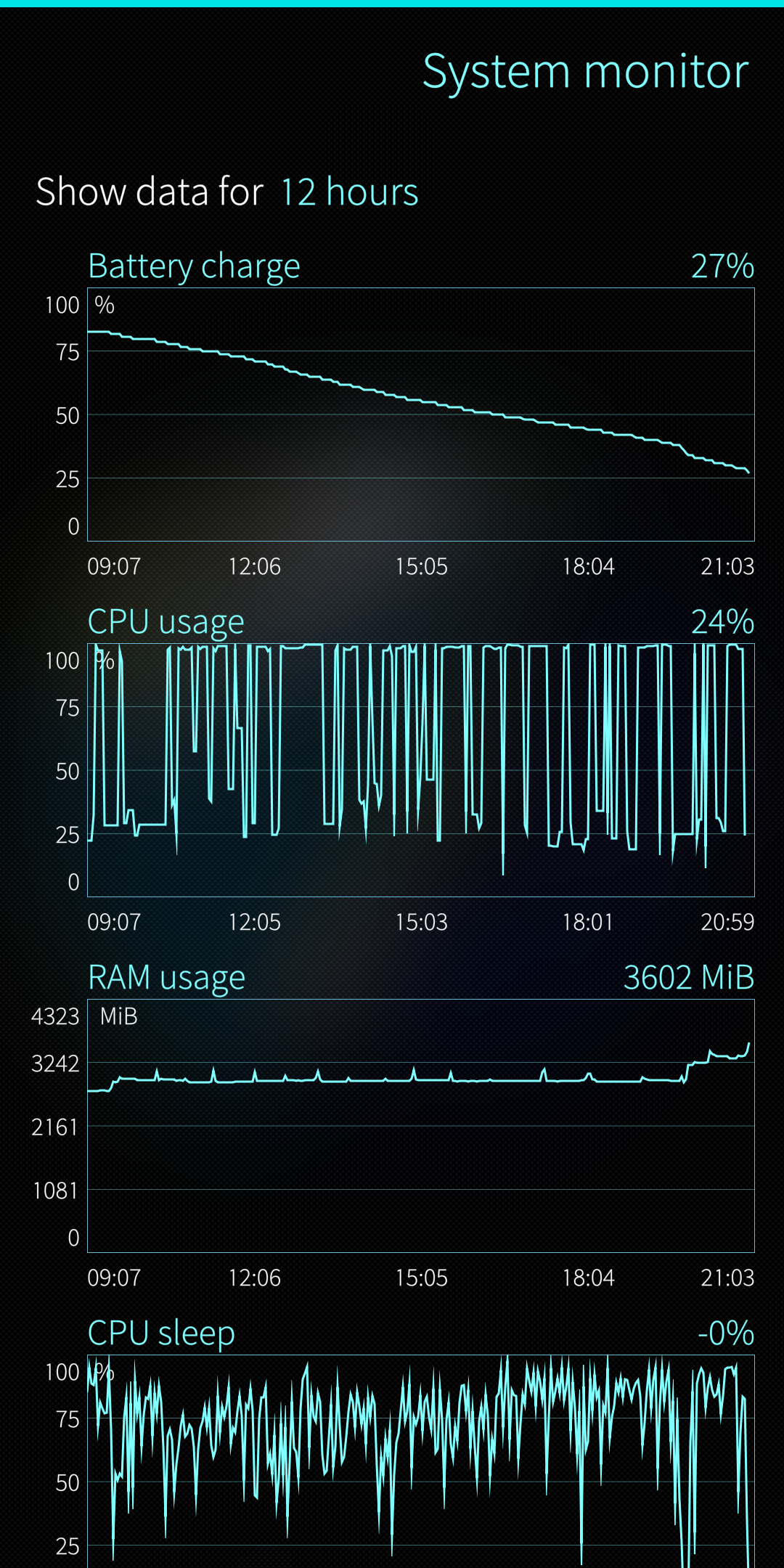
But to make it more comparable: could you please (temporarily) install system-monitor and make a screenshot of the 12 hour measurements like I did and tell your global usage, and if you started with AAS autostart or not?
Your device is doing better, especially at night, where the sleep reaches almost 100%. It’s about the same trend-line as I had before installing 5.1.
I am faced with this two scenarios:
no sleep + low CPU = bad (autostart AAS)
low sleep + high CPU = even worse (no autostart AAS or even use AAS)
In the second scenario the sleep gets constantly interrupted as the journaling also suggests. But I cannot find the root cause of that (no progs are forcing a wakelock) and it does not seem to hit you.
Would be nice if you could reboot with AAS autostart and see if the device gets any sleep after that. If it doesn’t it definitely looks as a general AAS 32-bits bug. If it makes no difference, I will be even more confused.
Bateries percentages are difficult to use in order to quantify consumption.
A weak battery can lose 25% in one hour.
A good battery will lose 5% in one hour with the same consumption.
Shouldn’t we talk in mA/h, instead?
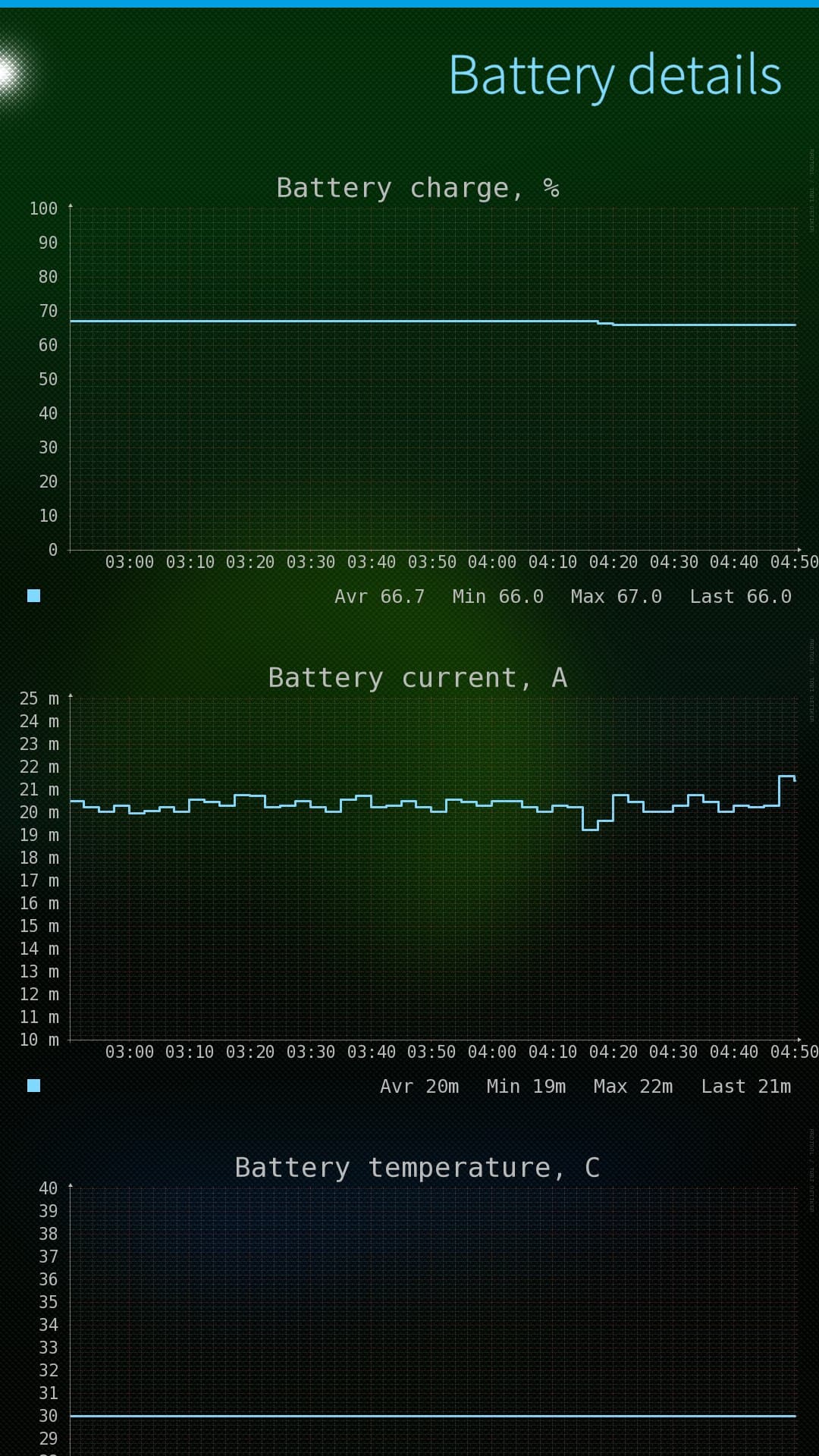
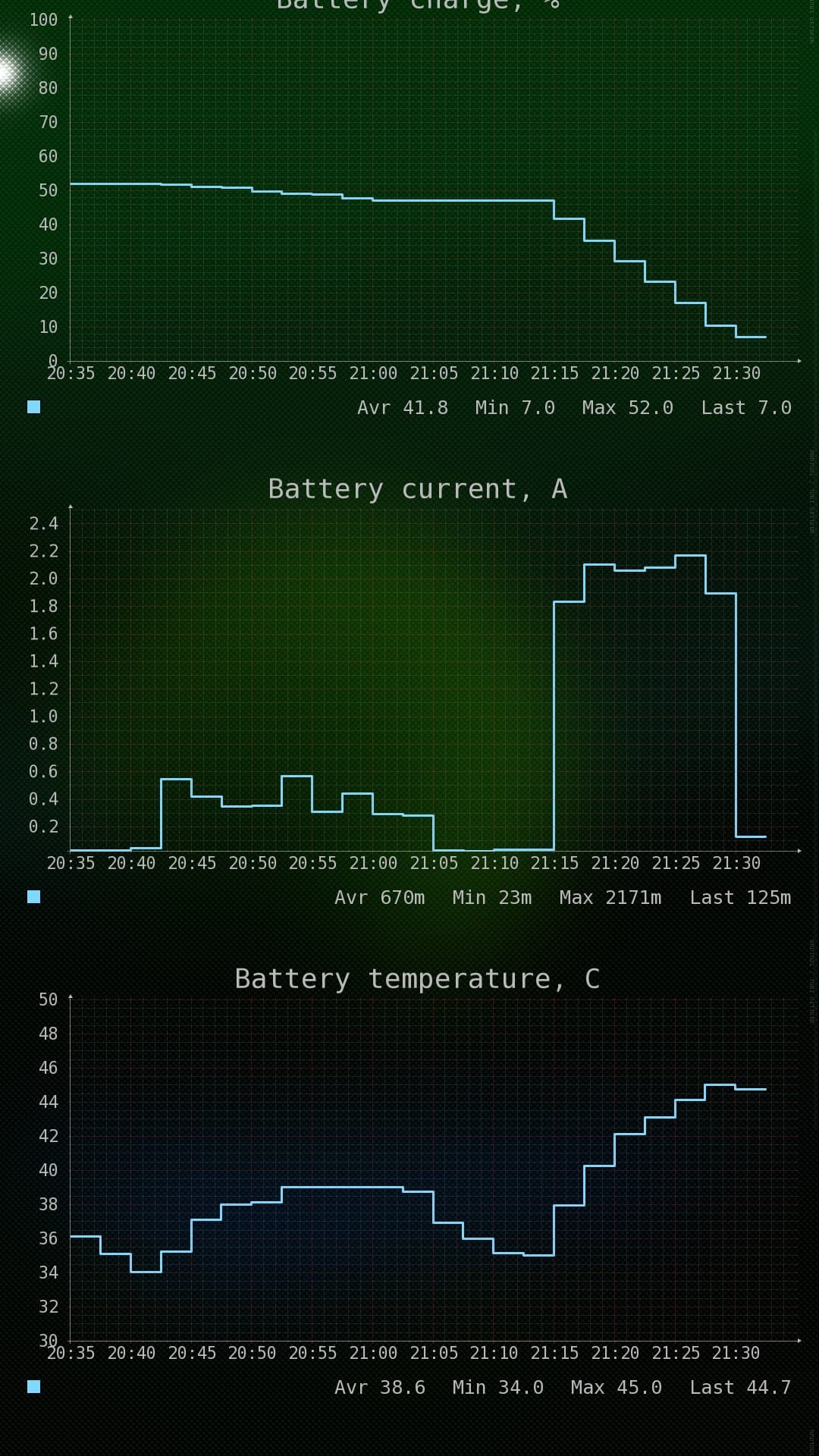
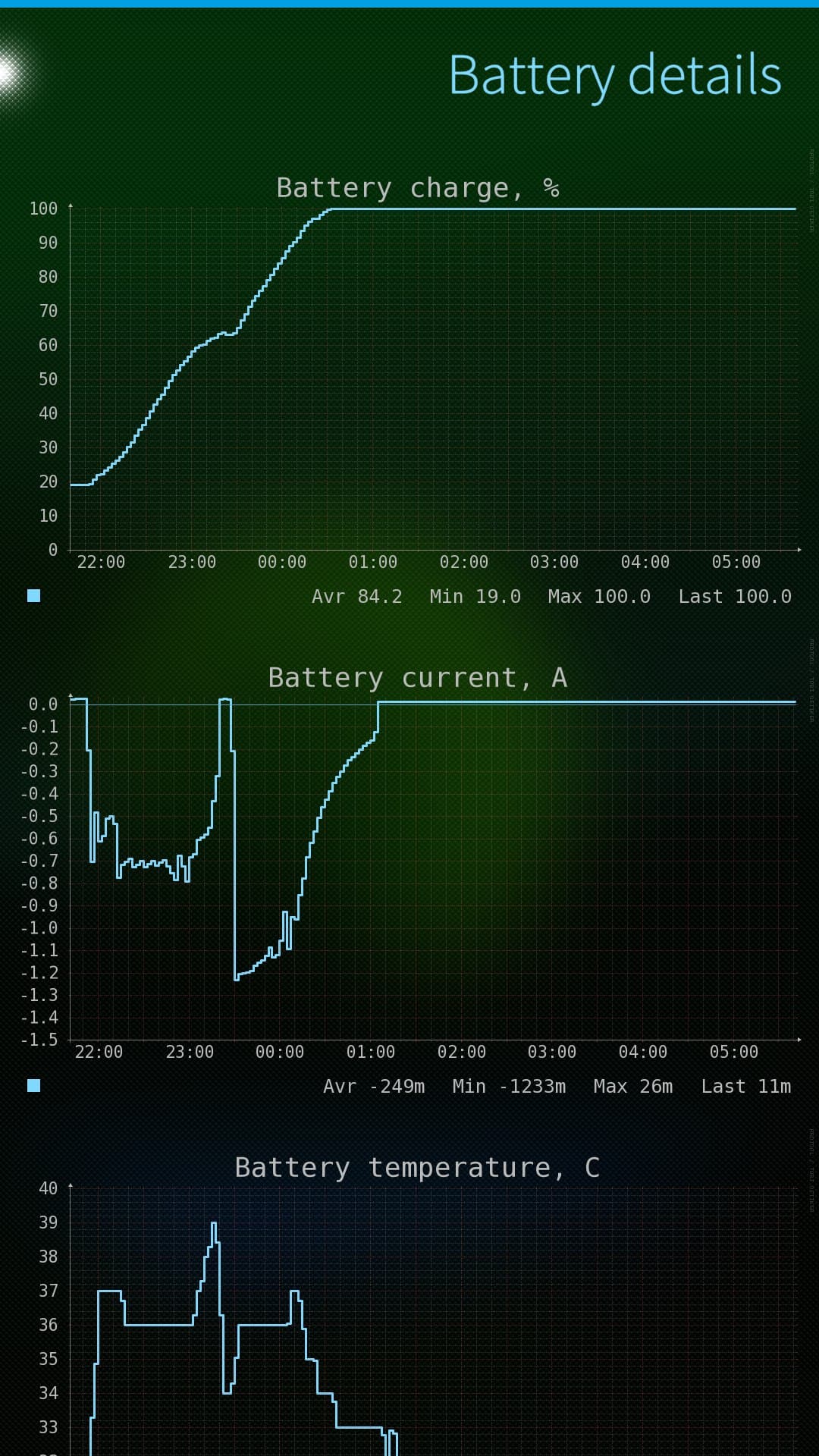
Strangely here the consumption (flight mode + no AAS) of my XA2 is almost identical, perhaps even some mAh better than on .78:
2000 mA consumption is huge.
Atm, I’m not able to link that to any event or action…
But perhaps an event will emerge, with some time. With Natural Intelligence, one never knows xD
And rebooted around 20:00. Is it okay for you to get only12h or should I send it after 24h?
I checked wake_[un]lock and no zygote …
P.S. and I remembered the reasoning not autostarting AAS. I had the strange phenomenon that some SMS did not get through and I found here other with same problem, mentioning autostart of AAS. Since I had that setting off, no problems with SMS…
@peterleinchen In this case a few hours is also fine, as I am mainly interested in the zygote lock. But that is not there in AAS autostart as you have already seen. so your device seems “okay” on SFOS 5.1.
@ric9k does systemscope also provide sleep graphs? I would assume so, and how does that look? And does a top like program show apps that you have a high CPU load at the moment it goes wrong, or is the journalctl spammed with wake lock related messages?
It’s a bit frustrating to me to see we all seem to have different XA2 patterns/issues while all recently upgraded to 5.1, which was not the case on 5.0. Maybe Jolla can make sense of this information.
I came too late to top, or to crest it. Il try, if possible, next time.
Yes, I 've got lots of
journalctl | grep -i wake
…
Jun 25 14:42:44 SfEr kernel: last active wakeup source: mce_mux
Jun 25 14:42:44 SfEr kernel: PM: Wakeup pending, aborting suspend
Jun 25 14:42:44 SfEr kernel: active wakeup source: mce_bluez_wait
Jun 25 14:44:39 SfEr kernel: PM: Wakeup pending, aborting suspend
Jun 25 14:44:39 SfEr kernel: active wakeup source: mce_bluez_wait
Jun 25 14:44:42 SfEr kernel: PM: Wakeup pending, aborting suspend
Jun 25 14:44:42 SfEr kernel: last active wakeup source: mce_mux
Jun 25 14:44:42 SfEr kernel: PM: Wakeup pending, aborting suspend
Jun 25 14:44:42 SfEr kernel: active wakeup source: mce_bluez_wait
Jun 25 14:47:46 SfEr kernel: PM: Wakeup pending, aborting suspend
Jun 25 14:47:46 SfEr kernel: active wakeup source: mce_bluez_wait
Jun 25 14:47:48 SfEr kernel: PM: Wakeup pending, aborting suspend
Jun 25 14:47:48 SfEr kernel: last active wakeup source: mce_mux
Jun 25 14:47:49 SfEr kernel: PM: Wakeup pending, aborting suspend
Jun 25 14:47:49 SfEr kernel: active wakeup source: mce_bluez_wait
Jun 25 14:51:56 SfEr kernel: PM: Wakeup pending, aborting suspend
Jun 25 14:51:56 SfEr kernel: active wakeup source: mce_bluez_wait
Jun 25 14:52:28 SfEr kernel: PM: Wakeup pending, aborting suspend
Jun 25 14:52:28 SfEr kernel: active wakeup source: mce_bluez_wait
Jun 25 14:52:31 SfEr kernel: PM: Wakeup pending, aborting suspend
…
Another strange thing: Top menus Wifi and Bluetooth buttons sometimes don’t react for a long time (5 to 10s.?), or until I lock/unlock (side button) the phone. Nothing appears in journalctl, however. I wasn’t able to find anything.
On one XA2 (SFOS 4.6.0.15) the finger print sensor stopped working (CSD tool confirmed that).
Since then I have battery drain.
Masking fpd unit didn’t help.
Not sure if the messages in the journal point to a driver of the sensor preventing sleep too often.
System monitor graphs differ a lot to my other XA2.
Just in case…