Does skipping work? (see my post above yours…)
Can not test i have only hi-fi headphones or line-in in car or home amplifier. Maybe i will find old apple but not sure if there is skip button  or when i meet somebody with that :)) …
Ifi Hip DAC v1 (the blue flask) works ok.
Update on this. Couple reboots later the USB-C to 3.5mm Apple adapter started working for me as well. Forgot the phone phone is running Linux, reboot fixes everything 
And works Including sound control.
If someone is looking for a “professional” DAC solution: Sonnect Soundwire
USB-C to 2*XLR is working with JP26
2 Likes
People have no chill here. I was just asking to add a table in post #1 using a well-known meme format for all the tested USB-C adapters.
Something like:
| Column 1 | Column 2 | Column 3 | Column 4 |
|---|---|---|---|
| USB-C adapter hardware | Tester | Working state or not | Notes |
2 Likes
I have a Cambridge Audio Dacmagic XS. It works perfectly.
Happy about the Axagon DAC / Jack 3.5 mm adapter. Thanks @dopi04 and @koza for the advice.
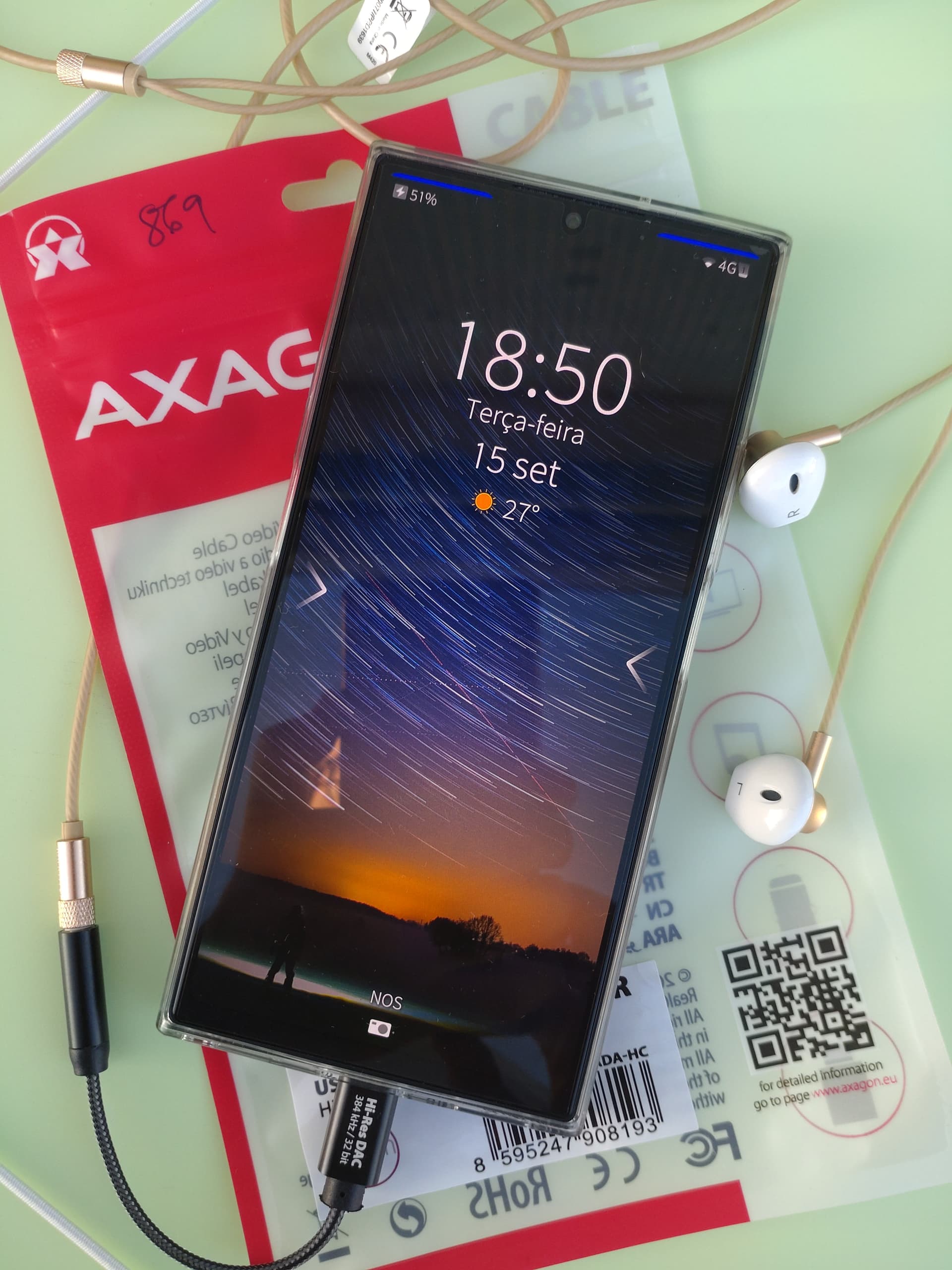
(Visible on the picture: JP2601; photograph taken with Xperia 10iii)
EDIT: on a PC, the device appears as:
idVendor=3302, idProduct=56c5, bcdDevice= 0.03
TTGK Realtek USB2.0 Audio
The real manufacturer is Shenzen TTGK Technology https://www.szttgk.com/en/product/conversionaudiomodule.html
3 Likes
That is a great idea.
A table will make much easier to see all the data quickly.
2 Likes
I’ll try to do that (later, though because it will take time).
If anyone knows how to convert the first post to a wiki, help is welcome.
2 Likes
Does not work:
Data cable by OTB
Model: OTB-DK003
- Click the three dots (…) at the bottom right in the opening post
- A wrench icon should appear to the list of actions
- Pressing that should open a menu, and there should be an option “Make Wiki”.
1 Like
I don’t see the wrench icon so I probably don’t have an high enough level to do that.
Maybe a moderator can help with that.
Thanks anyway, at least, I now have the answer to the “how” which can be useful anywhere this forum engine is used.
Edit: Adapters list reformatted (only 2 headsets for now so I’ll see later).
What does “working” mean here? I have one that works but the sound is worse than 128kbit mp3. Is that working? Hee
Not ideal, that is true.
I would say that it means you can hear and understand the person on the other side of the call and vice-versa. The quality would still be worth noting in the comment column, of course.
Every bit of information can be useful to someone. Even if it does not work at all, it’s still useful information. You can put the device name and any comment you have about the result.
I would assume if you get sound out of it, then it works.
It clearly works as “USB-C to 3,5mm jack adapter”, but you could add a comment about the low sound quality.
2 Likes
I assume this is not a wiki so I report it here:
I just tested the “Moswag USB-C to 3.5mm” adapter.
Happy to report it gets detected and both stereo out and microphone work
It’s the usual anonymous adapter. I post the dmesg for extra infos, but doesn’t really say much.
I suppose it’s only distributed by Amazon. This one
kernel: usb usb1: New USB device found, idVendor=1d6b, idProduct=0002, bcdDevice= 6.12
kernel: usb usb1: New USB device strings: Mfr=3, Product=2, SerialNumber=1
kernel: usb usb1: Product: xHCI Host Controller
kernel: usb usb1: Manufacturer: Linux 6.12.38-4k xhci-hcd
kernel: usb usb1: SerialNumber: 11200000.xhci0
kernel: usb 1-1: new full-speed USB device number 2 using xhci-mtk
kernel: usb 1-1: mbrain: idVendor=0000, idProduct=0000, bcdDevice= 0.00, speed=2, state=5
kernel: usb 1-1: mbrain: idVendor=0000, idProduct=0000, bcdDevice= 0.00, speed=2, state=6
kernel: usb 1-1: not running at top speed; connect to a high speed hub
kernel: usb 1-1: New USB device found, idVendor=0020, idProduct=0b21, bcdDevice= 1.00
kernel: usb 1-1: New USB device strings: Mfr=1, Product=2, SerialNumber=3
kernel: usb 1-1: Product: USB Audio
kernel: usb 1-1: Manufacturer: Generic
kernel: usb 1-1: SerialNumber: 20210726905926
kernel: usb 1-1: mbrain: idVendor=0020, idProduct=0b21, bcdDevice= 1.00, speed=2, state=7
kernel: input: Generic USB Audio as /devices/platform/soc/11201000.usb0/11200000.xhci0/usb1/1-1/1-1:1.3/0003:0020:0B21.0003/input/input9
kernel: hid-generic 0003:0020:0B21.0003: input,hidraw0: USB HID v2.01 Device [Generic USB Audio] on usb-11200000.xhci0-1/input3
https://www.alibaba.com/product-detail/JCALLY-AP7-AK4377ECB-High-Resolution-Audio_1601638582543.html
JCALLY AP7 AK4377ECB High-Resolution Audio Adapter Portable DAC Amplifier Type-C to 3.5mm Headphone Amplifier
Does not work 