Great update! This lifts usability to a whole new level! I will use it for two or three days and see what comes up. Thanks a lot
Hi! One question about your Sailwave, why not to rather contribute to AllRadio2?
It is also based on https://www.radio-browser.info/ .
See
https://gitea.nesnomis.nu/nesnomis/harbour-allradio/wiki/harbour-allradio+wiki.-
and:
Looking forward to have it in the Jolla Shop👍
Using v1.3 for a few days I can say that I am pretty happy as a user! There is one thing left that I struggle with and some others where I would suggest improvements but they are more personal preferences and not necessarily feature requests.
When opening a Podcast I find it hard to distinguish between played and unplayed episodes. I can see that played episodes are somewhat greyed out but I really struggle to see the difference at a glance. Please add more contrast!
The less important stuff:
- While the Downloads page does everything it should and works great, why is it in the pulldown menu and not in the carousel like Podcasts or New Episodes? Both are fine but is there a reason for the difference?
- The List of New Episodes shows buttons for adding an episode to the playlist as well as one to instantly play it. I think it would make more sense to replace one with a downoad button for episodes that are not yet downloaded. Everything is still available on fingerpress, but I think this would be more logical.
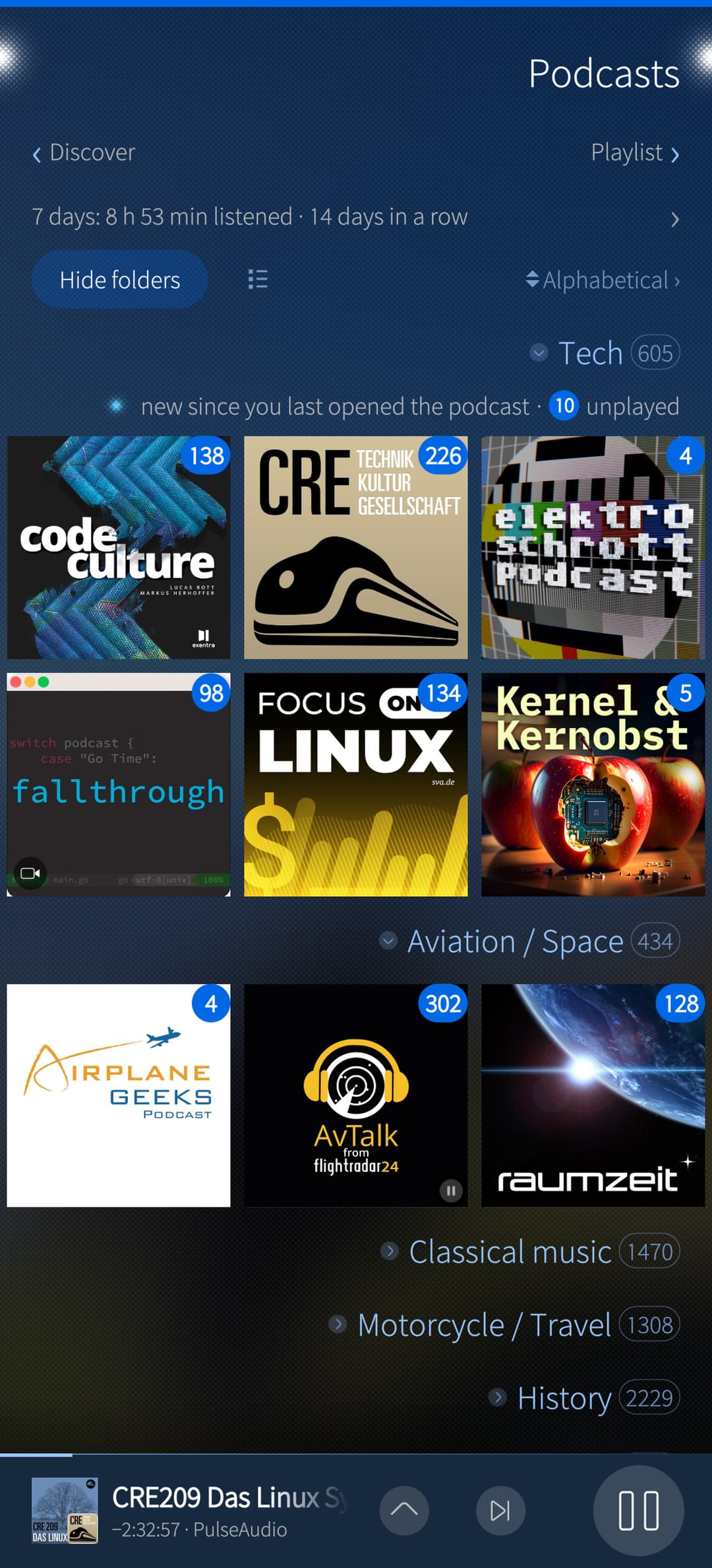
- The Podcast tile view makes it very easy to spot unplayed episodes and how many each podcast has - the number in the blue dot. The list view makes this much harder to discover. All info is there, just harder to see when compared to the tile view.
Again thanks for the great app.
Hello,
wow, many thanks for your extensive testing and the many thoughts you have done to help me improve the app expereicne.
I have noted everything - while 1.3 focused on the playlist, the coming v1.4 will be a rework of Downloads and New Episodes (with more triage options), so your suggestions really come in handy.
Played / Unplayed: You are right, the difference is really too subtle. I will dim played episodes more and mark unplayed ones more clearly.
Podcast list view: The number of unplayed episodes will go in the dot in the list view too, just like it is now in the tile view.
Download button in new episodes would be one of the triage options in the rework of the New Episode page. I am yet to figure out how to make all options (Play, add to playlist, download…) easily and quickly reachable without cluttering the layout.
Downloads page in the pulley: This was a deliberate choice as for me the Downloads page is more of a tool (storage, archive, queue…) than a content list like Podcasts or New Episodes. I am considering making it selectable as one of the “carousel” pages in the settings, just like “Discover”
Keep you updated 
Greetings,
Thomas
Download: GitHub release v1.4 – how to install: see the end of this post.
Hello, fellow podcast and Sailfish aficionados,
in my first post I mentioned that Sailcast started as a personal project, focused on my own needs. Even though it isn’t in any store yet, there are already quite a few downloads from GitHub, users and feedback in this thread. So my goal now is to make Sailcast better for everyone who uses it – and then to offer it to a broader public on OpenRepos and in the Jolla Store.
That’s why, with version 1.3, I started a journey to make Sailcast easier to use in everyday life: fewer taps, clearer wording and less thinking. With version 1.4, released today, that journey continues – this time focusing mainly on two pages I use every day: New episodes and Downloads.
New Episodes
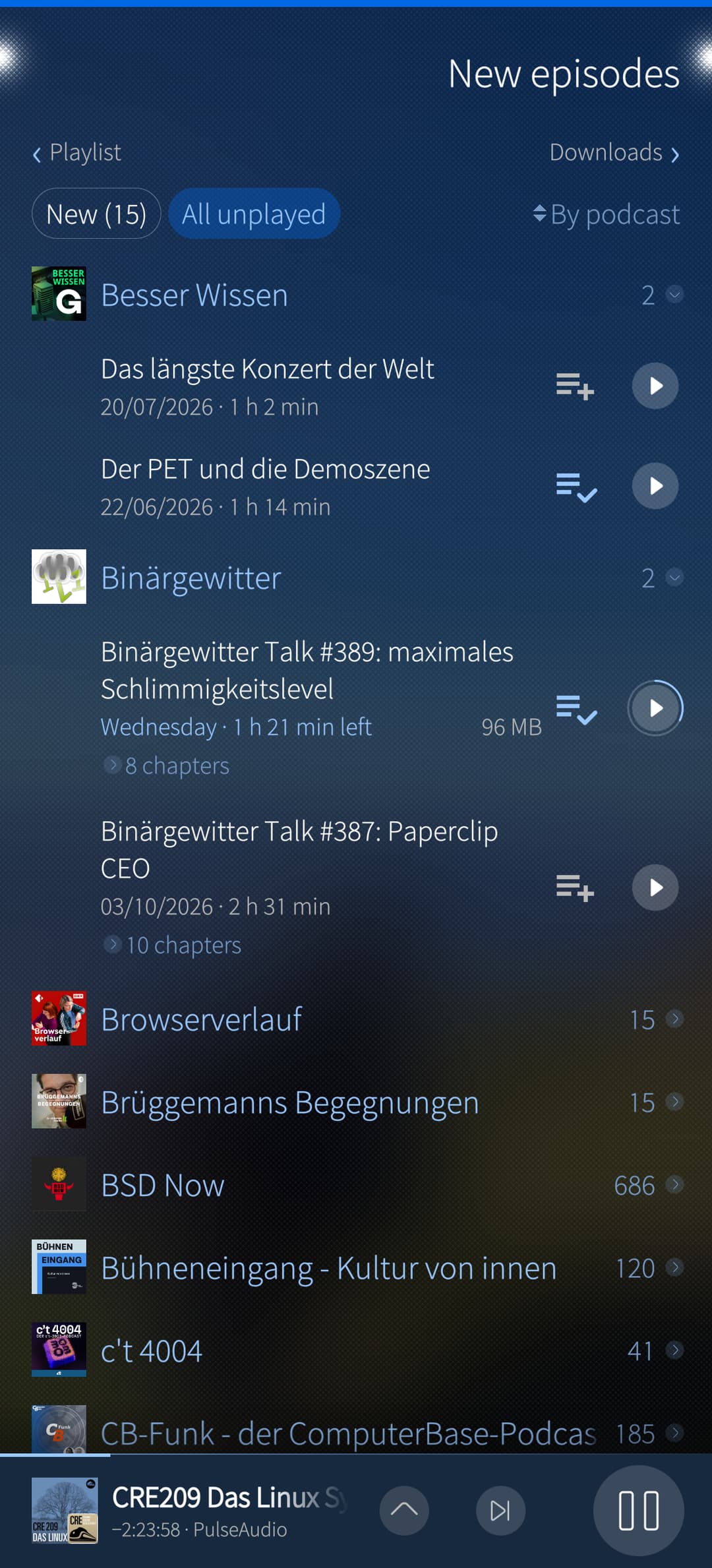
As an avid user of AntennaPod I really appreciate it’s Inbox concept and the triage options. I had the vision to recreate something similar, but in a way that feels at home on Sailfish. I hope I found a good solution: the New episodes page now has two views: New (what new episodes came with the latest updates and you haven’t looked yet) and All unplayed.
With these two views you can finally triage:
- Set aside an episode without marking it as played (with Undo)
- Clear New in one go
 puts an episode into the playlist and downloads it (WiFi rules respected)
- Group by podcast with covers, fold and unfold groups
- Hide daily news feeds from New episodes per podcast (hint: with 1.5 I’m planning a feature for handling those recurring news feeds and keep them apart from the normal playlist to a section of their own)
- Clearer icons for various states: episodes playing, episodes downloaded…
Please let me know what you think of the new options and whether they work for you and your workflow.
Downloads
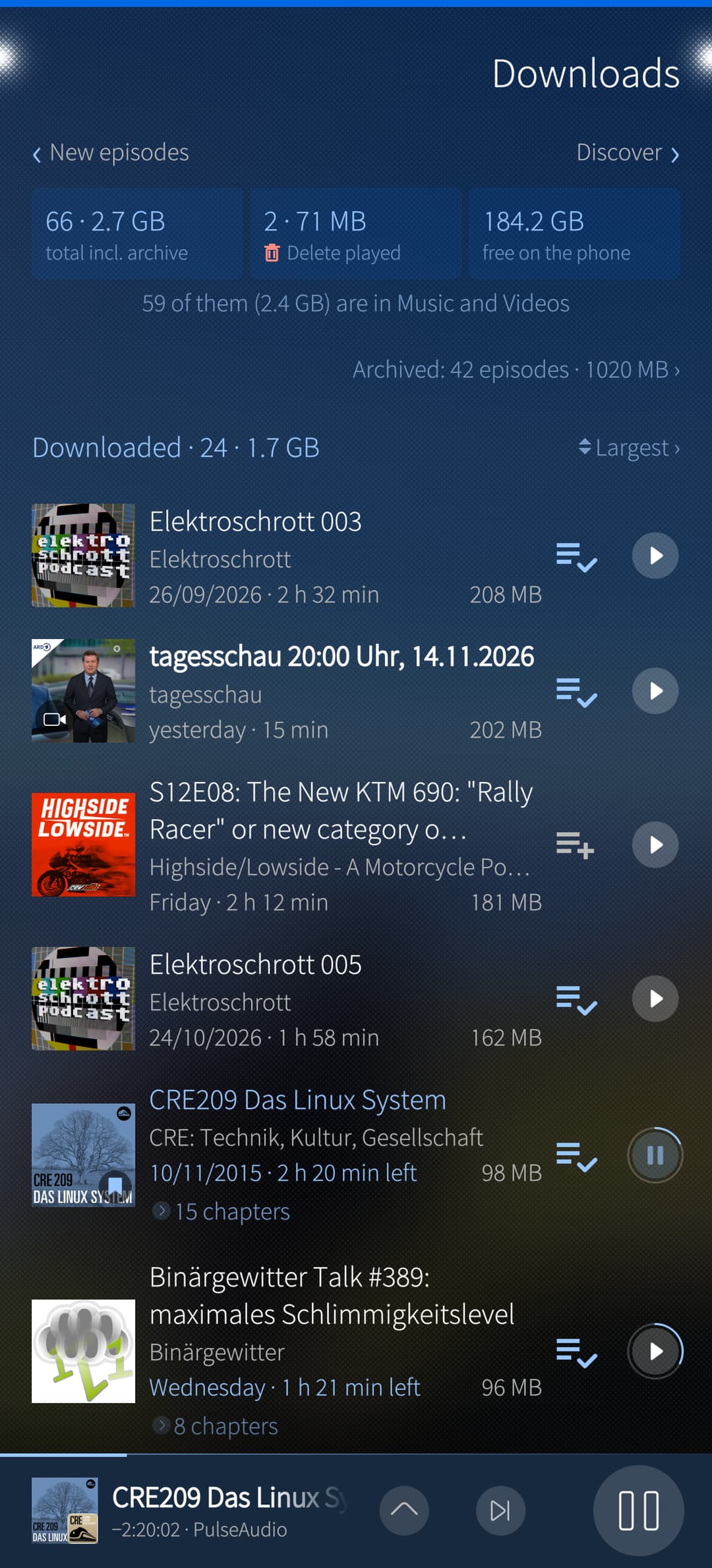
- Delete several… in the pulley menu: select and delete many downloads at once (tap, or press and hold to mark a whole range); the bar shows how much space you get get back
- Sort by largest first
- Downloads is now an optional swipe page next to New episodes @grawuzikapuzi
Playlist
- New sorting options including Smart Shuffle - after the much appreciated idea of AntennaPod
- Keep sorted, pins for episodes you moved by hand and an option to auto-add per podcast
Listening statistics
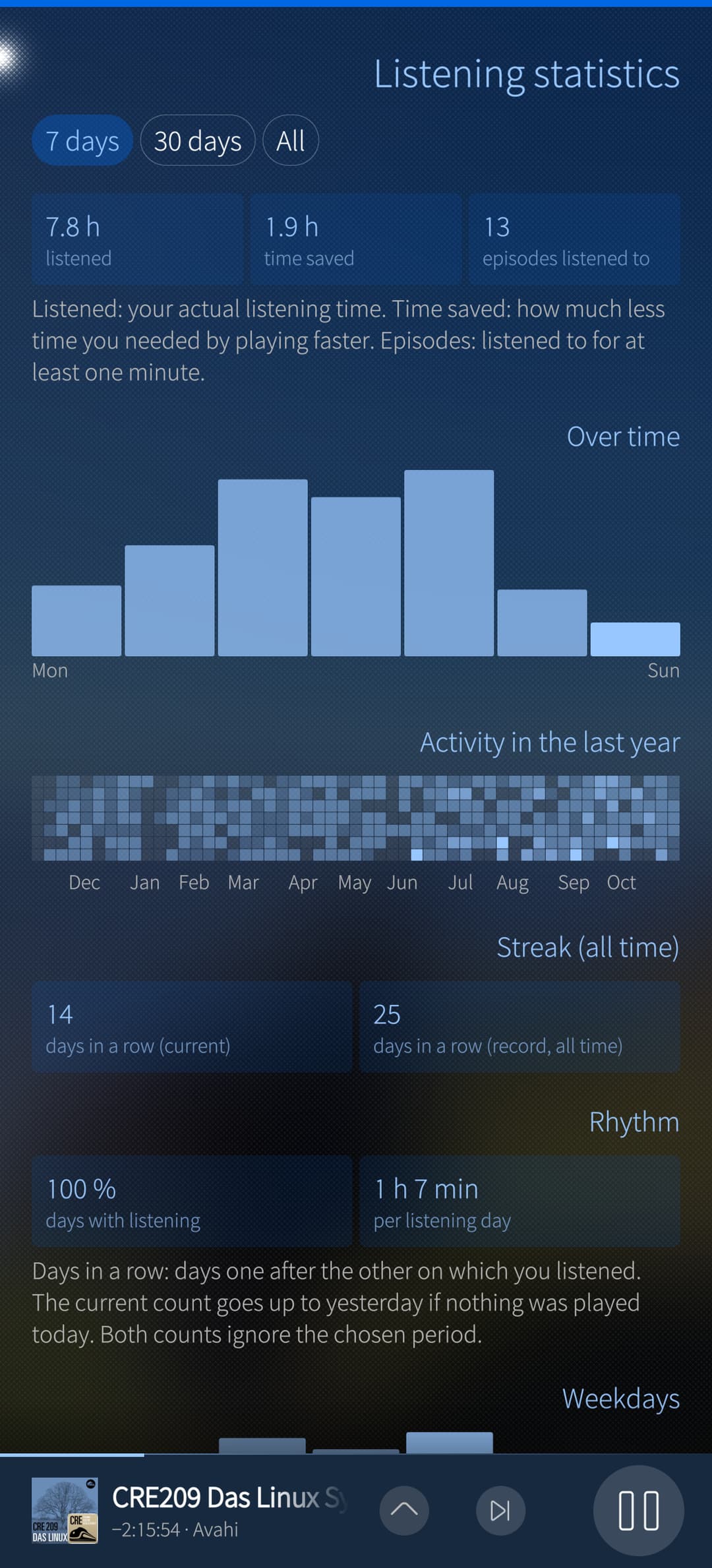
- A line on the Podcasts page: “7 days: 3 h 20 min listened · 5 days in a row”
- A tap on the line opens a statistics page with time listened, a year of activity, days in a row, records, categories and a ranking of your podcasts and much more…
Share my podcasts
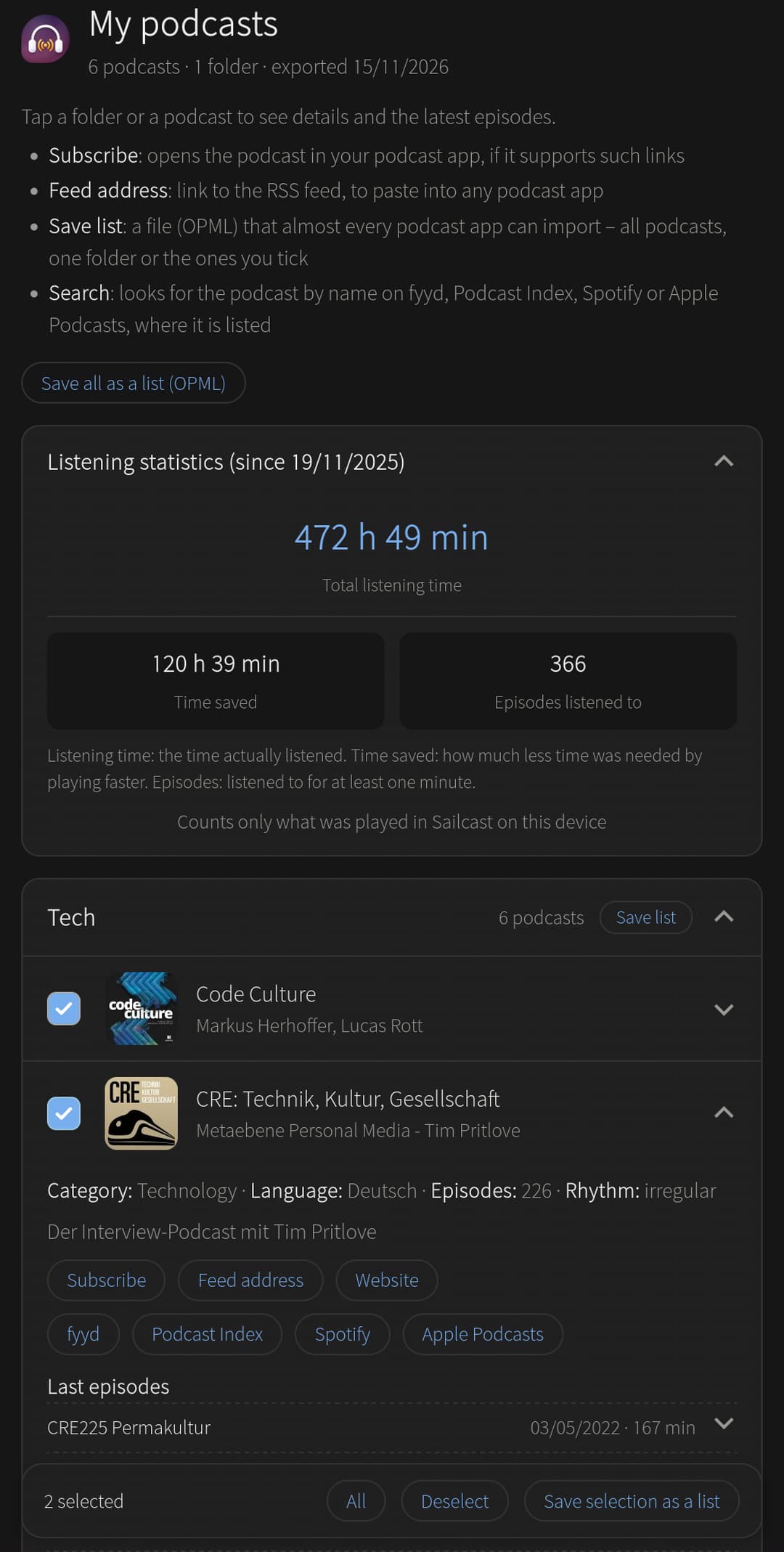
A personal playground: Sailcast can create a self-contained web page to share your podcasts with friends. It shows your podcasts (selectable by folder) with covers, descriptions and the latest episodes, links to each feed and website, search links for fyyd, Podcast Index, Spotify and Apple Podcasts, and optional listening statistics. It also gives you an OPML file for any podcast app – with all podcasts or only the ones you select. You find it in Settings → Import and export → Share my podcasts.
Maybe nobody needs it – but it was a lot of fun to build, and I learnt a lot about current web technologies (a lot has changed since I learnt HTML 4 at school) 
Example:
And a few other things…
Settings regrouped into seven pages py purpose, shorter pull-down menus with the same order everywhere, grid/list on the Podcasts page with one tap, a more reliable player (resumes correctly after a long pause), and many small fixes.
Known issue
As in 1.3, a video pauses briefly when you go to or from its episode page; a complete rebuild is planned for 1.5.
Screenshots
| New episodes | Downloads | Playlist |

| Statistics | Podcasts |
Download / Installation
Release Sailcast 1.4 · t-sappl/harbour-sailcast · GitHub – OpenRepos follows as soon as it accepts uploads again
How to install the RPM on the phone – no command line needed:
- Once: go to Settings → Untrusted software → allow installation
- Download the RPM for your device from the GitHub release page (at the end of the page under “Assets”)
aarch64– 64-bit devices such as the Jolla Phone (2026) and Jolla C2armv7hl– 32-bit installations (older Xperias)i486– Jolla Tablet and the emulator
- Tap the downloaded file (browser downloads, or Files app → Downloads) and confirm “Install”
Updating from an earlier version works the same way – just install the RPM of the new version; all your podcasts, settings and listening state stay.
(Command line alternative: devel-su pkcon install-local harbour-sailcast-1.4-1.aarch64.rpm)
Greetings,
Thomas
Hi, thanks for the update and incorporating my and other suggestions.
After testing I found one important (for my usecase) regression in the “New Episodes” page. There is no longer any option to see which episodes have been downloaded already and which are not. There is the + icon that downloads but also adds icons to the playlist - so these steps can no longer be controlled independently.
With 1.4 the only way to determine Episodes that are not yet downloaded is to go to “Podcasts” and have a look at the line that says something like “10 unlistened, 8 downloaded”
Did I overlook something?
Helloy
thanks for testing and the report. No, you didn’t overlook it, it is too much hidden:
- a downloaded epusode only shows it’s size now as an indicator that it has already been downloaded. I agree that’s too subtle and with a small release 1.4.1 I will being back the icon
 without downloading: in Settings → Downloads → “Download playlist episodes” off. Then only adds to the playlist, and you can download separately with a long press and “Download”. In 1.4.1 I’ll also add an entry to the context menu of an episode with “download and add to playlist”, when the automatic download is switched off in settings.
- a Downloads filter in the pulley of the New Episodes page should also be helpful (“Filter by downloads…”: “only downloaded / only not downloaded”)
Version 1.4.1 with these fixes and some other small changes should be released within the next 1-2 days.
Greetings,
Thomas
Ah, the size indicator. Now I see it too and this mostly covers my usecase. But considering that I had to ask, it really is a bit too subtle, thanks.
The filter option sounds useful too!
Sailwave 1.4.1
Hello,
I have just released version 1.4.1 on Github, a small release with some fixes and improvements.
New:
-
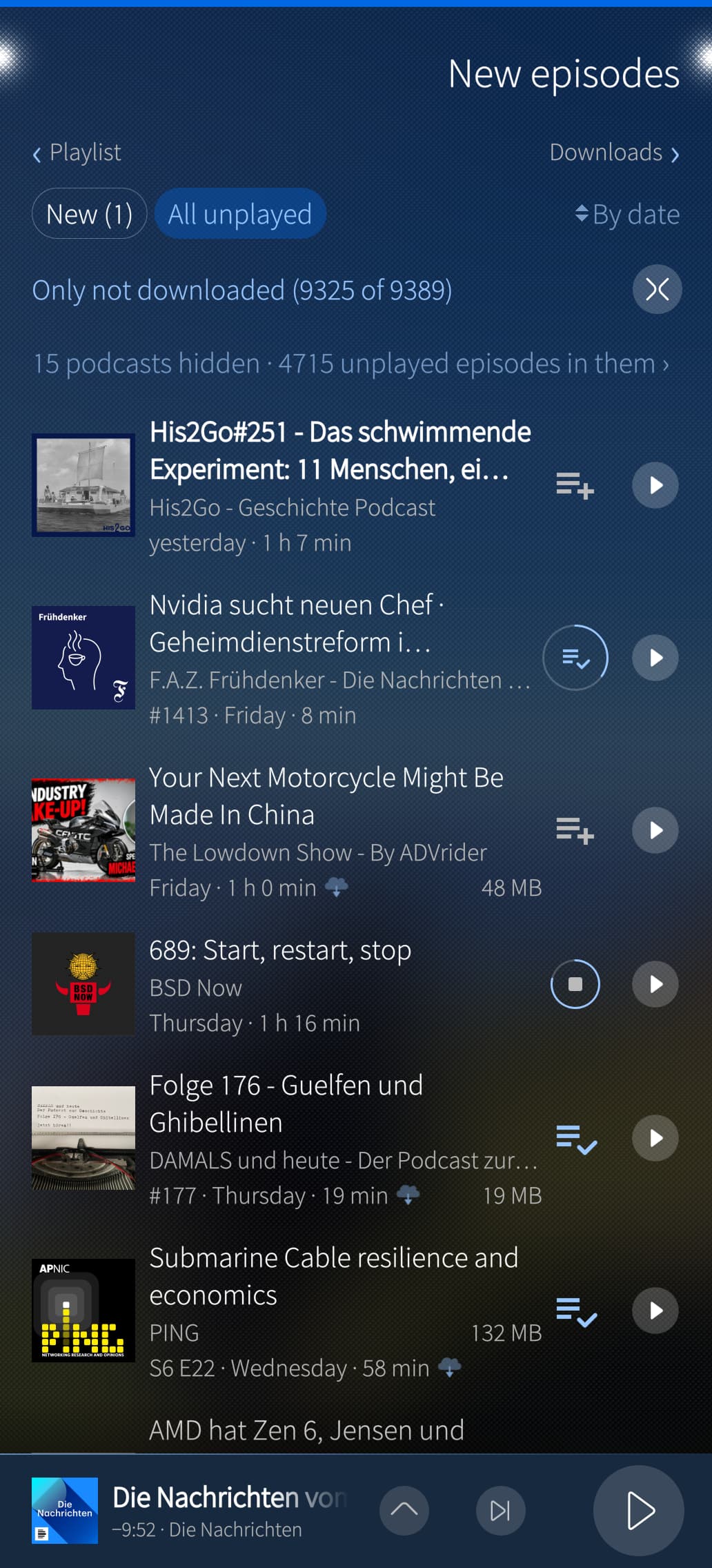
Download filter on New episodes: pull-down menu “Filter by download …” – only downloaded or only not downloaded. A line under the view chips shows it with the count (“Only not downloaded (4 of 12)”); tap it to switch between the filters, tap ✕ to show everything again. … Edit: an episode that was downloaded while you were on the page stays until you leave the page, so nothing jumps away under your finger. That was a deliberate decision after my own testings, but I’m reconsidering it – feedback welcome.
-
Podcasts hidden from New episodes at a glance: a line on New episodes says how many podcasts are hidden there and how many new episodes they have – tap it to choose the podcasts shown, all on one page (All / None). The update message names new episodes in hidden podcasts, so an empty page after “7 new episodes” is no longer a mysteriys.
-
The Cloud download symbol is back next to the size. @grawuzikapuzi
-
The episode menu has a new entry – “Add to playlist without downloading”, or “Add to playlist and download” when the setting “Download playlist episodes” (Settings → Downloads) is off.
-
Hide a podcast from the statistics instead of deleting its listening history – the time is kept and counts again when you show it.
-
An already heard episode put back into the playlist becomes unplayed again, so the next update keeps it there.
| New Episodes page |
Fixes:
- Play started the next episode after you had put an episode back into the playlist
- Smart Shuffle no longer mixes the playlist when you release a pin
- The shared web page only names podcasts that are on it (for example if only certain folders are selected)
- Archiving video podcasts, the player bar on choice pages, and a few smaller things
Known issue
- Switching from one episode to another can, rarely, start the new one from the beginning instead of where you left off (happens also in earlier versions). If it happens, jump back by hand on the episode page or the player bar – a fix comes with the next update.
Download: https://github.com/t-sappl/harbour-sailcast/releases/tag/v1.4.1
As always, please install the RPM file manually.
Thanks to @grawuzikapuzi for the report about New episodes and downloads.
Greetings,
Thomas
Thanks so much for making and also for developing and updating this app. I’ve been using Antennapod for a while and acually having a good native podcastplayer was important to me.
Keep up the good work.
btw; I also enjoy your two other *casts. 
Just installed Sailcast 1.4.1
Love:
-control over downloaded offline episodes, relevant naming (vs cryptically named “cache” deposit like gPodder does), the offline download location is user configurable and structure is logical!
-possibility to rearrange order of items in the playlist (by hold and drag!)
-bookmarks and notes
-Sailfish Interface & look
Wishlist:
-audio controls: Balance L+R (even “Music Players” forget this) + Equaliser for voice.
-Search my podcasts results: it says “search my podcasts - podcasts, episodes and bookmarks on this phone” brilliant that it searches in a cached episodes list of non-downloaded (so not exactly “on this phone”) but once the result turn up there is no right click option to allow action from within the search result lists such as download, add to queue, download & add to “create folder” =thematic folder for research. Search for 2 keywords that may have different writing such as “Sud Stream” and “Sudstream”
ID3Tag to be filled automatically in downloaded files with all possible information for sorting in standard music players, such as Media player in Jolla?
Export of bookmarks + personal notes to Jolla Sailfish OS “Notes”. Jolla Notes are searcheable and can be shared too! This could be one note per podcast channel , one note per episode or the whole list of poscast episodes with subsection of notes and comments.
-Custom playlists (Quick on the go, Daily on the ground News, Bedtime stories, Nerd talk, Conspiracy realism…) and possibility to automatically add podcasts to one or more playlists also based on keywords.
-Circular playlist (just continue playing, back to start)
Turn “recommendations” standard to OFF. (opt in instead of opt out⁾
Thank you for making work of a serious Podcast platform.
Hello,
thanks for your kind words. A native podcast player that can replace AntennaPod was exactly my goal - so it’s great to hear that it works for you
Re the other two apps (don’t want to hijack the thread): both received some nice updates as well, but due to the OpenRepos problems, you currently have to download and install the RPMs manually as well (Sailfeed v1.4 and Sailwave v1.2.1)
Sailcast 1.5 (coming soon) will be able to check GitHub for new versions by itself, so manual updates get a bit easier.
Greetings,
Thomas
Hello,
thanks for the detailed feedback and your wish list, that’s exactly what helps glad the downloads, the playlist and the bookmarks work for you.
from your wishlist - coming with 1.5:
- recommendations are opt-in now. you are right - off by default is the better choice
- results from the search will get the usual menus (download, add to playlist, mark as played, etc..), for podcasts and bookmarks too. And “Sud Stream” will also find “Sudstream”.
- holding a chapter will set a bookmark at its start, named after the chapter
planned for later:
- custom playlist that fill themselves by rules are already in the making. In 1.6 I want to start with a pre-defined “news section” for daily news podcasts. If that works out well, next step would be enabling custom rules (like keywords/tags) and creation of more playlists (“bedtime”, “workout”, etc…) - like you suggested
- I want to rework and beef up the bookmarks page: grouped by podcast, episode and chapter and easier editing. A “Share as text” feature would also make sense for sharing with other apps (but I couldn’t find Jolla Notes as a share target)
- rewriting ID3 tags would need additional libraries, which conflicts with Jolla Store rule, so currently no planned - but what I have already planned: automatically created and constantly updates M3U playlists per podcast folder, so other music players show the episodes in the right order. Coming together with SD card as
Balance and equaliser:
- a volume boost and speech enhancer was also on my personal wish list as it’s helpful when listening while riding on the motorcyle. I investigated the possibilities as Qt Multimedia used by Sailfish OS doesn’t offer this. But this would only work with a custom GStreamer setup, which wouldn’t be allowed by Jolla Store. But I’ll investigate further
One question - what would you use the circular playlist for? Sailcast removes finished episodes from the playlist, so a back to the start feature would need a different mode - and I’d like to understand the use case first (maybe for falling asleep in the bed? :D)
Greetings,
Thomas
Tested v.1.4.1 today and can say - all my usecases are covered, no further requests from my side - Awesome 
I had to manually restart playback after each episode in the playlist for a few times today. I am not sure if this is on purpose or a bug. But nothing a quick tap on the headphones can’t remidy. So all is good.
Yep, have encountered that too. Also without bothering.
Hello both,
I will try to reproduce and solve this issue - an episode started from the playlist section should always trigger the next episode, only episodes started elsewhere (for example from Continue listening) should only load, but not automatically play the next episode from the playlist.
But most likely is has something to do with the audio ressource. I assume you had your device locked?
Greetings,
Thomas
You got that right. Bedtime loop on repeat is a possible scenario, sometimes I sleep in and miss a full episode and then it’s nice to jump back.
I see circular playlist also as a static or configurable playlist. Not like the quick enquesystem that dumps “listened to” episodes. More like a “thematic collection” that can grow to be completed and revisited and edited.
It would be nice to be able to export the whole playlist as a study package, including audio files, comments and the m3u to a folder (on SD) apart from the episodes’ standard residence under Podcast channel title named folder.
Currently I am helping myself with a simple Python script to do what I found missing in most Sailfish OS podcast software, including m3u, quick refresh, custom depth, groups but your well thought out software is clearly set to be leaping over it soon in splendid GUI colors.
My idea was to have full control over downloaded files, use any player for playback, use notes in Jolla for comments. In other words: get the files on disk, then use already available tools to play, comment, backup. No more dealing with sluggish internal custom podcast software database (close to 400GB and gPodder has had it)
In Quasar MX the balance and equalizer are already present, circular playlist = collection, provided download script puts files in a folder structure to feed to Quasar MX.
Edit: when I close Sailcast while playing playlist, then reopen it the current episode does restart from beginning.
Yes, device was locked in my pocket.
Hi, you’ve developed a great app! I have one more request: When my podcast episode ends, it would be nice if the episode I just listened to stayed “stuck” at the bottom of the player… It would be better to turn off the player once the episode ends (Just like in Antenna Pod). Then I can pick a new episode and keep going…