Sailcast - Podcast client with Podcast Index integration

Sailcast 1.2 released – download from GitHub

Hello everyone,

I have now published the teased version 1.2 of Sailcast on Github. This post explains the new features and changes as well as how to install the app until it is available on OpenRepos and in the Jolla Store. It’s quite a big update – it should make Sailcast nicer to use and adds features you may know from podcast apps on Android or iPhone plus several suggested here in the thread.

Download:
Release Sailcast 1.2 · t-sappl/harbour-sailcast · GitHub – OpenRepos follows as soon as it accepts uploads again, I will also submit this version as the initial release for the Jolla Store :crossed_fingers:

How to install the RPM on the phone – no command line needed:

  1. Once: Go to Settings → Untrusted software → allow installation
  2. Download the RPM for your device from the Github release page (at the end of the page under “Assets”)
    • aarch64 – 64-bit devices such as the Jolla Phone (2026) and Jolla C2
    • armv7hl – 32-bit installations (older Xperias)
    • i486 – Jolla Tablet and the emulator
  3. Tap the downloaded file (browser downloads or with Files app → Downloads) and confirm “Install”

Updating from an earlier version works the same way – just install the RPM of the new version and all your podcasts, settings and listening state stay.

(Command line alternative: devel-su pkcon install-local harbour-sailcast-1.2-1.aarch64.rpm)

New features and changes:

Thanks for all the feedback in this thread and via DM, a lot of it went straight into this version.

Discover

This is a completely new section - combining the former “Search / add podcast” page with “Discover” features:

  • For you – suggestions based on what you actually listen to (your languages, categories and keywords, and podcasts similar to your favourites), each with the reason why it is suggested
  • Trending podcasts from Podcast Index (german) and fyyd (english)
  • New - first episodes of new German-language podcasts from fyyd / curation “Nullnummern” by Hörsuppe, trailers of new English-language shows from Podnews
  • Browse categories, and similar podcasts for every podcast
  • My interests – a visually pleasing page where you can refine your interests in each category and subcategory (more, less or never), plus keywords and languages
  • Listen without subscribing - episodes can be listened to without subscribing the podcast, so you can try the latest episodes first or listen to the trailers to get hooked

As before, you can enter the URL of a feed, the URL of a website containing a feed (Sailcast finds all podcasts on this page), or just search by keywords.

Discover is a ring page between New episodes and Podcasts (on by default, can be switched off in Settings → General, can then be opened via the pulley on the podcasts page)
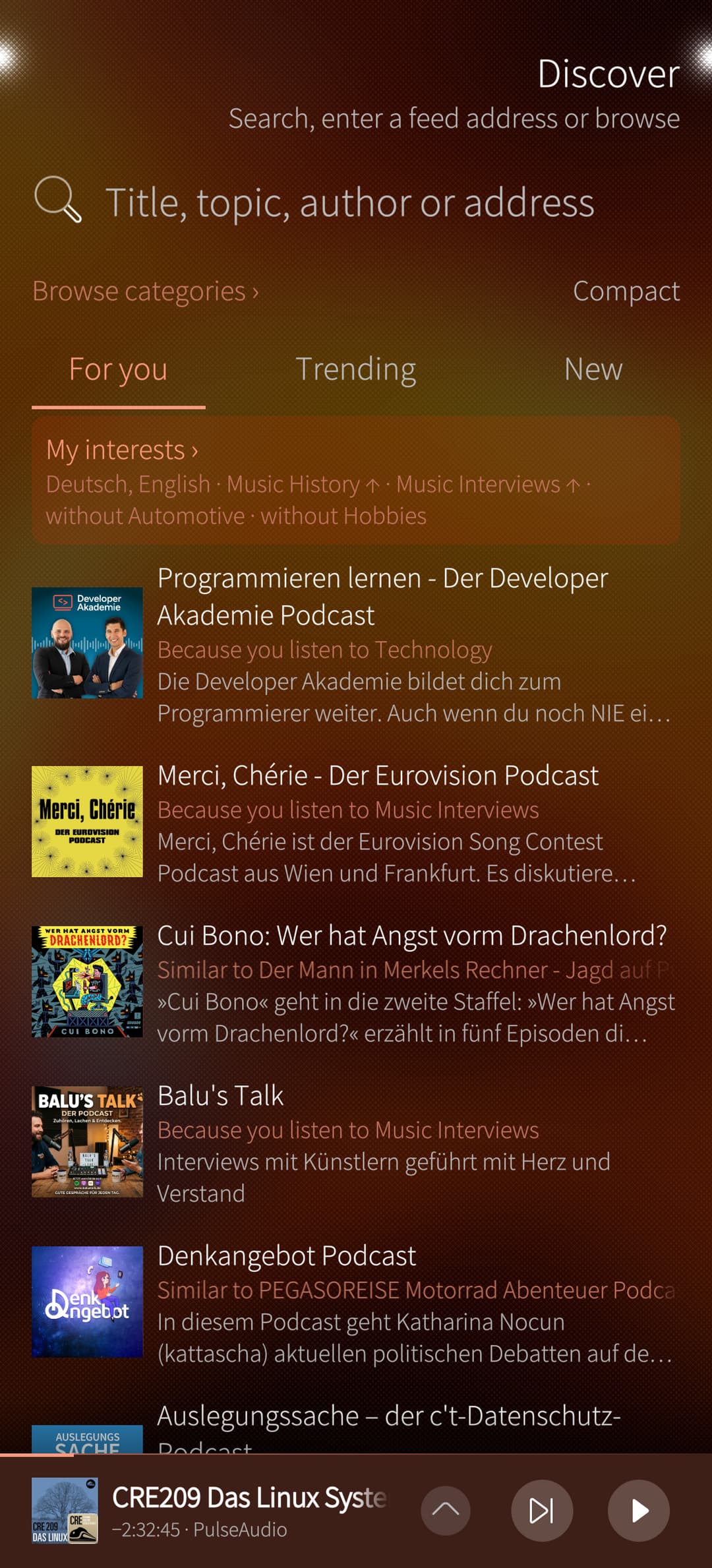
Other features and refinements

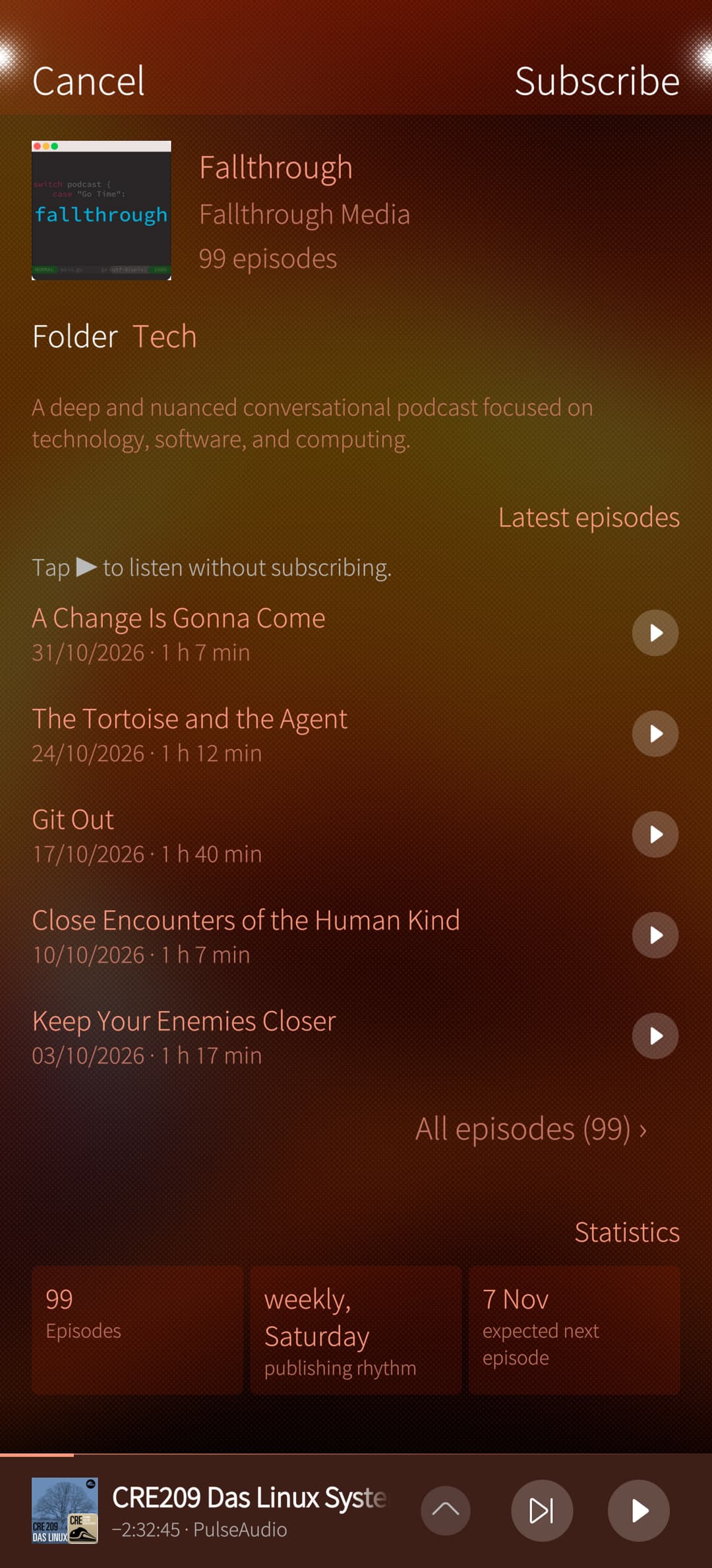
  • Podcast page with statistics (hours listened, publishing rhythm, expected next episode) and long episode lists grouped by season or month
  • Choose episodes to download, or to mark as played/unplayed – also optional on OPML import: only the newest episode unplayed (thanks @laoshu)
  • Add all unlistened episodes of a podcast to the playlist at once
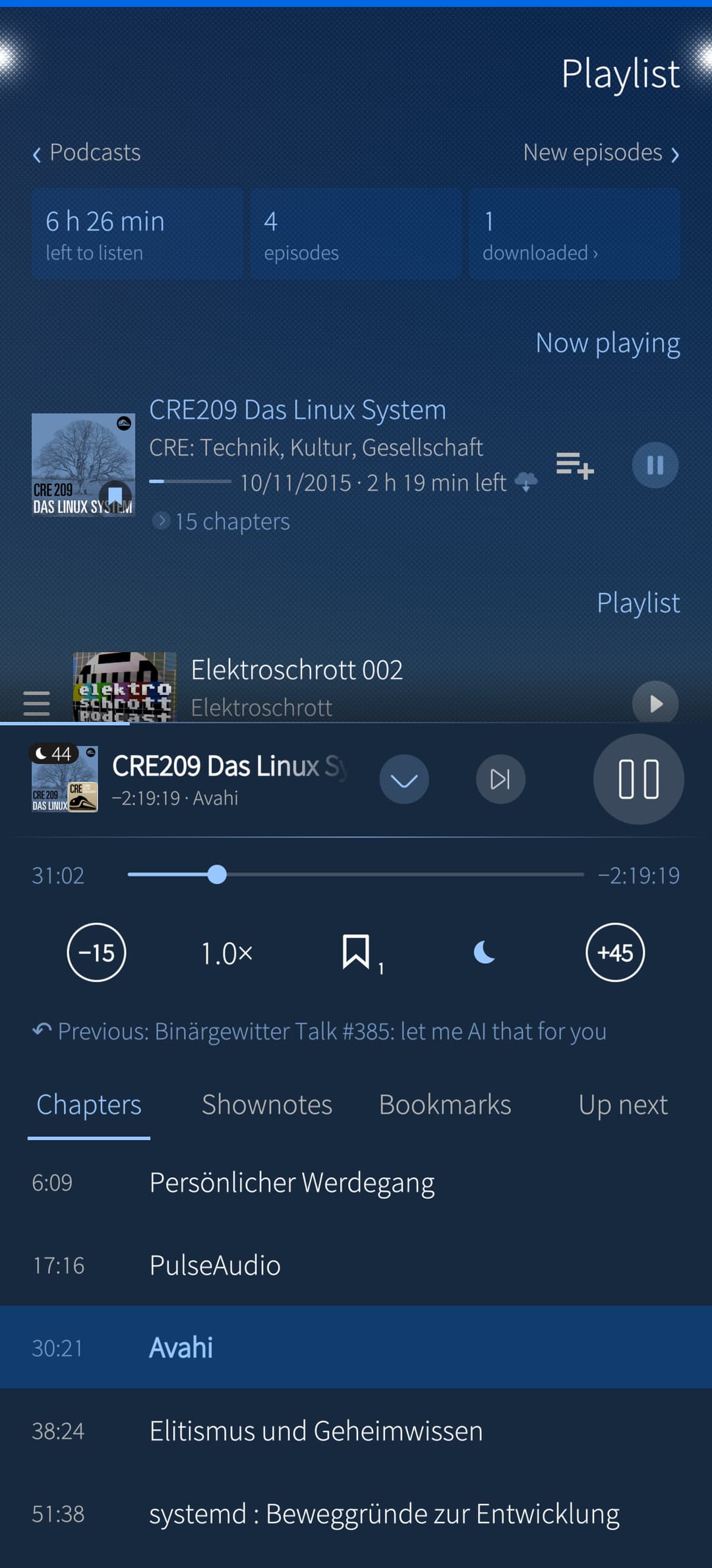
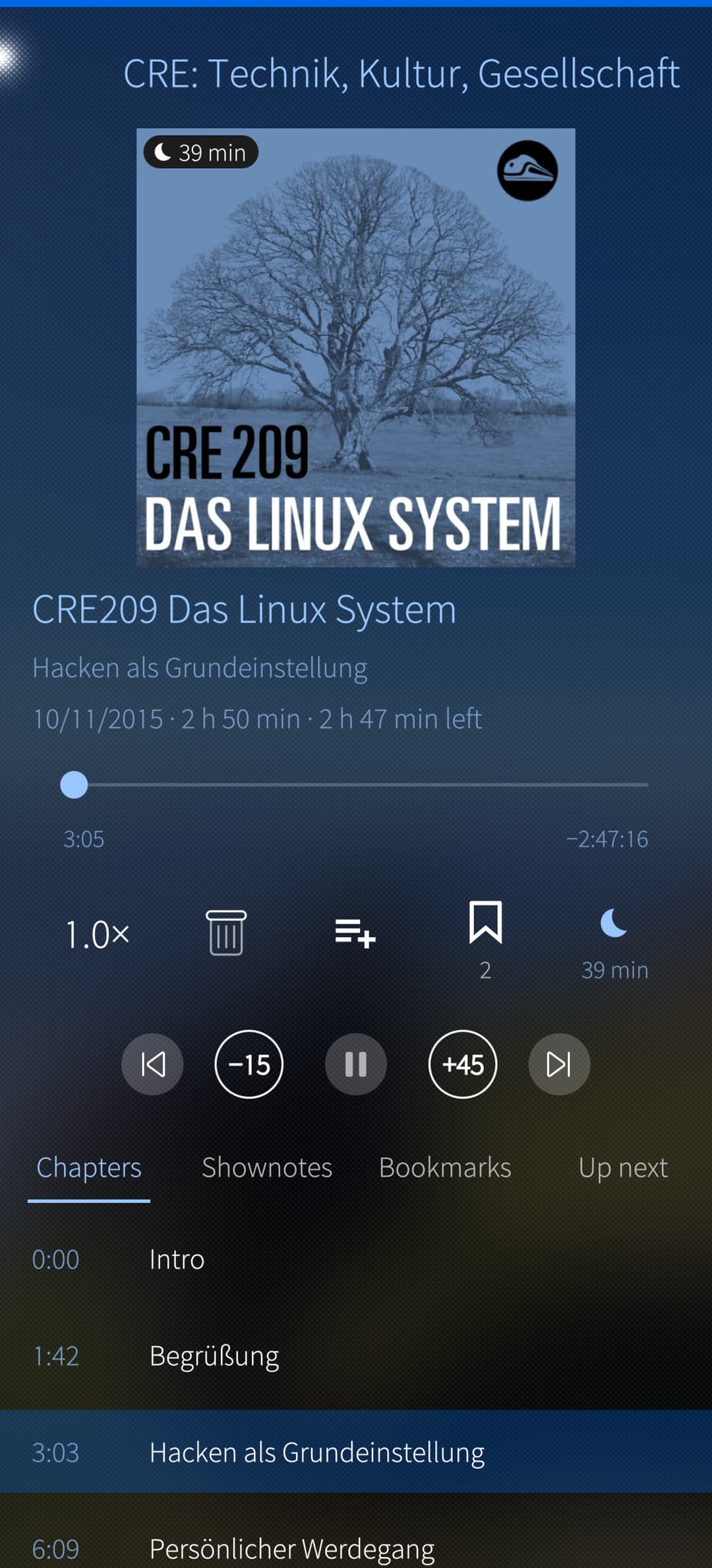
  • An expanded player bar: seek, skip, speed, bookmark, sleep timer, and tabs for chapters, bookmarks with notes and what plays next
  • The playlist plays in the order you see it; “next” skips an episode for good (played), and “Recently heard” brings it back where you left it
  • Downloads in your Music folder – for all podcasts, chosen per podcast (one list in the settings), or single episodes kept there for good; by default they stay hidden in the app’s folder. Option to move existing downloads to the new location. Half-finished downloads resume and are cleaned up after a week – thanks for the question here in the thread @yusssufff
  • Search on the phone - a switch to search also the episode descriptions / show notes (thanks @Eudoxos)
  • Browser links like podcast://, pcast:// and itpc:// open Sailcast (also when it is closed) and show the podcast to subscribe
  • First start experience - buttons on the empty pages to discover podcasts, set up the sync or import an OPML file, “What are you interested in?” in Discover, and short one-time hints where they help (player bar, podcast menu, folders, bookmarks, skipping)

Fixes: changing the speed while playing now takes effect at once; streams that hang on a weak network recover by themselves
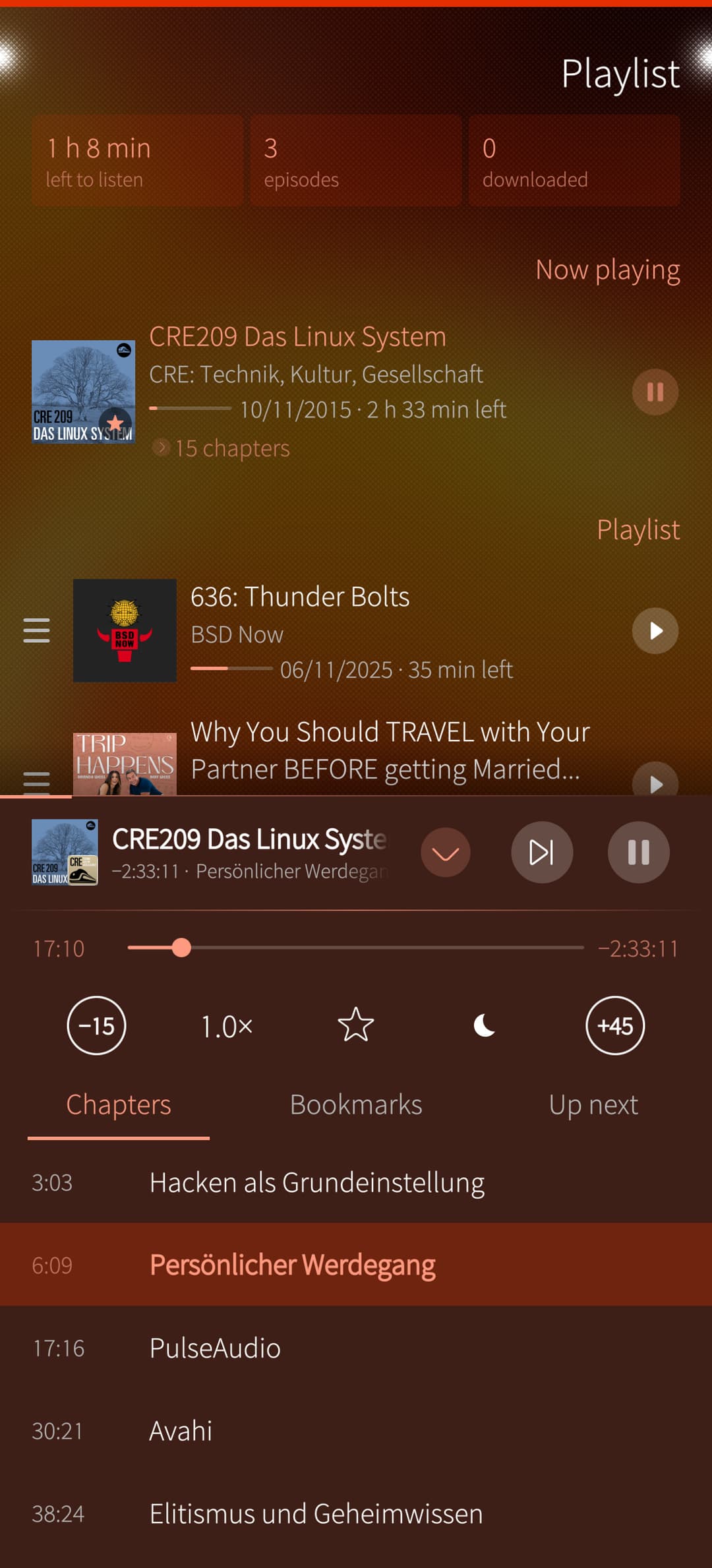
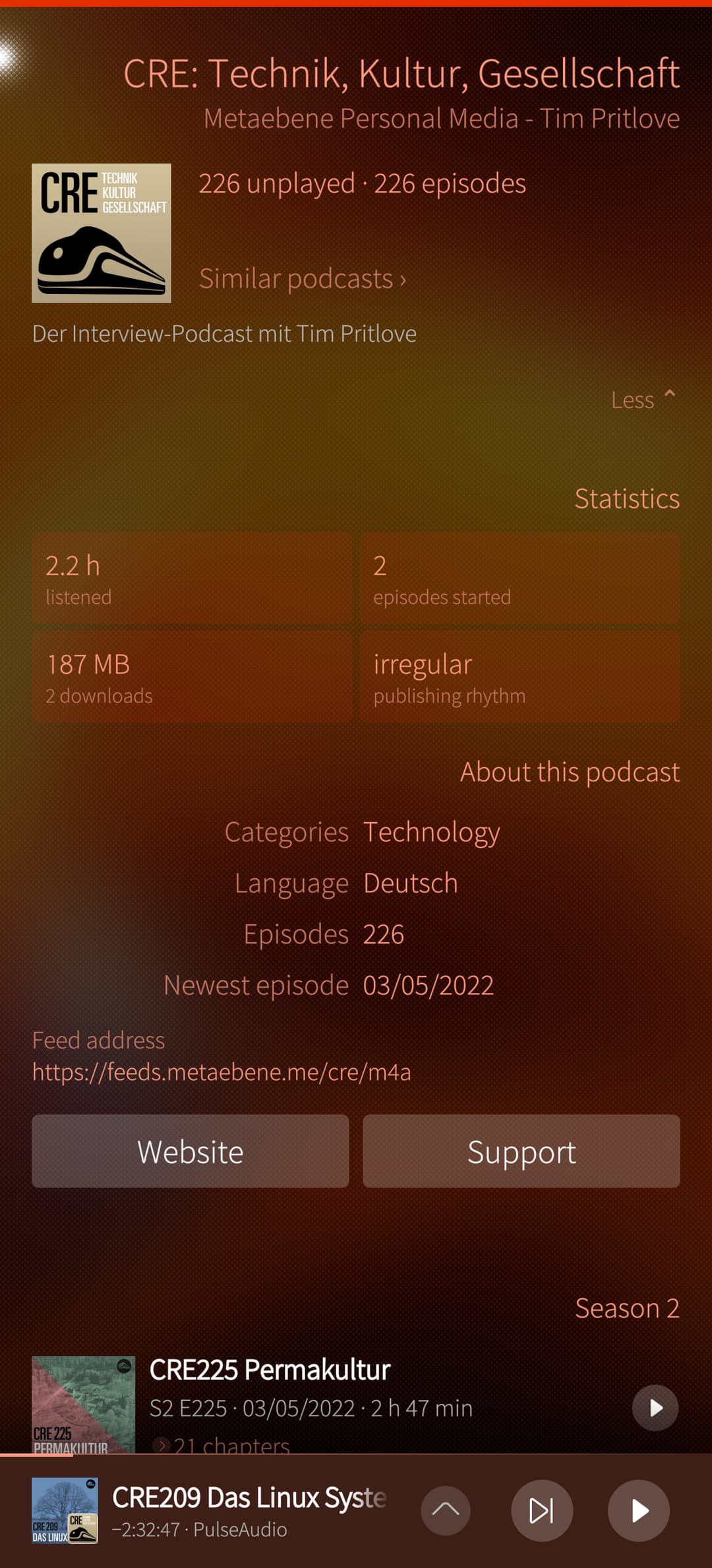
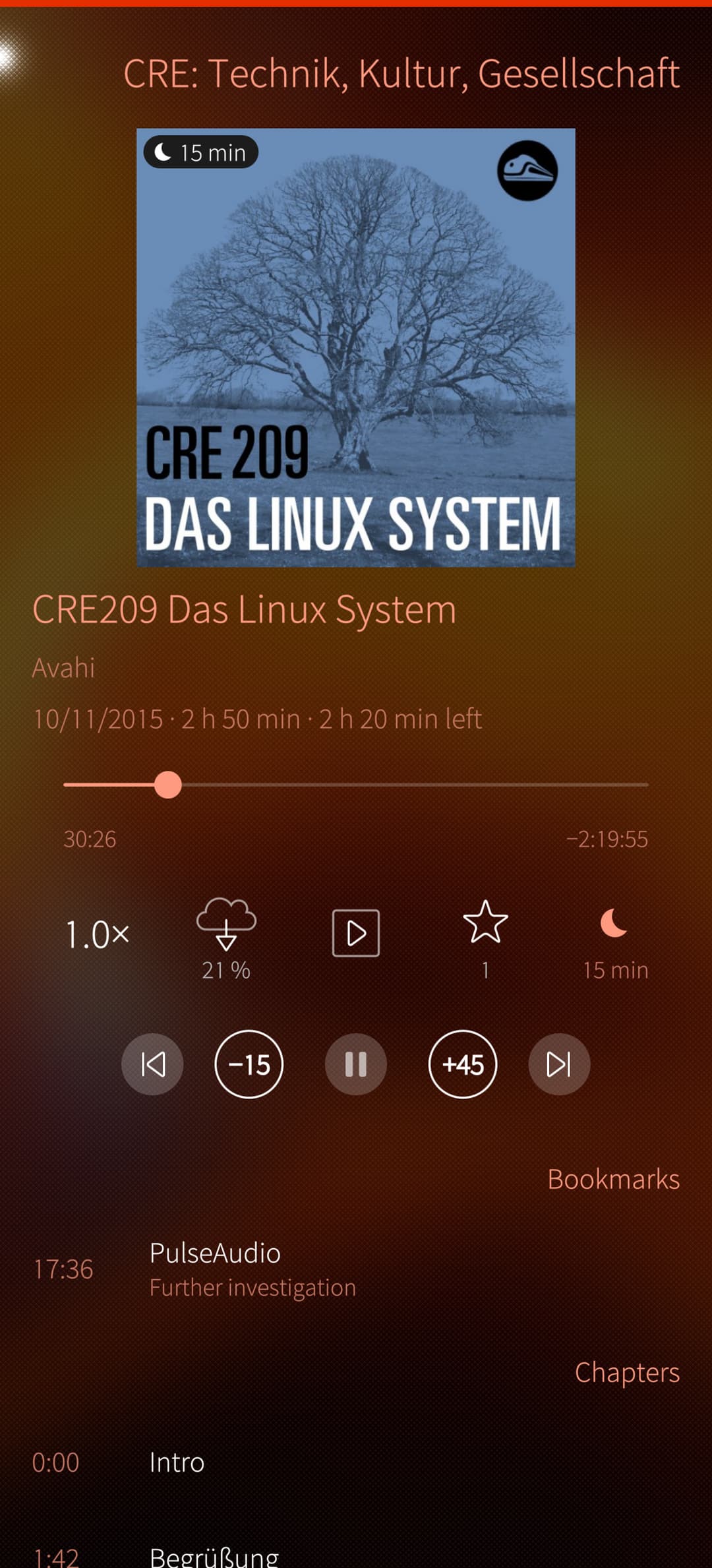
Playlist, expanded player bar | podcast details | episode page

Planned for 1.3: downloads and archive on the SD card or via WebDAV/Nextcloud, chapters from the show notes for podcasts without real chapters, and more curated lists from fyyd in Discover.
I’m also happy to include further suggestions from this thread – let me know what you like, what you don’t and what you’d like to see :slightly_smiling_face:

Privacy: Discover only sends languages, categories and search terms; “Recommendations from my subscriptions” (can be switched off) sends the addresses of your 10 most listened podcasts to fyyd. Details in PRIVACY.md.

As before, developed with the assistance of Claude – I decide and test everything on my Jolla Phone

Greetings from Vienna,
Thomas

5 Likes

Mark all podcasts as heard would be great. Ive imported opml and should now mark them all one by one. Thx for the app, I enjoy very!

Hello @carepack,

glad you enjoy it :slightly_smiling_face:

In 1.2 the OPML import has an option to keep only the newest episode of each podcast unplayed – so if you import again (or for the next time), that saves the clicking. Per podcast there is also “Mark all as played” in the podcast menu.

A “mark all podcasts as played” for everything at once is currently not implemented, but sounds like a good idea – I’ll add it to the next update (1.2.1 in a few days).

Greetings,
Thomas

Thank you. This would be nice and handy. I track too much shows which all I cant hear so after some time Im at the same point to wanna mark them all as heared. So cool you put it on the list.

I have the same problem - while testing the “Discover” feature I found so many interesting new podcasts and subscribed to them, but there is only finite time for listening to them… so to solve my own problem I already started outlining a “Trying out” feature:
subscribe to a podcast just to try it, without its episodes clogging up New episodes or being downloaded automatically. Those podcasts would be listed in a separate “Trying out” section at the top of the podcast list for hearing into them when there is time and then to decide later whether to keep them or unsubscribe.

This is planned for version 1.3 at the earliest (in 2–3 weeks), whereas “Mark all as played” will be part of 1.2.1 at the end of this week.

1 Like

Servus Thomas,
two first impressions:
I couldn’t find a capability to handle video podcast- is that planned?
And coming from gpodder, i quite like the two step options (10s/1min), depending on how long I’ve lost concentration, or to skip ads or find a certain passage.

Nice surface, impressive variety of option selectors. I guess that’s where the virtual assistant really does help.

Hello,

thanks for the feedback - yes, a “virtual assistent” is really helpful, also as a kind of sparring partner when making UI decisions or investigating topics and new features.
As I’ve never used video podcasts myself, this wasn’t really a priority for me at all - but after some research it turned out that about 90% of what’s needed is already built-in,only video output itself is (and some UI handling like the player bar) is missing. So adding it to one of the next versions should be do-able (testing it with tagesschau podcast).

Two skip steps sounds like a nice idea. I am thinking of adding a long-press on the skip buttons for the second option, configurable in the settings, where you can already set the interval for skipping back/forth.

Thanks for these suggestions.

Greetings,
Thomas

Hello, thanks for great app. Yuo can improve the list view on all pages if you alignt the line hight with the text size :slight_smile:

1 Like

Servas!

Will give it a try asap. Just received the new Jolla Phone and while Antennapod seems to work, something natively is of course preferrable.

Thanks!

First impressions after importing 50ish podcasts from Antennapod. The mark as played workflow is great! I could easily mark everything so that I was at the same state as with Antennapod.

What comes afterwards is a bit lacking. A “download all unplayed episodes manually” menu entry would be great. As would be the opposite - deleting all played episodes manually (I’ve seen the automatic settings)

Also on the tiles/list podcast overview: Podcasts with zero unplayed episodes are marked, whereas podcasts with one or more unplayed episodes are not. This seems backwards to me. (see post below)

Sorting everything alpabetically is a logical joice, but having podcasts with unplayed episodes above the others would make it easier to keep track of everything. Antennapod does it this way.

But overall, I’m very impressed! Good stuff!

OK, the mark I mentioned above disappears when I open the podcast entry. So I obviously just don’t know what it means .

If I understand it correctly there’s the “unheard episodes” marker with number in the right corner, and the “unseen update” marker in the left. if that’s correct it may be unwanted that the “unseen” marker remains if the episode is played from the “new episodes” page.

Also, could an episode be marked as heard if I’ve listened to most of it? Now, when I stop playback with just an outro remaining it is shown as new (and under circumstances even started from the beginning the next time?)

Grüß euch,

thanks for using the app and giving really helpful feedback :slight_smile: this helps me to get on “outsiders view” of things

@grawuzikapuzi @Eudoxos
Dot vs. number
You’re right that the dot was a bit illogical. It was meant as “new episodes you haven’t played yet since the last update”, but that is hard to guess.
I’ve changed it for 1.3 (see roadmap below): the light-blue dot in the top left corner now means “this podcast has new episodes since you last opened it” and it will disappear as soon as you open the podcast. The number in the top right corner always shows how many episodes are still unplayed.

Sort by unplayed
A sorting feature on the Podcasts page is included in 1.3. You will then be able to sort by most unplayed episodes (beside other sortings)

Count as played if x sec left
That’s a good point, I have the problem myself and I will solve it by using a gloal setting “Count as played when left remains” (with options Off, 15 sec, 30 sec, 1 min, 2 min).
When a episode is paused or skipped within the set period, it will be marked as played and the remaining time set to 0 sec.
Coming in version 1.3

Delete played downloads
this is possible in the pulley menu of the Downloads page. There is a global setting for “Delete played downloads after x days” and also a setting per podcast in the “Podcast Settings”

Download all unplayed
Currently this is only possible per podcast in the podcast settings, but a global setting makes much sense (“Download all unplayed x episodes” with a list of your podcasts (all / none / selected) and newest x episodes per podcast. I will plan this for version 1.4

larger font settings
@Demonia thanks for pointing this out. Your screenshot was from Sailwave, my internet radio app, but I have also checked the various font settings with Sailcast.

  • Sailwave will receive an update in the next days with a fixing of this problem
  • Sailcast should be on the good side

Bug reports:

  • Zero unplayed but marked: by design this should not happen, but I will investigate this further and hope I can reproduce it
  • “Started from the beginning”: if possible, could you please tell me when this happened? I am currently fighting with this problem at video podcasts (coming in 1.3) - audio podcasts shouldn’t be affected and I haven’t experienced this problem there yet, but I’d like to rule this out

Roadmap:

  • version 1.3 will be released in the next 2-3 days.
    Beside the fixes/features mentioned above the main feature will be support for video podcasts (video streams, video on episode page, full screen, sound only switch, enhanced download options)
  • version 1.4 planned within the next 2 weeks
    Sorting in Playlist page, archive of episodes to WebDAV, SD card support, download of all x unplayed episodes of all podcasts at once

Keep you updated here in this forum

Greetings,
Thoms

7 Likes

Yes the Downloads page indeed solves some issues. But I had to search a while before I found it in the pulldown menu of the playlist page. Can this only be reached this way? I think it sould be more discoverable.

Used Sailcast to listen to Podcasts for a few hours today and discovered a bug.

I have not yet come to understand it fully but here is what I know. I have set the play speed to 2x although I cannot find the general settings or where I did this. Anyway - opening the settings for any specific podcast shows the play speed as “Wie allgemein eingestellt (2,0x) - This seems correct.

But when listening to podcasts, after one playlist item is finished, the next always starts with 1,0x speed. Skipping for 30sek restores the 2x play speed.

Hello,

i was able to reconstruct the bug - the media player only takes rhr new speed when you jump within the file so a new episode only uses the global speed until rhe first skip.
A solution to this will come with v1.3

Also you are right that the general speed was hard to find: it could only be changed in the player. In version 1.3 it is also in Settings → Playback → Speed, which is mlre consistent with general ings.

After your various feedbacks, v1.3 contains quite a few usability improvements and fixes. I tried to make existing features easier to find, easier to understand and more consistent, and to focus on UI rather than on new features.

Greetings
Thomas

1 Like

Well thank you! Will continue testing because I am a heavy user :wink: and am happy to have a native client to work with.
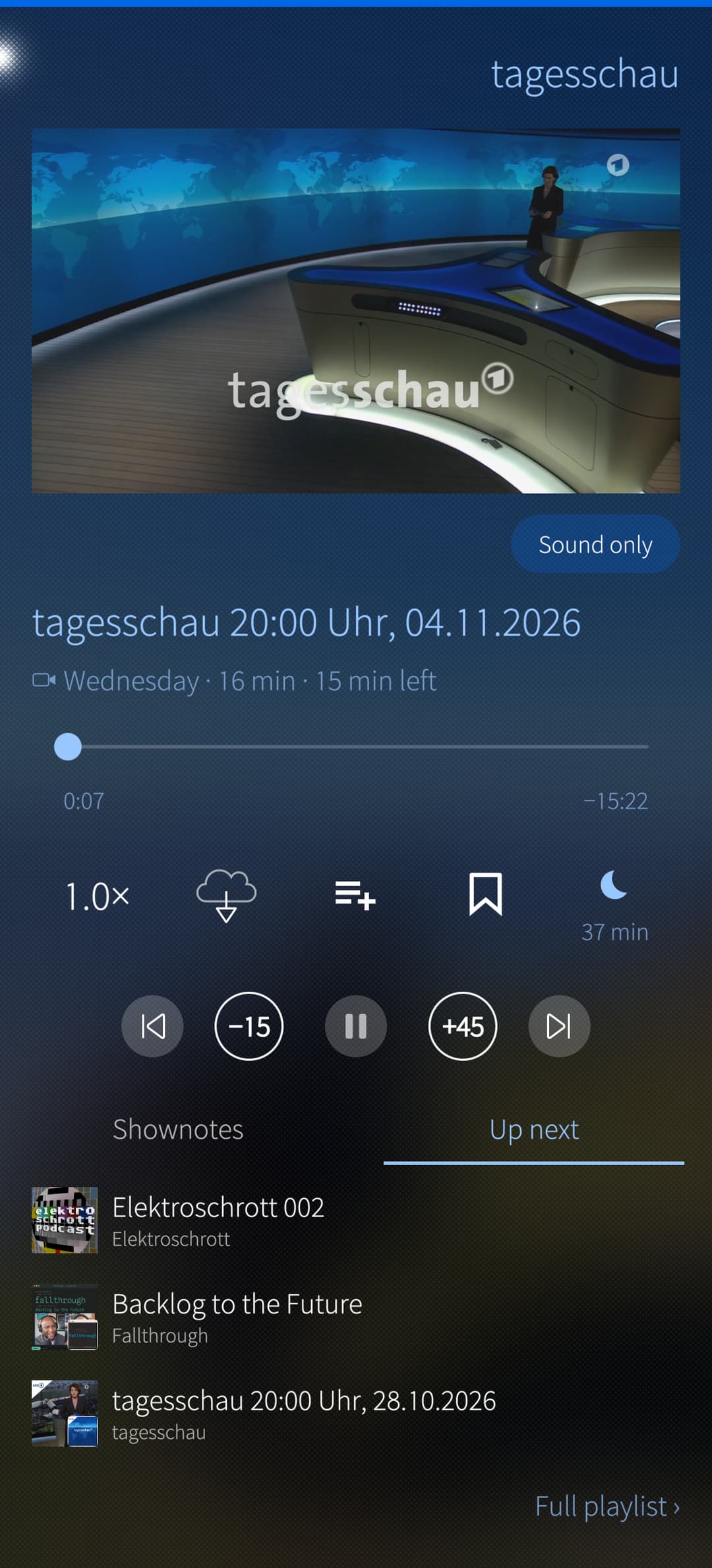
2 Likes

Could enlarging the miniplayer be done with a swipe instead of the button?

1 Like

Hello everyone,

I am happy to announce that version 1.3 of Sailcast has been published on GitHub – see “Download” below. As before, I tried to include as much of your valuable feedback as possible to make the app a pleasant experience for everyone.

Easier to use

Besides new features, the main focus of this release was the user experience. A usability check and your feedback showed that not everything was self-explanatory or understood the way I intended. The result is many small changes, for example:

  • One consistent style for all buttons (highlighted for main actions, outlined for others, red for delete and unsubscribe actions)
  • Consistent pulley menus and context actions; Downloads can be reached from every main page (thanks @grawuzikapuzi)
  • Clearer icons for bookmarks (a ribbon instead of the star) and the playlist (lines with “+” to add, with a check mark when already in it)
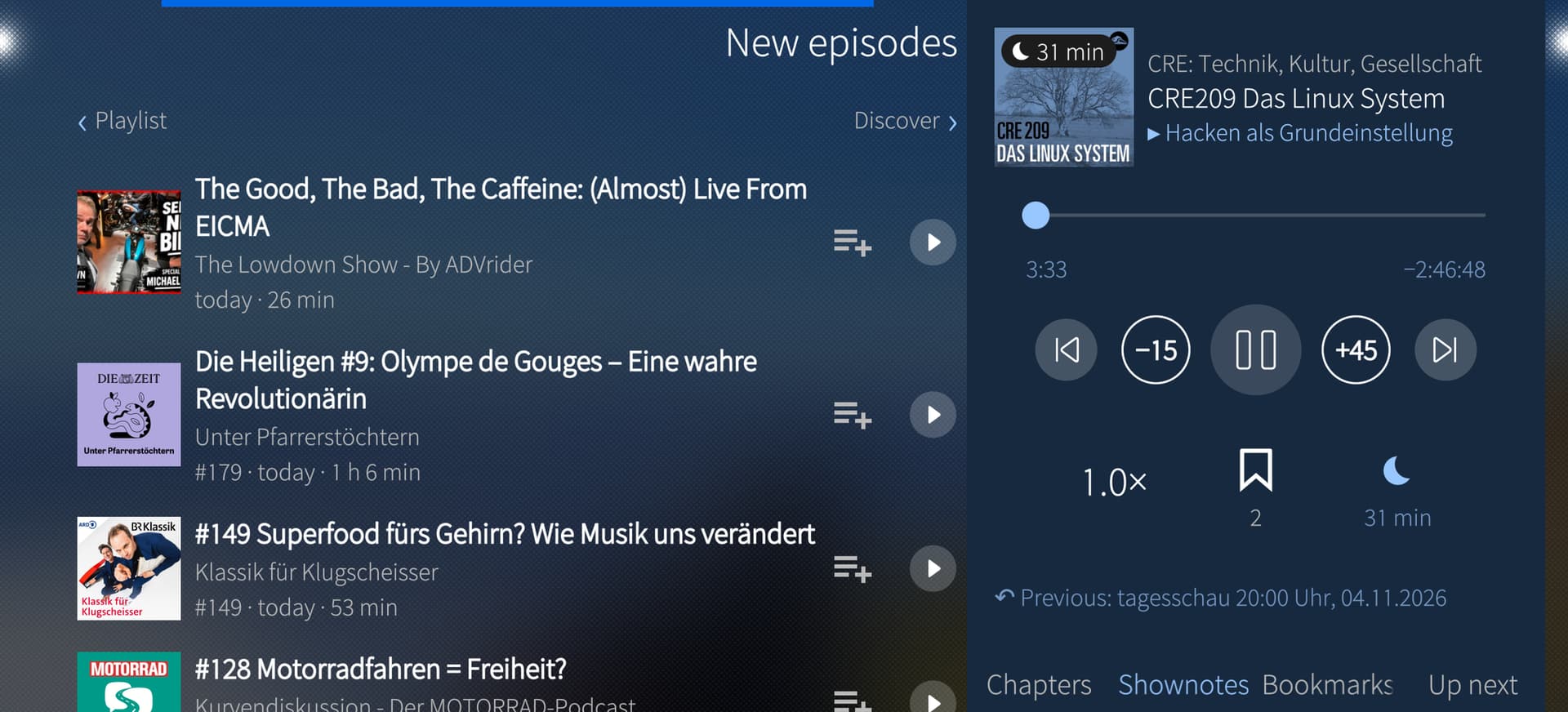
  • Show notes in the player, next to chapters, bookmarks and up next
  • Rework of the episode page, which now uses the same controls as the player
  • The dot on a podcast now means “new since you last opened the podcast” – with a small legend on the Podcasts page (thanks @grawuzikapuzi, @Eudoxos)
  • Global speed in Settings → Playback (thanks @grawuzikapuzi)
  • Clearer and more consistent wording throughout the whole app
  • Last-minute feature: in addition to the arrow button, the player bar can now be swiped up to open and down to close it (thanks @Eudoxos)

New: video podcasts

In addition to audio podcasts, Sailcast can now play video podcasts as well (thanks @Eudoxos for the suggestion):

  • Picture on the episode page, full screen mode, “sound only” mode
  • Audio and video versions of a feed (podcast:alternateEnclosure) and HLS streams – with an audio version in the feed, “sound only” switches to it and really saves data; otherwise this button only hides the picture
  • A question before streaming video over mobile data (with the size); downloaded videos are stored in Videos/Podcasts, so the Gallery shows them

Also new

  • Sort the podcast list (alphabetical, newest episode, last subscribed, most unplayed) (thanks @grawuzikapuzi)
  • “Hide folders” on the Podcasts page: all podcasts in one list, in the chosen sort order (e.g. the newest subscriptions on top) – “Show folders” brings the grouping back
  • Press and hold the skip buttons for 1 minute steps (thanks @Eudoxos)
  • “Count as played when less remains” (Settings → Playback): pausing or skipping with only the outro left marks the episode as played (thanks @Eudoxos)
  • “Mark all as played …” in the settings (thanks @carepack); after subscribing, keep only the newest episode unplayed
  • Duplicate subscriptions are merged

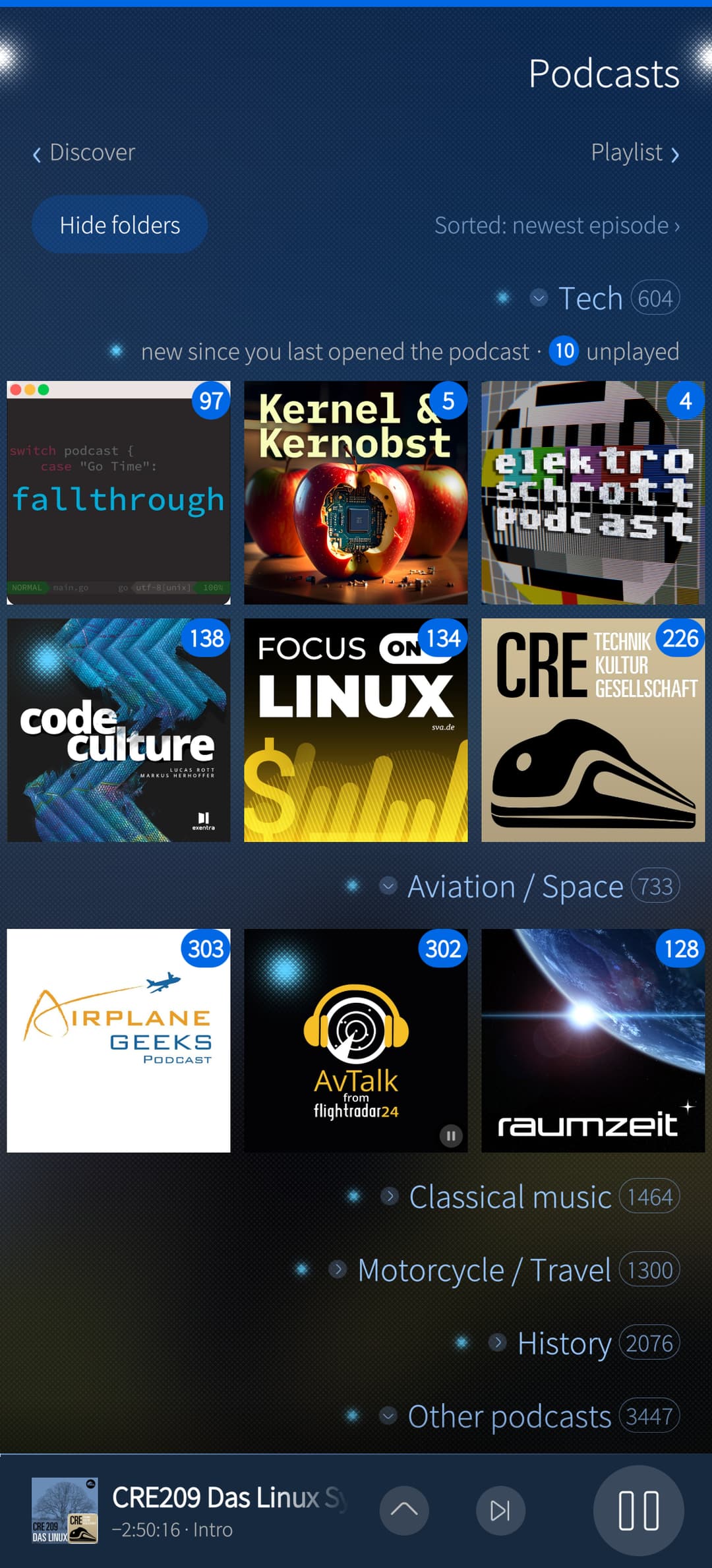
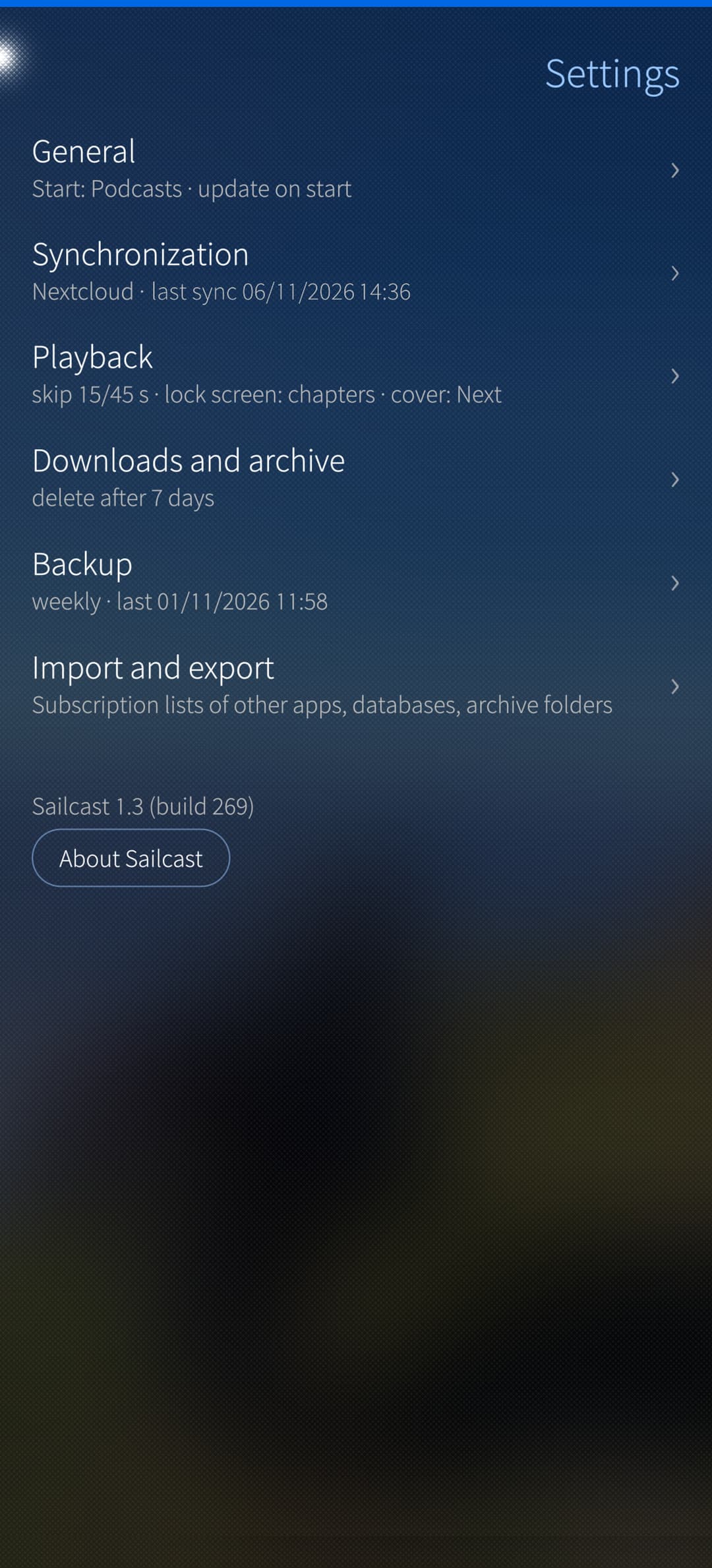
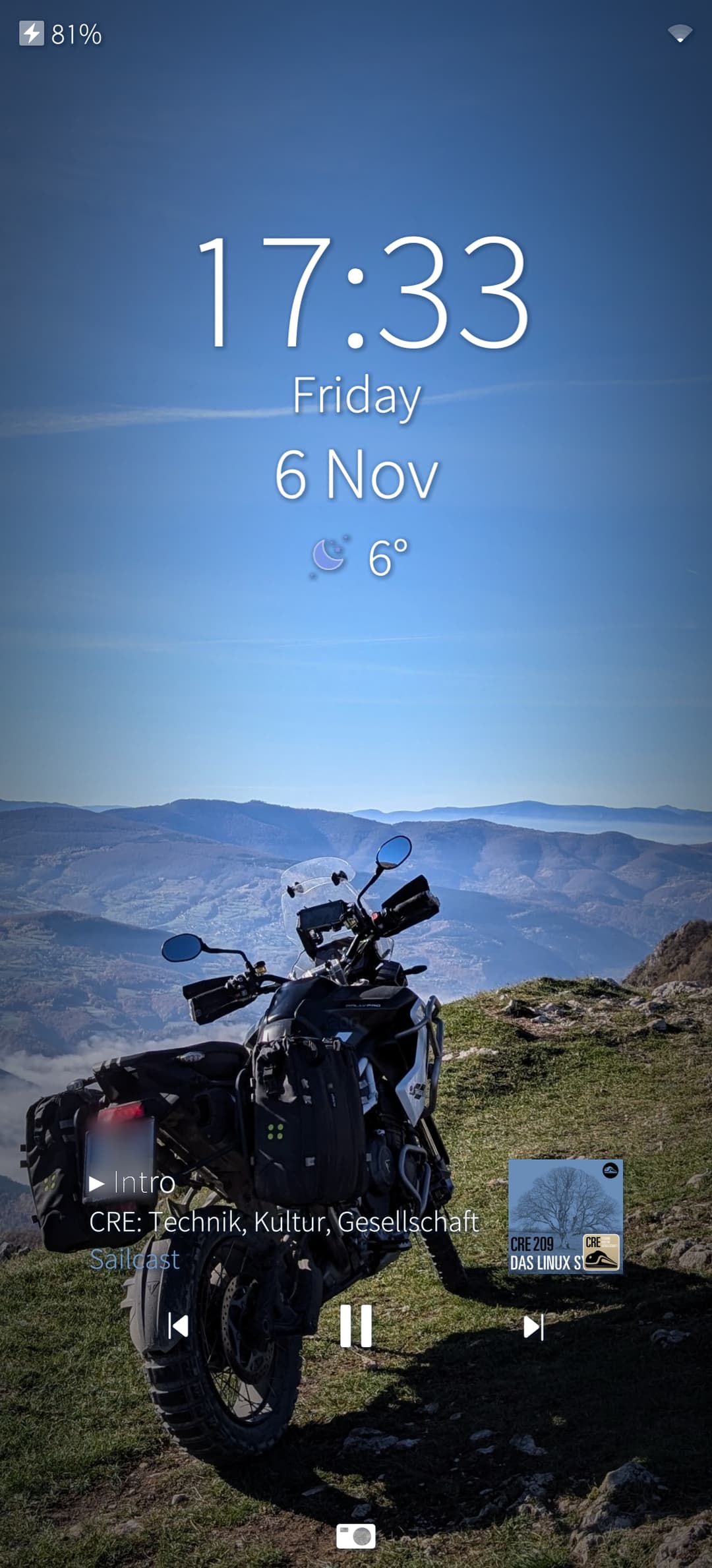
| Podcasts with folders | Playlist with Extended Player | Newly subscribed podcast |


| Episode | Settings | Lockscreen

Landscape player with New episodes

Fixed

  • The global speed applies from the first second – also on the next episode and on video (thanks @grawuzikapuzi)
  • An episode skipped in the middle keeps its position

Coming next

  • 1.4 – Listening and storage: “Save for later” for episodes you want to keep in mind, a playlist package (sorting, smart shuffle, pinned episodes, automatic adding per podcast), a listening statistics page (the listening time is already recorded since 1.3), archive to WebDAV/Nextcloud, downloads and archive on the SD card (@yusssufff), and downloading all unplayed episodes of all podcasts at once
  • 1.5 – Chapters and discovering: chapters from the show notes for podcasts without real chapters, chapters from downloaded MP3 files, notifications for new episodes, and more curated lists in Discover

As before: developed with the assistance of Claude (Anthropic) – I define the features, make the decisions, review the changes and use the app every day on my Jolla Phone (2026).

Download

https://github.com/t-sappl/harbour-sailcast/releases/tag/v1.3 – OpenRepos follows as soon as it accepts uploads again

How to install the RPM on the phone – no command line needed:

  1. Once: go to Settings → Untrusted software → allow installation
  2. Download the RPM for your device from the GitHub release page (at the end of the page under “Assets”)
    • aarch64 – 64-bit devices such as the Jolla Phone (2026) and Jolla C2
    • armv7hl – 32-bit installations (older Xperias)
    • i486 – Jolla Tablet and the emulator
  3. Tap the downloaded file (browser downloads, or Files app → Downloads) and confirm “Install”

Updating from an earlier version works the same way – just install the RPM of the new version; all your podcasts, settings and listening state stay.

(Command line alternative: devel-su pkcon install-local harbour-sailcast-1.3-1.aarch64.rpm)

Greetings,
Thomas

6 Likes

First impression: good improvement, the new features offer real benefit and additional usability, and the overall experience is intuitive. I like it!

1 Like