is the “Lift to show LP-Screen” needed to get the doubletap to work?
Yes I need it
uet non trouvé: mcetools
Paquet non trouvé: mcetools
La commande a échoué: This tool could not find any available package
Yes, that’s the trigger mechanism to archive it using the built‑in power‑save feature, if I’m informed correctly. It’s no big deal for me, just lift the device a little bit or turn it topside up when it’s laying on the table.
1 Like
Sorry, there was an typo:
Command-Line is mcetool and not mcetools
3 Likes
pkcon install mcetool : “this tool could not find any available package”
pkcon install mce-tools : “succes”
2 Likes
the ps-on-demand=enabled , not enable
1 Like
but it does work, you kinda need to wait a bit to see the clock before double-tapping though.
Also, it seems not to persist through rebooting
all not found
Did you install mce-tools succesfully?
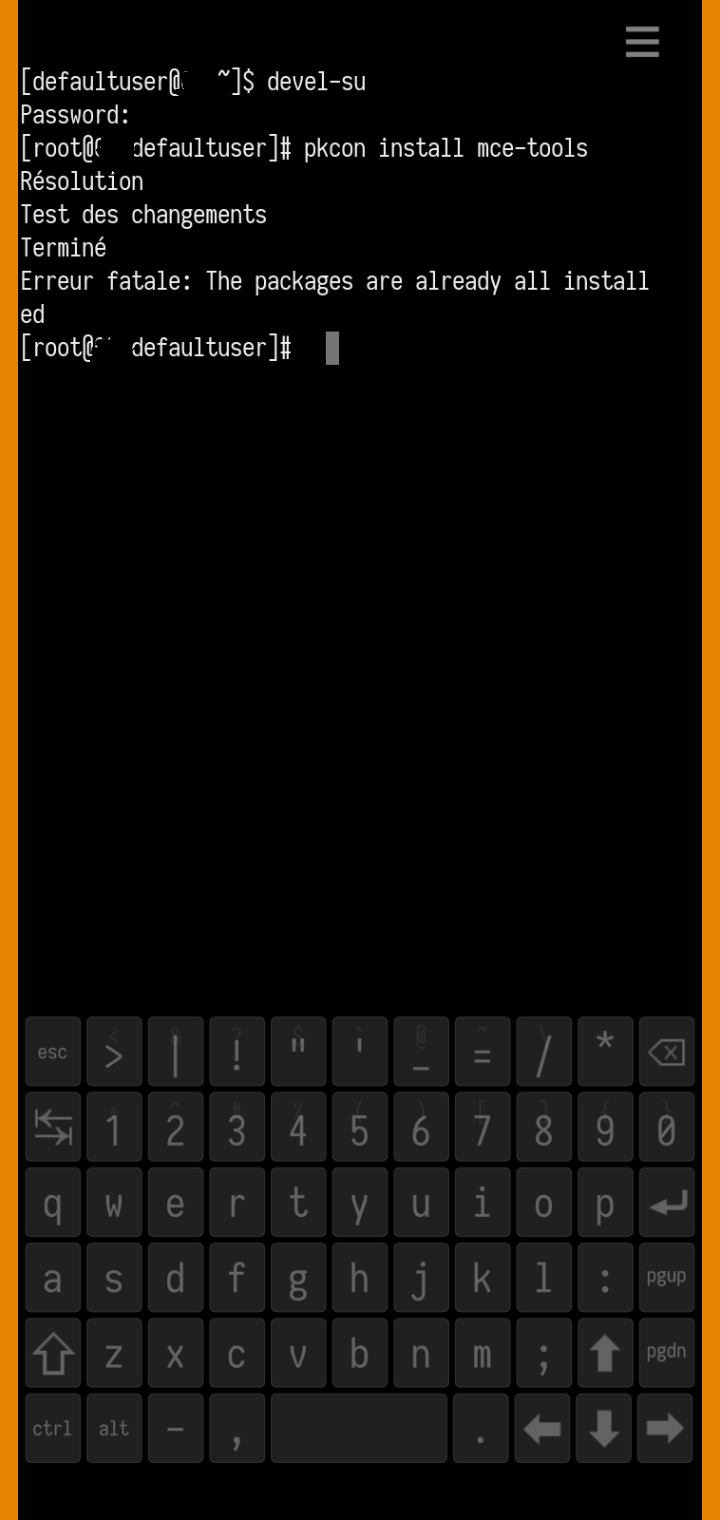
Can you add run screenshots?
Screenshot of the commands or mcetool
run screenshots = commands
That way we can see the issue.
I ran it like this
mcetool set-wakeup-sensor-mode=enabled
mcetool set-low-power-mode=enabled
mcetool set-ps-on-demand=enable
mcetool set-lpmui-triggering=from-pocket,hover-over
mcetool set-doubletap-mode=unlock
and no problems came up and I checked the mcetool and nothing changed
Radio states:
	Master:                      enabled (Online)
	Cellular:                    enabled
	WLAN:                        enabled
	Bluetooth:                   disabled
	NFC:                         disabled
	FM transmitter:              disabled
Call state (type):                   none (normal)
Button backlight:                    disabled
Display state:                       off
Color profile:                       hardcoded
Brightness:                          1 (1-100)
Dimmed brightness static:            3 (1-100 percent of hw maximum)
Dimmed brightness maximum:           50 (1-100)
Compositor dimming high threshold:   10 (0-100)
Compositor dimming low threshold:    0/disabled (0-100)
CABC mode:                           ui
Dim timeout:                         30 (seconds)
Dim with kbd timeout:                use default (seconds)
Adaptive dimming:                    enabled
Adaptive dimming threshold:          10000 (milliseconds)
Display never blank:                 disabled
Blank timeout:                       3 (seconds)
Blank from lockscreen:               10 (seconds)
Blank from lpm-on:                   5 (seconds)
Blank from lpm-off:                  5 (seconds)
Blank inhibit:                       disabled
Kbd slide blank inhibit:             disabled
Display blank prevent mode:          keep-on
Keyboard backlight:                  disabled
Inactivity status:                   inactive
Inactivity shutdown delay:           disabled
Power saving mode:                   enabled (inactive)
Forced power saving mode:            disabled
PSM threshold:                       20 (%)
Touchscreen/Keypad lock:             locked
Touchscreen/Keypad autolock:         enabled
Touchscreen/Keypad autolock delay:   30 [s]
Devicelock is in lockscreen:         enabled
Lockscreen unblank animations:       enabled
Double-tap wakeup policy:            proximity
Fingerprint wakeup policy:           always
Fingerprint wakeup allow delay:      500 [ms]
Fingerprint wakeup triggering delay: 100 [ms]
Fingerprint wakeup throttle delay:   250 [ms]
Volumekey input policy:              default
Powerkey wakeup policy:              always
Powerkey blanking mode:              off
Powerkey long press delay:           1500 [ms]
Powerkey double press delay:         400 [ms]
Powerkey press from display on:
	single                       blank,tklock
	double                       blank,tklock,devlock,vibrate
	long                         dbus1
Powerkey press from display off:
	single                       unblank
	double                       unblank,tkunlock
	long                         (none)
Touchscreen gestures:
	gesture0                     unblank
	gesture1                     unblank
	gesture2                     unblank
	gesture3                     unblank
	doubletap                    unblank
	gesture5                     unblank
	gesture6                     unblank
	gesture7                     unblank
	gesture8                     unblank
	gesture9                     unblank
	gesture10                    unblank
	gesture11                    unblank
	gesture12                    unblank
	gesture13                    unblank
	gesture14                    unblank
	gesture15                    unblank
	fpwakeup                     unblank,tkunlock
	gesture17                    unblank
	gesture18                    unblank
	gesture19                    unblank
Powerkey D-Bus actions:
	dbus1                        send signal with arg 'power-key-menu'
	dbus2                        send signal with arg 'event2'
	dbus3                        send signal with arg 'event3'
	dbus4                        send signal with arg 'event4'
	dbus5                        send signal with arg 'event5'
	dbus6                        send signal with arg 'event6'
	dbus7                        send signal with arg 'event7'
	dbus8                        send signal with arg 'event8'
	dbus9                        send signal with arg 'event9'
	dbus10                       send signal with arg 'event10'
Powerkey ps override count:          3
Powerkey ps override timeout:        333 [ms]
Display off override mode:           devlock
Use low power mode:                  disabled
LPM UI triggering:                   from-pocket
Use als mode:                        enabled
Use als autobrightness:              enabled
Active als input filter:             median
Sample time for als filtering:       125
Use orientation sensor mode:         enabled
Orientation change is activity:      enabled
Flipover gesture detection:          enabled
Use wakeup sensor mode:              disabled
Use ps mode:                         enabled
Use ps on-demand:                    enabled
Default ps uncover delay:            100 (ms)
In-call ps uncover delay:            500 (ms)
Touch can be blocked by ps:          disabled
PS acts as LID sensor:               disabled
Use lid sensor mode:                 enabled
Filter lid with als:                 disabled
Lid closed als limit:                0 (lux)
Lid open actions:                    unblank
Lid close actions:                   tklock
Kbd slide open trigger:              no-proximity
Kbd slide open actions:              unblank
Kbd slide close trigger:             after-open
Kbd slide close actions:             tklock
Allowed dim timeouts                 [ 15 30 60 120 600 ]
Brightness fade [def]:               150 (milliseconds)
Brightness fade [dim]:               1000 (milliseconds)
Brightness fade [als]:               1000 (milliseconds)
Brightness fade [blank]:             100 (milliseconds)
Brightness fade [unblank]:           90 (milliseconds)
Autosuspend policy:                  early
CPU Scaling Governor:                automatic
Use fake doubletap:                  enabled
Tklock autoblank policy:             enabled
Lipstick core delay:                 30 (seconds)
Input grab policy:                   enabled
Input grab allowed:                  none
Touch unblock delay:                 100 (milliseconds)
Display on after incoming call       5000 ms
Display on after outgoing call       2500 ms
Display on after alarm               1250 ms
Display on at usb connect            5000 ms
Display on at usb mode query         10000 ms
Display on at charging start         3000 ms
Display on at battery full           disabled
Display on at jack insert            3000 ms
Display on at jack remove            3000 ms
Display on at camera button          3000 ms
Display on at volume button          2000 ms
Display on activity extension        2000 ms
Led breathing:                       enabled
Led breathing battery limit:         101 (%)
Memory use warning [used]:           disabled
Memory use warning [active]:         disabled
Memory use critical [used]:          disabled
Memory use critical [active]:        disabled
Memory use level:                    unknown
Button backlight off delay:          5000 [ms]
Charger cable:                       unknown
Charger state:                       off
Battery level:                       75
Battery status:                      ok
Battery state:                       discharging
Charging mode:                       apply-thresholds
Charging override:                   disabled
Charging enable limit:               87 (%)
Charging disable limit:              90 (%)
Does rotation work (rotating the home screen)?
It’s needed for the LPM-Screen to work. My C2 still has the problem that the sensor-service need to be reset after boot with:
systemctl restart sensorfwd.service
Maybe this will be a solution for you as well. So LPM is persist through rebooting.
The rotation works for me and I turn it off most of the time
I don’t remember if I ever had to do that after boot on my C2. Later yes but not after boot.
I have also the Problem that SIM-Card is not recognized after boot until i perform:
systemctl restart ofono
So this is maybe some kind of runtime timing problem during initialization (too fast/slow?). I wasn’t motivated enough to enable logs and search for the cause. I just created a start.sh that runs the commands above as a quick-and-dirty fix.
Nothing has changed. What I want most is two taps to wake up the screen and see the time and incoming notifications.
I noticed this in the output of mectool
Double-tap wakeup policy: proximity 
I had the same SIM problem the very first few SFOS versions but not after that. I also suspected timings as it work if I disable and reenable it. For a long tome SIM just works on every boot right away.