Email runs super smooth but in use there are some settings and interface features which could help further. It would be great to add more settings to:
The “Sort by: …” could be a setting that persists between reboots (also discussed here)
It would be great to configure which folder the sent messages are stored
Delete emails from notifications
To copy message Subject -field
Set font size for message body
Search could be set to exclude deleted messages
Remove sender (myself) when replying to all (Fixed in upcoming update?)
Delete new mails from notifications
The navigation between folders could be clarified. Currently I have to navigate back up to the previous folder for a u-turn to get around (for example FileBrowser feels more present). Navigation has been discussed before.
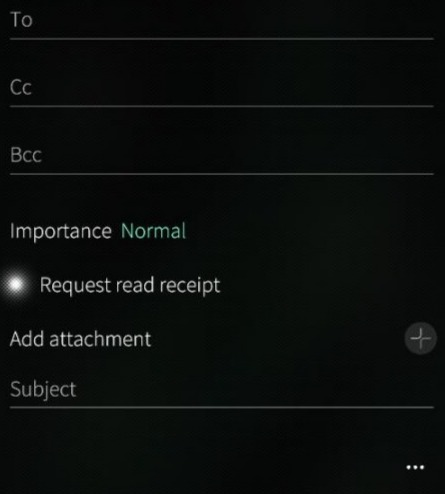
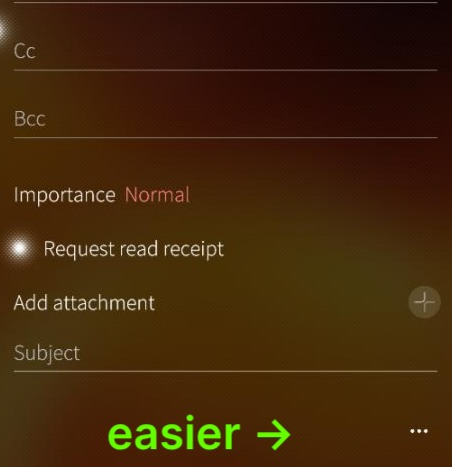
Small issue with “three dots” getting mixed with message body: An issue present in dark ambiences which do not have a gradient background (e.g. Kaamos black or Fire). When writing new mail I’d benefit from an interface element which shows the “three dots” -menu does not interfere with the message body alignment (perhaps a gray semi transparent bubble around the dots?). Currently I don’t always know where the message body is.
Small issue with animation: when writing new mails the + icon is for adding more recipients but after opening the “three dots” -menu, there is an slide animation which opens a view where + icon is for attachments (Using the same icon for to different functions is confusing, the animation ties the icons).
It took a while to understand that the settings for the email client are in the are in the Accounts of the device general settings (perhaps there could be a link to those in the application?).
new version of gpg would be helpful. i know there is a license problem but if splitting the gpg part into an own part it could be replaced by a community gpg version.
In addition, I’ve noticedn that in JP26 v5.2, there is no space between email account icons. Ideally, I would like to be able to reorder email accounts in the initial pages of the email app.
The email content font is very small when viewing html emails, I have changed ./.cache/com.jolla/email/.mozilla/prefs.js :
from
user_pref("layout.css.devPixelsPerPx", "2");
to
user_pref("layout.css.devPixelsPerPx", "2.5");
Yes, I would also like to have dark mode in html emails.
I observed that when replying “To all..” I’m included as a message recipient too (in the TO: field). Is this expected behavior? I don’t have this in other email programs I uses. And are these things that could be patched with the patch manager system?
Oh, found it. Also an other thread from 2025 with a link to “plain text email patch”, which is good to know. Also the issue of not being able to set the folder where sent emails are stored, and font size are mentioned. As they are in this one from 2023.
Bug archeology . What is considered the best method to support the system email application development for new users? Is a process of listing issues stressful or beneficial?
Email search currently provides a list of matching emails, it would be useful to also support bulk actions, such as read all or delet all. It should also useful to select multiple emails, and apply an action to the selected messages.
Sorry if i was not clear, i meant to apply bulk actions on listed emails from a search operation.
For example, search some pattern, then either select individually (or all the search results) and delete.
 ).
). . What is considered the best method to support the system email application development for new users? Is a process of listing issues stressful or beneficial?