SailfishOS gui has many delays for several actions like scrolling, swiping etc. There are patches which reduce or let you configure some of them. There is also a good thread about speeding up the device by @Seven.of.nine
5 Likes
Will share some unscientific data about charging. First time charging the Jolla Phone, with a PD2.0 65W brick (Note: if AI is to be believed, the phone may have been charging with 27W max, not at its maximum 33W as shown on the box). 25 degrees Celsius room, the phone was at room temperature before the charging started. The phone turned itself off because of low battery, and it stayed off throughout charging. Don’t have any wattmeters or anything, so can only share times, as follows:
charge to 30% required 30 minutes
charge to 50% required 53 minutes
charge to 80% required 94 minutes
Also, the phone became noticeably warm before the 30% mark, and it became cool before the 70% mark.
6 Likes
Check Settings->Battery I think the default threshold is 90%, so it stopped at 90 and restarted charging once it dropped to 89
8 Likes
Thank you @throwaway69 , I never had a smartphone that respected the threshold when it’s powered off. You live and you learn 
7 Likes
Could this be because of the software updated needed for the charging related to PD3?
Cause this looks extremely slow.
Regardless, thank you for sharing the numbers!
2 Likes
Also, two things worth mentioning:
- When the phone is powered on and I plug it into AC power, the pop-up appears asking whether I want to switch to MTP or charging only. Is the phone unable to find out that it’s plugged in into AC?
- Before enabling developer mode, some scary text appears, saying “Enabling developer mode may void your warranty. Accepting these terms enables developer mode”. So, does it actually void the warranty, or is it just fearmongering? And if I enable the developer mode, does it get “saved” somewhere, like Samsungs with their eFuses?
1 Like
Mine seems to be PD2.0, though. However, if AI is to be believed, my charger might have negotiated on 27W maximum, and the phone supports 33W maximum, as shown on the box. And my charger does not support PPS, I don’t know if the phone supports that.
The phone detects all the wires inside the cable are connected, instead of just the ground and +5V of those old dummy chargers, and asks what you want to do. You can set the default action to charging in the settings app, if you don’t need to use the MTP very often.
It may void your warranty if you manage to brick your device foobar. The warning has been there already on the very first Jolla Phone (2013), and I have never heard anyone loosing their warranty because of using the developer mode. It helps keep the people who has no business in there away from the danger.
10 Likes
You are right, it does actually detect it! I found a dummy earbud cable with actually no data pins, and it didn’t ask me for MTP. I will change it, no problem, it’s just weird behaviour, I guess. Not that I expect Android’s behaviour, but in general, plugged in to AC power and being asked for data transfer is interesting.
With great power comes great responsibility, thanks for the answer!
3 Likes
Now that the community has a site to report applications that work, you could fill a report of the ones you tested (whether your apps work or not).
The following apps are in the database, but lacking a report whether they work or not.
- Nordea Mobile Nordea Mobile - SailfishOS Compatibility
- Proton Calendar Proton Calendar: Secure Events - SailfishOS Compatibility
- Proton drive Proton Drive: Cloud Storage - SailfishOS Compatibility
- Proton VPN Proton VPN: Fast & Secure VPN - SailfishOS Compatibility (this one you said does not work)
When I receive my Jolla Phone (2026), I’ll make sure to test a bunch of apps relevant to my location (government services, healthcare, mobile operators…).
9 Likes
Angry Birds from Rovio…
when login dialog is opened automatically by app
if you open from login dialog another app, such as browser edge to read information from rovio site by clicking a link on the dialog. Looks like repaint thread is blocked by a modal dialog…
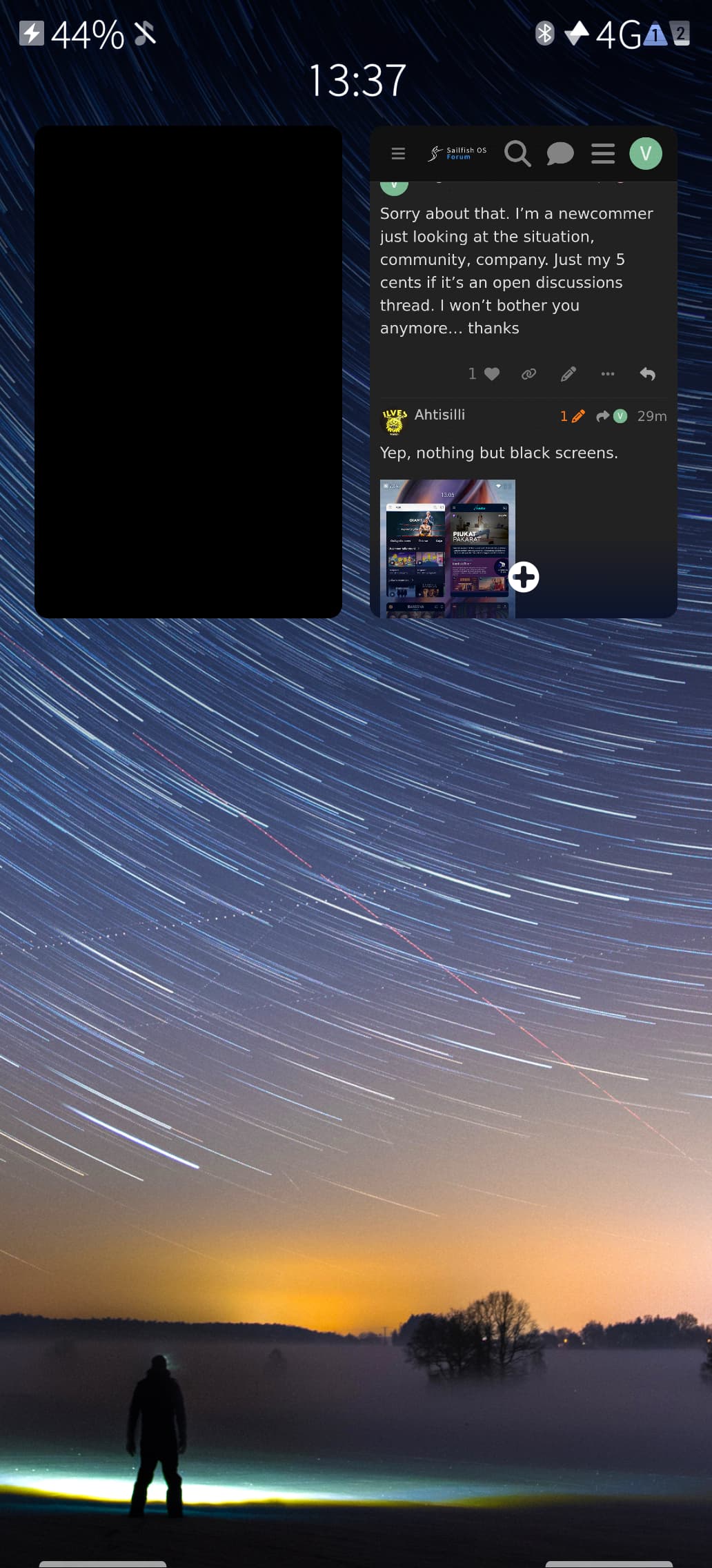
Another example: install an app from Aurora Store. Once the installation is complete, you’ll see an Installed button on the app’s page in Aurora Store. Tap that button to open the app. The app will launch normally.
Now open the Sailfish OS app switcher. Instead of the app’s preview, you’ll see a black rectangle.
1 Like
Ahtisilli, this message belongs to a different thread. I don’t know why it ended up here.
I’d rather report it as a bug, but I don’t know the proper way to do that yet.
The issue is real and should be addressed.
Not sure if someone already tested/validated Bluetooth (file transfer) with the new JP, but my wife and I, failed to transfer files between our new JP’s. Same between JP and C2…while transfers between all our other Sailfish devices works with no issue (C2, XA2, JP1 …). Couldn’t find anything related to this in this thread -sorry if I missed something.
2 Likes
After reading your message, I tried to share a picture from the Jolla to an Android smartphone, but the Jolla puts out a notification saying “Oops something did not work”. Tried also when they are paired together, still does not work. Do you notice the same thing?
2 Likes
Yes … and thanks for giving those details about pairing, error message…I forgot to include them, but indeed, same thing for us.
2 Likes
There’s a similar report over here although this WAS with older devices AppSupport Bluetooth feedback thread - #167 by peterleinchen so this appears to be a regression
3 Likes
There’s a problem with speech note keyboard in 5.2, and I have devised a workaround which is documented here: Feature Request: Speech to text keyboard function like FUTO project - #13 by ellemmennoppi
Long story short, the keyboard (version 1.6) installs its handler files one directory above where Sailfish 5.2 expects them.
4 Likes
OKBoard: The installed OpenRepos version 0.6.38 contains no Sailfish 5.2 patch. On 5.2.0.13 it falls back to its 5.0.0.55 patch, which applies with fuzz and offsets, but enabling the resulting plugin makes all keyboards disappear. Maliit remains active, and disabling OKBoard restores the standard keyboard.
It’s reported as working on 5.1, but that report might have been something compiled on the phone, so it may not be directly comparable with the current OpenRepos package. A dedicated 5.2-compatible build/patch appears necessary.
3 Likes
Sending and receiving files (texts and PDFs) from new JP2 to Linux pc + my old Xperia 10iii and vice versa works well. Jolla C2 seems to be the issue, here nothing can be sent or received after latest 5.1.0.11 (Pispala) update. However, I can strangely connect C2 to my car for hands-free calling. PS: I have not tested the new Jolla JP2 Bluetooth connection with my car yet.
1 Like
What is your idea on testing? Is it just opening applications and seeing whether they open? Because for like banks or healthcare, I don’t have a bank account of every bank in my country, same with healthcare, I am not registered to all (private) healthcare providers.
1 Like