Not sure I understand your last post, but yes, MicroG fakes itself as com.google.android.gsm and that needs to be hidden to Aurora. Else it will try to update from Google…
This should be mentioned in the install guides!?
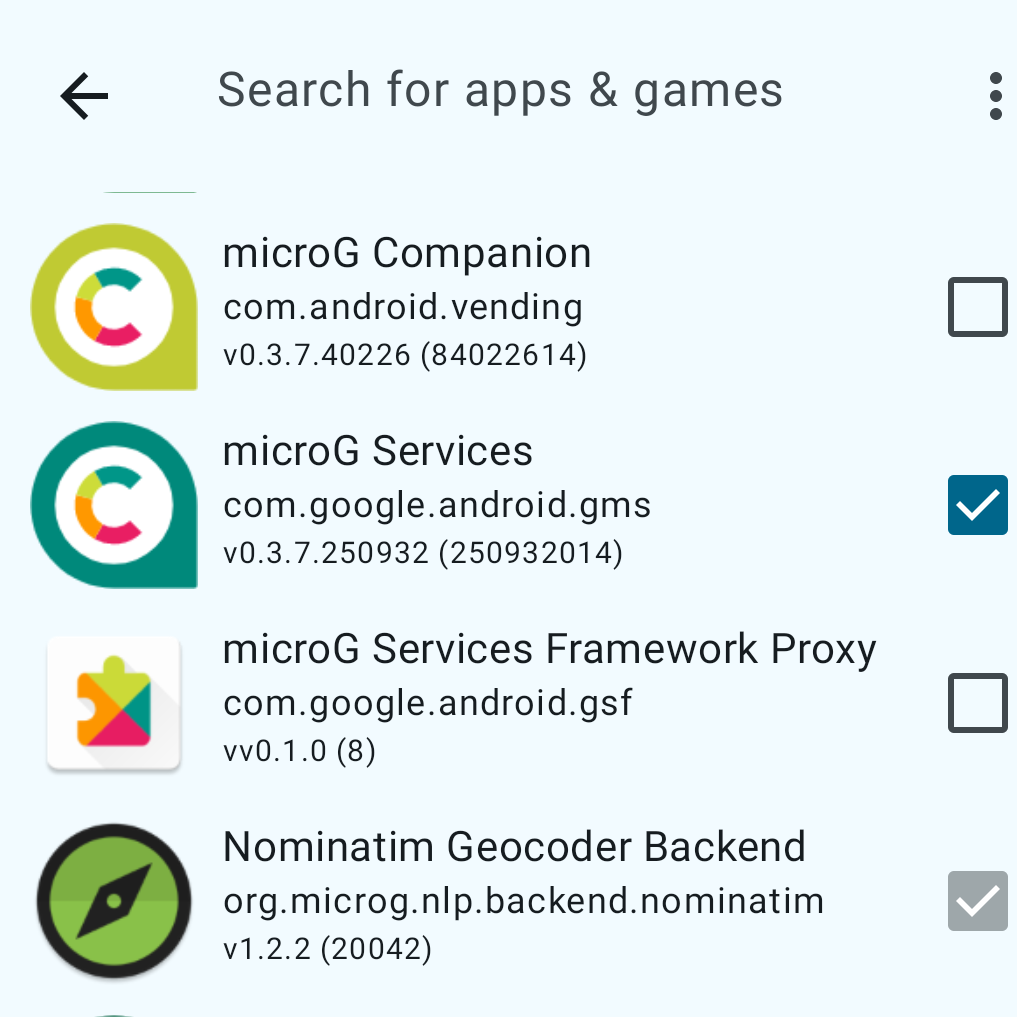
Not sure I understand your last post, but yes, MicroG fakes itself as com.google.android.gsm and that needs to be hidden to Aurora. Else it will try to update from Google…
This should be mentioned in the install guides!?
The Jolla 2 has Micro G pre-installed. How far should I skip in these instructions to activate it?
its not pre-installed its opt-in at the setup phase, and it’s pre-bundled/pre-configured with all these so no need to do anything extra.
I have many times accidentally tried to update that. It just fails to update, no harm done.
I didn’t read every single post in this thread, but it sounds like it’s a bad idea to let SFOS install MicroG for you, because then you can’t up/down-grade it from F-Droid? Is that correct?
If I let SFOS install MicroG for me, does that mean it only gets updated when SFOS is updated?
Good question!.. What i can say is that having installed MicroG with system setup on JollaPhone, its not listed in F-Droid but as an App in the Jolla Store, just as Android App Support
I had MicroG onall my three previous SFOS phones. It was always a ltlle bit tricky to get everything right.
Now with Jolla Phone with MicroG from Jolla store in the setup process everything works nice so far.
Sometimes newer versions of MicroG were not fully compatible with AAS, so a downgrade was necessary.
I am curious what was difficult about setting-up MicroG, as I didn’t notice any difficulties when I was testing on a Sony Xperia 10 III.
OK thanks, useful to know. But it seems the downside of MicroG from the Jolla Store is that you canNOT downgrade if you run into a problem (nor upgrade if there is a newer version that fixes a problem present in the Jolla Store version)…
Maybe difficult was the wrong wording. From store it’s easy, just installing and maybe add google account. In earlier times you needed to manually download it (or F-Droid first which as far as I remember was also added much later then Aurora store to the Harbour) - so not working out of the box and especially confusing for new users. And btw adding my google account in MicroG on 10 III doesn’t work.
If I recall correctly, microG doesn’t show up in F-Droid until you add microG’s repo to the F-Droid settings.
Also if you install microG with SFOS, you get it pre-configured, so you don’t need to touch any of the settings after installing it.
If you add the MicroG repo to Fdroid, the MicroG apps installed by SFOS show up.
But Fdroid displays a message saying something like:
“This app is made for an earlier version of Android and can therefore not be updated automatically” - this translated from Danish, so wording in English may be slightly different.
But the problem is that Fdroid cannot handle the MicroG app installed by SFOS. And since it is not possible to uninstall the MicroG installed by SFOS, it is not possible to up- or downgrade the app.
This may not be a problem for everyone, but I have a few apps not working correctly, which is working fine in my 10iii, but only using a older version of MicroG. I wanted to try downgrading in my JP26, but I may have to do a Factory reset, and install MicroG from Fdroid, just to test if it also will work in JP26.
I guess the problem is the Android layer itself and not MicroG as there are several bugs/problems with apps that don’t rely on MicroG and worken on older SFOS versions with lower android layer.
yeah, there has been HUGE changes within the AppSupport and a lot of general work to getting rid of technical debt, plus oc getting the JP26 working as well.
so its was kinda expected that there has been (paper cut) issues here and there now, which is why I hope next 5.3 release will focus on bug fixing and just some minor changes… for overall stability and usability .
I don’t think so. The problems are the same on JP26 and 10iii with two different SFOS versions and different appsupport versions.
On 10iii the problem disappeared when MicroG was downgrated.
This is because the MicroG applications set Android 4.4 as the lowest supported version. FDroid will give the same information about any app that supports such old Android versions.
I think it makes more sense that this is tied to AAS itself, as it is. (See Settings => Android)