If V is anything to compare it’s just the same as sfos, heavier usage you will have to recharge in the evening, lighter use might pull 2 days, the guys claiming 7 days battery life have 0 IM/email etc accounts and no social life (see ‘social drug websites’), if you tweak your phone like this on sfos (turn battery saver on at 100% charge, turn off all accounts and maybe switch to 2g?) you can probably also pull 3-4 days, but who cares about 4 days of a brick, as soon as you start using the display it takes a nosedive
2 Likes
I have seen some reviews that it lasts two days of heavy usage under Android but i don’t know since i have installed sailfishos after i bought the phone
Sounds fake, or maybe me having 3-4 email accounts and around the same IM accounts makes me a heavy user, but I had exactly the same experience when my sfos phone got lost and had to resort to galaxy A15 ( 5,000mAh) and then used xperia V (same capacity) for a while to compare, same experience with both, if you use the phone for few hours during the day downloading/browsing/chatting/playing some game for an hour you will have to recharge in the evening, I don’t believe 4500mAh battery of XIII would fare better
EDIT: and just to be clear, the V with airplane mode on and no SIM inserted waiting for sfos to drop does last around 6-7 days as a ‘brick’ on a single charge, so yes, that is actually something android does better as just turning on airplane mode and extracting sim card would not result in the same battery improvement on sfos, pretty sure 4 maybe 5 days is max, but it is not a benchmark people really care about
1 Like
Thanks for the info. In my case xperia 10 iii sailfishos with moderate usage and using android app at the gym wth music for about one hour results at about40-50 % remaining battery by night. In android i would expect it to be about60-70 . Not much of a difference. I have also both Beeper (fb and whatsapp getway) and viber installed
Not really sure, with active android device there is tons of calls to googol, microg reduces quite a lot, but there is still background activity, you can probably count mind2 lifetime to properly compare sfos, no gsm bs to have a daemon constantly up, no android surface, you could slim sfos to run on a wristwatch I think
1 Like
This is really weird. My old Xperia 10 III broke (the glass in several places) so I bought a second hand “new” one. After installing Sailfish and most of my usual apps and accounts, including Patchmanager but no patches yet - the power consumtion of the new device is less than half of my old!
My old phone is around -200 to -400 mA with no apps open.
My new phone is usually around -100 mA with several apps open.
This is with the same 4G connection and Wifi that I’ve always used before as well.
The only difference is that I think the new phone was on a newer Android when I flashed it.
Nice. But very strange. I hope Jolla will be able to find the cause of this soon.
1 Like
I create a long comand line in ShellEx and so I can stop all open Android apps or sailfish apps and processes from time to time…
sudo appsupport-attach am force-stop com.android.chrome
sudo killall com.android.chrome_zygote
sudo appsupport-attach am force-stop de.blitzer.plus
sudo appsupport-attach am force-stop com.sygic.aura
sudo appsupport-attach am force-stop de.mwwebwork.benzinpreisblitz
you can add all your android apps and with killall also some processes and Sailfish apps… The open apps and processes you can find with crest.
So the cpu using is very low and I have now 2day 22h with one charging.
2 Likes
So this is still not resolved? Who could have known. Meanwhile I am actually very happy with the stock android on my 10 III, which easily lasts about a week with 5G active. I will never, ever advise anyone into buying sailfish again.
1 Like
Another solution would be to use as few Android apps as possible and replace them with native ones for example, replacing the BenzinPreisBlitz app with SpritRadar | OpenRepos.net — Community Repository System.
1 Like
Yes you are right and I have deleted this for some weeks and use now this. The major reason was, that this app had a price trent about 4 weeks and per day…
1 Like
Anecdotally, it seems that after a “recent” SFOS update I now get an extra 12 h of use on a charge (20%→80%). So 2-2.5 days, compared to 1-2 days before updating. This is with my normal, moderate use - with intense use I need to recharge daily. (Phone is off or disconnected during night.)
I also think another forum member reported seeing an improvement after updating.
2 Likes
I have Xperia 10 iii , with sailfish 5.1.0.11.
I got higher battery consumption last months, I tried also deactivating android support / wifi / bluetooth, restarted several times etc. For some years now I use Battery Buddy to set charging limits and see Current mA consumption and battery temorature. years ago, I was getting 120~140 mA. Last months it was never going under 270~290 mA. And the problem except battery lasts less time, it also is that the battery gets warmer! A couple of weeks now I noticed that when I put the phone in airoplane mode, the consumption goes down to 120-140 mA again, even with Android support running and wifi /bluetooth activated. The only change I did also some months ago is that in Mobile Network I activated 4G calling (VoLTE) (it shows registered). I did some tests and deactivated without seeing any difference.
The consumption also drops during when I set Airplane mode - I checked the diagrams with SysMon app.
I use Crest to see tasks running, I don’t see anything uses a lot of cpu.
Has anyone else notice anything similar?
Yes. I noticed the same behaviour.
Sometimes i can’t charge the battery. BatteryBudy show minus values, even when the cable is pluged in. Ather a restart, the charging works again.
When something similar started to me, after a while only few cables could charge the phone, and finally no cable could charge my phone  . I ordered and replaced the type-c in the phone. I did it two times the last 3 years. This was one of the main reasons I won’t order phone without audio jack 3.5mm, I want to use headphones with cable, and I don’t want to add extra stress at the usb port of the phone with adapters.
4 Likes
I encounteted the ssme problem, cleaning the USB-C port can help, but this is just an indicator thst the port is dying.
Hello, I updated last week also my Xperia 10iii at 5.1.0.11 and have now also round about 250-300mA. I found also no big processes with the exception of two system processes:
“systemd –user –unit=default” had 3,4% every time and
“lipstick -plugin -evdevtouch-plugin -evdevmouse-plugin” also 3,2%.
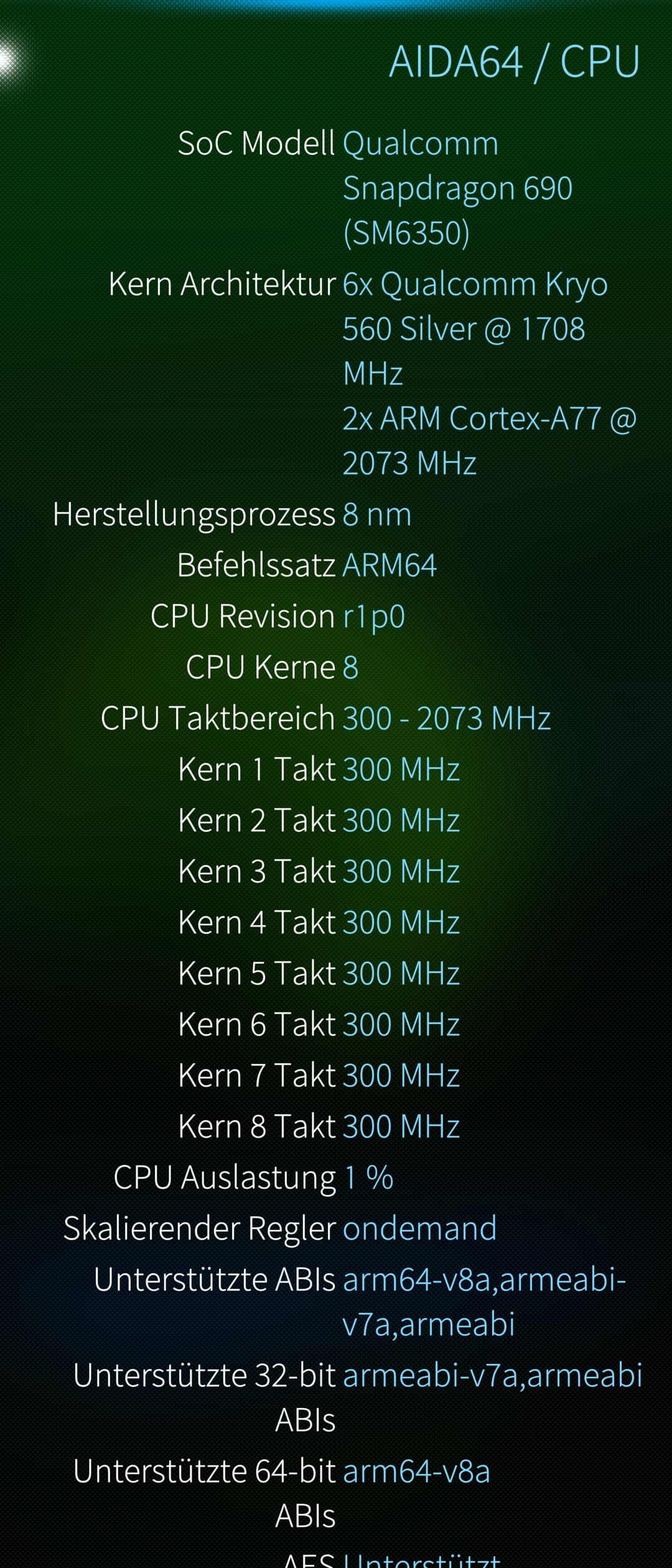
I make now 5 cpu changes in terminal and now the cpu are very often in min frequence. But the effect from the cpu changes was not so big as I hope.
What I changed? I changed the min freq from all cpus at 300Mhz.
Old the cpu frequences had follow limits: 6x 567.000- 1708.800 Mhz and 2x 787.200 - 2073.600 Mhz).
New the cpu frequences I used follow limits: 6x 300.000 - 1708.800 Mhz and 2x 300.000 - 2073.600 Mhz).
And I changed the scaling_governor from >schedutil< to >ondemand<. This makes that all cpu now goes down to 300Mhz if you wait some secounds. With schedutil I could not see that and the min frequence was original also higher. Its enought to change cpu0 and cpu6 the rest cpus will use after it also the same frequence and governor.
Also the suspend settings from the system I changed to “no sleep mode for all cpus” becaus the SFOS system will wake up the cpu every ms and this makes in sumary also more Battery drain.
You can see it very good in the app “AIDA64” from here or from Jolla Store.
If you will test it, you can use follow terminal commands:
echo -n ondemand > /sys/devices/system/cpu/cpu0/cpufreq/scaling_governor
echo -n ondemand > /sys/devices/system/cpu/cpu6/cpufreq/scaling_governor
echo -n 300000 > /sys/devices/system/cpu/cpu0/cpufreq/scaling_min_freq
echo -n 300000 > /sys/devices/system/cpu/cpu6/cpufreq/scaling_min_freq
mcetool -sdisabled
and for change back to original settings you can use:
echo -n schedutil > /sys/devices/system/cpu/cpu0/cpufreq/scaling_governor
echo -n schedutil > /sys/devices/system/cpu/cpu6/cpufreq/scaling_governor
echo -n 567000 > /sys/devices/system/cpu/cpu0/cpufreq/scaling_min_freq
echo -n 787200 > /sys/devices/system/cpu/cpu6/cpufreq/scaling_min_freq
mcetool -senabled
Now I have 136mA in idle, but I will search what is the reason for this big battery drain in comparing with my old Xperia 10II with 50mA.
If I found other solutions I will share it here…
1 Like
I tested also all other avaible governors like “conservative”, “ondemand”, “userspace”, “powersave”, “performance”, “schedutil”. The result was “ondemand” is the own setting with a good effect. “Powersave” make the phone to slowly because all cpu use only the lowest frequence and “conservative” make to much lags in the switcher. “Performance” bring all cpu at max speed = max current and userspace I not tested. Here are a good description.
1 Like
In the moment It try to reverce the last command to original mcetool -senabled. Tomorrow I will see the result.
I also tested this a long time ago, the governor changes nearly had no effect on the drainage.
1 Like
Oh thanks for the info, this chat is really long and now I see it. Yes, the effect is not so big but in 5.1.0.11 I had 300mA and now with 300 Mhz and ondemand I have 140mA in idle. But I think the base load is so high at the xperia 10III. I think it is not from the cpu and also not from the radios. I will compare the Android flash files. I was reading that somebody flashed a Xperia with installed A13 and the consumption are better. Maybe sony had changed a driver for a hardware device with high current consumption.
1 Like