You could either learn how to code and fix it or wait till it is fixed.
2 Likes
And I can as well stay on Pure Maps with native provider or offline maps. What is the point of running sailfish when most of your apps are android? Pure maps works fine, but before sfos I was using here and I would like to continue this expirience without android.
This was my kind of thinking before you answered. But it doesnt hurt to ask
2 Likes
Here WeGo (then Here Maps) was available native for Sailfish OS for a while, but it was replaced with the Android application. I understand the decision by Here to cease development for an OS that barely registers in their statistics, but find it somewhat annoying.
It was never native, it was always an android app (used it at the beginning with the Jolla 1). It was only in the Jolla store (when app support exists).
2 Likes
The current version of Here Wego with standard maps and settings works very good for some years now throughout Europe. You trade in privacy for getting traffic information for route optimization. Using the app offline is possible.
A privacy friendly alternative ist OSMand. Offline, OSM but no traffic information. It can navigate along gps tracks.
These are all Android apps. I see no valid SFOS alternatives.
I use OSM Scout (native Sailfish app) and find it good enough for my needs. There is no traffic information, but routing - also for bicycling and hiking - ist very good.
4 Likes
You are right. I forgot about OSM Scout. I used that too. It can also display given tracks but not navigate along them. Actual navigation is great.
3 Likes
Agree, OSM Scout is very fine. I love the offline topographical maps with level lines much! I never find them in other SFOS apps.
3 Likes
I have no problem using native service of pure maps or fully offline through osm scout server. Both works fine, but living in Warsaw I cannot have navigation without traffic information cause where you have a route that with empty streets that takes 10 minuts of driving can take anywhere between 10-60 minutes in rush hours.
Im still waiting for the release of official sfos for 10 V, I was using XA2 for some time now as I like this device even it is old (And problem with here was on XA2) today I reflashed my 10 III
Installed pure maps and gave it my here api code. I tried a random route and to my amazmet it worked, maps were loaded and routing displayed a route with traffic information.
Buuuuuut…..
It worked only once. Now I have no maps loading like I had on XA2.
I dont want to install any android app for navigation as it is not the point of me using sfos.
Its a shame that it doesnt work and nobody is doing anything about it. Why even bother with native navigation app where you cannot use service that have traffic information…
Have you checked your HERE API code? Mine has expired and I don’t even want to renew it, considering the new user requirements.
Besides that, maybe you can consider another map provider?
1 Like
Sort of same here in Berlin. I use Here Wego a lot but more and more it suggests routes blocked by traffic works since months or through cycle roads. If it suggests a way that actually works, I thought of that myself already. The privacy trade off makes less sense every day.
My Here API key also expired end august.
But default maps and routing still work.
To quote monty python, ‘Luxury!’ Last week It took me two hours to get out of Berlin. And I started outside of Berlin. 35 minute crush on the A10 (around Berlin) … so I ditched and drove (more slowly) through the nice watery bits on the south end of Berlin (Koepenik) … in the direction of the A113 … I was only having pure maps show the route (mapbox) … drove into the next mess and ‘barely got’ off the A113 … since every artery out of Berlin was blocked, it took my over 2 and a half hours to get past the A10. Turns out, no traffic information could have saved me. I could have driven a long detour (avoiding all of berlin including the A10), but that would have cost me almost two hours. Sigh.
Recently I made new one as old one expired. Didn’t change anything. Didn’t work on XA2, worked only once on 10 III.
Is there any viable option? I’ve been using here for a very long time and didn’t really consider other options
It does it like google does. If there is a shorter route it will direct some traffic there until it gets jammed too. But pretty soon its is going to be called “AI Routing”. Around my places I know shortcuts and so on so I can rely on my own data but it makes my job easier if I can see where traffic is before I start driving.
If you know the roads around It may be beneficial but not always is Traffic info usually gets you quicker, but when you driving to the places you don’t know (My case mostly) traffic info is your best bet
heh. As Mapbox led me to a road that was no longer a road, I checked google maps. Google also had a road where now only a construction site exists. There was no Traffic info involved though 
Like I said, best bet. But even best bets can fail.
But this disscution doesnt really change anything and I still need working solution
I’m a bit confused about:
- Which phone (10III now?)
- if your here key is up to date.
- Which version of SFOS (latest 5?)
‘It’ worked only once on which phone with current key? Seems it worked only once on 10III which sounds very very odd.
Well, you could have checked?
In theory mapquest has the required bits: Traffic API | MapQuest Developer Documentation
EDIT: I use mapbox and it has a traffic view (which I almost never use, but works).
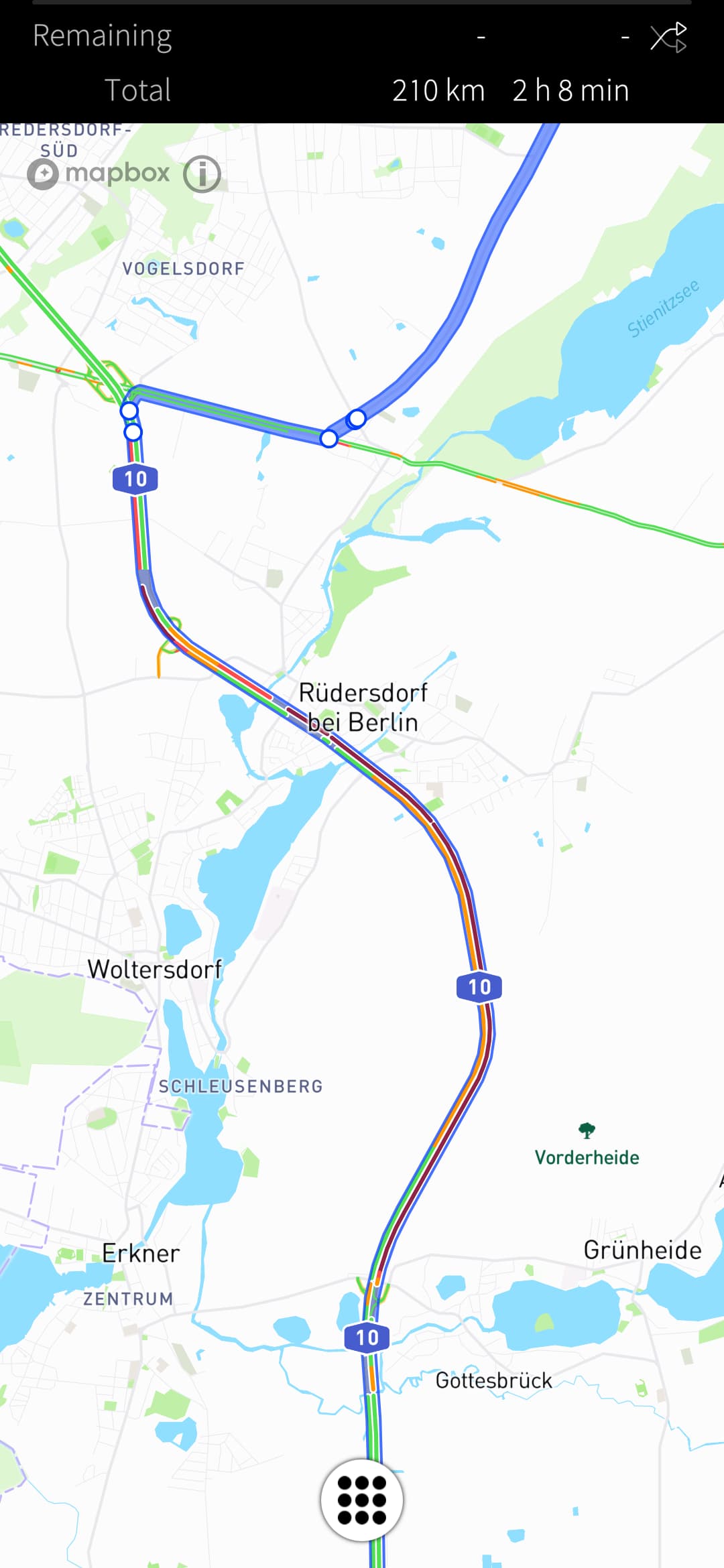
5 Likes
I didn’t check in detail the comments but you got it wrong. The Sailfish Maps was a native Sailfish application using Here APIs.
5 Likes
Oh really? Didn’t realize that - or it is just too long ago. It is sad, that this app isn’t there anymore.
1 Like
For those interested: HERE WeGo voice-guidance workaround on Jolla Phone 2026
I have been looking for a good navigation app for my Jolla Phone 2026, ideally something that works out of the box for a regular user.
So far, HERE WeGo seems to be the best option for my needs, but voice guidance was initially unavailable.
After searching the forum and discussing the available options with ChatGPT, I first tried SherpaTTS, as recommended here. Unfortunately, I was unable to download any voices.
I then installed Supertonic TTS from F-Droid. It worked correctly inside its own app, but it did not appear as a selectable text-to-speech engine in the general Android AppSupport settings.
After further searching and testing, I tried a workaround that had already been mentioned on the forum. It worked for me.
Working procedure
-
Install Supertonic TTS from F-Droid.
-
Open Supertonic and verify that it can speak correctly inside the app.
-
Install eSpeak NG temporarily from F-Droid.
-
Open eSpeak NG once.
-
Stop Android AppSupport from the Sailfish OS settings.
-
Perform a complete reboot of the Jolla Phone. Restarting Android AppSupport alone was not enough in my case.
-
After rebooting, start Android AppSupport again.
-
Open HERE WeGo.
-
Go to the voice-guidance settings.
-
Select Supertonic TTS directly inside HERE WeGo.
After completing these steps, Supertonic TTS became available in HERE WeGo and voice guidance started working correctly.
As already recommended here, it seems that installing and opening eSpeak NG, followed by a full phone reboot, may force Android AppSupport to refresh or rebuild its list of installed TTS engines. This may allow applications such as HERE WeGo to detect engines that were previously invisible.
My current setup
-
HERE WeGo for navigation
-
Supertonic TTS for French voice guidance, although it also supports English and other languages
-
eSpeak NG only as the workaround used to refresh TTS-engine detection
This solution worked on my Jolla Phone 2026, but results may vary depending on the Sailfish OS version and device.
I am still open to suggestions if anyone has found a better navigation app or a cleaner way to make Android TTS engines available. (I have also installed and tried Pure Maps and OMS Scout, but to be honest, they are not practical and not as easy to use as HERE WeGo).
In my opinion, voice guidance should work out of the box. Otherwise, reviewers and Jolla Phone 2026 owners like me will have difficulty recommending the device to regular users, which is unfortunate.
Chris
Steps summarized and edited with the help of ChatGPT.
9 Likes