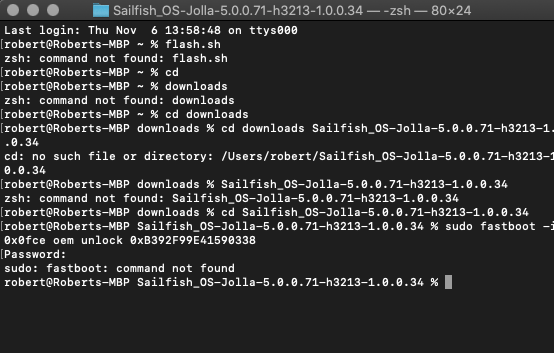
Well there is a problem, completed all instructions as found in instructions… But the command in unlocking by entering code is not working. As you see Im operating terminal in the correct folder.
The absence of fastboot suggests you skipped/failed step 2 of the instructions.
1 Like
The flash.sh command fails because you have to use either the full path to the script or ./flash.sh in the folder where the script is.
Just flash.sh would need the path of the folder where the file is in PATH environment variable.
The fastboot command fails with command not found. Did you install fastboot/android-tools ? Also fastboot shouldn’t need root/sudo
While correct, the instructions says to do so - and it should not fail because of it.
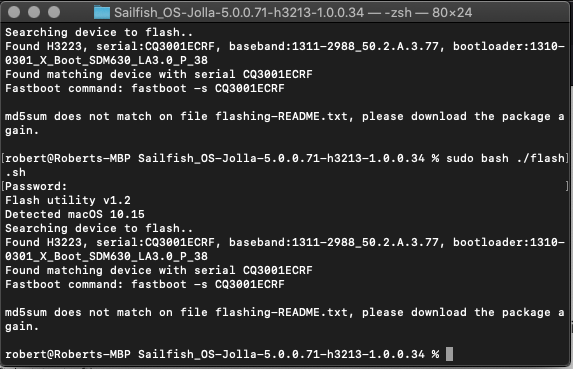
I tried another homebrew installation command that happened to get me past that step.
Now there is another homebrew or package insufficiency. I cannot update any more than 10.15 i wonder if this is even an issue.
It should not.
No there isn’t?
The last error says you have modified or deleted the readme file.
Well, did you? Does the problem resolve itself if you re-extract the downloaded zip file?
O i thought those were locked. Thats crazy, there was some typing going places it, shouldnt, matter. But that is a helpful catch. I would never thought that.
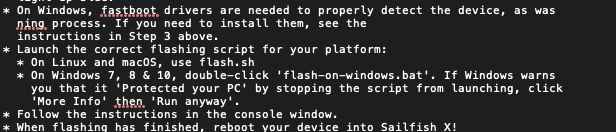
If you just pay attention and read the error, that’s exactly what it says.
Don’t even try to manually put the file back to its original state. Re-extract the downloaded zip archive.
1 Like
Yeah but my attention gets going many other places, I dont have the bandwith or foreknowledge. This definetly is an issue with non computer geniuses.
Is there a way to go back or do i have to redownlaod and re place the readme text?
Did you already throw away the zip file? That seems strange. If you did, then re-download it.
I get rid of those immediately after unlocking to avoid confusion in file keeping.
Your choices - your problems.
My damnation I know.
Just throw the kid in the pit of snakes and see if he’ll make the right choices to escape*
Download the zip to e.g. ~/Downloads
Extract the zip to ~/Downloads/Name_of_zipfile
This way you can keep the zip and dont confuse files
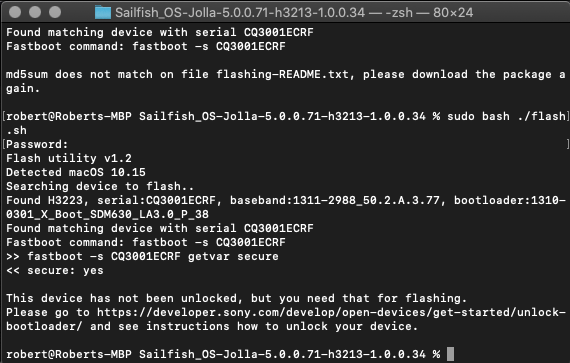
you need to unlock the bootloader with fastboot oem unlock 0x (and some unique unlock code for your device, check sony website https://developer.sony.com/open-source/aosp-on-xperia-open-devices/get-started/unlock-bootloader
edit:
sony seems to use fastboot oem unlock not fastboot flashing unlock
1 Like