You’ve hidden exactly the part I need. Any chance you could send it privately to me? If I had to guess, you’ve not included the protocol, e.g. https://? If so, try including that. I’ll add a fix that default to https:// if not filled.
3 Likes
Oooh i should have catched that! Thank you! I didn’t include any protocol, just my domain name. After prepending it with https:// it works now! 
3 Likes
New update is out and I’m rather excited about that one! It brings two features:
- favicons (optional, disabled by default) done in a privacy friendly way
- the icons are fetched through an official Bitwarden favicon proxy
- the cached files are stored as domain hashes
And the other big change is multiple accounts - by swiping to the right of the settings screen you can now manage your accounts, add new ones, switch to already added ones and remove them.
9 Likes
Fixed a bug where downloading the icons would starve Qt threads which resulted in your items not being fetched because they waited forever for a free thread.
Oh the joys of working in multiple languages and mixing their paradigms up. Note for future me: QtConcurrent threads are not goroutines.
4 Likes
Hello.
Thanks for this nice app! Unfortunately I have to report a bug, the password generation is showing an endless loop and never displays anything else. Even with latest update of the app 1.9.3-1, and with a clean reinstall (removing respective .local and .config folders)
Anyone else having this?
Hmm, I cannot reproduce this, any chance for some logs / details?
I wouldn’t know where to get logs. But it was working at the beginning, until it stopped. I notice also the transition to generator tab lagging / slowing down the display, same between password/passphrase. The other tabs don’t. I’m on the new Jolla phone…
Both password and passphrase generating works for me on latest release. Tried different options and lengths, no problem.
The app is now available in the official Jolla store! It’s a rather old version (1.4.1 vs the current 1.9.3) but I issued an update to the latest version just now, hopefully it will take less time than over a month this time.
8 Likes
Stunning work, thank you!
As a newcomer, jolla store seemed the obvious choice, but only while trying to teoubleshoot the 400 response I realized I’m 5 minor versions behind. Now got 1.9.3 from openrepos instead.
Password login still gives 400, but api key works. Next issue is that it forgets my login whenever I close the app, meaning I need to give it the api key every time. Looks like it has issues accessing secrets, as both pin to unlock and OS authorization fail with “Could not store the unlock key.”, and deleting all data ends here:
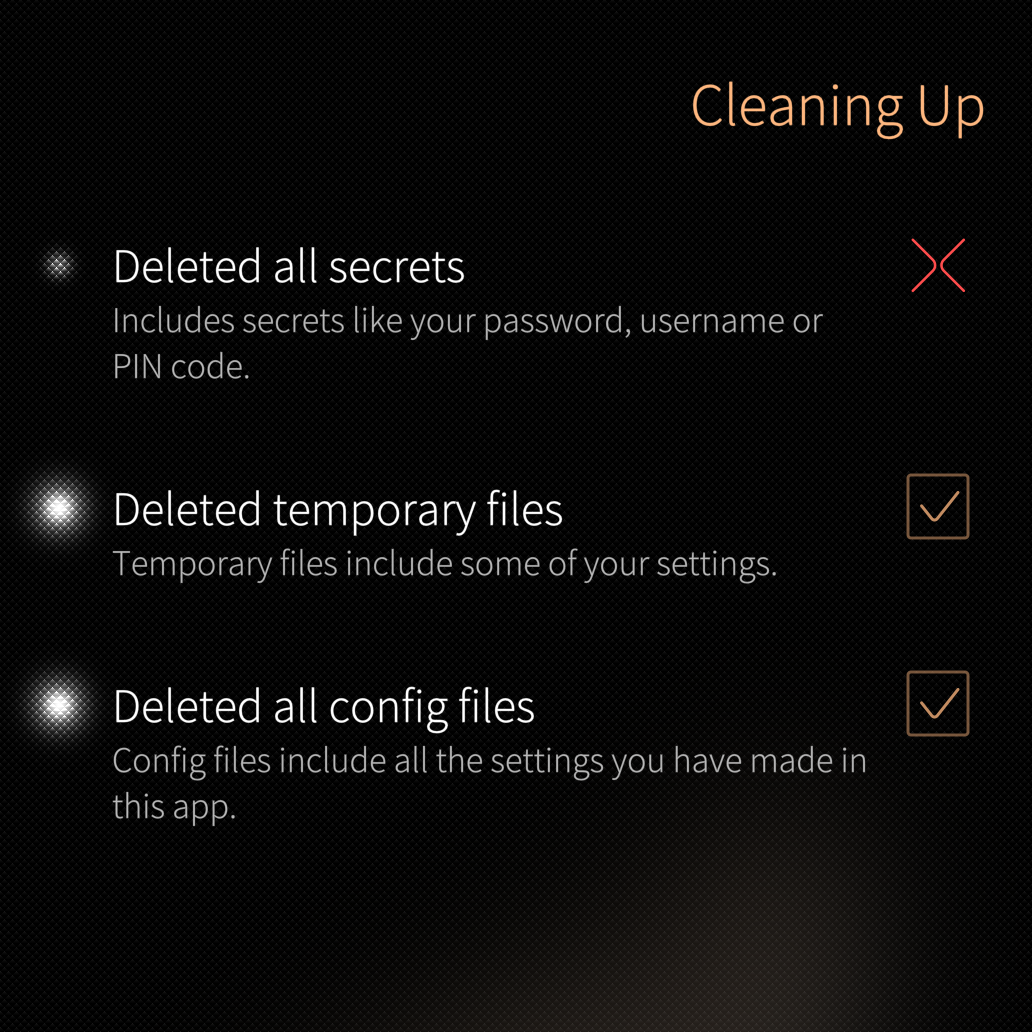
Edit: and my vault works, but also says invalid item (decryption failed): xxxxx error fetching xxxxx: invalid encrypted string at the top
Edit: Somehow, the secrets issue fixed itself. Still have the error about invalid item though.
XA2 user here… This app used to work on my device, but over the summer it started crashing out on launch. When started from terminal, it outputs
Bus error (core dumped)
Launching from terminal with strace I’m getting:
rt_sigaction(SIGRT_32, NULL, {sa_handler=SIG_DFL, sa_mask=[], sa_flags=0}, 8) = 0
rt_sigaction(SIGRT_1, {sa_handler=0xe6c3a261, sa_mask=[], sa_flags=SA_RESTORER|SA_ONSTACK|SA_RESTART|SA_SIGINFO, sa_restorer=0xe6c07281}, NULL, 8) = 0
rt_sigprocmask(SIG_UNBLOCK, [RTMIN RT_1], NULL, 8) = 0
mmap2(NULL, 2101248, PROT_NONE, MAP_PRIVATE|MAP_ANONYMOUS|MAP_STACK, -1, 0) = 0xe3aaf000
mprotect(0xe3ab0000, 2097152, PROT_READ|PROT_WRITE) = 0
rt_sigprocmask(SIG_BLOCK, ~[], [], 8)   = 0
--- SIGBUS {si_signo=SIGBUS, si_code=BUS_ADRALN, si_addr=0xffeac284} ---
+++ killed by SIGBUS (core dumped) +++
Bus error (core dumped)
Have installed valgrind to look for a more detailed error message, and got:
harbour-bitsailor: error while loading shared libraries: libbw.so: cannot stat shared object: Error 9
However, ldd shows the binary is properly linked to that library, which looks fine on disk…
[defaultuser@xa2 ~]$ ldd `which harbour-bitsailor` | head -5
	libbw.so => /usr/share/harbour-bitsailor/lib/libbw.so (0xf12ad000)
	libsailfishsecrets.so.0 => /usr/lib/libsailfishsecrets.so.0 (0xf1230000)
	libsailfishcrypto.so.0 => /usr/lib/libsailfishcrypto.so.0 (0xf1190000)
	libsailfishapp.so.1 => /usr/lib/libsailfishapp.so.1 (0xf1160000)
	libQt5Quick.so.5 => /usr/lib/libQt5Quick.so.5 (0xf0ed0000)
Currently using the Jolla Store package: harbour-bitsailor-1.4.1-1.armv7hl
With latest OpenStore package (currently harbour-bitsailor-1.9.3-1.armv7hl), the app launches fine on my XA2. But it can’t login with my e-mail and password:
[defaultuser@xa2 ~]$ harbour-bitsailor
[D] unknown:0 - Using Wayland-EGL
[W] unknown:24 - file:///usr/share/harbour-bitsailor/qml/harbour-bitsailor.qml:24:30: QML LoginCheckPage: Binding loop detected for property "status"
[W] unknown:0 - Login failed:  "unexpected status code: 400 (400 Bad Request)"
I’m using the Bitwarden’s EU server, and the credentials are fine because I’m actually getting the e-mail with my verification code from them after trying to authenticate in Bitsailor…
Hmm, I’ll try to see what happened in the 1.4.1 version, but given that 1.9.3 works, it probably already got fixed (I already submitted 1.9.3 to Jolla Store, we’ll just have to wait a month or so before it’s there).
Which version of the OS do you have? Cause right now it looks like abi mismatch on glibc. Any custom changes to that?
If not, I’d need a gdb run, something like this:
gdb /usr/bin/harbour-bitsailor
(gdb) run
When it stops on SIGBUS, collect:
thread apply all bt full
info registers
x/12i $pc-16
info sharedlibrary
info proc mappings
3 Likes
Glad it fixed itself, the secrets system sometimes breaks, not much I can do.
The invalid item means exactly what it says, your vault contains either an item that is undecryptable or the app does not know how to decrypt that (which I think should not happen anymore, all paths should be covered).
Can you go to your Bitwarden web vault and see whether there is any item that fails decrypting?
1 Like
The app currently cannot do any other 2FA than authenticator app, email 2FA is not supported. I’ll fix that in some future version (just created an issue for that: Add support for email 2Fa · Issue #160 · RikudouSage/harbour-bitsailor · GitHub), for now use api key / api secret.
3 Likes
I’m on 5.1, latest version for XA2.
Can’t get the app to launch with gdb, see here for the requested details (latest version from OpenStore): gist:9d3daf8230ff81b726789fff2582ba93 · GitHub
Before run in gdb, can you add these two?
handle SIGILL nostop noprint pass
handle SIGBUS stop print pass
That ignores the SIGILL from openssl.
Thanks, but I no longer have the Jolla Store package installed… The one on OpenStore doesn’t crash, it just doesn’t log in. Guess I’ll have to wait for Add support for email 2Fa · Issue #160 · RikudouSage/harbour-bitsailor · GitHub if I want to login with email/pass.
In the mean time, I’ve successfully logged back in with BitSailor using API credentials. Should have thought of trying that too, but was confused because of all these other issues. Maybe as a first priority make it more clear that email/pass won’t work with 2FA until the above issue is fixed? Thanks again!
2 Likes
Hi, my ids logs the url bitwarden.pw as a threat. Logs are generated when usin bitsailor. Whats the reasoning here contacting that url? Thanks for the great app.