Yep, can also confirm this 
Hi guys, first of all, I’m looking forward to getting my Jolla phone, before that though, is anyone willing to test the Royal Bank of Scotland app on Sailfish?
and yes it is a different bank from Bank of Scotland
With the RBS app from Aurora and Micro-G installed, I was able to get all the way to where they began asking for personal information to get you logged in. so that’s hopeful. I use a 10ii, but have a J2 on the way. @Hackintosh
Their app installs ok, and while I don’t have an account to attempt to login, I think there’s a very good chance it will work, for now.
I am able to login to the app of their sister bank, Natwest, and it seems that the apps appear almost identical, even the version numbers in the Google play store are the same
Brilliant, thank you guys for testing it
You’d be right, natwest owns rbs so it would make sense, but yeah that is great news.
Can’t edit the wiki, either because I’m too blind or confused to see the button or because of the reddit catch 22 where I need to contribute first to be allowed to contribute. Hope the format is at least somewhat correct:
- Germany
- Sparkasse
- S-pushTAN
- 5.2.0 (31004) A2 Neuntausend 20260520 SFOS 5.0.0.77 C2 (Requires renaming the Android device in /opt/appsupport/etc/appsupport.conf.d/10-hybris.conf: set ProductModel=JollaC2 and ProductManufacturer=Jolla - the default “Reeder S19 (AppSupport)” name causes a VALID-0003 400 error during Bluetooth device pairing for quick setup. See Potential Bluetooth Support in the Android App Support (AAS) - #206 by rdomschk for basic Bluetooth functionality.)
- S-pushTAN
- Sparkasse
1 Like
Thank you for your report. I amended it.
For future reference the button is after the instructions on the same line as hearts, links and reply.
1 Like
Thanks. And I can indeed not yet see the button. Oh well. With time comes Karma, I guess. 
New users don’t have the required trust level to edit wikis. They have to open enough different topics, read certain number of replies and also spend enough time reading topics in general on the forums to get the promotion.
3 Likes
Hi,
not sure how to edit this Wiki, so adding as reply:
Germany:
Hanseatic Bank:
Hanseatic Bank Secure: G1 - needs to be installed with Aurora beta with option “Microg-Installer” as installation method set.
Edit: Never mind, found the edit button. Stupid me.
5 Likes
POP Pankki (FI) launched their new mobile banking app June 1st 2026, and the app now requires NFC to complete the first strong identification. There should be an alternative method for activating the app but I haven’t received a reply from my bank yet to find out what is is.
7 Likes
Update: Not sure what exactly happened, but I was now able to create a profile without using NFC nor camera during the profile create wizard. This is what my bank replied to me, but that’s not what the instructions say… Confused a little, but evidently I can use the new POP Pankki (which includes POP Avain now) just fine!
6 Likes
Hi Sailors,
Would anyone with a Jolla C2 be willing to test a banking application for me, please? I just need to know if it will launch and stay open on a device without an unlocked bootloader. I have been using the app on my Xperia 10 III for 3 years without issue, but a recent security update caused it to immediately close with a message that translates to “Your device is insecure or doesn’t comply with the security requirements necessary to use it, so we are closing the app”. I am eagerly awaiting my new Jolla phone (Batch #3) and I am curious if this important app will work on my new device. I don’t know if it is detecting the unlocked bootloader or something else, but I assume a C2 will have a locked bootloader and/or be more similar than my Xperia 10 III in several important aspects. If it works on a C2, it gives me some hope it will work on the new Jolla Phone.
You can install it from the Aurora store by searching for “Pichincha”. The full name is PICHINCHA BANCA MÓVIL from Banco Pichincha, C.A and is named com.yellowpepper.pichincha. The logo is yellow and has the word ECUADOR in the bottom left. It is very important to choose the Ecuadorian app and not the related apps from Peru, Spain, etc, so please check the country name in the bottom left of the logo carefully. If the app stays open after a few seconds and has visible fields, then it should be perfectly fine, but if it closes with a Spanish-language message at the bottom right, then it won’t work and I will likely have the same problem with the Jolla phone that I do now with my Xperia 10 III.
Kiitos, Gracias, and Thank you very much to any kind soul willing to lend a hand!
-PK
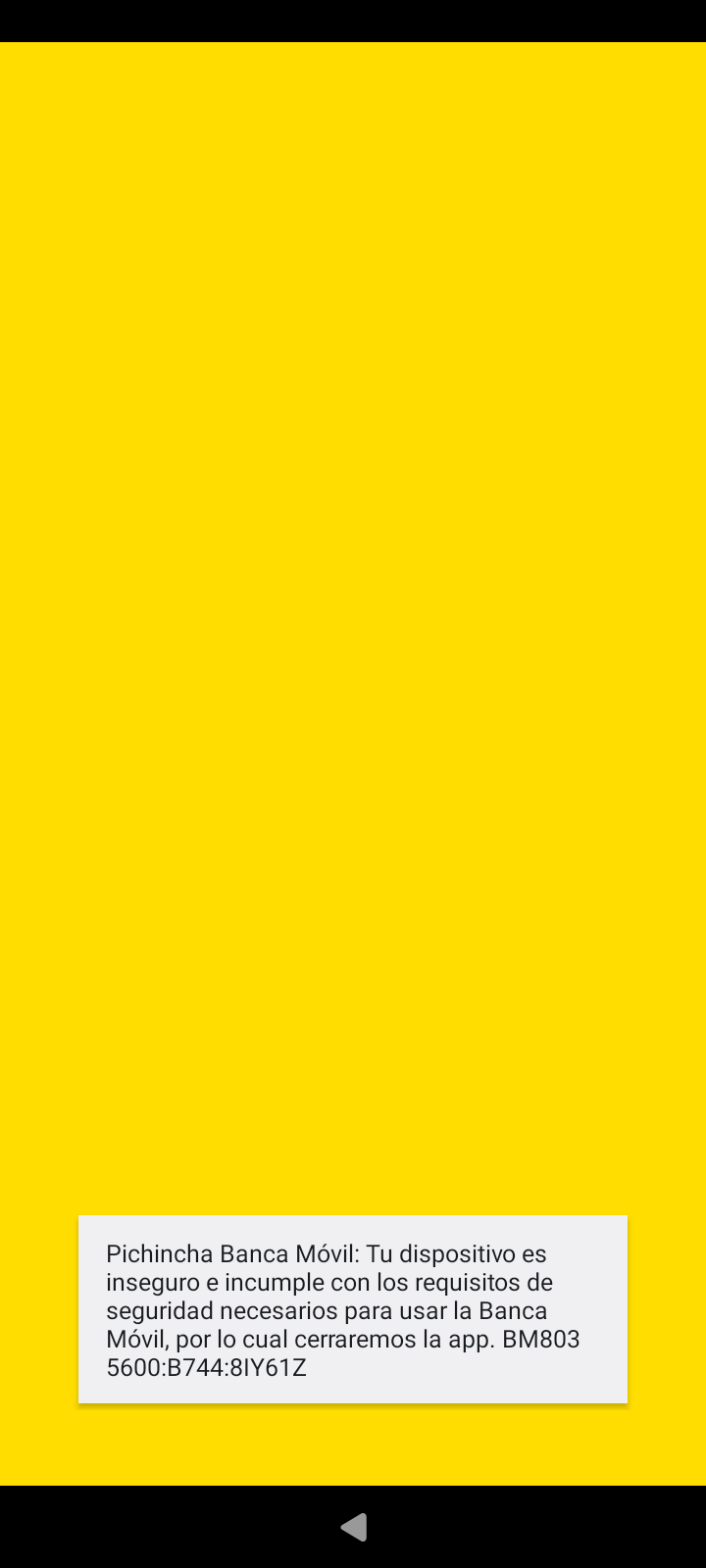
Thank you so much for taking the time to test that on your C2. That was very kind of you, and I sincerely appreciate it!!! The message at the bottom of your screenshot indicates that it detected that the device doesn’t comply with the security requirements and it is being closed intentionally. So, it’s not really crashing, per se, but it is essentially the same end result.
This is exactly what happens on my Xperia 10 III, and, based on your test, is 99% likely to do the same thing on my new Jolla phone when it arrives. I had my fingers and toes crossed, but alas it was not to be. It’s a real shame because I know that AppSupport runs the application perfectly. I used it successfully for 6 years on various SF phones. It’s just that the app was recently updated to put in some kind of additional security check and is detecting something on the Sailfish device it doesn’t like. At least I know now that it won’t work on my new Jolla phone either and I can keep my expectations in check. I am grateful to you for that knowledge and will update the wiki.
Because of the way things work down here, that app is critical for me to pay my bills and most of my day to day purchases. Nevertheless, Sailfish is and will remain my daily driver for strong philosophical reasons. I’ve installed the app on a cheap android phone with no sim card that I only use for that purpose. I use my regular SFOS phone for everything else. It’s not convenient, but I’d rather deal with that annoyance than give up the privacy and freedom and joy that using Sailfish gives me every single day.
Thanks again!!! Much appreciated!
PK
7 Likes
Does that app not have some sort of website you can visit?
1 Like
Yes, there is a web version of the app where you can do everything via browser that the application can do. Unfortunately, though, to complete the login to the website, you have to generate a token using the Android application. This is the bank’s mandatory 2FA mechanism and sadly they don’t offer an alternative such as SMS text, phone call or anything else.
Maybe J2 will need an update with an OpenTitan chip.
1 Like
I can’t currently look the source, but Rainemak has mentioned in some thread I once found that AAS side don’t have any information about phone bootloader status. It is faked somehow inside the AAS. Can also be that bank just decided to use the Google safetynet or some s*it. I would contact the bank! But super happy that you keep fighting for your right and deal with the annoyance rather than switch over
1 Like
Are there any other bank apps in your area that you can test SFOS on the XIII in the meantime? If they work maybe just consider switching to that bank that works..