Back in the days when programming was possible on a Mac I wrote some apps. I would like to update my apps but I just do not get the development tools set up.
At my disposal is an older Mac with Intel processor and a newer one with M1 processor. I also have a rather old Linux server with no GUI.
Is there a way to use this hardware to get the development tools up and running? I tried several times on the Intel Mac but either Qt is crashing or Virtual Box is not running or I cannot deploy the app to my phone for testing.
What I am looking for is a guide that tells we what kind of hardware works with the current software tool and in which order I should install them. The Intel Mac is rather a mess now because I tried different versions.
Depending on what you need for your planned application, and provided you have a Sailfish OS device, you can even develop right off your phone. That’s what I do. Since the phone already has a terminal, a text editor, GCC, and the target environment, I can develop through my commute to work. If I want a larger screen and better keyboard, I SSH into the phone from my desktop.
My application is QML-only, and rather simple, so I don’t need GCC or a full IDE, but the IDE isn’t strictly required and the compiler is there if I want to use it.
If you do not insist on using the SDK, you can develop on pretty much anything, including the phone itself.
The SDK never really worked for me, and most of my apps are just Python and QML anyway, so the only tool I needed besides an editor to create them was rpmbuild.
So you need to change the thread title. Your point is the work with old app programmings?
Have you tried to delete old .pro.user files? Go to the root of your app directories. There must be a file ending with “.pro”. That’s fine. Now delete all files ending with “.pro.user”. Then open the Ot project.
Please come back with a more elaborate error description.
I’ve had very similar experiences on Arch Linux, the IDE would just crash the moment I’d try opening any of the example projects… did you also select VirtualBox as your virtualization option? I vaguely remember thinking it might’ve been related to that, but never got around to trying the other option (Docker)
There is a way to get qmake and sdl apps to also compile on device (tjc topic about chroot for development on sfos should still work, just skip the btrfs parts as that experiment is happily behind us), on n900 you could get qtcreator to fully run (however unpractical), with xdg-shell we might see that come back
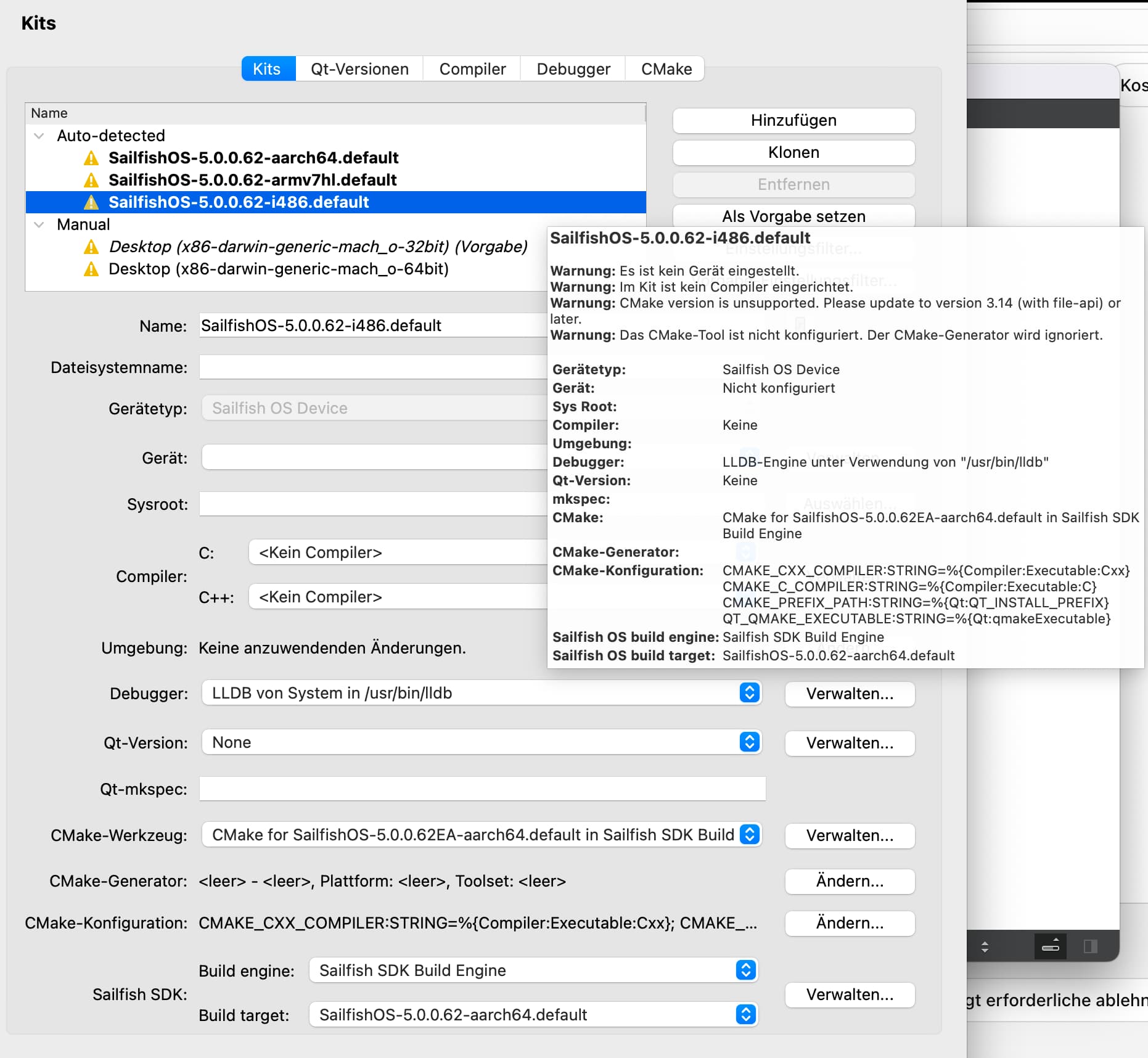
I had a litte success. The permissions for .ssh/config were wrong. This caused the crash on Qt. Now the projects opens and asks me to configure it. But I cannot select any Kit because all kits do have an error.
Also CMake was not installed what I fixed. Now version 4.2.3 is installed in /usr/local/bin/cmake
What are the correct values for the kits? Can anyone tell me how the kits should be configured?
Thanks for all the help so far. Coding is only one hobby and I do not have a lot of experience. I need the GUI for debugging mostly.
For the other options of developing apps I feel not experience enough to go down that road.
For me the error message shown in your pic has 2 points. No device is found. Have you the emulator installed? Check the device settings. And for me, the SDK will work with qmake as default. Give them a try. Or is the a diff for mac?
In a clean installation the kits will be created per magic. Use the “new project” button at the sdk start page.Have you tried one of the examples (button “example” at the start page)?
Please note your ssh trick. When connecting with your phone sending the ssh key can need some so magic too.
You mean the fifth button at the left bottom corner ? This will work if the project is configured for the architecture (eg. aarch64 for C2 or i486 for the emulator)
I found a hidden config file in my home folder. After deleting that and reinstalling the SDK it seems to work now.
Sorry for wasting your time but thanks for all the input.