But this is again some US company in behind. Or?
Tested it with UntisMobile and it works!!! Sooo many thanks !!! You mademy day! Greetings broncheolus.
3 Likes
Even if that’s the case, it is FOSS and people from all over the world are working on it. It provides all kinds of “desktop” environments you can use and for me, it just works better overall, as I’ve never been a fan of Sailfish OS usage paradigm to begin with. Only with patches, it is bearable. At least in my opinion.
Again, I don’t want to shit on SFOS, as I like the whole concept in general and I’d like to use fully European hard- and software. But again, Postmarket OS is FOSS. Anyone can work on it and improve it.
Just like with the Linux kernel, it is a world wide effort.
1 Like
I have been excited as hell for this workaround, but the
am start -a android.settings.SECURITY_SETTINGS
Does not work for me. Command not found. Any clues?
you can see attached screenshot from terminal what doesnt work. (also that I have fat fingers in terminal overall)
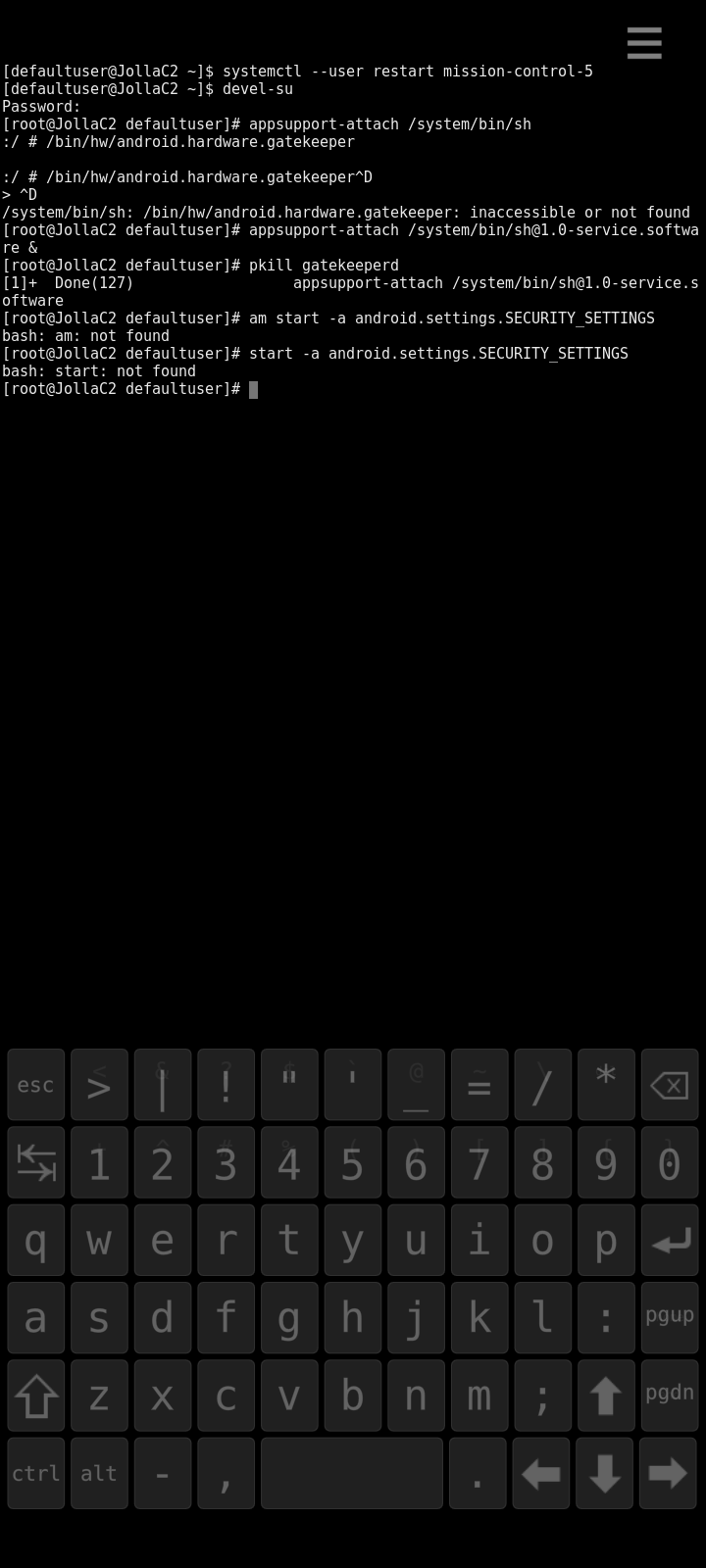
It looks a lot like you detached from appsupport (and then attached in the background &) and thereby you tried running the commands in your regular shell.
They are supposed to run in the appsupport shell.
ouch, fat fingers….thnx
Everything setting the pin went smooth but I can report that atleast Yale Doorman does not care about the already defined pin.


Thanks for the effort @nekron on this. Have you any clue why it works in some cases and other not? Some kind of additional security layer in Android?
Thanks for your feedback and glad some other apps start working with this fix. However, Revolut and Yale seems to check for biometric / passkey authentication which is not enabled by this fix. The fix only allows you to bypass applications checking for a basic device lock PIN or password that needs to be configured.
4 Likes
Thanks for the instructions, which worked so far. Unfortunately, the Rail Planner app (Interrail and Eurail passes) still doesn’t seem to recognize the screen lock setting. Too bad. But it was worth a try.
1 Like
Updated my little table, let me know if other listed apps work with nekron’s workaround. My Smartbroker+ app unfortunately doesn’t either (doesn’t display the “enable the display lock” message anymore, but gets stuck in an endless loading loop when trying to log in).
I’ve managed to get the Rail Planner app working! (At least well enough to start adding a rail pass, though I haven’t tried activating the pass yet.) Basically, I made a small fix that improves compatibility with various lockscreen/PIN-related things.
As of now, the fix only works if AppSupport is running Android 13, not Android 11 unfortunately. As it requires multiple files to be installed I packaged it up as an RPM - get it from here. After installing it, restart Android AppSupport, and if desired set an Android PIN via the Android settings (Settings → Android AppSupport → press on “Android version” 5 times).
I’d be interested to know if it also helps with any other apps. It won’t help with Revolut (since the problem there is that it detects the device as rooted) or with apps that need fingerprint ID etc, but it might help with apps that need a PIN to be set. The code is experimental and may misbehave. If it does it should just be a matter of uninstalling the RPM, but still, install at your own risk.
Source code is here if you want to build it yourself.
Some technical info: AppSupport disables the built-in Android KeyguardService, which is one of the components that manages the lock screen. Unfortunately this means that some lockscreen-related APIs fail, for example, KeyguardManager.isKeyguardSecure(), which is supposed to check if a PIN is installed, always returns false. This is what was causing Rail Planner to fail. So, the fix installs a replacement KeyguardService which stubs out most of the operations, just doing the bare minimum to pretend that the Android lock screen is working. With this in place the lockscreen-related APIs behave more sensibly. The RPM also includes an init file that starts the gatekeeper service following @nekron’s idea.
14 Likes
Hello Nick,
I tried to install your rpm on my XA 2 Phone now that it finally has Android version 13. My endgoal is the smart broker plus app which now shows to insert some pin, which i don’t know and can not reset. Neither direct, nor with the way of nekron.
Your rpm needs
appsupport13-system-unprivileged
but i have “only” appsupport13-system-privileged installed. Whats the difference? My micro g services work quite well.
I tried to rebuild it from source (took quite some time to setup -.-) and change the dependency name. But then rpm -i gives „Das Paket appsupportkeyguardstub-0-1.aarch64 ist für die Architecture different vorgesehen“. Now I have no more ideas.
Interesting, I don’t know what the difference is between unprivileged and privileged! My Xperia 10 II has appsupport13-system-unprivileged.
I believe the error message is because the build script generates a 64-bit RPM but the XA2 is 32-bit. To generate a 32-bit RPM, I think what you have to do is edit the the build shell script to change the option --architecture aarch64 to --architecture armv7hl.
Let me know if that works! If it does, I can upload a 32-bit RPM to the Codeberg repository.
Thanks for the correct architecture name. So with the 2 changes I could build an rpm with the 4 files it should have, and install it on my phone. The android settings app find the two stub apps in the Apps → list all apps → show system apps menu. But the behavior is unchanged. The Smartbroker+ app and the android system settings requests still a pin from me. I can enter what ever I want and it is false.
Maybe that’s by design? But I need to reset the existing code.
@nick8325 @nekron Thanks guys, I’ve installed your package and it works for my banking app. Right now I can use feature of backing app that depends on android lock mechanism. Thanks again, you are rock!
I think you can clear the existing Android PIN like this:
- run (as root)
appsupport-attach mv /data/system/locksettings.db /data/system/locksettings-backup.db - restart Android AppSupport
2 Likes
I got successful.
Moving the locksettings.db removed the pin, but I could not set a new one. The process always said there was already a display lock. So I deleted the package (rpm -e appsupportkeyguardstub) and restarted gatekeeperd with the way from nekron. Then I could set a new pin I know and log in to the smartbroker plus app.
2 Likes
Hello, this is sooo fantastic, it really works! Thank you so much, it was one of the essential features, that was missing. If there will be bluetooth support for android apps soon, everything will be perfect. PLEASE implement this in your next update @Jolla. I’m very happy and am eagerly looking forward to my new Jolla Phone in september . Cheers
3 Likes