Hi sailfish community,
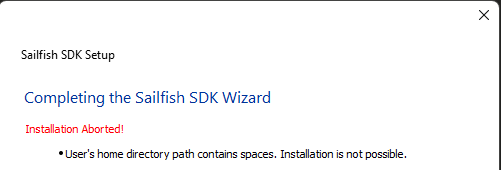
yesterday a friend told me about this project. I was curious in setting up the dev toolchain to build my first hello world app. I wanted to install the current sailfish sdk (SailfishSDK-3.12.5-windows-online.exe) on my Windows 11 machine.
First thing i get is an error because of spaces in my path. This should not happen. If it is a requirment the path should be changeable in the installer. I tried both, online and offline sdk installer. How to get started on a Windows machine? Thanks.
Any thoughts / comments?
Andreas