I recently placed an order for a Oct 2026 Jolla phone. I started doing more and more research, being more and more hyped about the project…. UNTIL I realized you need a jolla account to properly use all the phones’ features, including the android compatibility.
Is this true? Can Jolla deny me the use of the android compatibility layer, and other features, like the app store?
this is VERY concerning for me, given the EU’s approach towards totalitarian app-store restrictions, client side scanning, etc. I don’t want to rely on a device that could potentially be used against me or a device that could require compliance with totalitarian surveillance measures in order to use it.
This is non-negotiable for me, so if I am correct that the operating system requires an account to use (like microsuck windows) then I will have to cancel the order (sadly!).
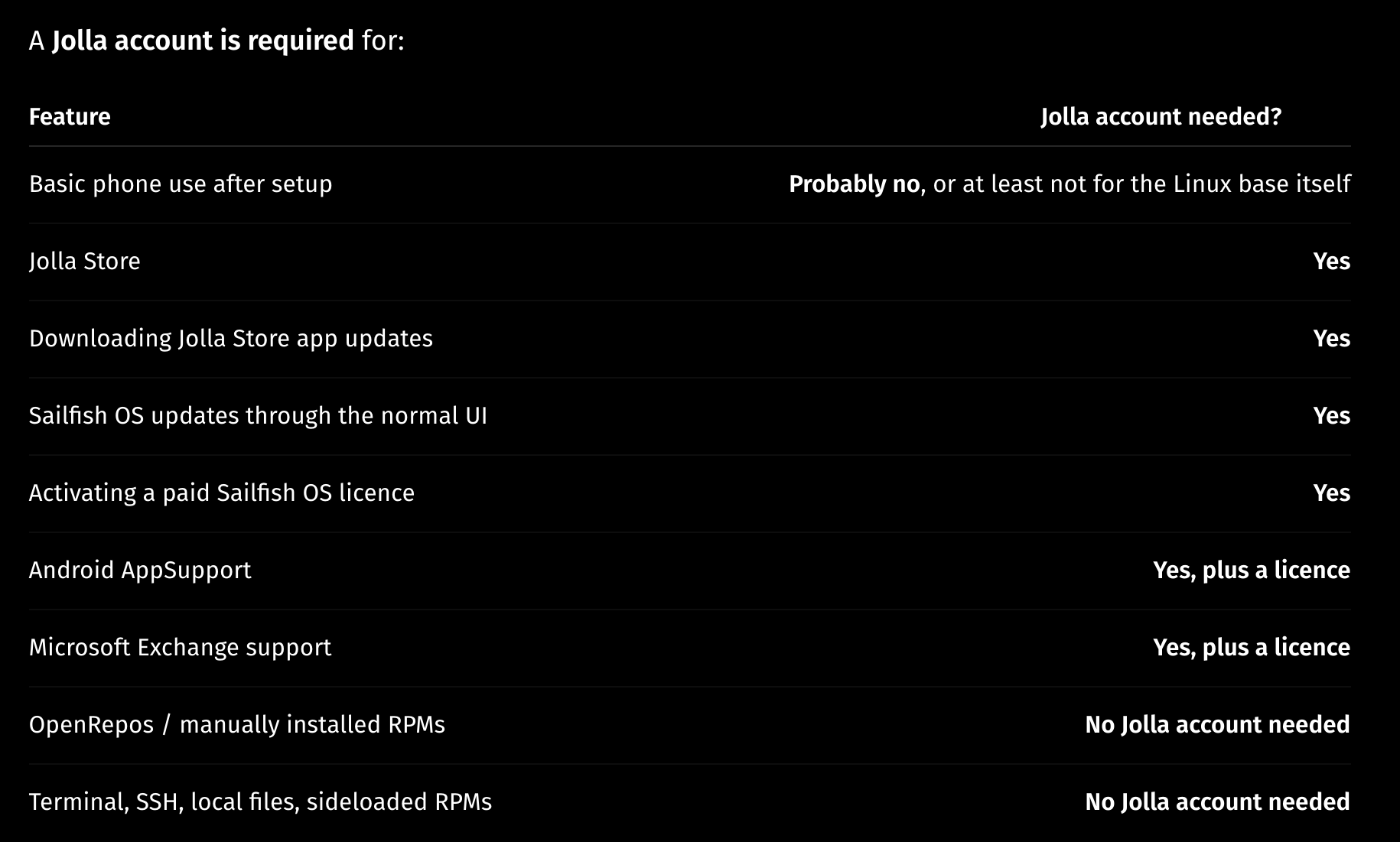
The operating system does not require an account. You can boot it up, set up an encryption pin, and you’re off to the races with using the phone (ya know, you make phone calls, send SMS, browse the web). This is unlike official Google Play Services-enabled Android which push you to opting in to services / features like Google Assistant/Gemini and logging in with a Google account.
You aren’t required to use the Jolla Store, you can use alternative repositories like Chum and Openrepos which are likely to have many of your desired native apps anyways. You can install RPMs, do things through the terminal, etc.
I can’t speak to AppSupport, but I imagine licensing would dictate use of your Jolla account. Re. Jolla Store, I’ve spoken to the team last time I was in the Jolla offices about the feasibility of it not requiring a Jolla account and AFAIK it is certainly feasible to do. Maybe a good opportunity for Jolla to improve on its European-first, privacy-respecting device especially alongside launch of J2.
Thanks for the well written reply here - I really want the 2026 jolla phone and to use sailfish OS and I can understand why an OS dev team may want to have a way to deny services in case the EU comes knocking for compliance.
From my perspective, I want to own my device - that’s what linux is all about and the philosophy we all subscribe to. so having a proprietary account-age-verification or whatever requirement to use the device is problematic for me (and I’m sure many others).
On a side note, I would be MUCH better if sailfish open sourced it’s components - this would essentially allow jolla to walk away from liability in the event there is a client-side or OS-side requirement from EU/UK ever implemented.
Though I understand your point of view, consider the following:
The Android compatibility is not “a feature of the phone”, it’s a paid app, which you can install (it asks at first boot) if you paid the licence to Jolla. The OS knows you paid the licence when you log in with your account and this account has a purchase in the history. You already created this account to purchase the phone and to post this message.
The Jolla Store does not need an account, nor any of the community stores.
The purpose of the account is to link your phone to the paid the licence of the two paid apps. The phone won’t send other data to Jolla (it knows the IP you’re connecting with, that’s all).
So what is the problem here? You don’t need the account to use the phone, alternative stores exists and there is even a Waydroid for those who don’t have access to AAS (community ports etc.)
I have a Sony Xperia XA2 without account just in front of me and the Jolla Store works (I have this phone since 2018). But don’t focus on the Jolla Store, it’s not very useful (a few hundreds apps maybe).
Maybe biggest hurdle in the end would be that you can’t have OS updates throught over the air IIRC? I think you can use Jolla store just fine, but basically all apps there are also in the community app stores. If you can live without android apps, you don’t need Jolla account I think
Ah yes, that may have been it. Thanks for the correction! I’ll edit my original post
@finaltwist It should be understood that Jolla almost certainly makes most of its revenue from automotive (Seafarix) and AppSupport nowadays. Dunno about Sailfish OS licensing for upcoming devices like the Commodore Callback, but anything is better than nothing.
We (Sailfish OS users) don’t bring in large-scale recurring revenue. After all, the Sailfish OS subscription is entirely voluntary! The revenue that Jolla gets from a “typical” customer is just one-off from a device sale (and historically also Sailfish X). It isn’t in the billions. They certainly have higher BOM for devices like J2 because they are working against economies of scale, especially with the memory crunch. I’m sure we’d all love for Jolla to be absolutely rollin in the EURs so more resources could be pushed into Sailfish OS, it expand its reach, be made more enticing for companies, etc.
For now, the best way (IMO) to break away from the multi-trillion dollar duopoly of Apple and Google is to use Sailfish OS. It’s not perfect but I would argue it is the most viable alternative mobile operating system in terms of usability and daily use.
FY2025 numbers below for context…imagine Jolla just getting the revenue from the freaking iPad!
Apple FY2025 by product/service segment (total $416.16B)
iPhone: $209.59B (50.36%)
Services: ~$108B (~26%)
Wearables, Home and Accessories: ~$37B (~9%)
Mac: ~$34B (~8%)
iPad: ~$28B (6.73%)
Alphabet FY2025 by revenue type (total $402.84B)
Google Search & other: $224.53B (55.74%)
Google Cloud: $58.71B (14.57%)
Google subscriptions, platforms, and devices: $48.03B (11.92%)
Thanks for the amazing responses - this is good information, and it looks like the AI was wrong in saying the Jolla store required the account to use it. Re: android compatibility - I would naturally steer towards waydroid here and ditch the licenced android compatibility layer. Has anyone used waydroid on sailfish? does it integrate well?
I won’t try validating this because I try not to interpret legalize if I don’t have to but I also pretty much expect everybody to have similar clauses as all these look like universal legal protections against end-user lawsuits for things they offer commercially. In case of Jolla if these are accurate, I’d give them the benefit of the doubt that they’re there in case they have to disable/remove a service for reasons outside their control, like a lawsuit from a big company or a government they can’t win, or some law changes.
Well, the XT9-case is a good example of how Jolla most likely would handles these issues. When Jolla, as a result of the reorganization, lost its old license to sell XT9 as part of the SFOS-license, nothing changed for the old users, as they can still access those packages, and only the new licenses sold after the reorganization did not get access to those packages.
I know both solutions to run Android apps within SFOS:
a) App support from Jolla on Xperia phones
b) Waydroid on a community port SFOS (my daily driver)
Both are different technical solutions : with app support the Android apos are installes parallel to native apps and accessible via the drawer, integration is really good
Waydroid is a VM container you have a app starter on the drawer that start a complete Lineage Android OS. The Android is running just as a regular native app. Integration is lower than native app support.
I like both solutions without any clear preference, I can work with both.
My bad, you’re right. I don’t know why I had the account logged in, the phone had a factory reset (to SFOS 3.3) and nothing installed. Maybe it asked at first boot I added it without thinking.
This is why I buy the Jolla Phone. Before Xperia 10 iii, again before xperia 10. Because it has AAS. I am willing to pay a license for this. Otherwise I can take my Fairphone 4 or 5. The Sailfish OS Port is top for these two. Don’t get it wrong, I’m an advocate of native apps. But certain things simply do not exist and AAS is a blessing … And just uniquely integrated. The nice thing about SfOs is, you can decide. And it works (ever better I have a Jolla account. It is only about the license. That is all.
You need an account:
–For the Jolla store.
–For the Android App Support.
–For easy GUI upgrades.
Thats the business model.
I think its a good model.
If you dont, then yes, just cancel your order.
@finaltwist : You can enter the Jolla account creds into the phone, install everything you want including Appsupport if it’s a paid licence, and then delete the Jolla account creds from the phone. Installed software remains, but you’ll get no updates and can’t log in to the Jolla Store no more after deleting the Jolla Account.
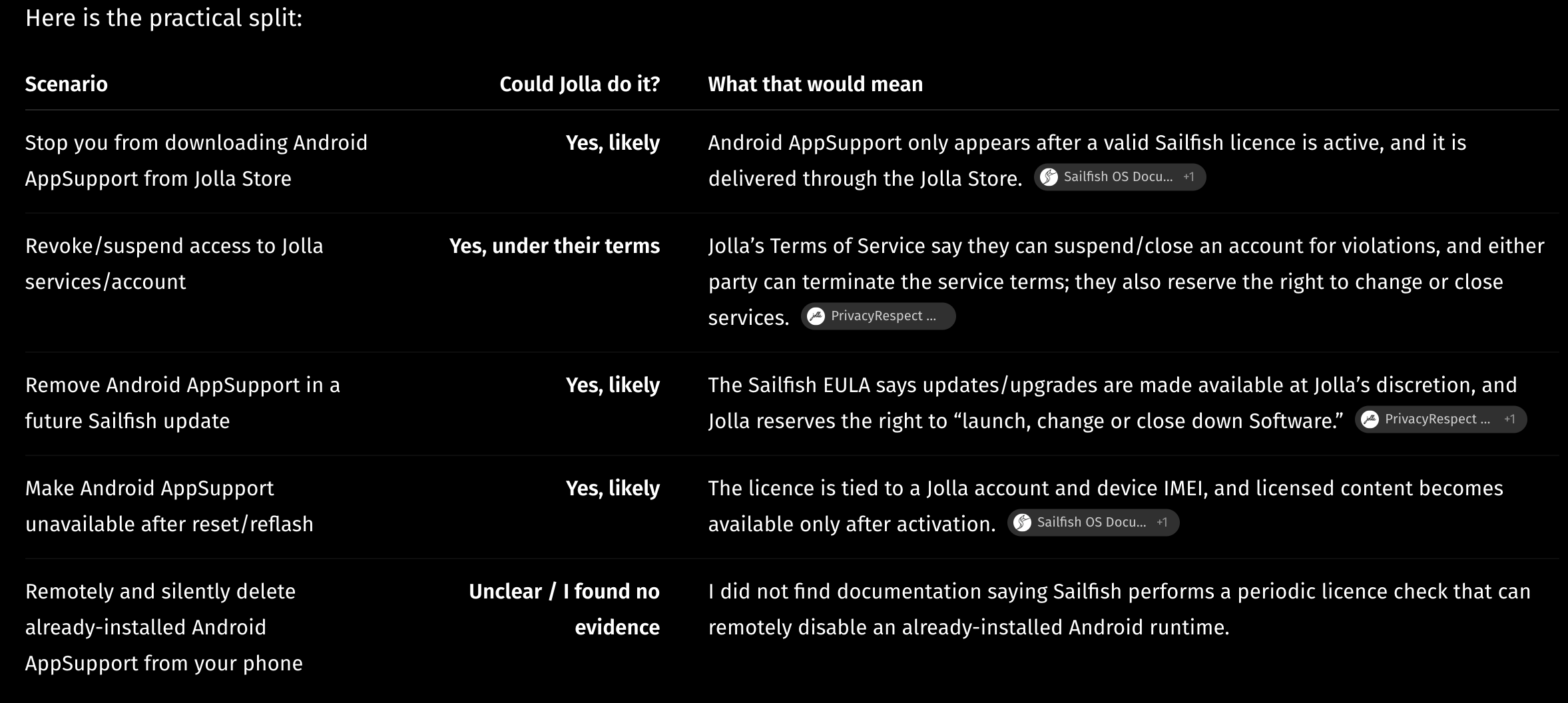
Don’t trust blindly the word salad generator. They’ll just put random word into realistic sounding sentence to fill the table. The last point is bogus: there’s no such thing as license check and remote disabling in SailfishOS.
Rather than trying to interpret the license, look at the tech and how it works.
Under the hood, SailfishOS just installs RPM packages, merely some repositories (Jolla’s) are behind a log-in for licensing/paid access reasons, others aren’t (openrepos, chum, .rpm file that you just directly installed from a USB-C stick, etc.)
Android App Support is just a software installed as an RPM from of the repo behind a log in.
The same way that RedHat and SuSE cannot remotely access your computer and start uninstalling stuff from your locally installed distro without consent, the same way Jolla doesn’t have an access to your phone and could not remotely wipe Android App Support from your phone.
If you manage to get an RPM (e.g. because you have a log-in to access the repo, BUT also because you have the RPMs on a USB-C memory stick) you can install them, AAS will work and almost(*) nothing will remove. There is no continuous pinging to a mother ship happen in the background (“license check”).
(*): Exception is dependency conflicts. E.g.: you want to update the system on the command line but the version of AAS currently installed is not compatible with the new OS. zypper dist-upgrade would in that case give you a menu asking whether to uninstall AAS, or not install the conflicting update, or ignore dependencies.
That’s not remote disabling by Jolla, that’s just your package manager trying to juggle contradictory dependencies.

 I have a Jolla account. It is only about the license. That is all.