Xperia 10 IV sfos 5.1.0.5 update OK. Blutooth on off on off without reboot is now working. Bluetooth in aas now works  . Tested with NewPipe android app. Jolla weather app is back. Powered by yr.no. Better than ever before .
Chum got uninstalled. Not able to install again. I have not tested all instaled apps. So far only Rpn calculator and OSM Scout Server is not working.
3 Likes

No it is not normal.
You have a borked, semi-updated system.
“Xperia IV sfos 5.1.0.5 update OK. Blutooth on off on off without reboot is now working. Bluetooth in aas now works . Tested with NewPipe android app.”
Does 5.1 use Camera 2 API and, if so, does the camera on the 10iv now work?
5 Likes
Obviously I am not part of the Developer group, so I am not currently in the process of updating to 5.1. I’ll do this as part of the Early Access release when it happens.
However …
The 1.5Gb of free space that needs to be available on the root file system in order to do this is, I believe, going to be a big issue for many SFOS users wishing to upgrade - especially those who are not confident in using the Linux command line and therefore not able to follow @nephros guide. I hope Jolla is aware of this as I can see Jolla/this forum flooded with related questions, issues, etc about failed upgrades or upgrades that won’t even start because there is not enough free space.
@nephros guide is certainly helpful for some, and for me as well (I’ve been using Linux and Unix before it for a good 30 years, so know something about things even if I am not as expert as some here) but even I have failed to get the 1.5Gb of free space on the root partition without contemplating major surgery on any of my SFOS phones. And then I wonder whether this is even worth it - perhaps I should just forget about upgrading altogether and simply re-flash 5.1 from scratch when it becomes available. More of this below.
The last few upgrades, I believe, needed at least 500 Mb free. It looks like 5.1 now needs three times the amount of free space - and this is a huge ask for most, especially XA2 users with only a 2Gb root partition.
I have 5 x SFOS phones - XA2, XA2+, Xperia 10 iii, iv and v. In app terms they are all identical mirror images of each other. They all have exactly the same SFOS apps, and App Support with exactly the same Android apps. I maintain the phones this way so I can easily switch between them (depending upon which I am playing with) and have everything I need to hand.
Ignoring the XA2 and XA2+ for a moment because they are a different (32 bit) architecture and concentrating on the Xperia 10 iii, iv and v, and bearing in mind these are mirror images of each other as described above, they all have different amounts of free space on the rootfs. My guess is that this is to do with their history:
- The Xperia 10 iii is the oldest in SFOS usage terms and has not been re-flashed for a good few years now. I’ve basically upgraded it each time from the early 4.n releases. It has 492 Mb of free space on the root partition.This is the phone that I use most because it mostly works.
- The Xperia 10 v is the next oldest, Its only been upgraded two or three times from the early 5.n releases. It has 801 Mb of free space on the root partition.
- The Xperia 10iv is the newest and has been upgraded once from the originally flashed 5.0.0.62 to 5.0.0.77. This has 830Mb of free space on the root partition.
So there must be a decreasing amount of ‘leftovers’ from previous upgrades as we progress from the 10iii through the 10v to the 10 iv. I am not sure if @nephros guide will help me in identifying and getting rid of these ‘leftovers’ when the time comes to upgrade, if indeed I can get rid of them without breaking the OS. Maybe the differences are to do with the variations in the SFOS images to cope with the slightly different Xperia 10 hardware variants, in which case there are no ‘leftovers’ to remove.
Some pen and paper exercises (because I am not actually upgrading now) this weekend on my three phones tell me I can get back 310Mb by deleting every SFOS app. Obviously I can do this, and then re-install them after the upgrade, but in this day and age surely you shouldn’t have to delete every app on your phone just to upgrade the phone from one OS release to the next. Another big space user is AppSupport in /opt. This takes up 610 Mb.
From what @Ahtisilli says above, about Jolla moving AppSupport from /home to /opt in the root file system starting with the Android 13 upgrade, this appears to be a poor decision bearing in mind the known space constraints on the root file system that have been around for years. I can only imagine that there was some overriding technical reason why this had to be done.
So, especially on my X10 iii, and even if I deleted all my native apps and removed AppSupport (which would give me around another 920Mb), at the moment I still can’t free up in excess of 1.5Gb on the root filesystem. The 10 iv and v would then have the required space, but then I would still be left with hours and hours of work re-installing everything again - and, as I said above, I would question whether it was all worth it over re-flashing 5.1 from scratch.
Surely there must be another way of doing this which doesn’t involve major technical surgery and hours and hours of post upgrade recovery on the phone prior to each upgrade?
5 Likes
The 1.5GB free space requirement for the upgrade will be an issue for many. should we have a separate thread for that including possible solutions?
2 Likes
In Settings → Sailfish OS updates
change
Check for updates
to
Manual
After update, things look OK:

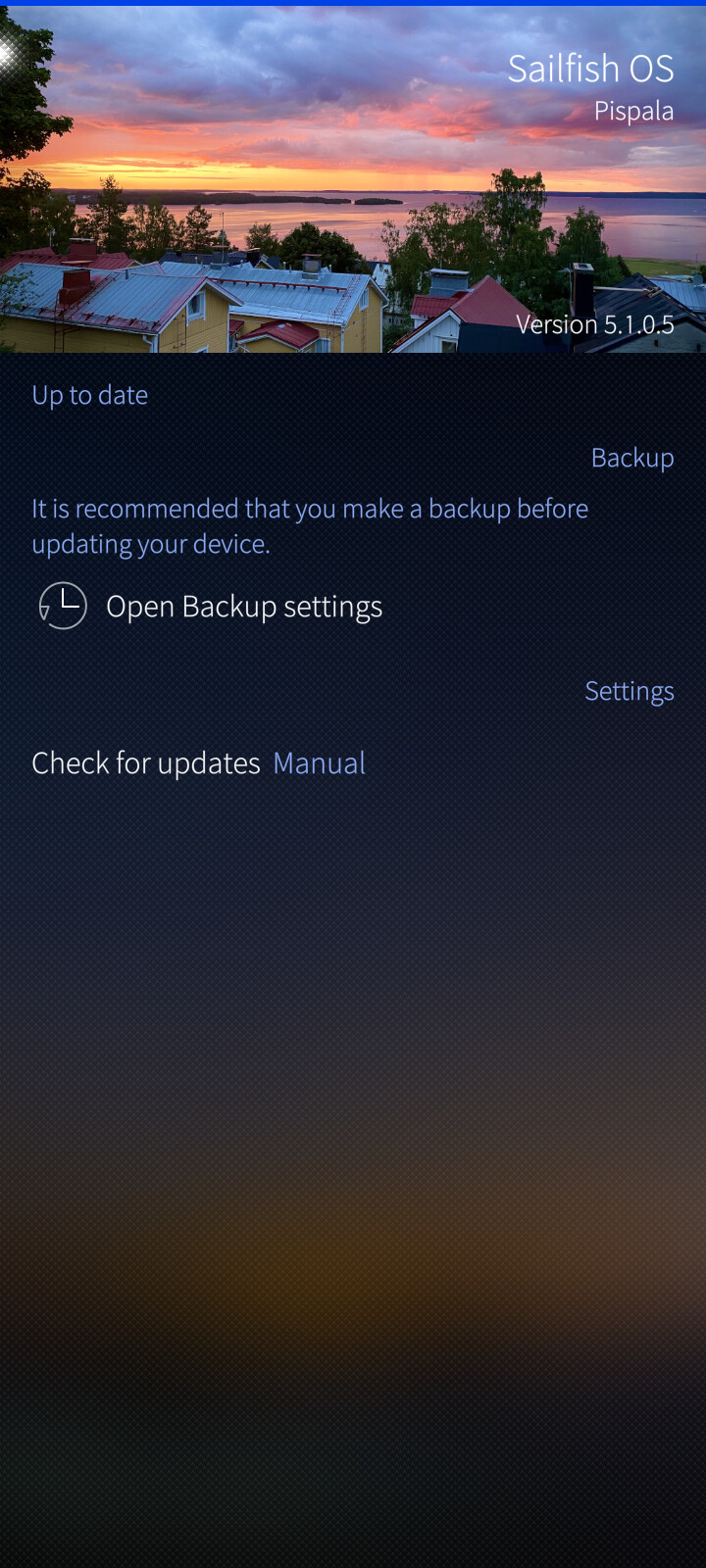
However, when I ‘Check for updates’ it reverts to an update for Tampella 5.0.0.77.
Is this still indicative of a borked update?
1 Like
can anyone confirm whether the 10III now has the treat-mobile-data-as-wifi option in android appsupport (currently only on the C2 for all 5.0 versions)?
Xperia 10 IV 5.1.0.5. I can confirm, Settings - Android Appsupport - have settings for “Treat mobile data as WLAN”
5 Likes
@Pam This would be very interesting. Does the camera at the 10 IV works now?
It was the first time I upgraded from the command prompt, so it was fun just to look at the download list. It went like running water… all the way to the droid* part, and a little later appsupport13*. Is this how much faster Sailfish alone is? 
1 Like
@joboe. Xperia 10 IV 5.1.0.5 camera does not work.
4 Likes
Thank you for letting us know.  If it had worked, I would consider to flash my X10 V….
You don’t have to do anything. I had the same problem. I did a clean install, and it’s still giving me the same update.
1 Like
Do you mean that apps in the AAS can actually utilize bluetooth? E.g., you can connect a smartwatch?
And, if this is true, is there an option in AAS settings to disable android access to the BT?
SFOS is not released yet. Wait and see until release. I have only tested bluetooth audio from android apps. No settings other than what we are used to in Sailfishos.
After updating my phone to version 5.1, I received a notification for update 5.0.7.7. Much like Windows updates, it insisted that I needed to install it even though I was already on 5.1. I hit update and then install. During the process, it said ‘Sailfish could not be updated.’ There was a restart button, so I pressed it, but now the device won’t turn on at all =( I think my device is dead.
Did you read AND understand these posts?
5 Likes
You wrote code to update by yourself? That sounds odd. All info was already here in the thread…
1 Like