Nope. Checked all the settings several times, even reinstalled the microG but with no luck.
I confess that none of the things you listed have been resolved, so no, not “great progress” in that respect. My expectations were that we were not going to see an update until 5.1, so to have Jolla working to get things addressed in a 5.0.0.72 → 5.0.0.73 is appreciated.
Given the option of no updates until a lot of things are addressed in a major update versus more frequent updates released that make progress on something each time, I prefer the latter.
Like other 10V owners, I am earnestly looking forward to 5.1 and seeing what they get operational. But I do want to encourage them for what they do accomplish with essentially one hand tied behind their back with the Sony blobs situation that Jolla cannot predict, let alone control.
That all being said, if you have a 10V and are waiting for the items you mentioned to be resolved, alas, we have to wait. I am sure they are hard at work to get 5.1 out to everyone.
3 Likes
X10III: the phone seems more eager to drop to 3G. Things worsen when traveling /cell switching.
Is this handled internally by the modem? Or by SFOS based on the reported signal strength?
I also experienced that bug again. Restart from utilities was enough to get audio back this time
Should be handled fully by the modem.
3 Likes
There is a fix for the microphone:
1 Like
Updating to 5.0.0.73 went really smooth on my Xperia 10 III. Just one issue: search from the bar of sailfish browser doesn’t work anymore. I had the same problem on another update but don’t remember how I resolved
1 Like
I can report that audio/video calls on telegram (AAS) improved a lot with .73, i didnt encounter audio stuttering yet.
BUT, as i use headphones (wired) on 10 II for telegram audio/video calls, a new problem that appeared with this update is that the microphone isnt getting the sound from the wired headset, but instead takes it from the phone device itself.
I didnt had this issue earlier than .73.
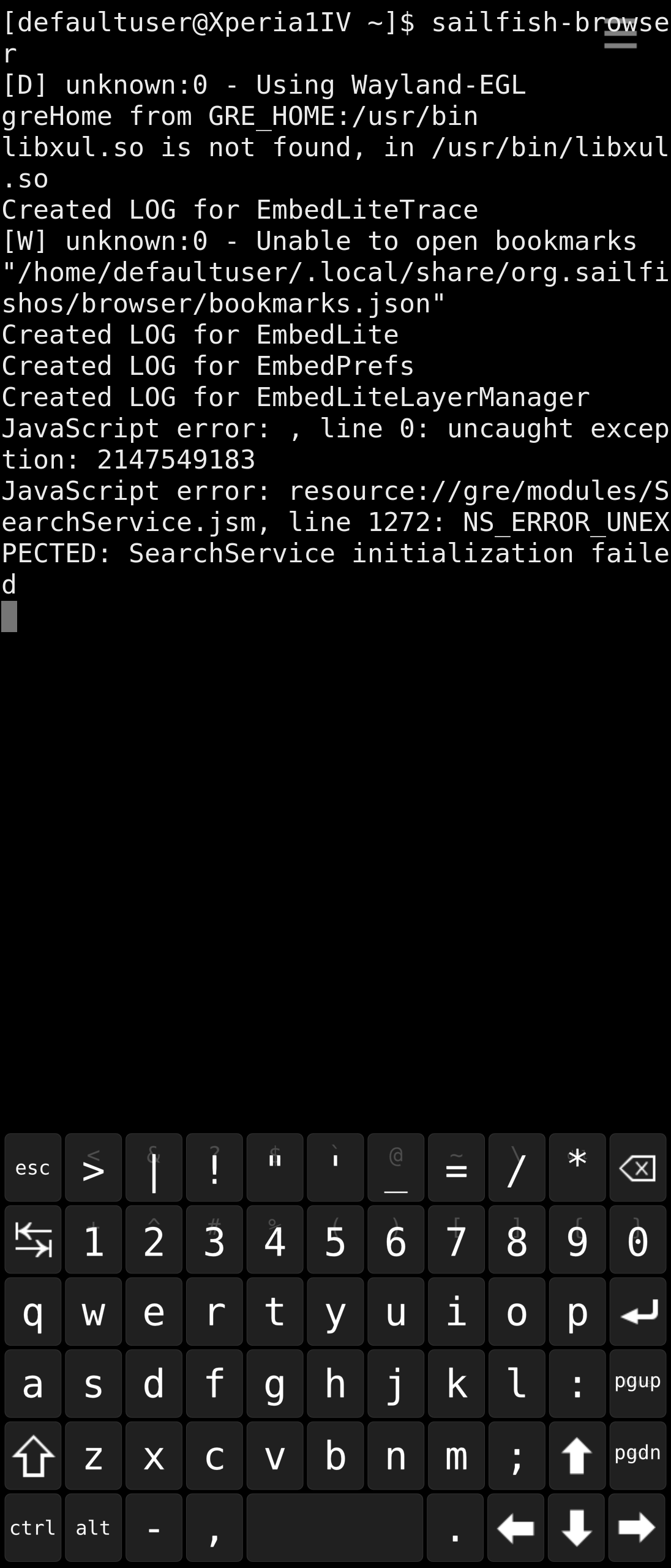
I’ve got the same issue. If I type e.g. “pizza” in the browser’s address bar, instead of showing search results for that keyword in the search engine selected in browser’s settings, the browser uses the keyword as part of the URL to be opened and adds “.com” to it, so the “pizza” keyword turns into an attempt to open “pizza.com” URL.
If launched from the Terminal, sailfish-browser shows the following error:
Javascript error: , line 0: uncaught exception: 2147549183
Javascript error: resource://gre/modules/SearchService.jsm,
line 1272:NS_ERROR_UNEXPECTED: SearchService initialization failed
4 Likes
JC2 update OK. seem not anymore receiving same SMS multiple times. Some fun: the try to open the document from link above at ”All recent Sailfish OS release notes can be found here [quote=“Keto, post:1, topic:27568”] found **[here]( Topics tagged release-notes )** [/quote] …” using the JollaC2 turns into error: type of file text/markdown not supported.
The search bar works ok for me on Xperia 10 iii and 10 v.
3 Likes
Same behaviour. Not searching from bar anymore and opening any website in which there’s a word I typed on the bar. Same as @wetab73
1 Like
Thanks for the update.
Went fine on an XA2 DUAL. Everything seems very good but one bug seems to show its nose back: The “no microphone during calls” one.
During, let’s say, 50% of the calls (I made like 8 calls so far), correspondents were not hearing me. I had to call back/be called back in order to be heard.
I’ll wait a bit to really see how often it is and will try a wired earphone, gather logs and make a proper bug report if needed.
1 Like
There are also some other, earlier reports of this issue, e.g.
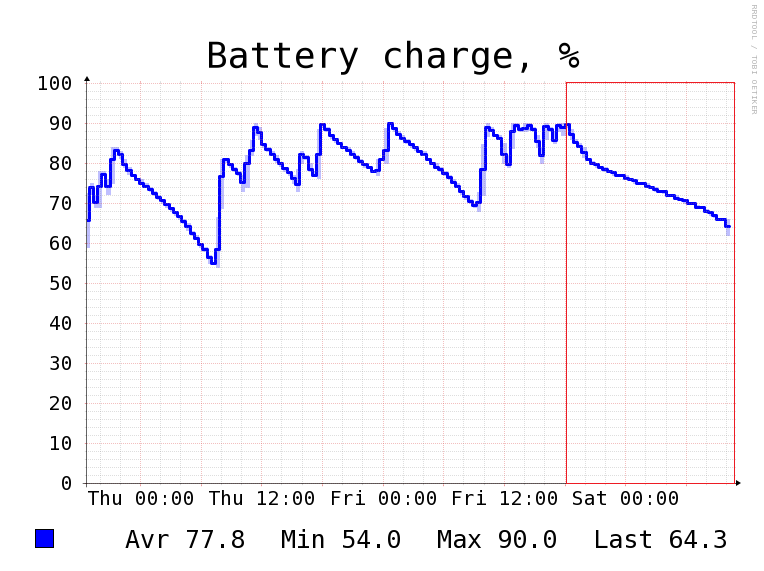
Did the update from .72 to .73 yesterday evening, and also noticed that the battery discharge rate seems much less than in a long time.
3 Likes
I’m curious, what did you use to create this graph?
2 Likes
Systemdatascope, available on OpenRepos:
Either screenshot the graph from app, or choose “report” from the menu, and the graphs are exported as .png pictures to /home/defaultuser/Documents/SystemDataScope/<date_time>
Thought i quoted post #137 from basubipr, but apparently not - This is on an Xperia 10 III.
3 Likes
I tried reinstalling it with “pkcon install --allow-reinstall sailfish-browser” but nothing. Looking at /usr/lib/mozembedlite/chrome/embedlite there are only a couple of xml files. Maybe something’s missing…
1 Like
I just updated on xperia 10 plus and everything seems to be working. I don’t have the browser search issue.
I’m unable to install this update on my X10-II. I’ll search some logs later