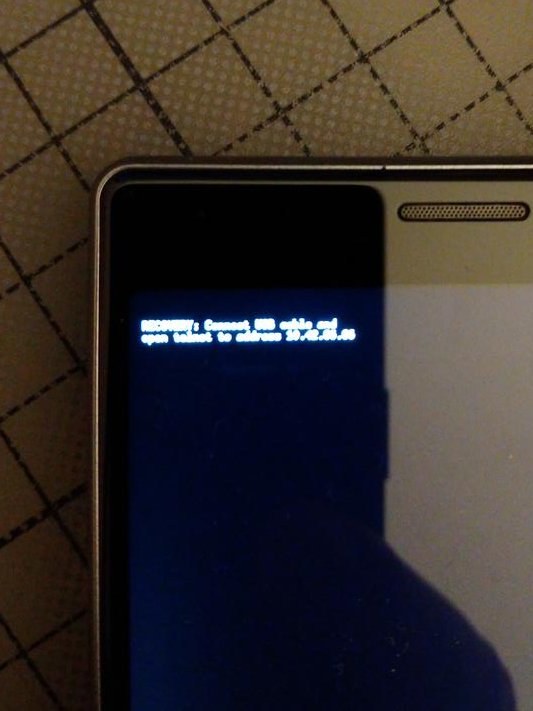
If relevant, my 10 III was flashed while on the latest Android 13 base with SW_binaries_for_Xperia_Android_11_4.19_v9a_lena
Is this also valid for Xperia 10? Thought this applied to XA2?
1 Like
Problem on Sony Xperia 10 II;
Yay!, for once, I have a problem with the last update.
I’ve noticed the battery in my device seems to be draining a little faster since the update.
Using Crest to monitor the situation, i notice that /usr/bin/lipstick -plugin evdevtouch -plugin evdevmouse -plugin evdevkeyboard:keymap=/usr/share/…. is running at a constant 8% to 10%.
I killed the process, forced shut down and restarted the device. I watched the said plugin usage in Crest and watched in dive way below 3%, problem sorted, or so I thought. But no, the plugin is back and running at 8 to 10 % again. This was not a problem before updating to 5.0.0.71
Which device is affected?
1 Like
Edited to reflect your comment, thanks. I added the report pre-coffee!
1 Like
Xperia 10 / 5.0.0.71 - can confirm this.
If AAS autostart on boot = OFF and after restarting AAS manually but no GUI restart and no reboot, audio on Oscilloscope and Spectrum Analyzer is back again!
Thanks very much for the hint!
1 Like
No, it might not be valid for Xperia 10, need to get the correct partition there, but I don’t currently have that device available.
You can find the correct partition number in the recovery shell with
grep 'PARTNAME=misc' /sys/block/mmcblk0/mmcblk0p*/uevent
which should output something like
/sys/block/mmcblk0/mmcblk0p64/uevent:PARTNAME=misc
where mmcblk0p64 is the partition, with possibly different number at the end. You can then verify it with hexdump (replacing the correct number in the device path)
hexdum -C /dev/mmcblk0p64
The output of that should start with the boot-recovery line.
After that you can use the dd command, just replace the device path if it’s different on Xperia 10.
UPDATE: The misc partition path on Xperia 10 is /dev/mmcblk0p60. So clearing the boot mode there can be done with dd command
dd if=/dev/zero of=/dev/mmcblk0p60 bs=2048 count=1
We also have the fixes ready for all the devices affected by the recovery boot problem, and will be making a new release soon.
6 Likes
Xperia 10 V is not affected by the boot to recovery problems, so updating it is safe in that regard.
1 Like
Interesting, I have a X10-II too and the process uses about 1.6% of CPU and 4.9% of memory. I noticed that systemd --unit=default.target uses about 7.9% percent of CPU.
I tried to update a Xperia 10 device here. The process (GUI) stops and says something about a full storage. I dived in and it shows that some rpm downloads in /var/tmp fills the root partition (/) - especially the appsupport rpm. Any thoughts?
How are the CLI commands to clean this on SFOS? Are there any commands on SFOS analogue to
apt-get autoclean
apt-get autoremove
apt-get clean
on Debian? Surely there is a way to perform this also on SFOS, but how?
pkcon --autoremove should remove unused dependencies, like apt-get autoremove.
Dont think that the downloaded packages are cached, if you install one, remove and install again package gets dowloaded again (but there is a zypper clean / zypper cc command which would be used for something like that)
Ok, dump here, would it need to be cleared?
~ # hexdump -C /dev/mmcblk0p60
00000000 62 6f 6f 74 2d 72 65 63 6f 76 65 72 79 00 00 00 |boot-recovery…|
00000010 00 00 00 00 00 00 00 00 00 00 00 00 00 00 00 00 |…|
*
00000040 72 65 63 6f 76 65 72 79 0a 2d 2d 77 69 70 65 5f |recovery.–wipe_|
00000050 64 61 74 61 0a 2d 2d 72 65 61 73 6f 6e 3d 4d 61 |data.–reason=Ma|
00000060 73 74 65 72 43 6c 65 61 72 43 6f 6e 66 69 72 6d |sterClearConfirm|
00000070 0a 2d 2d 6c 6f 63 61 6c 65 3d 65 6e 5f 55 53 0a |.–locale=en_US.|
00000080 00 00 00 00 00 00 00 00 00 00 00 00 00 00 00 00 |…|
*
00100000
@jeskata yes, that needs to be cleared
1 Like
Didn’t work, needs some modifier/parameters extra.
zypper clean did something,
[root@bastel2 defaultuser]# zypper clean
Alle Repositorys wurden bereinigt.
[root@bastel2 defaultuser]#
For this, zypper clean command needed abt. 15-30 seconds. No idea what it really did, but no error msg.
not sure maybe it just cleans this directory “/home/.zypp-cache/” (seems to be the package directory)
edit:
regarding --autoremove:
maybe you have to use it like pkcon --autoremove remove package ? (to remove package along installed dependencies, but not sure as I only use rpm with sailfish). So maybe same thing as zypper rm -u ?
Great, problem resolved.
1 Like
The temporary package download dir can be changed by creating /etc/sysconfig/packagekit file containing
PACKAGEKIT_ARGS="--keep-environment"
ZYPPTMPDIR="/home/.zypp-tmp"
We have this fix already in the main development branch, and I’ll probably include it also in the next 5.0 release.
7 Likes