Pushupmenu behaves strange in combination with changing height of textfield

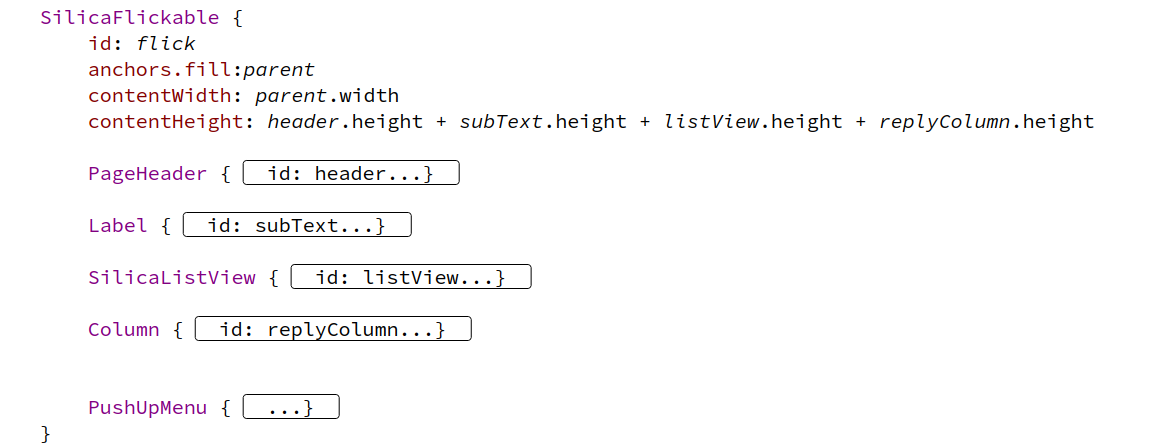
I have a pushupmenu within SilicaFlickable, copying relevant code:

   SilicaFlickable {
    id: flick
    anchors.fill:parent
    contentWidth: parent.width
    contentHeight: header.height + subText.height + listView.height + replyColumn.height

…

   Column {
        id: replyColumn
        anchors.top: listView.bottom
        width: parent.width

        Row {
            id: inputRow
            width: parent.width
            spacing: Theme.paddingSmall


            TextArea {
                id: replyField
                width: parent.width - attachButton.width - sendButton.width - 2 * Theme.paddingSmall - Theme.horizontalPageMargin
                //: Label for message
                //% "Message"
                label: qsTrId("message-la-message")
                //: Placeholder for send message
                //% "Send message"
                placeholderText: qsTrId("message-ph-sendmessage")
                hideLabelOnEmptyField: false
                backgroundStyle: TextEditor.FilledBackground
                horizontalAlignment: TextInput.AlignLeft
                height: Math.min(implicitHeight, Theme.itemSizeExtraLarge * 2)

            }

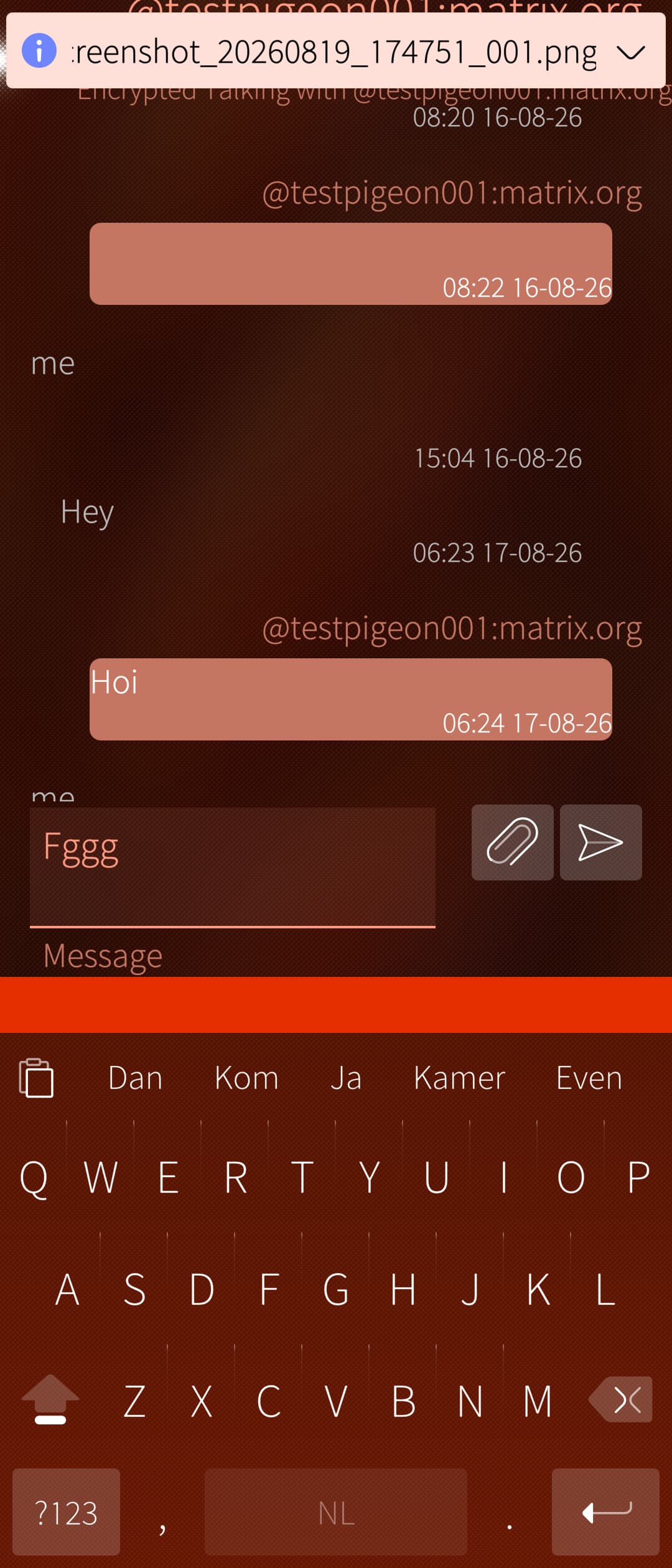
When entering text in text area and pushing on enter, so stretching the text area, I get a bar below the screen, it disappears when clicking outside the text area, but it’s not so proper behavior. See screenshots. How can I avoid this?

1 Like

Try removing the height of the TextArea.

Also, are your Pulley/Pushey components children of the outermost Flickable?

1 Like

What do you expect to happen when pressing Enter?, if you are expecting perhaps to move to the next window after hitting Enter, then you need to apply EnterKey.onClicked: nextField.focus = true

Also, the white underline can also be hidden using: backgroundStyle:TextEditor.NoBackground

It seems that these properties are available in both TextArea and TextField

Removing height did not change the behavior.
PushUpMenu is child of SilicaFlickable, see screenshot. It does contain 4 Menu items, no specific settings in the PushUpMenu

Wanted behavior when clicking enter: staying in the textfield, going to next line. It is the orange border in the screen shot that I want to avoid. Apparently the orange line, showing there is a pushupmenu, becomes bigger when the textfield enlarges.

Nephros has already pointed out your problem. Your PulleyMenu is not shown in your code and should be present inside SilicaFlickable.

The pulley menu should be at the top of the screen (orange line), unless it was your intention to have the pulley menu on the top of the keyboard?

Have a look at the documentation.

I have seen phenomena like this.
I think it has to do with overly zealous height and anchoring.
And I think the reason is the VKB, which normally should go over the PushUp, but in this case doesn’t, which pushes the Pushey up.

Is your listView’s bottom anchored somewhere?

You could try using the fact that SilicaListView is itself a Flickable, and putting header, text field etc inside it:

Page {
SilicaListView {
  clip: true
  anchors.fill: parent
  header: Column {
    clip:true
    PageHeader{}
    Label { id: subText }
  }
  footer: Row {
     TextField {}
     IconButton{}
  }
  model: ...
  delegate: ...
  PushUpMenu {}
}
}

Tx for reference, but I am using a push up menu, not a pull down menu. Pull down works fine.

Tx for suggestion. I did a lot of tests. Using the footer ánd putting the PushUpMenu in the SilicaListView worked out.
PageHeader and subText I kept in SilicaFlickable as I want it to always stay on top.

Giving following structure:

Page {
    ...
    SilicaFlickable {
        id: flick
        anchors.fill:parent
        contentWidth: parent.width
        contentHeight: header.height + subText.height + listView.height
        PageHeader {
            id: header
            title: roomName
        }

        Label {
            id:subText
            anchors.top: header.bottom
            anchors.right:parent.right
            text:matrixSession.getMembersText(roomId)
            font.pixelSize: Theme.fontSizeExtraSmall
            color: Theme.secondaryHighlightColor
            truncationMode: TruncationMode.Fade

        }

        SilicaListView {
            id: listView
            anchors.top: subText.bottom
            anchors.left: parent.left
            anchors.right: parent.right
            height: flick.height - header.height - subText.height
            clip: true
            spacing: Theme.paddingMedium

            footer :         Column {
                id: replyColumn
                width: parent.width
		        ...
	        }
	    
	        ...
	    
            PushUpMenu {
            
	        }
        }
    }
}