Sorry, I do not own an apple dac. But I came to think: My dongle is an ibasso, also with seperate volume control on android. Do you by any chance know, if the steps for activating volume on apple dac, could work on other dac brands also. Or is it dac chip specific? Just curious
I think that might work if you modify the set-usb-dac-volume.sh script mentioned in the instructions to use correct sink, you can find the correct one from the output of “pactl list”.
3 Likes
Perfetto  I will give it a shot then..
Thanks again for trying to understand. I will say this, and I hope you can see it from an end user point of view:
The DAC section currently describes concepts, but not fully, the concrete actions, an end user (maybe mostly new sfos users) must take.
On Xperia 10 III, the DAC is detected but remains silent until specific PulseAudio and xpolicy configuration lines are added manually. This is not clear from the current documentation.
As stated earlier: These lines mentioned, by you, earlier in this thread:
[device]
type  = usbaudio
sink  = startswith:"alsa_output."
flags = refresh_always

[device]
type  = usbmic
source= startswith:"alsa_input."
flags = refresh_always
It´s still not clear, in the wiki (for me, at least) , that these lines, needs to be added in the folder: /etc/pulse/xpolicy.conf.d/usbaudio.conf , to get the sound to work (and continue to work, after a reboot)
Ok, you need to inspect the contents of the folder to see that the file already exists but named ‘/etc/pulse/xpolicy.conf.d/usbaudio.conf.disabled’
The reason the wiki page says to navigate (cd) to that folder and link (ln) the file is that the contents may change with system updates. Linking would keep the config active even if the contents change.
Hence the instruction to cd and then ln -s (ie. change directory and link, symbolic).
1 Like
Okay, So what I did, was to create a new directory: usbaudio.conf
And what you are saying, and what the wiki describes is:
That, there is already a disabled USB audio policy file.
To enable it, rename or link it so it becomes active
I´m starting to get it. The issue is, that we use different phrases to explain and understand. Or at least, different word orders. I hope it makes sense.
Either way, I understand it better now compared to, when I first asked 
thx
Frankly, I’m not sure what the content originally conveyed. However, the instructions to execute were clear and have not changed.
 cd /etc/pulse/xpolicy.conf.d/
ln -s usbaudio.conf.disabled usbaudio.conf
I gather you were not familiar with the ‘cd’ command. Nor, likely, the ‘ln’ command. When in doubt, ask first.
It was not so much the linux commands but the explanation behind.
Anyway: point taken. And your work is much appreciated
I have just tested an USB DAC that is muted after plugging it in USB port by default.
the DAC can be unmuted by
pactl set-sink-mute "USB_DAC_sink_name" toggle
There is the same behaviour in every device and OS I have tested but only in SFOS the DAC does not produce any sound after unmuting.
Sound looks like redirected to correct sink and I can see that USB DAC sink is in RUNNING state during playback.
1 Like
Just on a hunch since the apple dac is set to 40% volume by default, is it possible that it’s the volume setting? Did you also increase that? EDIT: the dacs I’ve tested (beside the apple) all had volume at or near 100% on being plugged in.
Yes, I have forced volume 100% but no change. Now I see another strange thing, base volume parameter is"
base volume: 2147483647 / 3276800% / 270.93 dB
That one should be 100% / 0 dB and it looks like pulseaudio issue.
1 Like
I just tried the audio output via USB-C on the JP2. It did not work out of the box, plugging in the USB-DAC only led to a short interruption with continuation of phone speaker output but at audibly reduced volume.
I also only found the disabled config file in /etc/pulse/xpolicy.conf.d/
So I did apply what poetaster described in his post in January.
cd /etc/pulse/xpolicy.conf.d/
devel-su ln -s usbaudio.conf.disabled usbaudio.conf
This has resolved the issue for me. The phone is now switching between speaker and USB when plugging/unplugging the USB-C DAC.
1 Like
I assume this is why they havent yet started selling the USB earbuds, there seems to be some software stuff they need to resolve first…doubt it will be done for 5.2, maybe with 5.3?
2 Likes
on my JP2 (5.2.0.16) Apple dac works out of the box. but it is not separate sink anymore like it is on my xperia with SF5.1 so volume fix does not work!
now it is ‘port’ output-usb_device of sink.primary_output
tried enable usbaudio.conf but no change still after plug not a separate sink
Hi all, seems this is the right place for me to report my experience with my USB DAC on the new JP2 (received today).
I have a USC-C FiiO KA11 which I used on Android previously. The DAC seems to work out of box, but it seems to randomly stop* playback. The issue seems present both when playing audio on Android and native Sailfish OS apps, if that helps.
For comparison, I have a plain old white Google USB-C to 3.5 mm mini jack dongle which I got with a Pixel phone years ago that doesn’t seem to have this issue.
Edit: to be precise, the playback “stalls” for a split second, and then it continues playing, it’s not a full stop but more like if the playback is cut for some reason, then it continues playing. This issue is not present on the Google USB-C adapter.
UPDATE: Connecting the KA11 to an Android Phone and using the FiiO app to change from UAC 2.0 to UAC 1.0 seem to do the trick and I no longer have audio cuts. Note that installing FiiO Control from Aurora was not able to detect the USB device, so I had to use an actual Android phone.
1 Like
Many thanks for this UAC 1.0 hint, I can confirm the Fiio KA 11 audio cut losses on Jolla phone that are absent on my daily driver Volla phone
1 Like
I did a bit of extra research with my limited Linux audio knowledge, with the KA11 connected and playing audio, and the different UAC settings, I checked both /proc/asound/cards and on /proc/asound/card1/stream0 and get the following results:
UAC 1.0
 cat /proc/asound/cards
 0 [mt6858mt6369   ]: mt6858-mt6369 - mt6858-mt6369
                      mt6858-mt6369
 1 [KA11           ]: USB-Audio - FIIO KA11
                      FIIO FIIO KA11 at usb-11200000.xhci0-1, full speed

---

cat /proc/asound/card1/stream0
FIIO FIIO KA11 at usb-11200000.xhci0-1, full speed : USB Audio

Playback:
  Status: Stop
  Interface 2
    Altset 1
    Format: S16_LE
    Channels: 2
    Endpoint: 0x03 (3 OUT) (ASYNC)
    Rates: 96000, 88200, 48000, 44100
    Bits: 16
    Channel map: FL FR
    Sync Endpoint: 0x84 (4 IN)
    Sync EP Interface: 2
    Sync EP Altset: 1
    Implicit Feedback Mode: No
  Interface 2
    Altset 2
    Format: S24_3LE
    Channels: 2
    Endpoint: 0x03 (3 OUT) (ASYNC)
    Rates: 96000, 88200, 48000, 44100
    Bits: 24
    Channel map: FL FR
    Sync Endpoint: 0x84 (4 IN)
    Sync EP Interface: 2
    Sync EP Altset: 2
    Implicit Feedback Mode: No
UAC 2.0
cat /proc/asound/cards
 0 [mt6858mt6369   ]: mt6858-mt6369 - mt6858-mt6369
                      mt6858-mt6369
 1 [KA11           ]: USB-Audio - FIIO KA11
                      FIIO FIIO KA11 at usb-11200000.xhci0-1, high speed

---

cat /proc/asound/card*/stream0
FIIO FIIO KA11 at usb-11200000.xhci0-1, high speed : USB Audio

Playback:
  Status: Running
    Interface = 2
    Altset = 1
    Packet Size = 36
    Momentary freq = 48000 Hz (0x6.0000)
    Feedback Format = 16.16
 Interface 2
    Altset 1
    Format: S16_LE
    Channels: 2
    Endpoint: 0x03 (3 OUT) (ASYNC)
    Rates: 44100, 48000, 88200, 96000, 176400, 192000, 352800, 384000
    Data packet interval: 125 us
    Bits: 16
    Channel map: FL FR
    Sync Endpoint: 0x84 (4 IN)
    Sync EP Interface: 2
    Sync EP Altset: 1
    Implicit Feedback Mode: No
  Interface 2
    Altset 2
    Format: S24_3LE
    Channels: 2
    Endpoint: 0x03 (3 OUT) (ASYNC)
    Rates: 44100, 48000, 88200, 96000, 176400, 192000, 352800, 384000
    Data packet interval: 125 us
    Bits: 24
    Channel map: FL FR
    Sync Endpoint: 0x84 (4 IN)
    Sync EP Interface: 2
    Sync EP Altset: 2
    Implicit Feedback Mode: No
  Interface 2
    Altset 3
    Format: S32_LE
    Channels: 2
    Endpoint: 0x03 (3 OUT) (ASYNC)
    Rates: 44100, 48000, 88200, 96000, 176400, 192000, 352800, 384000
    Data packet interval: 125 us
    Bits: 32
    Channel map: FL FR
    Sync Endpoint: 0x84 (4 IN)
    Sync EP Interface: 2
    Sync EP Altset: 3
    Implicit Feedback Mode: No
  Interface 2
    Altset 4
    Format: SPECIAL DSD_U32_BE
    Channels: 2
    Endpoint: 0x03 (3 OUT) (ASYNC)
    Rates: 44100, 48000, 88200, 96000, 176400, 192000, 352800, 384000
    Data packet interval: 125 us
    Bits: 32
    DSD raw: DOP=0, bitrev=0
    Channel map: FL FR
    Sync Endpoint: 0x84 (4 IN)
    Sync EP Interface: 2
    Sync EP Altset: 4
    Implicit Feedback Mode: No
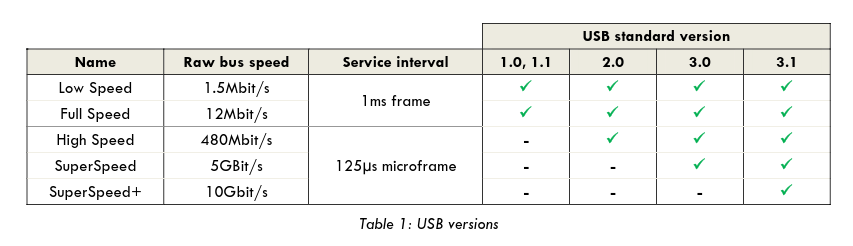
You can see a couple of differences here. Several more “Altset” configurations available on the UAC 2.0 mode, but also an interesting difference is that the Status appears as Running on UAC 2.0 while it appears as Stop in UAC 1.0. Also, the list of cards the KA11 appears listed as “high speed” on UAC 2.0 while it appears listed as “full speed” on UAC 1.0.
That data corresponds well to the table below, on UAC 2.0 on High Speed mode running at 125 us, that seems to be too much for the JP. “Forcing” it to work as UAC 1.0 at full speed and so lowering it to 1 ms per frame it’s enough to run without interruptions.
But wait there’s more.
I checked my Topping DX1 DAC using a USB-A adapter and this is the cards content:
[root@JollaPhone2026 defaultuser]# cat /proc/asound/cards
 0 [mt6858mt6369   ]: mt6858-mt6369 - mt6858-mt6369
                      mt6858-mt6369
 1 [DX1            ]: USB-Audio - DX1
                      Topping DX1 at usb-11200000.xhci0-1, high speed
Let’s check the stream0
[root@JollaPhone2026 defaultuser]# cat /proc/asound/card1/stream0
Topping DX1 at usb-11200000.xhci0-1, high speed : USB Audio

Playback:
  Status: Running
    Interface = 1
    Altset = 1
    Packet Size = 72
    Momentary freq = 48000 Hz (0x6.0000)
    Feedback Format = 16.16
  Interface 1
    Altset 1
    Format: S32_LE
    Channels: 2
    Endpoint: 0x01 (1 OUT) (ASYNC)
    Rates: 44100, 48000, 88200, 96000, 176400, 192000, 352800, 384000
    Data packet interval: 125 us
    Bits: 32
    Channel map: FL FR
    Sync Endpoint: 0x81 (1 IN)
    Sync EP Interface: 1
    Sync EP Altset: 1
    Implicit Feedback Mode: No

.... and more
So the JP is perfectly able to run at the same speed with the DX1 without issues, except the “Packet Size” is 72 instead of 36.
And here’s where my limited Linux audio knowledge ends My DX1 runs as UAC 2.0 without issues, but on the KA11 that doesn’t work well. Hopefully someone can make sense of this.
2 Likes
I may have found a relevant correlation for the dropouts: on my JP2026 (SFOS 5.2), the USB-C DAC dropouts are directly tied to WLAN being active.
-
WLAN off: playback is completely gapless, even while switching apps.
-
WLAN on (Bluetooth off, 5 GHz, strong signal, close to the router): dropouts return immediately.
So it is not WLAN/BT coexistence and not a weak-signal issue. dmesg shows no USB disconnect during the dropouts (the DAC stays connected), but the log is full of connectivity-subsystem errors during playback:
[wlan] soc7_0ForceEnableHostCsrIrq:(HAL ERROR) Polling conn_infra ID failed. (0xdeadfeed)
repeating several times per second, plus conn_wakeup churn and “Consys HW version id retry(10)”. This looks like audio buffer underruns caused by scheduling jitter from the conn_infra subsystem rather than the USB link itself. The active output is the droid-card deep_buffer port (output-usb_device of sink.primary_output) reporting ~10 ms latency, which is likely sensitive to that jitter.
Could others with USB DAC dropouts try simply toggling WLAN off and check whether the dropouts disappear for them too?
Yeah, I can confirm this as well!
- I switched my KA11 to UAC 2.0 using the FiiO app
- Played music (MP3 at 320 kbps) with WiFi on → Audio cuts
- Played music (same song) with WiFi off → No audio cuts
This is not an issue with other DACs, like e.g. my DX1 desktop DAC.
Switching the KA11 to UAC 1.0 also fixes the audio cuts (even with WiFi on)
1 Like