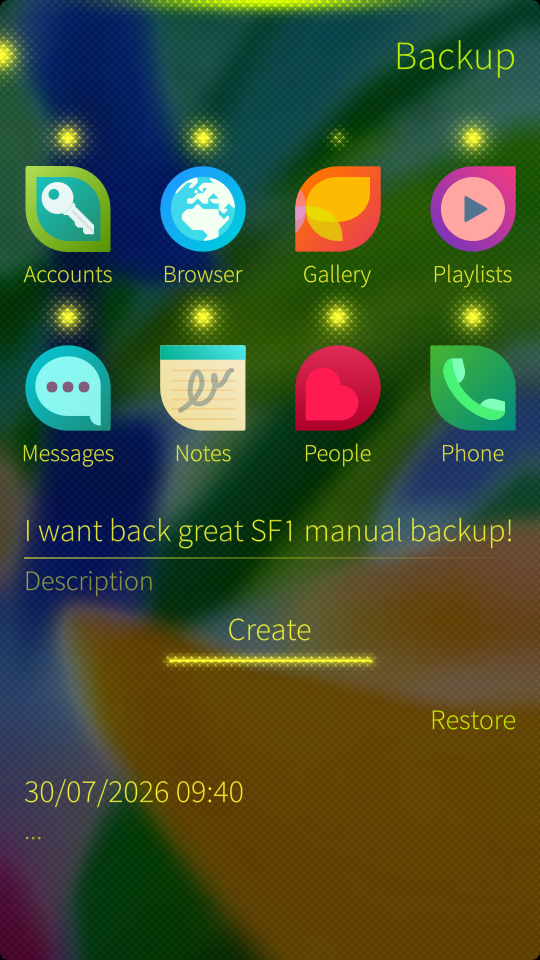
Add options of what a backup should contain, e.g. choose folders/app data which has to be contained
Pros:
- You could split a backup this way, and avoid huge tarballs
- You could prioritize of what to be backup, and avoid huge tarballs
Add options of what a backup should contain, e.g. choose folders/app data which has to be contained
Pros:
i agree that removing this feature was step back like the apple way “we know what you want and what is best for you”…
@Jolla @rainemak please bring back at least option to disable including gallery while creating backup to sdcard…
In addition to the above :
My use case: SDCard backup, no photos/videos/media, jolla mail, few other apps and folders
I have not tested recently, but on my 10iii the backups to cloud is a “.tar.gz” that was actually not gzipped. It was a tar file with a “.tar.gz” suffix. From my tests, it seemed that gzip step was taking a bit of time, so maybe compression was skipped to save battery?
Encrypted backup is a must for using backup to cloud and the reason I backup to SD card instead (which is LUKS encrypted). Backing up to an online file in clear is crazy idea!
I backed up on recently on SD card ( X10III, 5.1.0.11) and the output is a plain tar archive.
Sorry, doesn’t make sense to me:
- encrypted backup
Backups should not be encypted by themselves (nor compressed). This makes it harder to restore, or rather more likely that recovery may fail, because both encryption as well as compression means the whole backup set becomes unusable of parts of it get corrupted.
Uncompressed and unencrypted backup sets do not have this issue.
In addition, backups are currently (at your option), encrypted at rest: You can choose to encrypt the SD card, and NextCloud also has this feature.
- option to save accounts with their passwords
Nope. Passwords belong into password managers, not in backup sets.
- jolla mail backup
Huh? Unless you are using POP3 and permanently store all your mail on the device, what would be the purpose of this?
Both with IMAP and Exchange/MSO365, all mail is stored off-device.
- allow auto backup on SDCard
Absolutely, and there is a FR for this: Automatic backup to SD - #6 by thejiral
I don’t like leaving my emails on 3rd pty servers for too long and I’m not skilled enough to securely run a imap server of my own.
So I use pop3, both on my home pc and phone, with phone configured to leave messages on server. The PC downloads and removes from server (dflt behaviour ). This way I have a handy copy of my emails on the phone.
Long story short, I would like that restoring a backup produces a working device in the state I selected for inclusion in the backup file - without additional fiddling.
Hence including the accounts and their passwords (if they were backed up)
The encryption part is for not leaving passwords/keys in clear, esp if stored in 3rd pty cloud.
I don’t think that encryption should be enforced, but just offered.
The integrity of the backup files, etc. is user’s responsibility.
My backup file being corrupt after encryption:
On the other hand:
The nextcloud instance being hacked:
Nextcloud encryption is not a silver bullet; if the nextcloud server is compromised, an attacker can retrieve the keys: “encryption keys will be present in memory of the Nextcloud server during the time a user is logged in and could be retrieved by a determined attacker” – Nextcloud encryption and hardening
Conclusion: I totally prefer taking the risk of a backup file being corrupt (I can automate a verification on a daily basis and make sure it is not the case) over the risk of data leak.
This! 
And the much nicer glowing pulley menu indicator we can see in the screenshot above.
And the unique glowing indicator dots also for the items in the top menu as we had them in Sailfish OS 2 and earlier. Alternatively, make the icons in the top menu glowy themselves to indicate their current state.
And some glow for the buttons too, as we can also see in the screenshot above. Although I have to admit that the “Create” button in this screenshot isn’t intuitively identifiable as such. But with a frame around the text instead of just a line below the text, this problem is solved IMHO. This frame could also be used as a progress indicator while the backup is created.
@Jolla: After all, you still write in Design Principles - Sailfish OS : “The visual style is simple, though warm and friendly; it is based on metaphors of glass and shining light.“ Remember your own company slogan from back then: “We are Jolla. We are unlike.“ You and Sailfish OS should be. More than ever. Also and especially in terms of visuals and UX.
Or just make it fast enough for modern amounts of images?
Workarounds are always second-best (at most) options.