I’m slated to receive my Jolla Phone soon (batch #3), and I’m poking around online and in the virtual machine to see what it’s like. I found that I cannot set a password manager system-wide with autofill and am instead left switching apps to the password manager, searching for the service, copying the password, switching back to the app, and pasting the password…
In apps, that is usually a one-time deal, but websites tend to log you out after a period of time, meaning you would have to do this dance again.
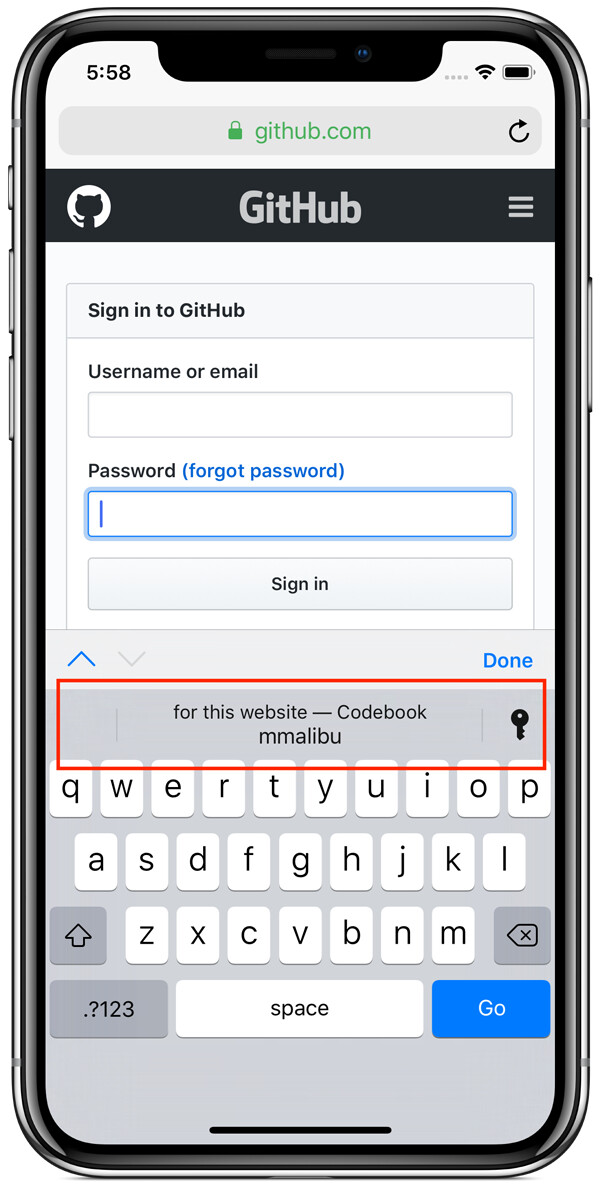
Since the Sailfish UX already incorporates paste functionality in the keyboard, I think something like iOS does would be applicable:
Ah, I did overlook that one, thanks for pointing it out that will alleviate some of the strain. But that still leaves me with another separate password source. I use Bitwarden for all my passwords and would prefer to keep everything in one place.
I’ve found that 1Password (Android) works reasonably well. Although I’ve only been testing the phone (not as a daily driver yet) for a few days.
One thing I have noticed however is that the keyboard now has my 1Password password saved as an auto suggestion. Not sure how that can be blocked and I don’t see a way to clear individual learned words.
KeepassDX lets you autofill passwords in Android apps.
It would be nice to have something similar on the native side.
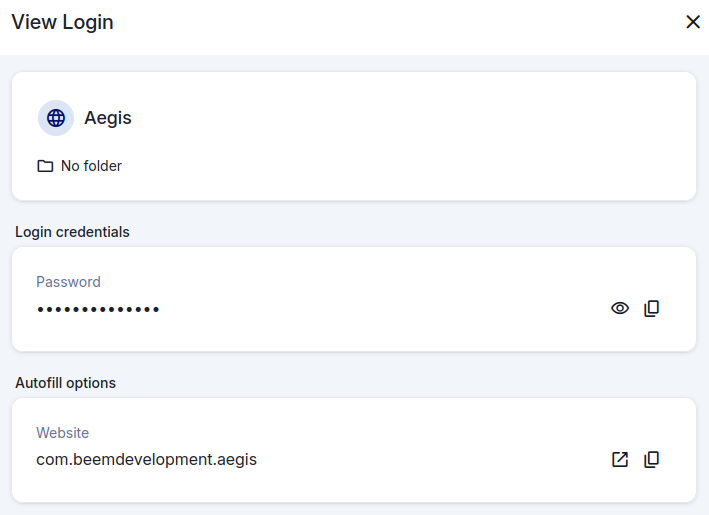
ownKeepass (can be found in Chum) has a nice integration that allows you to copy the selected record’s username and password with cover actions (see top left cover below), but it would be nice to have a KDE wallet type integration, with just needing a PIN to unlock and then autofill
Yeah copy, sure, pretty sure most managers allow that already, but for autofill, is the app supposed to scan your terminal output and figure out itself you’re trying to ssh/scp/ftp… to xxx as yyy? Other apps for secrets access use pin/fingerprint, so also not really useful there
Edit: giving an app access to output of your fingerterm/toeterm/ghosteel etc is a security nightmare for sailjail all just to skip one button press: paste???
The Android app ID is configured as the autofill matcher.
When the user focuses a username/password field and an autofill service is configured, the keyboard would show a “Select password” prompt next to the paste symbol for example. Tapping it opens the configured password manager with the app id filter active where the user can select the correct entry to autofill. If no entry is found with that app id allow the user to search the manager and select one manually (and update the entry but this is up to the password manager itself most likely).
This avoids the issues seen in this thread: the keyboard doesn’t store or learn passwords or create a second source of truth in the browser password store.
For the terminal scenario, you’d assign the same app ID to multiple password entries. The keyboard would still show “Select password”, letting the user choose whichever credential they want to autofill? Just spitballing here on this specific scenario.
And how is this faster than copying a password from bitwarden/ownkeepass app and just pasting? Again, most apps use sailfish-secrets vault you can unlock with pin/fp, if you need a specific password from a list copying from the passwordapp seems faster (and for terminal apps where 90% of password prompts happen seems completely unusable unless all of them get a rewrite to accept passwords from your app per appid and also somehow the apps need to know there is a password prompt, so for all possible cli apps??? Lynx and linksh and whatever cli app you just compiled lol, huge ask vs just clicking paste)
I have always had a delusion, that storing passwords in browser can be a security risk. Now that I did some reading, it seems to be quite safe, but not optimal.
Anyways, I find it somewhat tedious to store ~200 passwords in a browser. I already have them in my keepass database and for sake of simplicity, I’d like to be able have them in just one place. For me, some kind of a browser plugin for ownKeepass would be the best option.
If somebody has the skills, time and motivation, I’d be happy to support that effort financially.
There is keepassxc browser plugin, but what you would need to buy is bringing back plugin support to the browser, check if android ff works with that plugin for free in the meantime (it’s sadly very likely next browser update is in two years, if we go by experience, maybe android keepassxc with android ff work (the nightly or dev(?) andro ff was supposed to support all plugins not only pre-checked so check if that helps))
Just adding my vote for some generic way for a third-party password manager to integrate with the SFOS keyboard. Keep it simple:
Have a button on the keyboard for opening the user’s chosen password manager, which would allow them to find & choose the relevant credential - with an option to send it directly to the keyboard (without copy & paste). Not quite as simple as KeePassDX’s Magikeyboard (where you don’t need to switch to KeePassDX once you’ve found the relevant entry), but good enough IMHO.
Or even better, just allow the user to switch SFOS’s keyboard with a third-party one (and back again). Then someone sufficiently clever can implement something like KeePassDX’s Magikeyboard.
I have hundreds of credentials (inc. OTP) stored in a KeePass database, which I don’t wish to manually duplicate in a 2nd SFOS database & manually sync (I did that once & it was horrendous). And having the keyboard learn my passwords as auto-suggestions sounds terrible for security.
And which app will use those hundreds of passwords? Most apps have a single password (like your xmpp client to your xmpp account, maybe your notes app for notes works fine with fp/pin), why and how would you improvise some password passing client-host system when most of your on-phone access is behind a pin/fd? Even on iphone you unlock your forti/msauthenticator with pin/fp, what’s the use case if not for terminal and it’s impossible to get autofill with terminal?
A password manager is almost essential when you have very long passwords & unique email addresses for each internet account. Copying & pasting from a KeePass app is somewhat laborious & possibly insecure.
@throwaway69
Sorry, I don’t understand your point(s). But bear in mind that I backup my KeePass database to my desktop computer, so I can use (but not update) the same credentials database.
Phone apps don’t really operate with hundreds of accounts/passwords, you usually use pin and/or fingerprint to unlock an app, what app exactly do you expect to need your hundreds of passwords? Terminal with ssh, copypaste should be enough unless you expect your terminal to monitor your output, but then maybe you want android if that’s your expectation