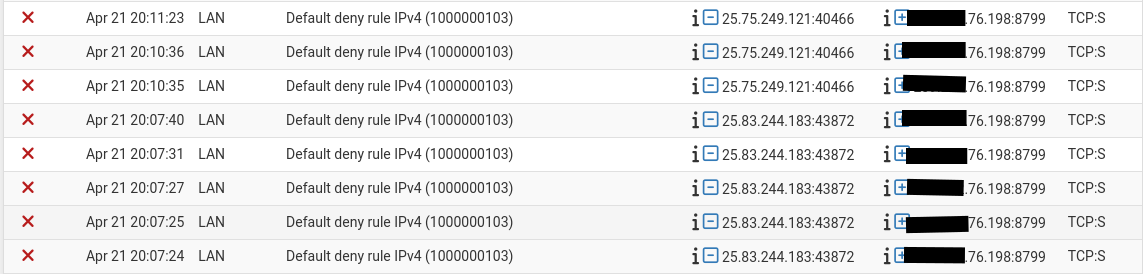
Hello, my firewall caught some strange behaviour that is guaranteed to be related to my SailfishOS installed Xperia 10 III. Just thought I’d ask around to see if anyone here has seen similar behaviour or could explain it to me.
The IP addresses on the right side of the screenshot above are one of my telecom provider’s MMS servers, which I know from the port being used, having manually entered it into the settings on SailfishOS. However, the 2 IP addresses on the left are not anything I recognize. Some whois requests say the IP addresses belong to a range assigned to the UK Ministry of Defense. However, my firewall is listing this as a LAN initiated request, and I’m definitely nowhere near the UK, and my LAN has the standard 192.168.0.0/16 assignments. I know this request is somehow involving my Sailfish device, both from the timing (I was fooling around a lot with re-flashing and setting up my Xperia earlier that day), and because my Android devices never contact MMS servers through my WiFi network.
Again, just wondering if this can be explained by anyone here or if similar behaviour has been seen by others in the community…
One of the activities of RIPE is to maintain a database of European IP networks, DNS domains and their contact persons and other infor- mation needed for the technical coordination of IP networks. This database is called the RIPE Network Management Database or sim- ply the "RIPE Database”
Huh, I must have made a pretty big typo. Still confused as to why it’s showing up as a LAN originating IP, and why it would be contacting the MMS server. Perhaps a question partially better suited to pfSense’s forum.
Caught the behaviour again, though with IP 25.211.140.233. ICANN is corroborating my initial finding this time. Anyways, I wonder if this behaviour of trying to send/receive MMS via WiFi is a known bug? As far as I can remember they’ve always been forced to go through cellular data. Perhaps it is why MMS refuses to work here in Canada. That or I need to phone my carrier’s tech support to force associate my IMEI with my account, since it doesn’t seem to do it automatically…
On another note, the folks over at the pfSense forum suggested that this behaviour could indicate a problem with network stack configuration. Does anyone know how I could check on and troubleshoot such things?
I’m just looking for pointers in such a direction really. I’ll link the thread for you to take a gander if you or anyone else so desires. They’re probably using the more technical language you’re looking for.
Some of the big orgs that got large allocations way back when have returned parts of their address space to alleviate the IPv4 address shortages, in addition to that from what I have seen on my router Jolla “bleeds information”/bridges between cellular and wifi connections (security issue).
These two factors together could mean that your firewall is seeing packets that should have been sent out over your phone’s cell modem.
(It could also be on purpose assymetric routing so that when you are on wifi you get fast downloads but said downloads won’t be interrupted if you move off wifi though that sounds very iffy to me)
Well, my carrier here in Canada does not own any IPs in the 25.x.x.x block at all, and current IP while on mobile data in my area is not a 25 address either. So while my firewall is seeing something triggered by uploading/downloading MMS content, something’s going wrong with the network software somewhere. And the two experienced networking people over at pfSense seem decently certain about their conclusion, I just don’t know where to go from there.
What happens with android device that uses mms or rcs that connects to your firewall device? Are they passing through without alarm? Maybe that’s the problem and you’re missing how google servers are passing those without triggering an alarm
Edit: with sim in and sim data off they should be using same communication tracks to communicate mms/rcs, no?
MMS never goes out over WiFi, only mobile data, on my Android device. My service provider’s MMS servers are programmed as DNS hostnames, so my firewall (which is also a DNS resolver) would log if those requests were ever going through it whether blocked or not. Only the Sailfish device sends anything related to MMS through WiFi. And I have painstakingly removed nearly all traffic to anything Google with my firewall, certainly anything DNS related.
MMS does not send or download with mobile data disabled here in Canada.
The thing is your carrier doesn’t need to own it, especially with blocks belonging to defense orgs that often are kept airgapped parties in severe need for IP space may play loose with the rules and “adopt” some/all of that space as internal address space for their CGNAT.
Should they? Absolutely not, but people do strange things to get things working and as long as the UK MoD doesn’t publish a route or they make sure that the internal address space is not being published out it will probably work.
Nah, I was receiving mms/rcs over wlan when in US on an unsupported band with US simcard, so this definitely can go over wifi
Literally in NY with XV and don’t remember if it was verizon or tmobile sim, zero ‘mobile connecitivity’ still chatting over sms/rcs (android mind you, would probably have been fcked on sfos) when had wifi

 This is in no way a specific enough description to warrant a question like this.