Hope your app, will come soon.
1 Like
Discovering meshthings thank to this thread.
I knew the principle, ofc, but that was kind of ‘floating’…
Very nice to see things moving in SFOS about mesh.
And soon or later necessary. Perhaps. Anytime desirable, at least. Very interesting philosophy anyhow.
Just to say you can count me in.
4 Likes
My MeshCore efforts are currently on hold because I still can’t figure out why my direct messages are being rejected. I’ll come back to it and try it again when I have more time.
5 Likes
The Meshcore system has even more components now. Meshcore OS has been launched so that makes three firmware options - Meshore OS which is still developing and Ripple Firmware ( Buy Me a Coffee) for T-Deck devices both with paywall, then Community on Github for many other devices. Plus the setup for repeaters which is web only with Meshcore NZ, then administered with a paid for app. All quite straightforward really. The setups have to be done with either Chrome or Edge browsers. Messages however are encripted. Then there’s Threema for a small one time payment . And the great team at Jolla.
Meshcore Direct Messages can only be sent if you have been entered in the other user’s Contacts list.
FWIW, if you have Android App Support, you can redirect bluetooth to the Android container. Code snippets here and in the forum. Run as root in a shell, or use qCommand.
I have successfully paired with T-Deck and T-Echo, and use Meshtastic app from F-Droid in my XA2.
But, for devices with support for USB serial devices (so, not the XA2 annoyingly) the Python CLI via USB might work as well.
Of course a native app would be nicer still.
2 Likes
Well, guess what!
First, pair your Meshtastic device via bluetooth to your Sailfish-device - just the regular route, so not via the Android container. I use a LilyGo T-ECHO.
Then open a shell on your mobile:
[defaultuser@XperiaXA2 ~]$ mkdir meshtastic
[defaultuser@XperiaXA2 ~]$ cd meshtastic
[defaultuser@XperiaXA2 meshtastic]$ python3 -m venv venv
[defaultuser@XperiaXA2 meshtastic]$ source venv/bin/activate
(venv) [defaultuser@XperiaXA2 meshtastic]$ pip3 install meshtastic[cli]
(venv) [defaultuser@XperiaXA2 meshtastic]$ meshtastic -b --dest '!4ef06944' --text "Hello from SailfishOS!"
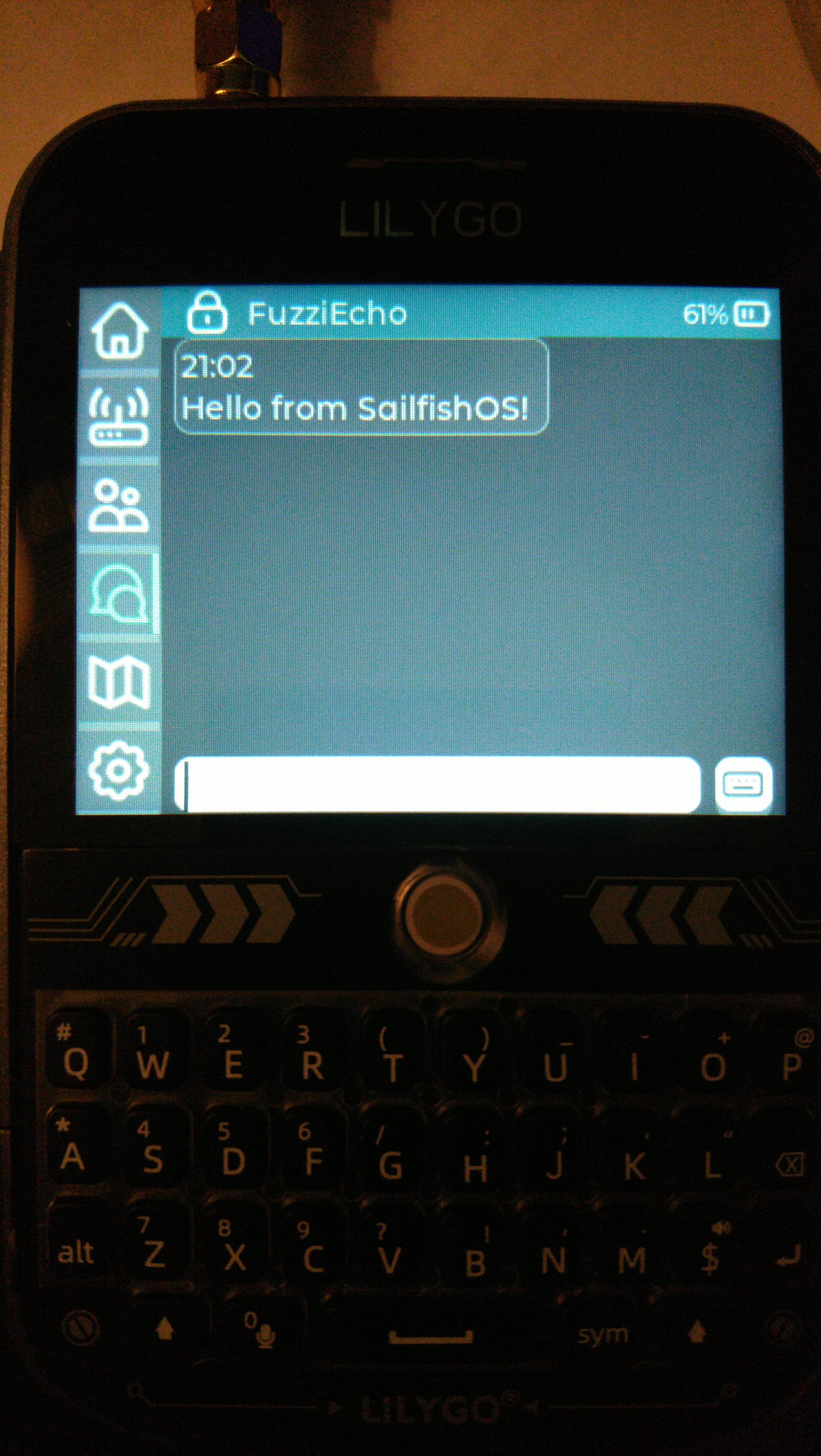
That’s it! It Just Worked! (I was surprised as well)
Just the -b parameter works, but is slow to detect the device. You can add the BT MAC address for quicker action.
3 Likes
Thank you for that information, I’m afraid that it is rather beyond my skills level. I have Android App Support on both my Xperia 10 iii and C2 with the Aurora Meshcore app downloaded, its just that Bluetooth wrinkle. I can copy a CL - and only use Linux GNU with different distros over various machines except for stuff that will only run on Windows which its still possible to use just with a stripped out Local Account and now have a T-Deck + and a Pro . I had to carry an old iphone without a sim as well a Sailfish phone and the companion receiver. Its very difficult with software different for every device and all the changes/updates that happen frequently.
It is really easy and fun. I’d recommend you to reconsider this question.
BT-connect to your device
Enable Developer tools in Settings. A terminal icon will appear on the app grid.
Open the terminal and type the commands.
The most difficult is perhaps to find your device’s mac address.
And that’s it!
Is there a way to monitor decentralised autonomous networks when we’re out?
Just to have an idea of which/how many already exist in my area?
1 Like
Thank you for the information, I’ve give it a try. The MAC address is in Settings - About
Hi there, I would be willing to help you test. I have several Mestastic and MeshCore devices and a C2 and would love to get this working.
3 Likes
Thank you for the kind suggestion, I have not been able to reach testing yet. I could not follow the suggested steps already posted here . I cannot program, if the CL scripts shown do not work I’m flumoxed. The BT problem is not limited to just Meshcore, there’s another thread here just about that. To use Meshcore I’ve resorted to an old iPhone without a simcard and a companion device. And T-Decks, a Plus and a Pro. The Ripple firmware on the Plus is OK in sofar as it goes but needs coding to work properly, load map tiles and update but Andy’s MeshOS looks promising. The Pro is way behind. The factory firmware has 4g calling, which works and no NMEA so far as I can see. But I cannot find a way to keep that on the device and have mesh firmware on the SD card. The M5 loader and Ripple offers are way beyond me. I can download and extract the files but they need writing to a file system in Python on the SD card first, the files are in formats that are not familiar to me and Balena will not flash them. I would happily pay for guidance.
A standalone Mesh device with 4g calling is very appealing. I did note the PinePhone Pro had a LoRa Back cover in that thread here as well.
Have you been able to test Meshuga with any of your Meshtastic devices?
(Only wi-fi connection is supported at that time)
I do not have any Meshtastic devices. The lower packet density and unlimted hops with Meshcore might possibly result in fewer lost messages. Meshtastic defaults broadband transfer onward connection at 7 hops. I do not use any Android devices, and use an old iphone without a simcard for a companion device only for repeater and room admin. The bluetooth disconnection issue makes it unusable I think for being out and about. And I would have to carry and keep charged three devices. So I am concentrating on standalone mesh devices. I use both Ripple and MeshcoreOS on the T-Deck plus, both work and have pro’s and cons . I use Ripple on the Pro, just starting to use it. Different again. I’ll wait and see what comes along - the P4 mighr be interesting when it has a sensible battery. And a LoRa back with firmware for my first batch next Jolla phone (when it comes) would be amazing
Ordered one ilygo and will start with midhtastic soon 
Good luck with the T-Deck. You might want to brush up on Python to access the most up to date firmware and install the M5 Launcher to enable different meshes on the same device - for instance both Meshcore and Meshtastic
1 Like
Is meshcore better? I understood, the most common is meshtastic.
I would not say which is better, they are different as I described in a previous post. The way to decide is to try both.
Meshcore is UK based with a small number of what seems to be full time devs here and and one source in New Zealand. Meshtastic is US, with a different dev setup. Support for both is Youtube and Discord. Meshcore also distribute Ripple firmware and have their own MeshOS which seems to be concentrated now on the Lilygo P4 with OLED GUI display, currently unavailable for 868mHz, probably that will change after the end of the Chinese New Year holiday. The lowest cost option good for familiarising with flashing and setting up as a companion, repeater and room server, remote management, is a pair of V3 boards . With cases and batteries added about £45 for the pair. Much bettter and easier of use is the Seed t1000e which is everything in one case ready built with large battery and performs well for either system. I have mentioned before that the Meshcore companion app downloaded from the Aurora store does not work with Sailfish because of the contained Bluetooth component is flagged as dangerous. A fix has been kindly offered here, I have not managed to implent it yet. I have used an old iPhone with BT5 but the bluetooth connection with the companion device just drops frequently and at random. An acknowledged built in by Apple fault. The T-Deck standalone is available as either a board needing battery and case or as a fully built Plus. I thank Jolla every day for Sailfish.
1 Like