Hi,
i plan to implement a MensaMax client in the near future, since i need this to order lunch for my kids. Since there is already a version for UBTouch available (OpenStore), it should not be difficult to make use of the API. In a first step it will most likely be a read-only version (since i often foget to order lunch, and need a way to quickly check the orders).
Help would be appreciated, if there is anybody who is also interested in this kind of app.
Cheers,
Andreas
3 Likes
I was using it with the Sailfish-Browser, but first kid finished today, so no new orders until in maybe 3 years.
I am interested. My daughter is in a school using that. What do you need in terms of help?
Should be easy enough to port as it’s qml-only it seems.
One thing I struggle with after porting one-and-half UT apps is translating the right sizes of their ubiquitous units.gu() function.
I made this as a compat component but it’s not quite right yet:
import QtQuick 2.6
import Sailfish.Silica 1.0

/* compatability for Ubuntu Touch "unit.gu(X)" */
QtObject {
/* https://docs.ubports.com/en/latest/humanguide/design-concepts/units.html

Most laptops 1 gu = 8 px
High DPI laptops 1 gu = 16 px
Phone with 4 inch screen at HD resolution (around 720x1,280 pixels) 1 gu = 18 px
Tablet with 10 inch screen at HD resolution (around 720x1,280 pixels) 1 gu = 10 px
*/
function gu(inval) {
const fact = 0.3
if (Screen.sizeCategory == Screen.Small)      return Theme.dp(fact * 18  * inval)
if (Screen.sizeCategory == Screen.Medium)     return Theme.dp(fact * 16 * inval)
if (Screen.sizeCategory == Screen.Large)      return Theme.dp(fact * 8 * inval)
if (Screen.sizeCategory == Screen.ExtraLarge) return Theme.dp(fact * 10 * inval)
}
function dp(inval) { return Theme.dp(inval) }
}
With this saved as UbuUnits.qml you can then simlply put in Main.qml:
property var units: unitContainer
UbuUnits { id: unitContainer }
and you don’t need to replace all the units calls separately.
I would love to hear which values work for you.
Other Ubu compat tips:
 sed -i '/import Qt.labs.settings 1.0/d' *qml
 sed -i '/import Ubuntu.Components 1.3/d' *qml
Their Settings is our Nemo.Configuration::ConfigurationGroup
Their MainView is either an ApplicationWindow or a Page with some compat properties.
2 Likes
Most likely testing, but we will see, once i am ready…
I finally release a first version of the app - you can find it here:
You can login (you need an account), create an account and view menus for the current and next/previous weeks. You can also see which menu has been selected. General menu data should be displayed - please compare with the web application, to see if something is missing.
So far it is a read only view - but i plan to add at least the ordering of the menu.
Feed free to check it out - i am open for feedback. App needs some polishing an proper translations and an icon. Expecting your feedback 
5 Likes
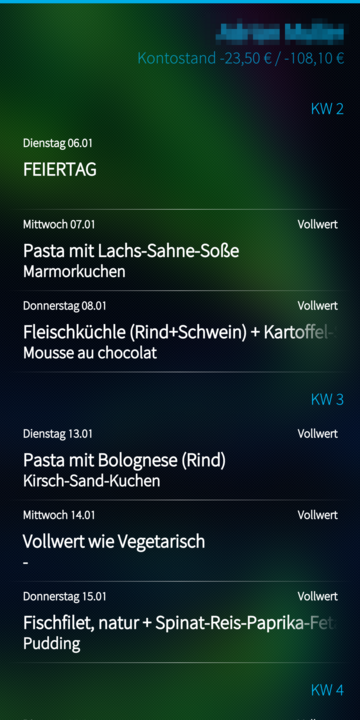
Just release a new version of the MensaMax application. The new version comes with
- Big UI cleanup - display ordered meals in list
- Allow subscription / unsubscription of meals
- German translation
- Icon added
The version can be downloaded from here: MensaMax | OpenRepos.net — Community Repository System
The main screen of the application now looks like this:
If you are using the Android app, give the SailfishOS version a try. Feedback appreciated.
Cheers,
Andreas
6 Likes
I just gave it a try and I like it
The school my kiddo is on uses “mensahome.de”. While the initial attempt to use it caused an error message, trying it again without changing anything suddenly worked.
I can see the balance on the upper right corner as well as the current and the upcoming two weeks, i tried cancelling a day as well as ordering - all seems to work fine. I can also see the “userdata”.
Minor details for the UI/UX:
- The “Server” field isn’t very clearly named. Maybe it should be relabend to hostname with an example.com or something to make it clear. Because I originally thought it should be a full URL including
https:// - which it obvisouly wasn’t.
- Going back to the account list screen might be a back-button rather than having to “abmelden” via pully menu. That would be more sailfishy i think, but maybe that’s just me..
So, I like it
2 Likes
Hi,
i also noticed the error message that is sometimes returned when logging in. For some reason this somtimes works, and sometimes not. No idea what is the problem here. Just retry - the second time it usually works.
Regarding the two feedback items, i will have a look. Both should be implementable. I will create tickets for the two items and when i have the time, i will try to implement them.
Glad you like the app
Cheers,
Andreas
1 Like
Hi,
the details reported by you, should be fixed with Version 0.2.2, that i just released (on openrepos). Feel free to test. I also translated some missing texts (you will only notice when using the device in german). Also the handling of holidays should be better now - in case of holiday, no meal should be selectable. If that is not working for you, please report back, every school seems to do this a different way (just using some text), because there seems to be no proper way to do this on an organizational level.
Cheers,
Andreas
1 Like