REPRODUCIBILITY: 100% ?
OS VERSION: 5.0.0.77
HARDWARE: Xperia 10 II - Dual SIM
UI LANGUAGE: Finnish
REGRESSION:
DESCRIPTION:
Not sure if this has been already reported, couldn’t find.
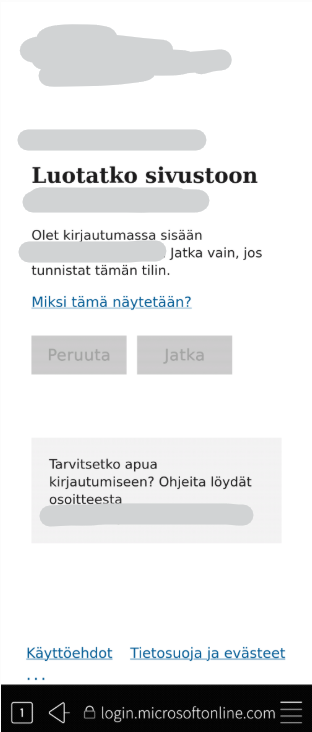
Microsoft 365 account login fails at (Domain Confirmation Dialog - Microsoft Support)
PRECONDITIONS:
365 account is added or needs a new login
STEPS TO REPRODUCE:
-
Phone noted that the account needs re-login
-
Clicked the account in Settings, login is opened in the Browser
-
I enter my username, password, MFA (with OTP code)
-
The Domain confirmation Dialog page opens, with options to Accept or Cancel.
-
When I click Accept, the buttons get greyed out, but nothing further happens and the login cannot be completed.
EXPECTED RESULT:
Domain confirmation dialog accept would pass on and the login get processed.
ACTUAL RESULT:
Cannot accept the Domain confirmation dialog, ie. cannot login.
MODIFICATIONS:
ADDITIONAL INFORMATION:
Has happened before, but I managed to eventually bypass it somehow (repeated tries, browser tag in desktop mode) but couldn’t make it happen this time.