likely used for engineering test builds as its way worse screen
2 Likes
And on the viewtrix page for the VTDR6126 it says that the panel technology is “LTPS OLED”. Does that mean either LTPS or OLED or is this some combination? It also says the panel can do 144Hz but obviously we have a new 90Hz version according to the panel name.
Panel technology has become so complicated I have lost the plot a long time ago 
1 Like
they have 3 variation: 90Hz / 120Hz / 144Hz (also resolution differs between these)
LTPS OLED (Low-Temperature Polycrystalline Silicon OLED) refers to the underlying thin-film transistor (TFT) backplane used to drive the individual self-emitting pixels on the BOE AMOLED panel.
11 Likes
It should mean both in combination. So it is definitely OLED and definitely 90Hz, very nice to hear (I was not doubting Jolla’s marketing, though). So any contrast and frame rate issues should be from the software/OS side, it seem
2 Likes
I have multiple keyboards (keyboard layouts) added, and because of that, when I type at my default comfortable speed, sometimes I change layouts, even if I did not intend to, because I think when I press with two fingers at once, it detects that as a swipe to change the layout (because you can change the layout by dragging horizontally between keyboards). Can this gesture be disabled? It kind of irritates me.
3 Likes
It’s not ideal, but you can uninstall any keyboards you don’t use in System Settings, under Text Input.
Perhaps someone else has a better solution…
1 Like
A good fix, not elegant, but works, thanks! I dont know how Sailfish’s Keyboard works, but it feels like gestures are programmed into the keyboard, and there’s no (config) file for gestures/settings you can tinker with
Happy to know the screen is 90Hz, thanks @ahjolinna !
@thejiral I checked again the video I took, and you are right, 3 frames between two updates actually, which is in line with 90Hz.
So all that’s left is the input lag, my “feel” mixed up those two in the end, and it’s the solvable one, nice!
I’ll try to look more into it, I hope the devs will take a look too. It’s simply about getting most out of what this phone can do.
9 Likes
That’s a long-standing papercut bug, it’s been there since that gesture was introduced (ten years ago in 3.0) and it tends to happen more often when the device is running out of memory. It’s probably some parameter that needs to be tweaked a little, but no one’s done so yet.
3 Likes
When I get my Jolla phone, I’m expecting there to be quite a few things that they have not yet gotten around to optimising. Which is fine, they can’t do all development in such a short amount of time. The most important thing is that the hardware works, and the software doesn’t crash or misbehave (too often!). Optimisations are the last thing to worry about, and the least important.
12 Likes
I want to ask more about this, did you swap yours for the Jolla already, if so, how was your experience migrating it from an iphone 12, or rather iOS in general? Reason I ask is I have one too that I’m replacing, especially because of the battery life.
2 Likes
I have not fully retired the iPhone12 but turned it into an “Ipad Mini”, without sim card, no phone number, purely Wifi. That is because I still want to use it with my infrared camera and as a “better camera” in general. Please keep in mind that I use the Jolla Phone so far purely native, without a single Android app.
There were two apps on the iPhone that are probably not working on the Jolla Phone (even with app support): ID-Austria and the Raiffeisenbank banking app (Elba). For the former I have gotten a Go Trust Idem key. That enables access but not extensions (necessary every 5 years it seems). Good enough. The banking app would have an alternative key reader one could apply for. I have not done that yet but intend do. The banking app still works on the wifi based Iphone.
The UI is very different on the Jolla Phone. One has to get used to it, retrain muscle memory but honestly I like the Sailfish UI and gestures, quite possibly prefer it already. The home screen with running apps is considerably more useful than I expected and even the event view works very well and I always hated how iOS handles notifications.
A shortcoming of the Jolla Phone is probably that its just not quite as polished feeling, especially in the browser where you can feel a bit of stuttering, depending on the site. Perfectly usable but like I said, feeling a bit less polished. Another one is the camera, or rather the camera app. The iPhone is simply on a flagship level, almost any situation, even very bad light or dark night images still deliver nice images on the iPhone. I think the Jolla Phone camera can deliver very nice images but one has to be more considerate and dynamic range is certainly more of an issue. There is a plus though as well. I felt that iPhone images do feel a bit fake with all that processing. You really see how the phone is trying to sharpen everything.
What was the most surprising maybe is, how the native Jolla Phone browser can handle Youtube without issues and does so with no ads in the videos and basically no ads in the video list (maybe the host blocking list helps that I use but I think there was very little even before). On the iPhone that is a pain. I used the Brave browser for youtube, everything else, including Safari is absolutely miserable there.
Battery life is something I can only judge from purely native usage (no android apps support at any time) and it is good. Much longer than my 2-3 year old iPhone and I think also better than when that was new as well.
26 Likes
A thing I first paid attention to today: the wifi receiption seems a bit low. Both at home and at work with easily tens of networks visible to other devices (2,4/5/6 Ghz, both weak and strong) the phone can only see about 2-8 at most. At work while sitting less than 10m away from an access point, the main 5Ghz network was only about 60% and the 6Ghz network was not visible to the phone at all.
On the positive side my home network and the main network at home both work fine, and at work roaming between several access points seems to work much more reliably than on my Xperia 10 II before.
4 Likes
I have noticed this also and I asked on this thread earlier if someone had experienced the same. Couple of weeks ago I made some 5GHz WLAN comparison with JP, FP5, Pixel8 and Huawei Mate20 Pro, and the the result was that in every situation the Pixel8 was the clear winner, FP5 seems to receive a little bit better than JP, and Huawei was always the worse. I was looking the signal levels from OpenWrt wireless stations -section, so they should be somehow comparable. (for example Huawei in my opinion is too optimistic with it’s own signal bar) The signal levels change a lot depending on the position etc, but after numerous tests the big picture is clear. Here are the averages I have noted back then:
Huawei -78.8 dBm, Pixel8 -63.0 dBm, FP5 -69.0 dBm, Jolla Phone -71.8 dBm
Some measurements were made locating the phones at the same exact spot one by one, some others putting them all together, so don’t take this as a scientific research.
Also mobile signal level seems to be constantly low when looking at signal bar. It’s almost always at minimum level. I don’t know if it’s SailfishOS signal bar that reacts only on higher reception because on FP5 (SFOS 5.1) the signal is not any higher. But when I put the same sim card in Pixel I have 3/4 bars.
I’m a little bit worried if most people have perfect signals, it would mean that my phone is defective, or antenna wires are loose etc.
To give something to show, I took a screenshot of the wlan 5G signal levels at the moment.
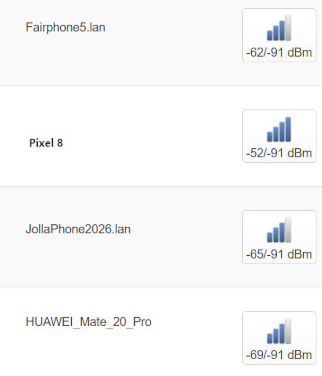
4 Likes
Judging by the post, you mean 5GHz WLAN, not 5G mobile data internet. Sorry for being pedantic, though.
Very interesting data, though, thank you for sharing it!
Mobile signal is also something I find interesting. I tested two older Android devices and from what I can tell Sailfish OS is more reluctant to show a full signal bar, compared to Androids. Even though I have noticed that mobile 5G signal in dBm was better on the Jolla Phone (2026) than those Android devices.
2 Likes
Yes, I’m talking about WLAN 5GHz, it was there, but I edited my post a little to be more clear. I feel the signal level problematic in my home, not every corner is now covered for JP…
1 Like
From my usage and unscientific testing so far, mobile data and Wi-Fi hotspot results are interesting, to say the least.
For mobile data, I am getting around 150 Mbps at home, which is a shame, I have to say. At the same time and place and carrier, my older Androids get around 300-400 Mbps. Signal strength dBm was on par or better on Jolla Phone (2026), by the way. Comparing spec sheets of my Androids and Jolla Phone (2026), AI was saying that Jolla Phone has a crappy modem, and that I will never get close to 400 Mbps with this new phone.
Which is why I never rely solely on AI (and also despise it for numerous reasons).
Because, get this, at work, I got record speeds, like more than 500 Mbps! I never got such great speeds with my Androids which had the same carrier. And I also made sure to bring an Android with me, and yeah, Jolla Phone beats it hands down - 260 Mbps download and 15 Mbps upload on the Android versus 500 Mbps and 60 Mbps, respectively. As for signal strength, Jolla Phone (2026) was consistently getting a better signal here.
So I am pretty perplexed as to why it’s handing me record speeds at work, but at home, I am getting only half of what I used to.
And I am also perplexed as to why USB tethering seems to also give slower speeds than the phone can achieve. For example, on my Android, if I get 300 Mbps on it, I can also get 300 Mbps through USB tethering. With the Jolla Phone (2026), if I get 150 Mbps, I get around 100 Mbps through USB tethering. I followed Sailfish OS docs for enabling USB tethering.
For Wi-Fi hotspot, things are also interesting here, because I get only 50 Mbps download, which is pretty terrible in this day and age. Though this can be explained (somewhat) by the fact that Wi-Fi sharing only uses Wi-Fi 4 and I get a Tx rate of 72 Mbps. But why Wi-Fi 4? I don’t see a way to change it through GUI.
8 Likes
I have been posting maybe not-so-great replies the past couple of times here. Though I admit, it can be a pretty rocky start for sure. Also, to put it in context, Jolla as a company is really small, did not have much money to move around for like the past decade or so. Furthermore, I got the phone during the event, so, in my eyes, I still have “beta” software, which is not indicative of the whole experience that will be a year or a couple of years down the road.
So that’s why I want to post a more cheering reply here. I have fully moved to the Jolla Phone (2026) for the past week or so, and honestly I like it really much. The phone feels really solid and comfortable in the hand, is light, and buttons have a nice clicky feel to them. Everything works as expected, and I haven’t really encountered any life breaking bugs in the software side of things (apart for a few rough edges, like the Wi-Fi hotspot and mobile data, but I feel they can be optimized/fixed down the road). Bluetooth on AAS worked on first try, and it worked really well, no dropouts in calls or anything. The phone can sometimes feel warm on the top side (that’s where the SoC sits, presumably), but it’s definitely a lot better than the hand warmer Androids of today, which is really neat. Oh, also, I have to give kudos to Jolla for the battery part of things. This thing is really lightly sipping the battery juice. I had to charge my previous Android phone at least once during a full workday, but now with the Jolla Phone (2026), I just don’t! And the fact that it has a user replaceable battery which Jolla will start selling soon is absolutely amazing. In my eyes, a smartphone can have a worse/bad, but still usable camera, display, speakers, etc. but it can’t have a bad battery - what’s the point of it being smart and portable, if you’re always on the lookout for a receptacle?
25 Likes
I appreciate realistic criticism. In my opinion, being realistic and pointing out a company’s shortcomings instead of acting like a corporate sycophant is a very good thing. Otherwise, we all know how easy it is to praise the Jolla Phone as if it were the best phone in the world just to fit in with the community and get likes. Honestly, I do not like choosing that kind of approach either.
That is why I want to thank you for being yourself and for expressing your criticism thoughtfully and politely.
Jolla is, after all, a company that is still at the beginning of its journey. What makes it stand out to me the most, and what I would even describe as futuristic in a way, is its software. I have seen the car the company is currently driving forward, and it looks good. The one thing I genuinely wonder about is what their dream at the very top of the mountain really is. Where do they ultimately see themselves?
Of course, I suppose no one except the CEO can answer that. We will see it as the company progresses in the coming years. In that sense, I truly admire Jolla. It made me feel very proud and honoured.
8 Likes
The mobile signal level handling is being fixed. It’s a known issue that it can show too low values in some cases.
22 Likes