How is Angelfish currently?

Very interesting. However, 20 minutes later, I still have no idea what syntax that file follows.

There’s kwriteconfig6 and kreadconfig6 but they are meant for changing/reading single values.

It seems kdeglobals is always created by some gui app.

find / -iname '*kde*' 2>/dev/null returns no example for what that file might look like or other hints.

OTOH I have a lot of Qt6 stuff now since I installed angelfish so the solution might still be found right on my phone.

to my knowledge, answer to all these is ‘no’. But it is always possible to get into Angelfish code and start adding this functionality. I am sure they will accept working PRs, as they accepted mine.

Easiest is to install KDE setup utils on PC and configure colors there. Then just take generated file and transfer to device. That’s a way I did it.

Maybe we need some separate thread. Angelfish is not abandoned, reply to question over here.

2 Likes

using this config file as example should also work, https://github.com/KDE/qqc2-breeze-style/blob/master/style/BreezeLight.colors
(save as .config/kdeglobals)

4 Likes

On the topic of styling the UI, note that qt-runner has the ability to apply a QtQuickControls conf file.

Place a file called qtquickcontrols2.conf into ~/.config/qt-runner and it will be applied.

For a short example, see PR#1, for more details, Qt Quick Controls Configuration File | Qt Quick Controls | Qt 6.10.1

2 Likes

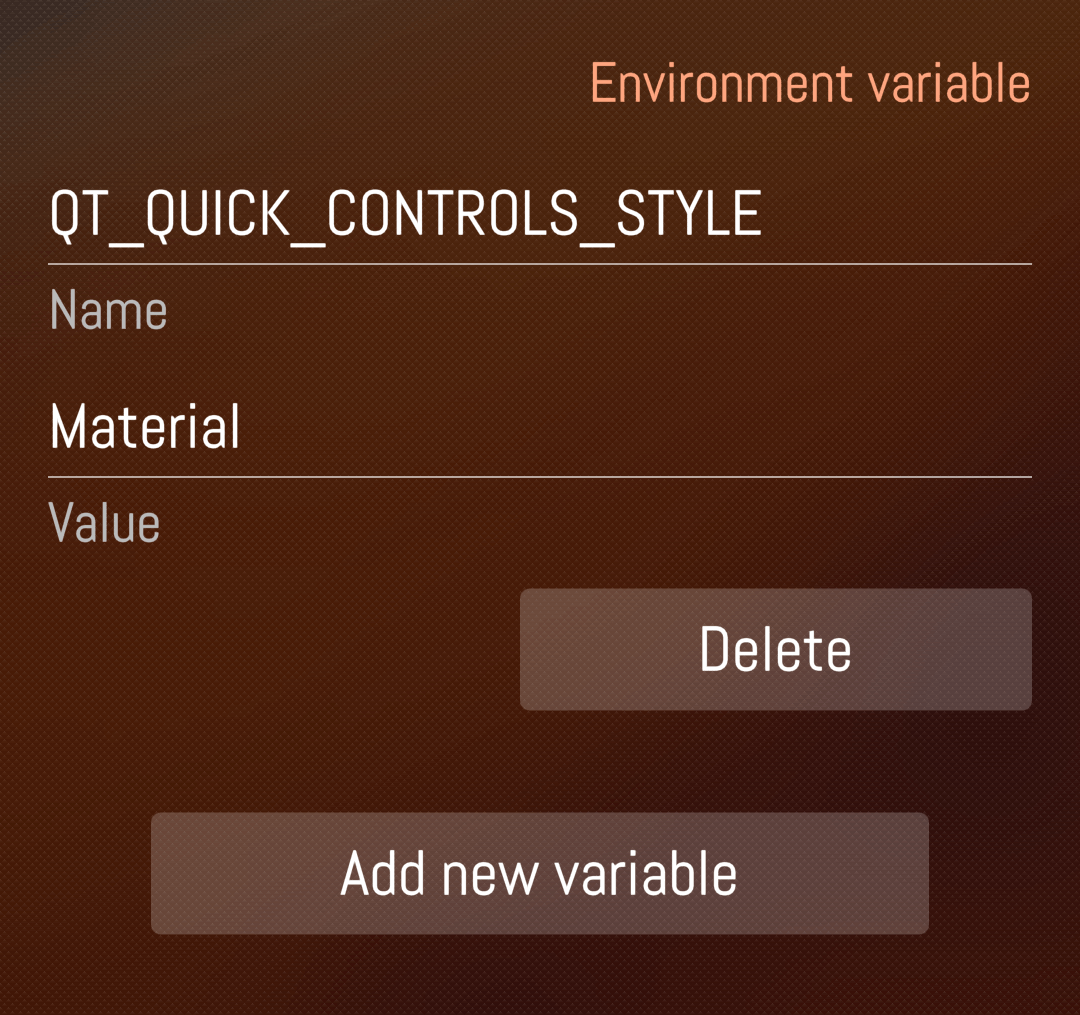
I managed to make Angelfish use the Material style by manipulating the env variable in Qt Runner:

That works.

The same can be achieved by first deleting that variable, then editing ~/.config/qtrunner/qtquickcontrols2.conf:

[Controls]
#Style=org.kde.breeze
Style=Material
FallbackStyle=Universal

[org.kde.breeze]
Font\Family=Sail Sans Pro
Font\Weight=Light

[Material]
Font\Family=Sail Sans Pro
Font\Weight=Light

But now there’s no icons at all. Maybe I now need to specify an icon theme explicitly?

1 Like

for testing environment variables you can also start angelfish with terminal like this, e.g.:
qt-runner env QT_QUICK_CONTROLS_STYLE=Material QT_QUICK_CONTROLS_MATERIAL_FOREGROUND=Blue /usr/bin/angelfish

Sharing of the clipboard-content like copy text or paste between Angelfish ↔ SFOS doesnt work.

1 Like

Adding the following variable switch Material into Dark theme:
Name: QT_QUICK_CONTROLS_MATERIAL_THEME
Value: Dark

But still no icons.
I first tried to turn Breeze in Dark mode but with no success.

1 Like

I confirm that sided to the BreezeLight.conf file pointed by @mive there is a BreezeDark.conf file.
Once this file copied as ~/.config/kdeglobals Angelfish starts with dark theme and icons (using default qt-runner variables).
Thx.

4 Likes

So, I downloaded BreezeDark.conf, copied it to /home/defaultuser/.config and renamed it to “kdeglobals”. Is that correct? Or do I have to create a folder “kdeglobals” (I don’t have this folder) and copy the file there without renaming it? Thanks!

2 Likes

You’re first guess seems correct. Did you check the result ?

1 Like

Perfect! That did the trick.

This is really cool. I love the dark theme. Silica would certainly be better, but a light theme is my setup complete alien.
Now clipboard exchange and working drop down menus are the remaining missing things.
I use Waydroid less and less. A solid browser is sooo essential

1 Like

I would like to have an option to always keep the navigation bar visible (and dont show the tiny url line) as the transition between both feels somewhat choppy

1 Like

I can confirm that setting BreezeDark.colors works. Nice.

And one can fiddle with the colors.

I’d still like to grok more completely how all this KDE theming works, without the GUI tools at hand.

Change icon theme?

For all those who have yet to discover it:

You can swipe left or right on the URL bar to go back or forward.

8 Likes

I get an error message when following the wiki for installing Angelfish (on both my devices FP4 and C2):

Fatal error: nothing provides ‘libQt6Core.so.6()(64bit)’ needed by the to be installed angelfish-23.04.3+kf6.20251130080443.9.gcff3199-1.19.1.bso.aarch64
Nothing provides ‘kf6.qqc2-breeze-style’ needed by the to be installed qt-runner-qt-6-0.4.6-1.9.1.bso.noarch
Please help, I would love to try out the browser :slight_smile:

packages are there, not sure why they are missing
https://repo.sailfishos.org/obs/home:/piggz:/qt6sb2/sailfish_latest_aarch64/aarch64/

did you refresh packages after adding repository urls?

Yes, ran the refresh command listed in the wiki.

Just did a refresh and tried to install qt-runner-qt6 and got the same error.

please show output of

pkcon repo-list

and

pkcon get-packages|grep "qt6-"