Ah, okay, it works via “Open link”. I’ve been trying it the whole time via "long press on the link and then “Share” method.
Thx
Ah, okay, it works via “Open link”. I’ve been trying it the whole time via "long press on the link and then “Share” method.
Thx
Does that explain enough?
I am on latest 5 dot something SFOS
And still (again) using Nemo as the “default iser”, that’s all.
And I do hope I misunderstood: you are not going to add bash as dependency and have other users automatically install ‘bash’, are you?
Sounds like you would be opposed to that? This would not mean replacing the default shell, just having bash available when called explicitely. (edit: I meant, I wouldn’t want to upset people’s systems; but unfortunately that’s exactly what would happen, see further down)
Not sure what busybox means by “bash compatible”, but that does not magically turn busybox’s shell into bash. Example: arrays, the most recognizable bashism (and incidentally the main reason I’m asking the question in the first place):
defaultuser@Xperia10II-DualSIM:~
> busybox bash
defaultuser@Xperia10II-DualSIM:~
> x=(a b)
sh: syntax error: unexpected "("
2defaultuser@Xperia10II-DualSIM:~
> exit
I dont know what that exactly does bit I guess you have to find some workarounds
(or maybe do parts/everything in python to avoid shell specifiy stuff?)
Not sure if it’s possible to install bash alongside the default:
[defaultuser@Xperia10III ~]$ pkcon install gnu-bash
Resolving
Testing changes
Finished
Fatal error: the installed busybox-symlinks-bash-1.36.1+git6-1.13.1.jolla.aarch64 conflicts with ‘gnu-bash’
provided by the to be installed gnu-bash-5.0.18+git2-1.6.6.jolla.aarch64
Thank you @Matias, this is what I meant and what I feared.
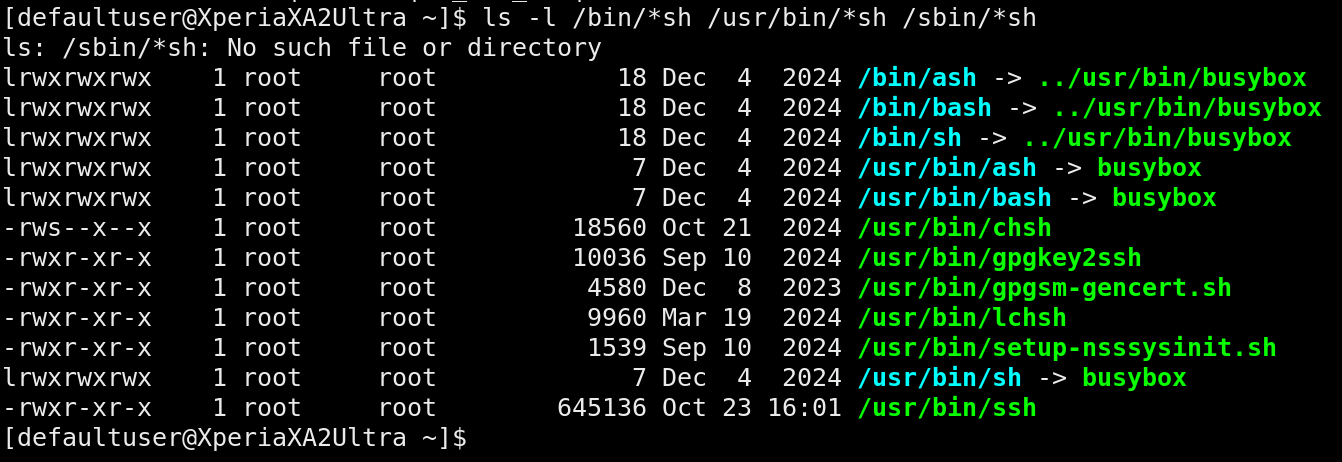
I have now installed SFOS fresh on a spare phone and I can confirm that a) bash is not installed by default, and b) this is indeed what happens when I try to install gnu-bash. Not an elegant solution on the devs’ side imho - it would be trivial to have any ‘#!/bin/bash’ shebang default to busybox while still having gnu-bash installed alongside. (edit: a cludge though)
As it is, I do not want to mess with people’s existing setups and will continue to code for busybox ash.
As a bash user I’m curious how?
Of course. This is the situation on a fresh install:
The symlinks /usr/bin/bash and /bin/bash belong to busybox-symlinks-bash.
Option A:
If busybox-symlinks-bash symlinked only /bin/bash, /usr/bin/bash would be “free” to install gnu-bash’s bash executable to.
Option B:
The gnu-bash executable could be installed to, say, /usr/local/bin or /opt/bash/bin etc., and add that directory to PATH.
On second thought I’m not really serious about this; it would be a cludge to minimize system impact for users who want to run actual bash scripts while maintaining the IMO slightly weird “bash is actually busybox” interactive shell solution that is SFOS default.
If that in any way affects performance, the default shell in /etc/default/useradd should be changed to /bin/sh - powerusers who want to use gnu-bash interactive can always issue chsh /bin/bash.
Both options would require 1 extra step if a user wanted to switch to gnu-bash as their command line interface: chsh /path/to/bash (currently this happens automatically if you install gnu-bash and uninstall busybox-symlinks-bash).
And, of course, use #!/usr/bin/bash in all your explicit bash scripts instead of #!/bin/bash.
edit1: a primer on how bash differs from simpler/smaller/faster shells like busybox’ ash.
All this discussion is nothing to say about hosts-block; it will continue to use ash.
Hm, but tapping a link to blacklist it is somehow strange. And usually I’d like to block the full domain, not just a specific link.
Wow, impressive shell knowledge. Thx.
The backend script does that already. Hosts can only block full domains.
Have a look at the README which is also the text you see before installing, and usually also the same text as the first post in this thread. Oops, no, it does not say that in the README. Thanks for the call, will add.
BTW, I’d be glad if somebody would like to create a proper share plugin for this. AFAICS It requires compiling of C++ Qt stuff (so not even QML) in which I have close to zero skill. It would just need to show up in Share dialogs, and execute the backend shell script.
This is what I meant.
Do not play with such things for other users if you do not know the implications.
In earlier times you could just remove busybox-bash-symlinks-bash package , install gnu-bash and re-create some more symlinks.
But again, this is for internal playground usage
Just tested it right now. Yes, some sites seem to load faster. But what I noticed compared to my android device is that I still get adds - on Android I block those via DuckDuckGo virtual VPN on the device.
Is there any chance to do the same on SFOS (not necessarily with hosts blocks, but maybe otherwise?)?
@peterleinchen announced to bring back defender app
Has worked previously, see README-2.md. Updating this is on my TODO list.
I have now added AAS support.
It’s in testing, please test!
(Requires manual restart of AAS)
Yes, but still waiting for @keto to fix user administration on OBS.
@ohnonot maybe take a look at this app and repository?
I cannot find “hosts-block” in Chum. Am I stupid?