Deleting ~/.local/share/harbour-containers/, /home/.lxc/Debian and /var/lib/lxc/… and then reinstalling the application has solved the problem and the Containers app now works normally.
I had config files left /var/lib/lxc and I needed to delete those as well to get the app working again.
I have a slightly different problem, which I also reported on github. I had several containers running without any problems, until I got “Could not load page” when tapping on a container. I removed the app and also the folders mentioned in the solution to restart with a clean slate, but to no avail…
Ok, the cli output led me to the issue. I had played around with loads of qlm files to speed up animations and there was a problem in my modified /usr/lib64/qt5/qml/Sailfish/Silica/ExpandingSectionGroup.qml. After restoring the backup of this file I had made, the problem went away. Thanks!
That worked, thanks. Does anybody know, which distro to use to have working audio? A year ago or so, it used to be arch, but the setup scripts don’t seem to be working properly…
What device are you using? I fixed the setup script a while back but my Xperia 10 III has a kernel too old for current SystemD so I can’t test Arch anymore.
EDIT: nvm just read that you are using JP26. Have you tried temporarily enabling Chum testing repo and updating harbour-containers?
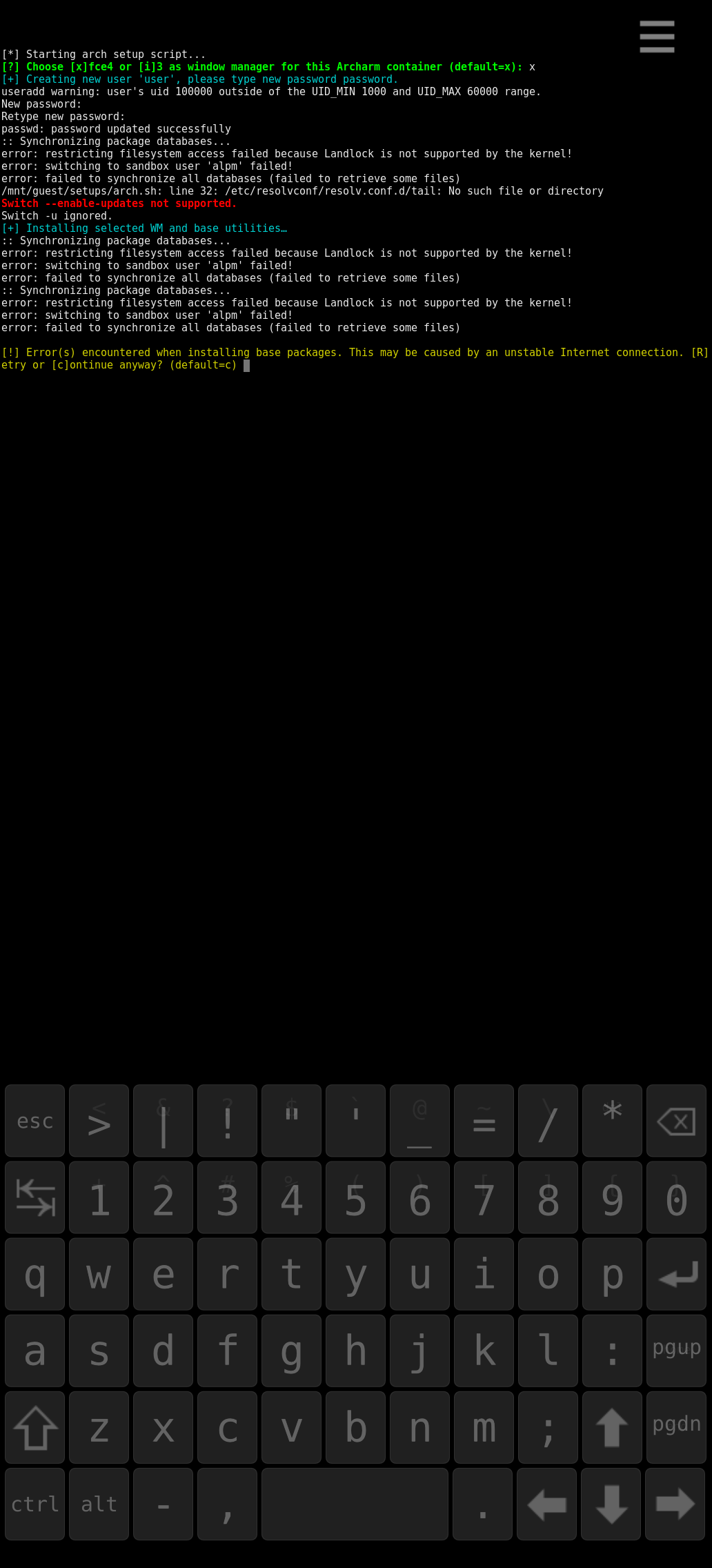
EDIT: that didn’t work either. It’s not possible to install base packages. The script complains about not having an internet connection… Anyway, not important. I was tinkering a little.
@Matias: I had a closer look and had forgotten to update the scripts from chum testing too. Still, no progress on my JP26. I made a screenshot.
The problem: “Landlock is not supported on your kernel.”
After that, I can apply the fix, but the X session still won’t start. There is one error when running the setup script: “target not found: xfmw4-themes”. might this be the culprit?
What is the terminal command to start the x session? I’d like to see, what the problem is.