I’ve tried everything possible like I did with other Xperia cases where I needed usb 2, older cables, newer, adapters, no adapters etc. C2 just doesn’t like me I guess.
On the bright side, I will meet explit on Monday and we will try to flash it with his tools!
3 Likes
Is this flashing guide still recommended in March 2026?
I “bricked” my C2 with
- charged up to 91%
- switched on, went through the assistant (Wifi did not work) until the assistant either ended or I unintentionally swiped it away
- was on the UI and looked around, found out I’m on 5.0.0. and the WLAN adapter “was not available”
- did google this error message and found the advice to reboot the device
- did reboot and now I’m stuck at the eternal spinner after entering the PIN
I looked into fastboot flashing: Fastboot flashing of Jolla C2
but when I run “fastboot getvar all” I get back an empty value which ChatGPT interprets as my fastboot loader being too old and that fastboot flashing wont be advisable.
Quick question here: Is ChatGPT right? If fastboot does not provide any variable, does this mean I still have the old (5.0.0.29 and before) bootloader installed on my phone?
Anyway, I’m now looking into this more low-level method. Is this method still advisable? I see that the mentioned ums9230_universal_unlock.zip archive has disappeared. From the file modification dates it seems that the ums9230_universal_unlock_EMMC.zip archive might be its successor. Is this correct?
I already opened an issue with Jolla, but it seems they are quite busy and maybe they want to see whether I can help myself before they offer me a send-in support.
Actually, I bought this phone in order to get in-depth hands-on experience with Sailfish OS, so I don’t mind the device bricking itself right out of the box. I just need some advice to work myself out of the hole.
Yes, the flashing guide is up-to-date. You have a newly ordered C2? Then you have a newer version of SFOS, then you asked.
So, there is no fastboot-connection. As long as we dont know which OS you use for flashing, its a bit difficult to help.
If you are on windows - then you can play around with drivers, that could help. But in that case my solution would be: use Linux (make a live-distro USB-Stick, plenty of options out there).
If you already use Linux: try a different port and a different cable.
I bought a 2nd hand C2, so don’t know how old it is. I gave the serial number to Jolla in the issue, maybe they can deduce the age of the device from it.
To clarify, fastboot devicescan see the device, just fastboot getvar all does not return any value (I was hoping to see the version of the fastboot loader to judge whether its safe to use the fastboot flashing method). So to me it looks like an early, minimal fastboot loader.
I work on Linux already and I also use a USB-A to USB-C cable which may avoid a cabling problem I read about somewhere else.
Thank you for your answer and input!
ChatGPT very often gets these things wrong, so please don’t rely on it. There is no official suggestion to use fastboot getvar all on the Jolla C2 before flashing, and it seems that it always returns an empty value. Did you already try to follow the steps in Fastboot flashing of Jolla C2?
Actually, it the guide in this thread isn’t entirely up-to-date since part of it only applies to the first batch of devices. I’ve added a note in the original post.
I did not. I was afraid that I would further mess up my phone if my fastboot loader is one of the older ones. Do you recommend that I should try the fastboot flash way first?
The official guide suggests that fastboot flashing will fail with the old bootloader, so you can try following the alternative method described here (which will also flash the new bootloader): Flashing the Jolla C2 ... | SailfishOS community wiki
Note that this method provides a lot more opportunities to mess up your phone than fastboot, so I do recommend trying fastboot first.
2 Likes
I tried the fastboot flashing and it worked! Nice, thank you!
2 Likes
thank you for the instructions. I am trying to follow them, but I am stacked at step 1.
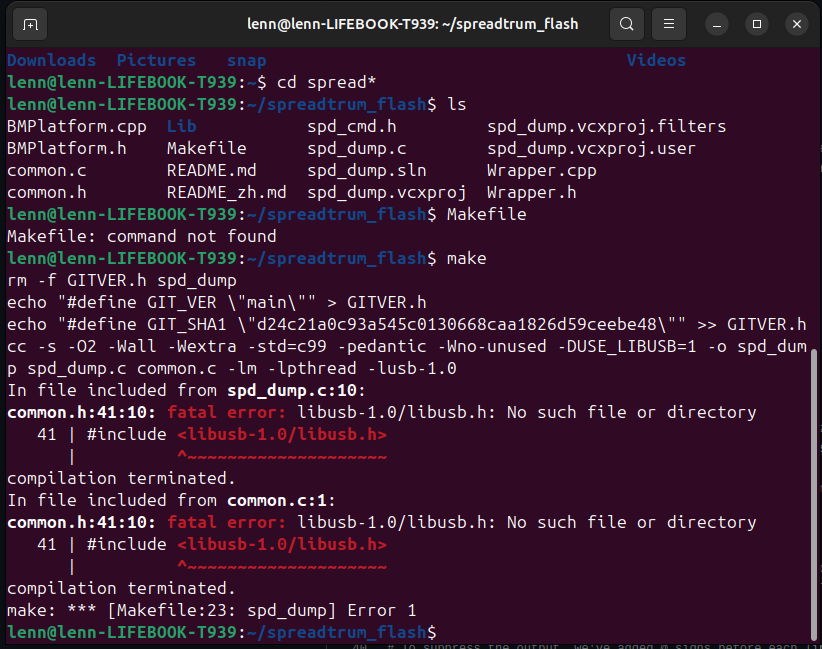
I now it sounds stupid, but I cannot build the flash tool - it is probably a silly mistake, can you please tell me what is wrong here?
it’s me again - the zip file at step 3 gives a dead link - can someone please confirm?
Confirmed. “Not Found”
You should find the file you are looking for here under the “Assets”. Press the “Show all 79 assets” to list all the files.
Thank you all who replied.
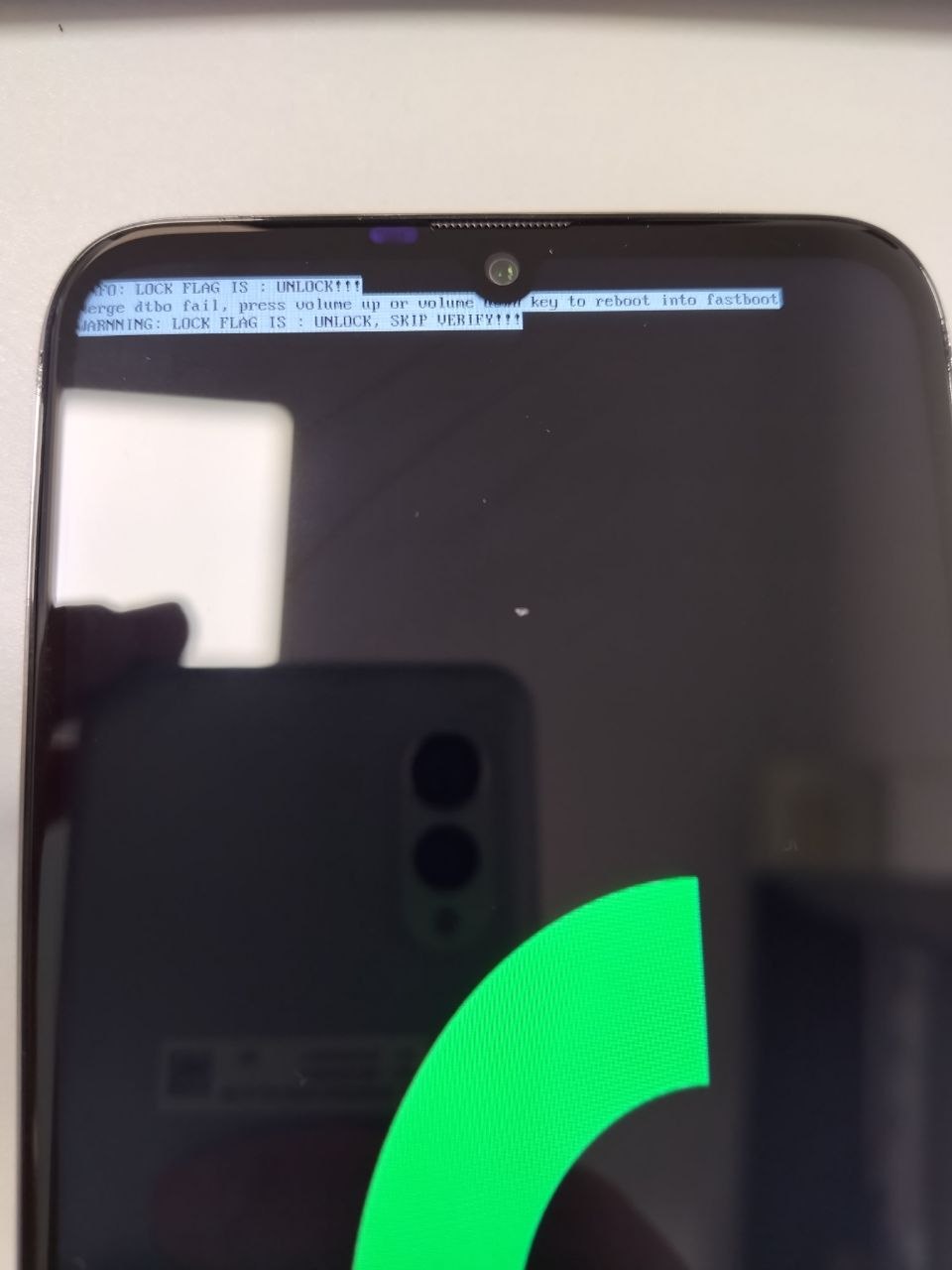
The tutorial under flashing C2 says to Copy the lk.bin from the C2 zip file to your C2 device (MTP/USB) and check that the md5sum matches. But my phone does not start after fastboot flashing and reboot. It just shows the images like below:
thank you! searching now
Thank you once again. I looked at the files, there are 2 files, one EMMC and one UFS:
-
ums9230_universal_unlock_EMMC.zip
1.06 MB May 4, 2025
-
ums9230_universal_unlock_UFS.dangerous.zip
sha256:ba0bfcd9fa7d193b94afdc2b29beb2425dbe261d5378aafce52f05f86c95aff7
1000 KB Aug 17, 2025
Do you know which one to use please?
My guess is EMMC with this price point devices.
1 Like
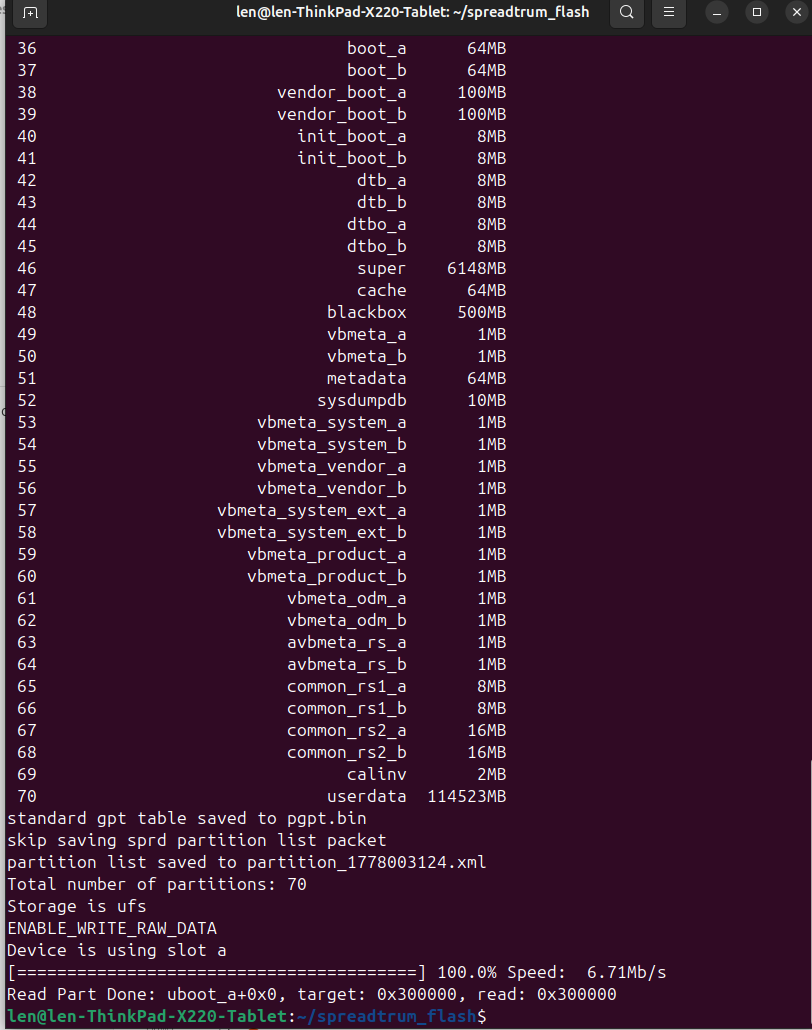
The Jolla C2 has UFS storage. Looks like it’s getting more common nowadays.
1 Like
So one should have used the ums9230_universal_unlock_UFS.dangerous.zip then?
I actually used EMMC version, and while the devices boots, it still has some issues, mainly with internet (wi-fi not working, update over 4G has been on infinite loop), slow performance etc…