I created a new repository with the package GitHub - juanro49/lpac-sfos: C-based eUICC LPA Local Profile Assistant Client (GSMA RSP) for SailfishOS . I test it and it compile and generates rpm files fine!
Thank you, I’ve ordered such a sim today so should be hopefully here tomorrow.
3 Likes
Which USB-C reader did you use?
I’ve bought a 30 day eSIM for testing and successfully downloaded a profile.
After a reboot the phone was able to use it like a normal SIM card.
Thank you again for providing the binary!
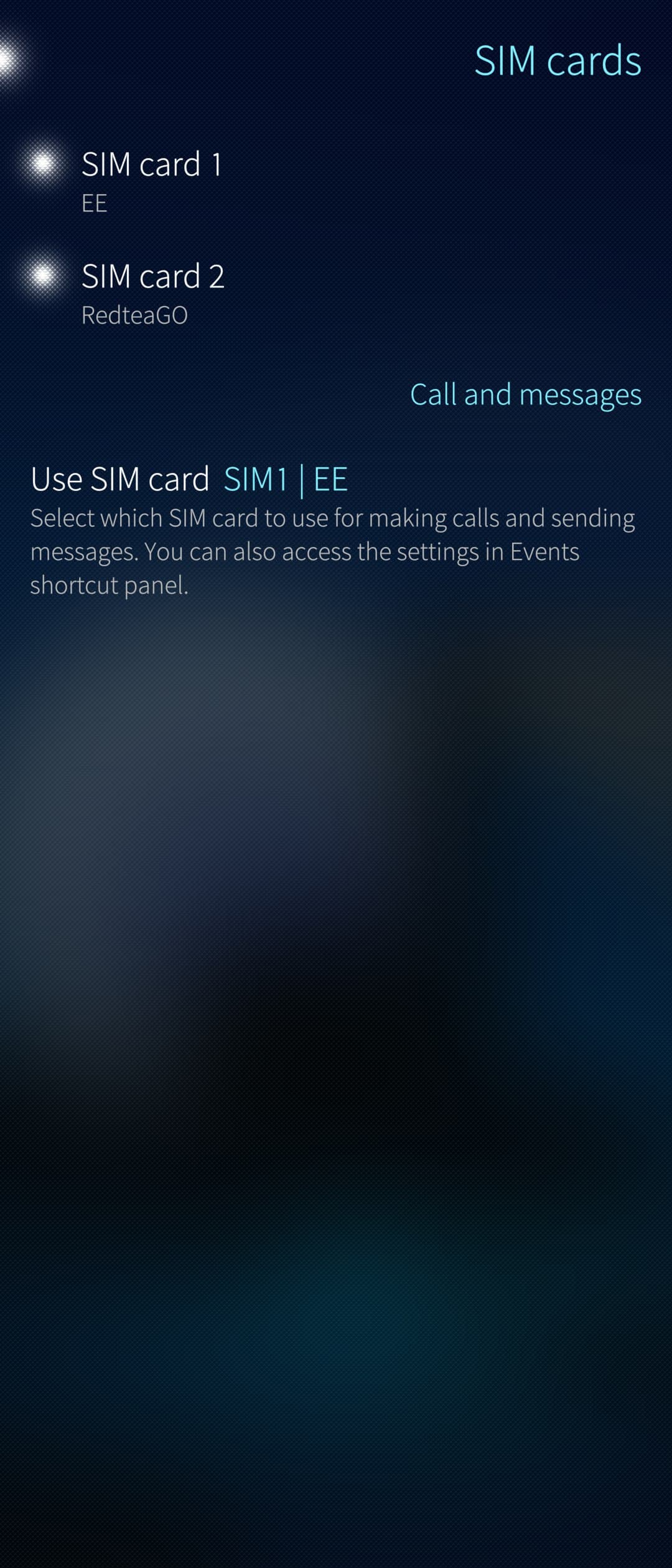
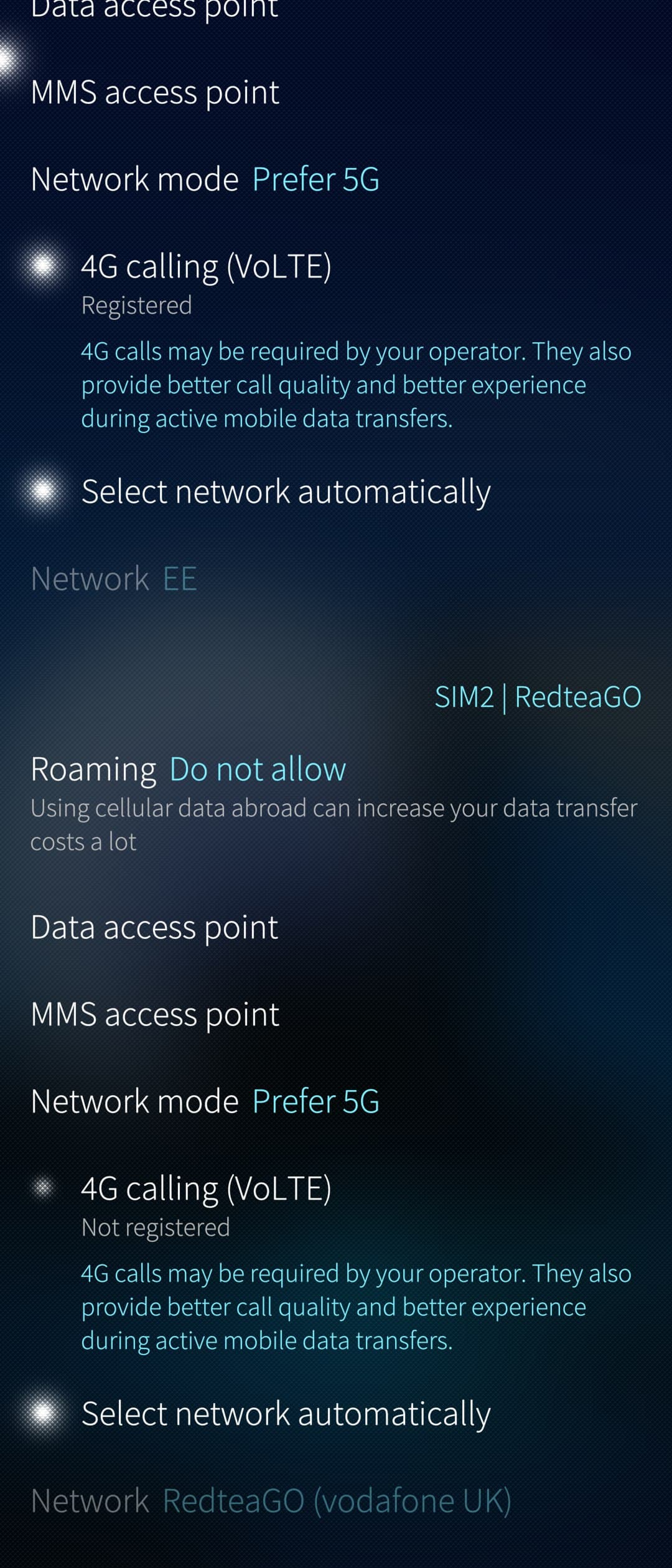
Now I have 30 days to write a SIM-Manager app before the card runs out 
8 Likes
I tried with a Zoweetek ZW-12026-1 that I had for reading DNIe (you need the large card that SIMs usually come with as an adapter and also a USB-A to USB-C adapter to connect it to your cell phone) and also with the one sold on the 9eSIM website that directly supports nanoSIM and comes with USB-C and a USB-A adapter for use on a PC. With the driver binder you can use the phone’s SIM reader.
Great! I was able to test it with https://www.firsty.app/es, which offers a “free” service, and it also worked well, in case anyone wants to test it without having to purchase a service.
1 Like
you can get a free esim profile anytime on ‘better roaming’
1 Like
Thank you. I think I will try everything with the internal reader first and then order the one from their page and add support for it in January.
2 Likes
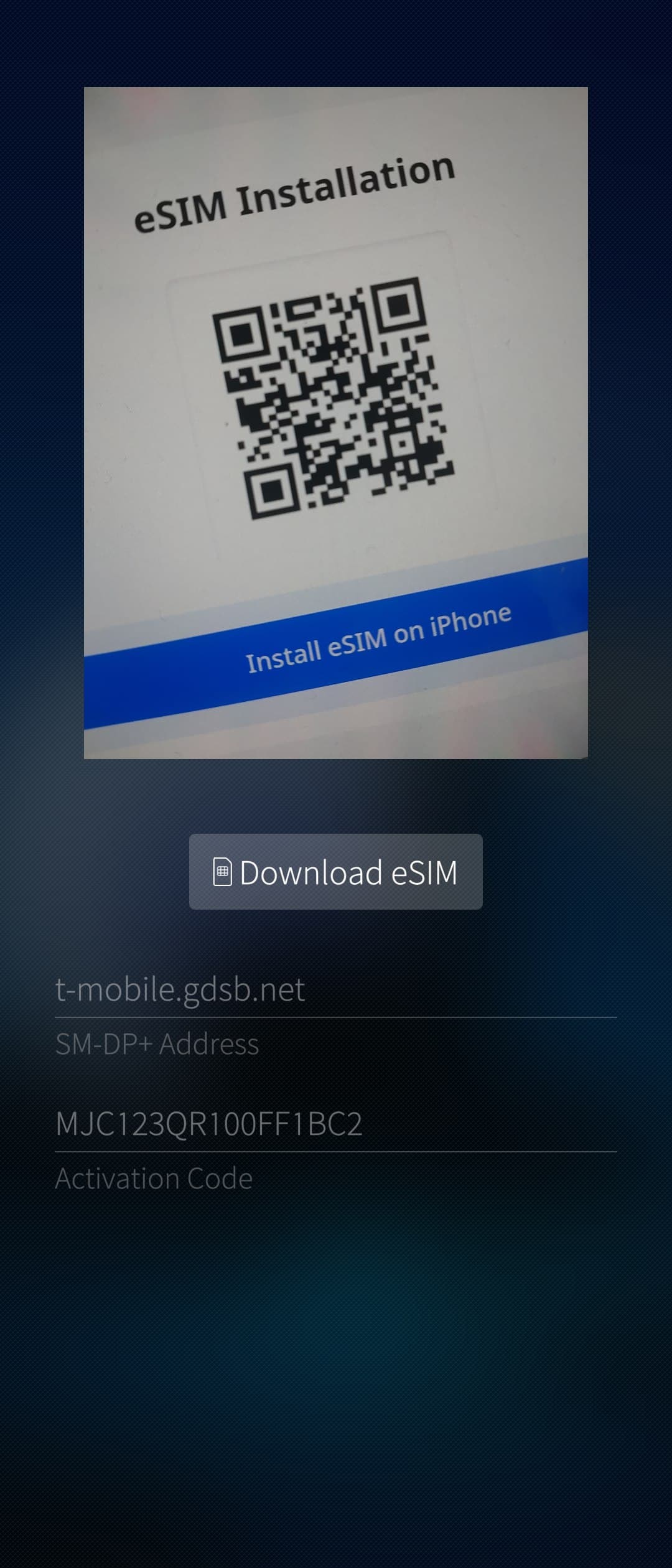
I pushed an initial version to OpenRepos today.
8 Likes
Good job I bought an esim on the web for Morocco. but failed to download it. On Xperia 10 v. It’s an esim for the holidays I would try in another country. The next time
if I understood correctly the app can be installed on a 10 III
I gave my Xperia 10 V away, so I can’t test whether it also works with the internal eSIM chip.
The Xperia 10 III has no built-in eSIM chip, so you have to use an external eSIM adapter.
I’ve tested it on the Xperia 10 III with this one:
I tried OpenRepos SimPro to manually download Eskimo eSIM Now that you received your 9esim card, treat yourself to some free data – 9eSIM (We all know about the problems with the Xperia 10 V camera in Sailfish not working.), but I get an error:
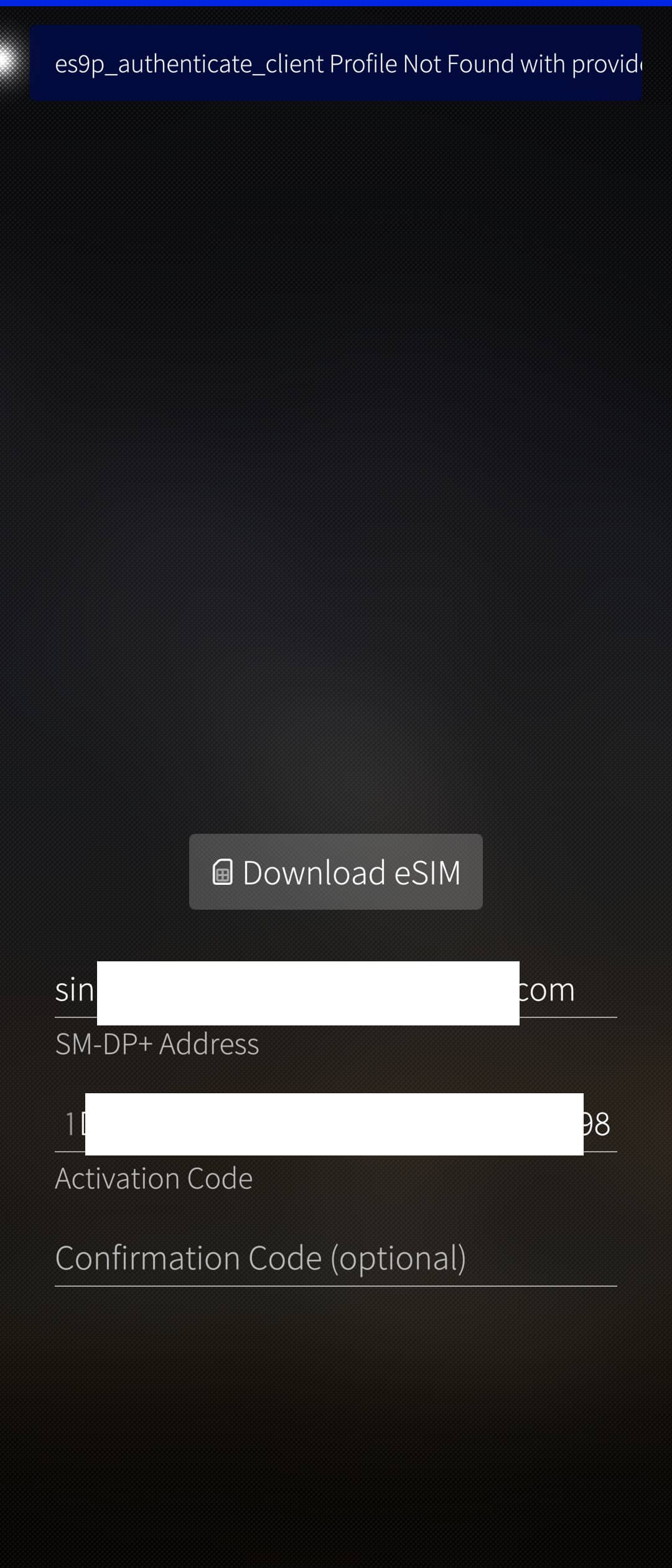
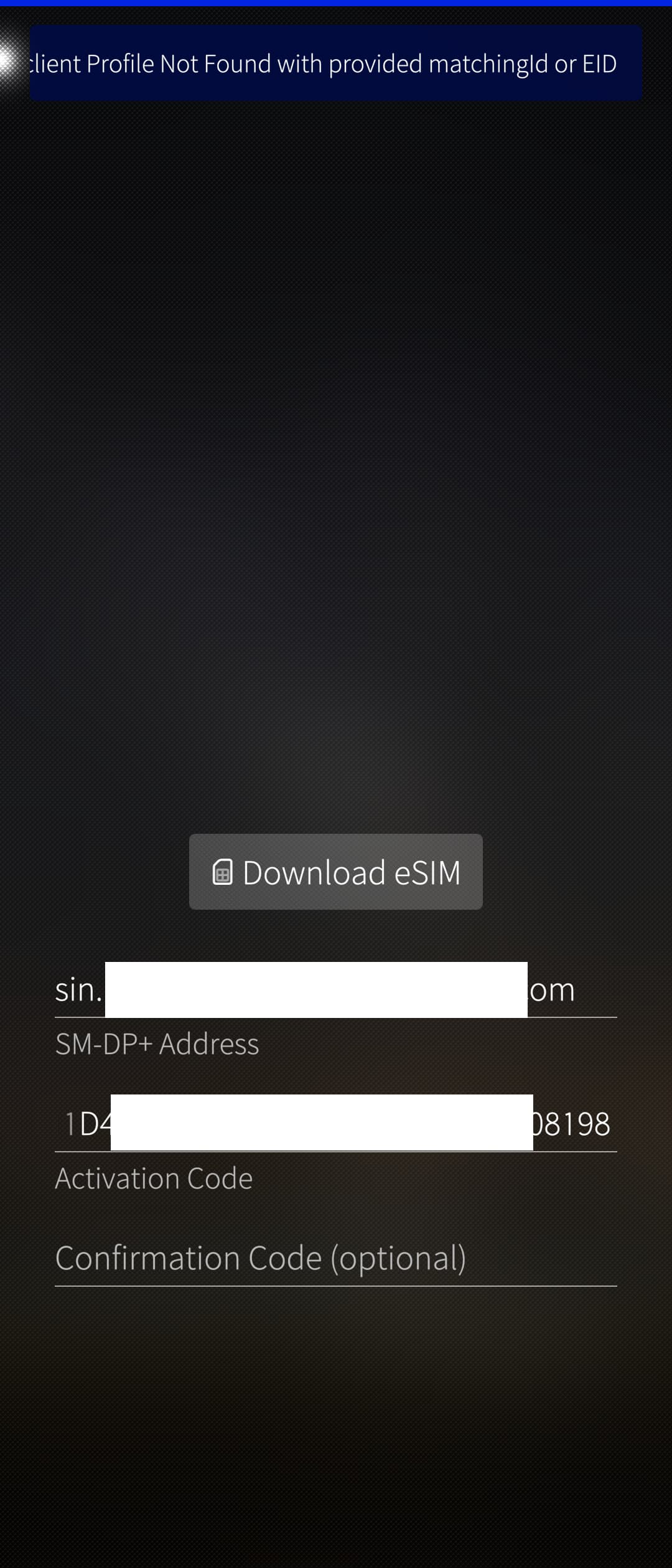
From command-line I can dowload it fine:
[15:56:15] defaultuser@Xperia10V:~ ✔☭ LPAC_APDU=gbinder lpac profile download -s ``sin.********************.com`` -m EF77****************************461A08198 | jq .
Attempting to connect to android.hardware.radio@1.0::IRadio/slot1
opened logical channel id: 1
{
"type": "progress",
"payload": {
"code": 0,
"message": "es10b_get_euicc_challenge_and_info",
"data": "``sin.*************************.com``"
}
}
{
"type": "progress",
"payload": {
"code": 0,
"message": "es9p_initiate_authentication",
"data": "``sin.***************************.com``"
}
}
{
"type": "progress",
"payload": {
"code": 0,
"message": "es10b_authenticate_server",
"data": "``sin.*******************.com``"
}
}
{
"type": "progress",
"payload": {
"code": 0,
"message": "es9p_authenticate_client",
"data": "``sin.*******************.com``"
}
}
{
"type": "progress",
"payload": {
"code": 0,
"message": "es8p_meatadata_parse",
"data": {
"iccid": "8965************7851",
"serviceProviderName": "Eskimo",
"profileName": "Eskimo",
"iconType": null,
"icon": null,
"profileClass": "operational"
}
}
}
{
"type": "progress",
"payload": {
"code": 0,
"message": "es10b_prepare_download",
"data": "``sin.**********************.com``"
}
}
{
"type": "progress",
"payload": {
"code": 0,
"message": "es9p_get_bound_profile_package",
"data": "``sin.*******************.com``"
}
}
{
"type": "progress",
"payload": {
"code": 0,
"message": "es10b_load_bound_profile_package",
"data": "``sin.***********************.com``"
}
}
{
"type": "lpa",
"payload": {
"code": 0,
"message": "success",
"data": {
"seqNumber": 3,
"bppCommandId": "unknown",
"errorReason": "unknown"
}
}
}
[15:59:17] defaultuser@Xperia10V:~ ✔☭LPAC_APDU=gbinder lpac profile list | jq .
Attempting to connect to android.hardware.radio@1.0::IRadio/slot1
opened logical channel id: 1
{
"type": "lpa",
"payload": {
"code": 0,
"message": "success",
"data": [
{
"iccid": "8932************3352",
"isdpAid": "a000**************1100",
"profileState": "enabled",
"profileNickname": "Firsty",
"serviceProviderName": "Firsty",
"profileName": "Firsty",
"iconType": "png",
"icon": "/9j/2wBDAAcFBgYGBQcGBgYICAcJCxIMCwoKCxcQEQ0SGxccHBoXGhkdISokHR8oIBkaJTIlKCwtLzAvHSM0ODQuNyouLy7/2wBDAQgICAsKCxYMDBYuHhoeLi4uLi4uLi4uLi4uLi4uLi4uLi4uLi4uLi4uLi4uLi4uLi4uLi4uLi4uLi4uLi4uLi7/wAARCABAAEADASIAAhEBAxEB/8QAGgA
BAAMBAQEAAAAAAAAAAAAABQIEBgADCP/EACwQAAIBAwIFAgUFAAAAAAAAAAECAwAEEQUxEhMhIlFhcUFCgZHBFVJToaL/xAAXAQEBAQEAAAAAAAAAAAAAAAAAAQID/8QAGREBAQEBAQEAAAAAAAAAAAAAAQARAiFB/9oADAMBAAIRAxEAPwD5trgCTgDJrgCTgb07p9iIFEkgBlP+aobUNqtrpbuA85KD9o3pKK0toh2
xLnyRk1E3StcC3i7m+Y/BRU7qdbeFpD1OwHk10ALqAXrlQQvQE7CvOS3glGHiU+uOtZ1p5Wm55c8ecg+K0kb82FXU44lyPSg7DrYq70woC9uSwG6nf6UXT9he8/McgCyr/dVNXtQhFwgwCcMPXzWUM0sdcmaUdHt+NzOw7U6L71a1S7MKCKM4kYdT4FWbGPlWsS/HGT7mqVxpss0zymZe4+NhVxDy1iHlLRouGFpiOrn
A9hVTV5uZccsHtjGPrTMEYihSMfKMUY+lyu7O0y5Y5PSiOYRHMIqtHpxzZQ+35o/9Ik/mX7UpbRcmBIiclRvTkRpwI2fdzDeu6brIcfen7hRPauu4Zcj8UdJpUjyO/NXuJO1KRry4VVjnhUAn2FORryP26RuXCzKM8KkgfSi49UkeRE5SjiIG9I27Ce1Rtwy4P5oBEMN6iPusgz96dL8nS+ZaC5l5MDygZKjai/1eT+F
fvSGojNlN7fms5TpRp2oyqapK7qghXLHA60nPIIoXkPyjNDaRDzLjmEdsfX61b1mXhhWEHq5yfYUFzWoua0bfUpZpkiEK9x87Crt9JyrWVvjjA9zVbS7QwoZZBiRh0HgVV1i4DyCBT2p1b3pqHs1OfaWkXQQm3c4BOVPr4q3f2XPxJGQsq/3QFKWeplAEuAWA2cb/AFqCZjZ56MxlZF5sLIwxxLgjxWbWCVpuSEPGDgj
xWijuIJRlJVPpnrXphQS3QE7mtJtt528rWBbeFY16ncnyagLVWuDcS4ZvlHwUVKW7toh3SrnwDk0Zdao7gpACg/cd6KEUK3qF8IFMcZBlP+aCJJOScmuJJOScmurmu3Jdv//Z",
"profileClass": "operational"
},
{
"iccid": "8965**********7851",
"isdpAid": "a0000****************1200",
"profileState": "disabled",
"profileNickname": null,
"serviceProviderName": "Eskimo",
"profileName": "Eskimo",
"iconType": null,
"icon": null,
"profileClass": "operational"
}
]
}
}
[15:59:49] defaultuser@Xperia10V:~ ✔☭
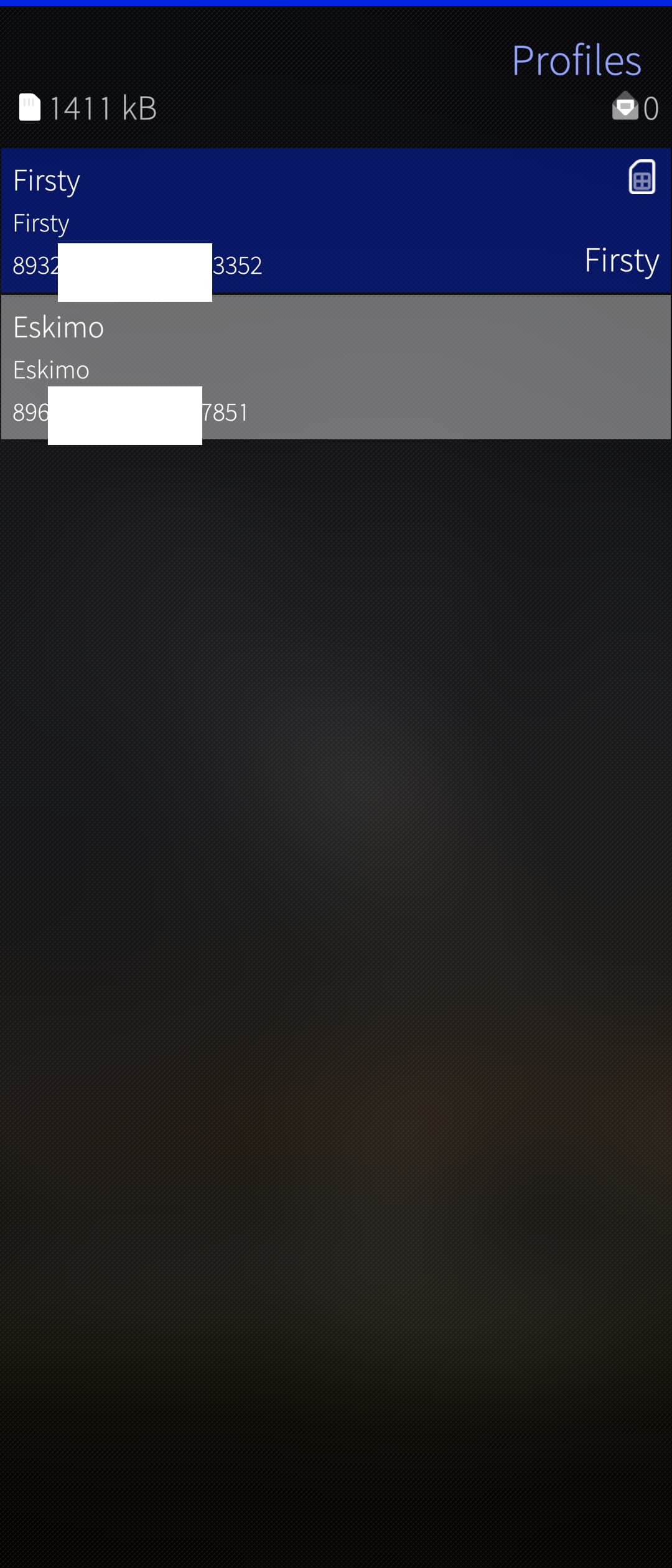
Then I can see them correctly in SimPro. To activate it, it works fine from the edit menu, but it doesn’t activate from the drop-down menu.
1 Like
Download and activation should be fixed in version 0.2.
I’ve tested it with two new manually added profiles, it seems to work fine now.
2 Likes
Out of curiosity, does the 9esim adapter work as on the 2nd sim slot? So that you could have your main sim at slot 1 and esim adapter at slot 2 which you could then get plan when you go abroad etc?
Yes, it does. I have one in my second SIM slot of an Xperia 10 III right now.
1 Like
Amazing to hear! Have to do same kind of setup for the Jolla phone!
@Juanro49 I don’t have an external card reader yet, but should you have time to DM me some examples of how the lpac output looks like (preferably without piping through a beautifier) I could try to implement support for external readers anyway.
I guess the profile messages will be the same once a card is detected but I would like to see how things like driver apdu or chip info etc. look like without the reader, with the reader but no card present, with the reader and card, etc. to be able to safely detect it.
2 Likes
The information displayed by lpac with the pcsc driver is the same as with gbinder (except that for pcsc there is an additional command, “lpac driver apdu list” to list the connected readers). The only difference is the errors displayed, which are specific to the pcsc library and are documented here: pcsc-lite: ErrorCodes .
Here are some examples:
- No lectors connected (same error in all commands):
[11:47:41] defaultuser@Xperia10V:~✘☭ LPAC_APDU=pcsc lpac chip info
SCardListReaders() failed: 8010002E (Unknown error: 0xFFFFFFFF8010002E)
APDU driver init failed
[11:47:51] defaultuser@Xperia10V:~ ✘☭
- 2 lectors connected without SIM
[11:47:51] defaultuser@Xperia10V:~✘☭ LPAC_APDU=pcsc lpac driver apdu list
{"type":"driver","payload":{"env":"LPAC_APDU_PCSC_DRV_IFID","data":[{"env":"0","name":"Alcor Micro AU9540 00 00"},{"env":"1","name":"Alcor Link AK9563 01 00"}]}}
[11:50:22] defaultuser@Xperia10V:~ ✔☭ LPAC_APDU=pcsc lpac chip info
SCardConnect() failed: 8010000C (Unknown error: 0xFFFFFFFF8010000C)
{"type":"lpa","payload":{"code":-1,"message":"euicc_init","data":""}}
[11:51:26] defaultuser@Xperia10V:~✘☭ LPAC_APDU=pcsc lpac profile list
SCardConnect() failed: 8010000C (Unknown error: 0xFFFFFFFF8010000C)
{"type":"lpa","payload":{"code":-1,"message":"euicc_init","data":""}}
[11:51:48] defaultuser@Xperia10V:~ ✘☭
- 2 lectors connected, second with SIM (for manual lector selection test, both
LPAC_APDU_PCSC_DRV_IFIDandLPAC_APDU_PCSC_DRV_NAMEis required)
[12:00:21] defaultuser@Xperia10V:~✘☭ LPAC_APDU=pcsc lpac driver apdu list
{"type":"driver","payload":{"env":"LPAC_APDU_PCSC_DRV_IFID","data":[{"env":"0","name":"Alcor Micro AU9540 00 00"},{"env":"1","name":"Alcor Link AK9563 01 00"}]}}
[12:00:58] defaultuser@Xperia10V:~ ✔☭ LPAC_APDU=pcsc LPAC_APDU_PCSC_DRV_IFID=1 LPAC_APDU_PCSC_DRV_NAME="Alcor Link AK9563 01 00" lpac chip info
{"type":"lpa","payload":{"code":0,"message":"success","data":{"eidValue":"89044******************1382","EuiccConfiguredAddresses":{"defaultDpAddress":"``smdp-plus-0.eu.cd.rsp.kigen.com``","rootDsAddress":"``lpa.ds.gsma.com``"},"EUICCInfo2"
:{"profileVersion":"2.3.1","svn":"2.3.0","euiccFirmwareVer":"37.4.3","extCardResource":{"installedApplication":10,"freeNonVolatileMemory":1391232,"freeVolatileMemory":32687},"uiccCapability":["usimSupport","isimSupport","csimSupport","a
kaMilenage","akaCave","akaTuak128","akaTuak256","gbaAuthenUsim","gbaAuthenISim","eapClient","javacard","multipleUsimSupport","multipleIsimSupport","multipleCsimSupport","berTlvFileSupport","catTp","getIdentity","profile-a-x25519","profi
le-b-p256","suciCalculatorApi"],"ts102241Version":"15.1.0","globalplatformVersion":"2.3.0","rspCapability":["additionalProfile","testProfileSupport","deviceInfoExtensibilitySupport"],"euiccCiPKIdListForVerification":["81370**********************ebfb"],"euiccCiPKIdListForSigning":["81370**********************ebfb"],"euiccCategory":null,"forbiddenProfilePolicyRules":["ppr1"],"ppVersion":"1.0.0","sasAcreditationNumber":"KN-DN-UP-0327","certificationData
Object":{"platformLabel":null,"discoveryBaseURL":null}},"rulesAuthorisationTable":[{"pprIds":["ppr1","ppr2"],"allowedOperators":[{"plmn":"eeeeee","gid1":null,"gid2":null}],"pprFlags":[]}]}}}
[12:01:20] defaultuser@Xperia10V:~ ✔☭ LPAC_APDU=pcsc LPAC_APDU_PCSC_DRV_IFID=0 LPAC_APDU_PCSC_DRV_NAME="Alcor Micro AU9540 00 00" lpac chip info
SCardConnect() failed: 8010000C (Unknown error: 0xFFFFFFFF8010000C)
{"type":"lpa","payload":{"code":-1,"message":"euicc_init","data":""}}
[12:01:35] defaultuser@Xperia10V:~✘☭ LPAC_APDU=pcsc lpac chip info
SCardConnect() failed: 8010000C (Unknown error: 0xFFFFFFFF8010000C)
{"type":"lpa","payload":{"code":-1,"message":"euicc_init","data":""}}
[12:01:44] defaultuser@Xperia10V:~✘☭ LPAC_APDU=pcsc lpac profile list
SCardConnect() failed: 8010000C (Unknown error: 0xFFFFFFFF8010000C)
{"type":"lpa","payload":{"code":-1,"message":"euicc_init","data":""}}
[12:02:56] defaultuser@Xperia10V:~✘☭ LPAC_APDU=pcsc LPAC_APDU_PCSC_DRV_IFID=0 LPAC_APDU_PCSC_DRV_NAME="Alcor Micro AU9540 00 00" lpac profile list
SCardConnect() failed: 8010000C (Unknown error: 0xFFFFFFFF8010000C)
{"type":"lpa","payload":{"code":-1,"message":"euicc_init","data":""}}
[12:03:07] defaultuser@Xperia10V:~✘☭ LPAC_APDU=pcscLPAC_APDU_PCSC_DRV_IFID=1 LPAC_APDU_PCSC_DRV_NAME="Alcor Link AK9563 01 00" lpac profile list
{"type":"lpa","payload":{"code":0,"message":"success","data":[{"iccid":"8932**********3352","isdpAid":"a000********************1100","profileState":"disabled","profileNickname":"Firsty","serviceProviderName":"Firsty","profileName"
:"Firsty","iconType":"png","icon":"/9j/2wBDAAcFBgYGBQcGBgYICAcJCxIMCwoKCxcQEQ0SGxccHBoXGhkdISokHR8oIBkaJTIlKCwtLzAvHSM0ODQuNyouLy7/2wBDAQgICAsKCxYMDBYuHhoeLi4uLi4uLi4uLi4uLi4uLi4uLi4uLi4uLi4uLi4uLi4uLi4uLi4uLi4uLi4uLi4uLi7/wAARCABAAEADA
SIAAhEBAxEB/8QAGgABAAMBAQEAAAAAAAAAAAAABQIEBgADCP/EACwQAAIBAwIFAgUFAAAAAAAAAAECAwAEEQUxEhMhIlFhcUFCgZHBFVJToaL/xAAXAQEBAQEAAAAAAAAAAAAAAAAAAQID/8QAGREBAQEBAQEAAAAAAAAAAAAAAQARAiFB/9oADAMBAAIRAxEAPwD5trgCTgDJrgCTgb07p9iIFEkgBlP+aobUNqtrp
buA85KD9o3pKK0toh2xLnyRk1E3StcC3i7m+Y/BRU7qdbeFpD1OwHk10ALqAXrlQQvQE7CvOS3glGHiU+uOtZ1p5Wm55c8ecg+K0kb82FXU44lyPSg7DrYq70woC9uSwG6nf6UXT9he8/McgCyr/dVNXtQhFwgwCcMPXzWUM0sdcmaUdHt+NzOw7U6L71a1S7MKCKM4kYdT4FWbGPlWsS/HGT7mqVxpss0zymZe4+NhV
xDy1iHlLRouGFpiOrnA9hVTV5uZccsHtjGPrTMEYihSMfKMUY+lyu7O0y5Y5PSiOYRHMIqtHpxzZQ+35o/9Ik/mX7UpbRcmBIiclRvTkRpwI2fdzDeu6brIcfen7hRPauu4Zcj8UdJpUjyO/NXuJO1KRry4VVjnhUAn2FORryP26RuXCzKM8KkgfSi49UkeRE5SjiIG9I27Ce1Rtwy4P5oBEMN6iPusgz96dL8nS+ZaC
5l5MDygZKjai/1eT+FfvSGojNlN7fms5TpRp2oyqapK7qghXLHA60nPIIoXkPyjNDaRDzLjmEdsfX61b1mXhhWEHq5yfYUFzWoua0bfUpZpkiEK9x87Crt9JyrWVvjjA9zVbS7QwoZZBiRh0HgVV1i4DyCBT2p1b3pqHs1OfaWkXQQm3c4BOVPr4q3f2XPxJGQsq/3QFKWeplAEuAWA2cb/AFqCZjZ56MxlZF5sLIwxx
LgjxWbWCVpuSEPGDgjxWijuIJRlJVPpnrXphQS3QE7mtJtt528rWBbeFY16ncnyagLVWuDcS4ZvlHwUVKW7toh3SrnwDk0Zdao7gpACg/cd6KEUK3qF8IFMcZBlP+aCJJOScmuJJOScmurmu3Jdv//Z","profileClass":"operational"},{"iccid":"8965**********7851","isdpAid":"a000*********************1200","profileState":"enabled","profileNickname":null,"serviceProviderName":"Eskimo","profileName":"Eskimo","iconType":null,"icon":null,"profileClass":"operational"}]}}
[12:03:18] defaultuser@Xperia10V:~ ✔☭
- 1 lector connected with SIM
[12:09:33] defaultuser@Xperia10V:~ ✔☭ LPAC_APDU=pcsc lpac driver apdu list
{"type":"driver","payload":{"env":"LPAC_APDU_PCSC_DRV_IFID","data":[{"env":"0","name":"Alcor Link AK9563 00 00"}]}}
[12:09:42] defaultuser@Xperia10V:~ ✔☭ LPAC_APDU=pcsc lpac chip info
{"type":"lpa","payload":{"code":0,"message":"success","data":{"eidValue":"8904********************1382","EuiccConfiguredAddresses":{"defaultDpAddress":"``smdp-plus-0.eu.cd.rsp.kigen.com``","rootDsAddress":"``lpa.ds.gsma.com``"},"EUICCInfo2"
:{"profileVersion":"2.3.1","svn":"2.3.0","euiccFirmwareVer":"37.4.3","extCardResource":{"installedApplication":10,"freeNonVolatileMemory":1391232,"freeVolatileMemory":32687},"uiccCapability":["usimSupport","isimSupport","csimSupport","a
kaMilenage","akaCave","akaTuak128","akaTuak256","gbaAuthenUsim","gbaAuthenISim","eapClient","javacard","multipleUsimSupport","multipleIsimSupport","multipleCsimSupport","berTlvFileSupport","catTp","getIdentity","profile-a-x25519","profi
le-b-p256","suciCalculatorApi"],"ts102241Version":"15.1.0","globalplatformVersion":"2.3.0","rspCapability":["additionalProfile","testProfileSupport","deviceInfoExtensibilitySupport"],"euiccCiPKIdListForVerification":["8137********************ebfb"],"euiccCiPKIdListForSigning":["8137********************ebfb"],"euiccCategory":null,"forbiddenProfilePolicyRules":["ppr1"],"ppVersion":"1.0.0","sasAcreditationNumber":"KN-DN-UP-0327","certificationData
Object":{"platformLabel":null,"discoveryBaseURL":null}},"rulesAuthorisationTable":[{"pprIds":["ppr1","ppr2"],"allowedOperators":[{"plmn":"eeeeee","gid1":null,"gid2":null}],"pprFlags":[]}]}}}
[12:09:49] defaultuser@Xperia10V:~ ✔☭ LPAC_APDU=pcsc lpac profile list
{"type":"lpa","payload":{"code":0,"message":"success","data":[{"iccid":"8932**********3352","isdpAid":"a000********************1100","profileState":"disabled","profileNickname":"Firsty","serviceProviderName":"Firsty","profileName"
:"Firsty","iconType":"png","icon":"/9j/2wBDAAcFBgYGBQcGBgYICAcJCxIMCwoKCxcQEQ0SGxccHBoXGhkdISokHR8oIBkaJTIlKCwtLzAvHSM0ODQuNyouLy7/2wBDAQgICAsKCxYMDBYuHhoeLi4uLi4uLi4uLi4uLi4uLi4uLi4uLi4uLi4uLi4uLi4uLi4uLi4uLi4uLi4uLi4uLi7/wAARCABAAEADA
SIAAhEBAxEB/8QAGgABAAMBAQEAAAAAAAAAAAAABQIEBgADCP/EACwQAAIBAwIFAgUFAAAAAAAAAAECAwAEEQUxEhMhIlFhcUFCgZHBFVJToaL/xAAXAQEBAQEAAAAAAAAAAAAAAAAAAQID/8QAGREBAQEBAQEAAAAAAAAAAAAAAQARAiFB/9oADAMBAAIRAxEAPwD5trgCTgDJrgCTgb07p9iIFEkgBlP+aobUNqtrp
buA85KD9o3pKK0toh2xLnyRk1E3StcC3i7m+Y/BRU7qdbeFpD1OwHk10ALqAXrlQQvQE7CvOS3glGHiU+uOtZ1p5Wm55c8ecg+K0kb82FXU44lyPSg7DrYq70woC9uSwG6nf6UXT9he8/McgCyr/dVNXtQhFwgwCcMPXzWUM0sdcmaUdHt+NzOw7U6L71a1S7MKCKM4kYdT4FWbGPlWsS/HGT7mqVxpss0zymZe4+NhV
xDy1iHlLRouGFpiOrnA9hVTV5uZccsHtjGPrTMEYihSMfKMUY+lyu7O0y5Y5PSiOYRHMIqtHpxzZQ+35o/9Ik/mX7UpbRcmBIiclRvTkRpwI2fdzDeu6brIcfen7hRPauu4Zcj8UdJpUjyO/NXuJO1KRry4VVjnhUAn2FORryP26RuXCzKM8KkgfSi49UkeRE5SjiIG9I27Ce1Rtwy4P5oBEMN6iPusgz96dL8nS+ZaC
5l5MDygZKjai/1eT+FfvSGojNlN7fms5TpRp2oyqapK7qghXLHA60nPIIoXkPyjNDaRDzLjmEdsfX61b1mXhhWEHq5yfYUFzWoua0bfUpZpkiEK9x87Crt9JyrWVvjjA9zVbS7QwoZZBiRh0HgVV1i4DyCBT2p1b3pqHs1OfaWkXQQm3c4BOVPr4q3f2XPxJGQsq/3QFKWeplAEuAWA2cb/AFqCZjZ56MxlZF5sLIwxx
LgjxWbWCVpuSEPGDgjxWijuIJRlJVPpnrXphQS3QE7mtJtt528rWBbeFY16ncnyagLVWuDcS4ZvlHwUVKW7toh3SrnwDk0Zdao7gpACg/cd6KEUK3qF8IFMcZBlP+aCJJOScmuJJOScmurmu3Jdv//Z","profileClass":"operational"},{"iccid":"8965**********7851","isdpAid":"a000********************1200","profileState":"enabled","profileNickname":null,"serviceProviderName":"Eskimo","profileName":"Eskimo","iconType":null,"icon":null,"profileClass":"operational"}]}}
[12:09:58] defaultuser@Xperia10V:~ ✔☭ LPAC_APDU=pcsc lpac notification list
{"type":"lpa","payload":{"code":0,"message":"success","data":[{"seqNumber":3,"profileManagementOperation":"install","notificationAddress":"``sin.prod.ondemandconnectivity.com``","iccid":"8965**********7851"},{"seqNumber":4,"profileManageme
ntOperation":"disable","notificationAddress":"``firsty.validereachdpplus.com``","iccid":"8932**********3352"},{"seqNumber":5,"profileManagementOperation":"enable","notificationAddress":"``sin.prod.ondemandconnectivity.com``","iccid":"8965**********7851"}]}}
[12:10:56] defaultuser@Xperia10V:~ ✔☭
1 Like
So, if I understand this correctly, there is no need to manually probe and select the specific external reader, and lpac will automatically use whichever reader has a card installed?
That means we could implement a simple logic along the following lines:
- Probe with LPAC_APDU=pcsc to see whether there is a reader with a card installed.
- If yes, continue using LPAC_APDU=pcsc for everything and keep the rest unchanged.
- If not, fall back to LPAC_APDU=gbinder and continue as currently implemented.
This would not allow for manual reader selection, but I doubt the added complexity would justify implementing that. It’s running on a phone, so very few people will have a USB reader permanently connected. If one is found, SimPro can reasonably assume it is meant to be used. If not present, the internal slot will be used.
That’s also probably far easier for users to handle than having to fiddle with software settings just to switch readers.
Plugging in or unplugging a USB dongle seems much more convenient.
1 Like
This is only necessary when connecting multiple readers (using a USB-C hub for example), which should not happen under normal conditions since, in theory, people will only connect one external reader. I only tested it to see how the reader selection is made (in case you have free time in the future and want to add an “expert mode” where you can configure more parameters such as manually selecting the driver to use, a specific reader, etc.).
By default, lpac automatically uses the first reader it detects (the one in position 0), so if only one is connected, manual selection is not necessary.
I think the logic you propose is solid, as it’s simple and doesn’t require excessive modification of the current code.