Yes, but only on the Xperia 10 iv. On the Xperia 10 v only the 2.0x lens works (plus the selfie camera), and then only with the v4b blobs. The torch also doesn’t work on the 10 v.
1 Like
Yes, please keep up the good work—this is a great initiative you’ve started, and I love the 10 IV. Is there a PayPal address for donations? 
3 Likes
One question remains: Did @jolla knowingly disabled those camera-enabling code lines because activating camera this way causes other issues with the device?
2 Likes
That sounds very logical.
I haven’t noticed any side effects from enabling the cameras in this way.
Interestingly, having a ferret around in the binaries it seems that the 10 iv and 10v have the files for both camera 1 API and camera 2 API, whereas the10 iii only has the files for camera 1 API. This is even though all three of my phones are on the same SFOS version of 5.1.0.11.
My guess is that when Jolla last looked at the 10 iv and 10 v the camera 1 API didn’t work on these phones and the camera 2 API may not have been ready (perhaps it was only included in 5.1.0.x as early enabling work for the 5.2 release used on the Jolla Phone 2026).
Nevertheless, Camera 2 API on the Sony Xperia 10 iv works very well (video aside … wasn’t that also a problem on the C2?) and I can see no reason why Jolla does not enable it properly. It works less well on the 10 v (only the 0.6 x lens works), but even that is better than nothing.
6 Likes
If I recall correctly, it was because the video recording didn’t work and maybe something with the flash?
Ah, is that why all three lenses are working on the 10 IV. No wonder my port can’t match it, I’m still using Camera1.
It would be nice if there was a way to switch between the two on the fly - have a toggle in the top menu to switch to Camera2 if you want the other lenses and back to Camera1 if you want to record a video.
@nephros made this for the X 10III, you could probably adapt it to work with these devices, indeed the service it triggers is nearly identical to the line used for the newer devices
2 Likes
Did you find out how to know which blobs you used? I’m facing the same problem. 
After a bit more tinkering I have now managed to get the Camera 2 stuff starting automatically at boot on the Sony Xperia 10 iv by setting it up as a systemd service unit.
It works reliably and, so far, has not created any other problems. I will run for a few days and report back if there are any issues. However, with fully working (still, not video), cameras, the recent microphone fix and reliable GPS, working fingerprint, Android bluetooth, working battery indicator, etc the 10 iv is becoming a possible daily driver for me.
The only outstanding issues (for me) is permanent audio routing to the speaker and erroneous reboots after removing the charging cable.
8 Likes
Would you be so kind as to provide us with a brief guide? 

I use v4b blobs. Now trying to rebuild the kernel and to add some debug output.
To make the Camera 2 API available automatically on boot I did the following.
BUT, the usual disclaimers, etc:
-
This involves tinkering with the OS as root so there is the potential to completely brick or ruin your SFOS installation. You do this at your own risk.
-
I have done this on a Sony Xperia 10 iv, with the v4b binary blobs and SFOS 5.1.0.11 installed. I have no idea what would happen on other models, with other blobs or other SFOS versions.
-
You need to be comfortable and capable of editing system files. I used a combination of the terminal (enabled on SFOS through settings/developer options) and the root version of File Browser available on Openrepos.
-
I have no idea what would happen if Jolla finally released an updated SFOS version for these phones that officially enabled the Camera 2 API (i.e. whether there would be some sort of conflict that caused a problem), but I would reverse the changes below before installing such an upgrade.
Firstly you need to create what I believe is called a service unit file that executes after all the key OS stuff has started up, and for the defaultuser (assuming that you have a modern username rather than the old nemo username).
These files live in /usr/lib/systemd/user
If you navigate to this directory using the root File Browser you can see all the service unit files there. I simply copy/pasted, and then renamed one that was already there to get the right ownership and permissions. In my case it was ‘harbour-stumblefishd-service’ as this looked like the kind of simple service unit that would work with the Camera 2 stuff.
Also in my case I could afford to experiment as the Xperia 10 iv is not my only SFOS phone, so if my editing caused problems I could always re-flash at some point whilst still being able to continue to use SFOS on my other phones. This may not be the case for you.
Once I had done the above I ended up with a new service unit file in /usr/lib/systemd/user called ‘harbour-camera2.service’. I then edited this file to look like this:
#SPDX-License-Identifier: MIT
[Unit]
Description=Camera 2 Service
After=pre-user-session.target[Service]
Type=simple
ExecStart=/vendor/bin/hw/android.hardware.camera.provider@2.5-service_64
Restart=on-failure[Install]
WantedBy=user-session.target
Note that in the ExecStart line you do not need the ‘&’ at the end of the command like you do in the posts above. This is because you are not using the command line to start the service (the ‘&’ at the end of a linux command tells the shell not to wait until the command finishes - which being a service it wouldn’t, or at least it wouldn’t until the phone is shut down).
Just for clarity the owner and group of this file should both be root, and the permissions should be rw-r–r–
Once the service unit file exists then you need to enable it.
From the terminal you need to do:
devel-su systemctl enable /usr/lib/systemd/user/harbour-camera2.service
You will be asked for your root password which, once entered, will result in the command making a symbolic link to the service in /usr/lib/systemd/users/user-session.target.wants
You should see a message to the effect that the link has been successfully created.
Once this has been done, reboot the phone and the Camera 2 API stuff should start automatically.
You can check the ‘harbour-camera2.service’ is running if you want by using the ‘SailiorD’ app from Openrepos.
8 Likes
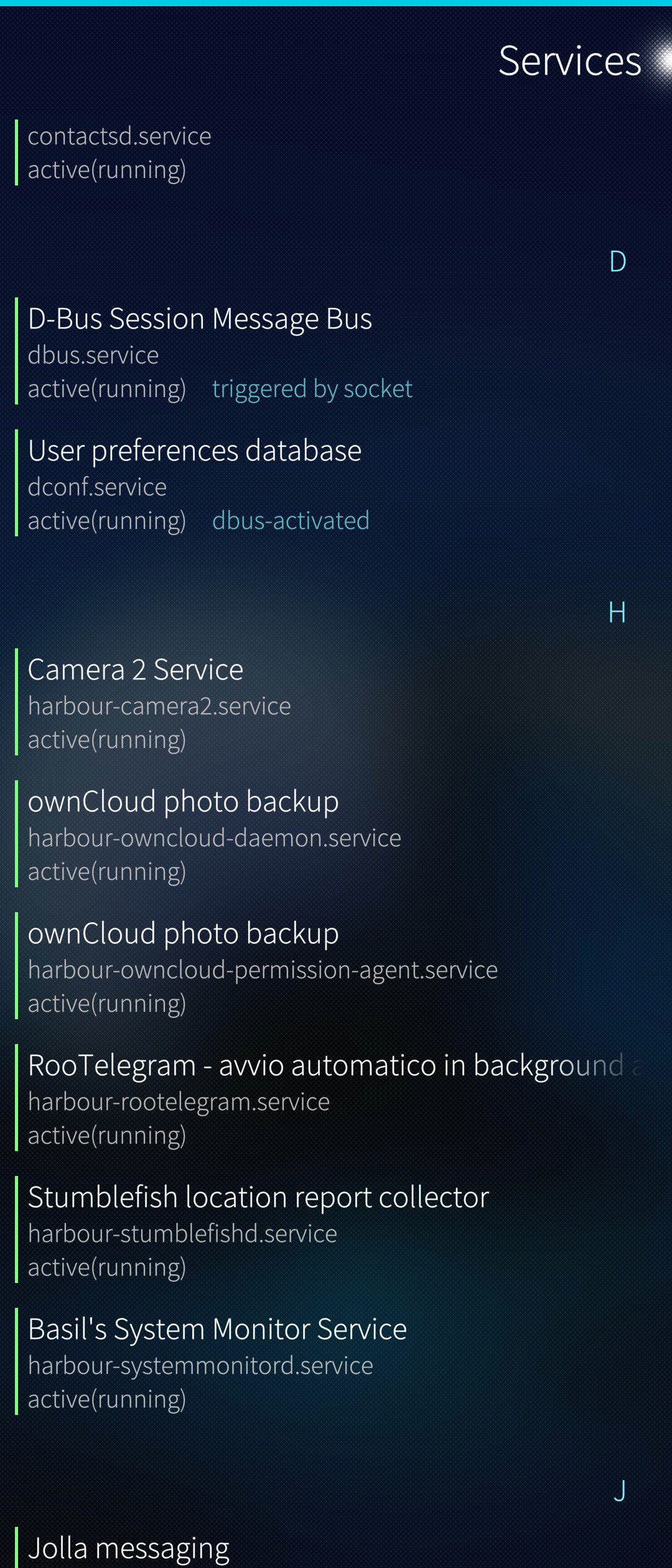
Finally, I have no idea if this is the ‘right’ way of making the camera 2 API stuff start automatically at boot, all I know is it worked for me. And, in the absence of Jolla releasing any official updates that fixed the camera on the 10 iv in the last two years, at this point anything that works is better than nothing.
In my old UNIX days it was done differently using init scripts, but it seems that times have now changed …
3 Likes
I tried v4b but I have a problem when I try the command fastboot flash oem_a swbinary..v4b I get an error message “requested download size is more than max allowed”
@mbrazi_1 This is easy to deal with, a quick search would give you the answer:
Hope this helps.
2 Likes
Yeah, I’ve pointed that out before in my thread too, except that /vendor/etc/camera/camxoverridesettings.txt doesn’t exist in my port and if I create it nothing changes.
1 Like
It doesn’t work for me. i have message waiting for DEVICE - SN.
Got it
fastboot -S 512k flash oem_a ./Sw_…….v4b_zamberi.img
For me that is the synthaxe it works
Thanks a lot
2 Likes