REPRODUCIBILITY: 100% (always)
OSVERSION: 5.2.0.16
HARDWARE: Jolla Phone (2026) - jp2601 - jp2601 - 1.0.0.16 - aarch64
UI LANGUAGE: Suomi (user: fi_FI, os: fi_FI.utf8)
REGRESSION: yes (since: 5.1.0.11 - aarch64)
DESCRIPTION:
AppSupport Bluetooth paired devices were able to unpair in OS v. 5.1.0.11 via AppSupport paired list under Sailfish Bluetooth settings. Thats no longer the case in 5.2 (see latest affected version in bug report details)
PRECONDITIONS:
- Have a Bluetooth device at your disposal, for example smart watch.
- Have AppSupport Bluetooth installed from Jolla Store
STEPS TO REPRODUCE:
- Pair Bluetooth device through Android application
- Try to unpair the device from Sailfish Bluetooth settings
EXPECTED RESULTS:
I can unpair my AppSupport Bluetooth paired device via AppSupport paired device list under Sailfish Bluetooth settings.
ACTUAL RESULTS:
There is no AppSupport paired devices list under Sailfish Bluetooth settings.
ADDONS:
- AAS Bluetooth Bridge: yes
MODIFICATIONS:
- Patchmanager: yes
- OpenRepos: yes
- Chum: yes
- Other: none specified
ADDITIONAL INFORMATION:
Workaround
The fact that AppSupport Bluetooth paired devices cannot be unpair from Sailfish Bluetooth settings nor in Android Bluetooth settings in OS v. 5.2 series. I figured out a workaround at least in my use case
My use case
I tried to pair my Pebble smart watch via official Pebble Android app. After the pairing process was almost complete the watch got stuck in negotiate phase and when I tried to close the Pebble app the app told me that the watch pairing was in error state and it suggested me to go and unpair the watch. I cannot do that in any other way than reinstalling the whole AppSupport. After a couple of reinstallation of AppSupport I figured out a workaround described below to unpair AppSupport paired Bluetooth device.
Preconditions:
- Developer mode enabled
Steps
-
Turn off AppSupport
-
Navigate to
/home/.appsupport/instance/defaultuser/data/misc/bluedroid -
Make copy of
bt_config.conffile as backup -
Edit
bt_config.conf(as root) -
Find the device (by its name) you want to unpair
-
Remove all lines related to that device within the file (see example).
-
Save the file
-
Turn on AppSupport
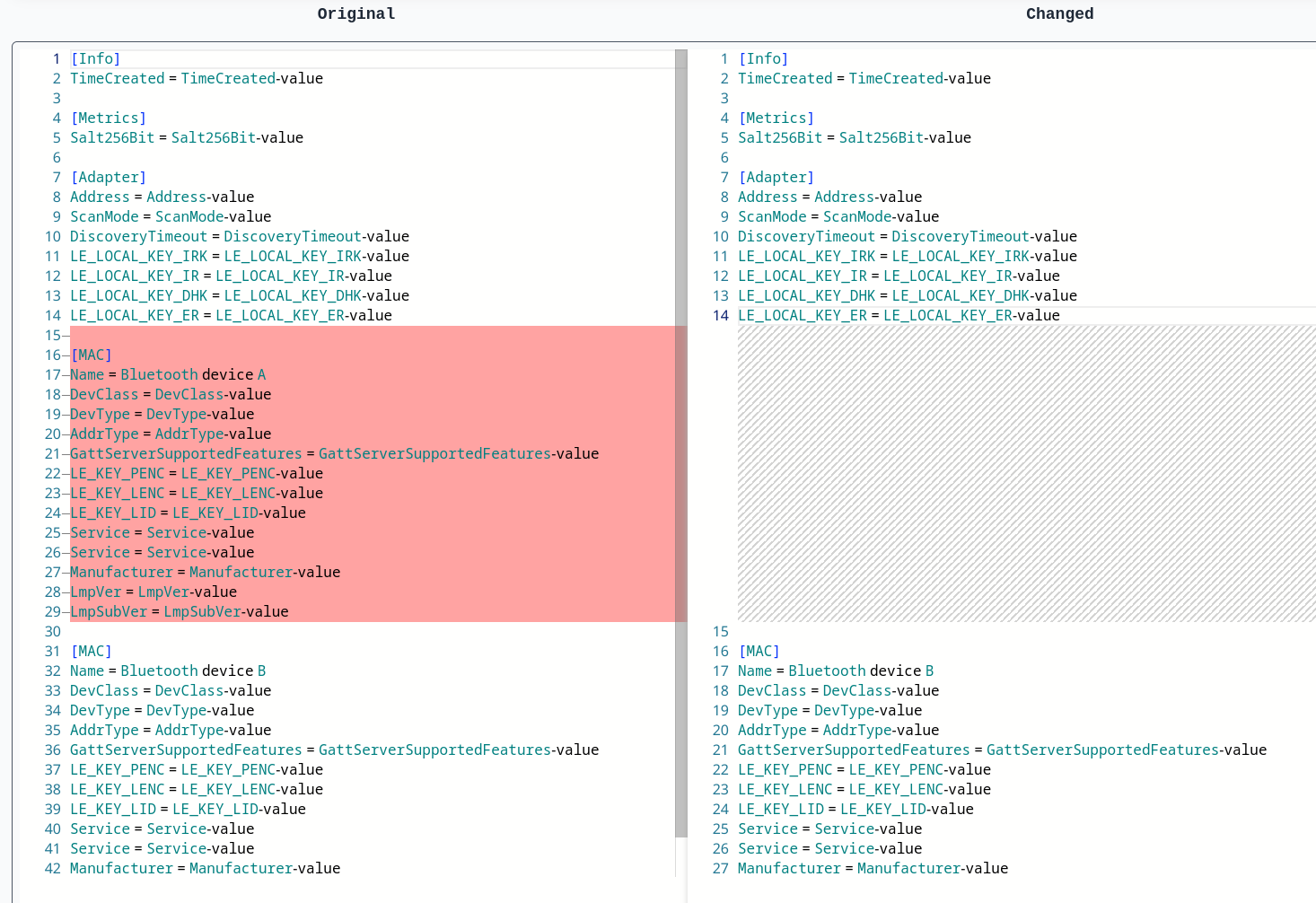
Now that Bluetooth device should be unpaired.
Device Owner User: defaultuser
Home Encryption: enabled