Oh, this requires some knowledge and experience: On some smartphone “motherboards” (= Printed Circuit Board (PCB)) the bus to the internal FLASH-memory chip (eMMC or a more modern bus like toggleNAND, UFS / M-PHY, NVMe etc.) is accessible via so called test-points (usually labelled TP1, TP2, … on the PCB). This enables to re-flash the FLASH memory without de-soldering it (which is nearly impossible with BGA chips on a densely packed PCB); still one must know exactly how to do this, i.e., which bus is used, have a programmer (a piece of hardware) for this type of bus, how to use this stuff etc.
The picture shows only two contacts (the ones encircled in green), which appear to be contacts exposed by a regular microSD card or some kind of adapter being inserted in the microSD slot.
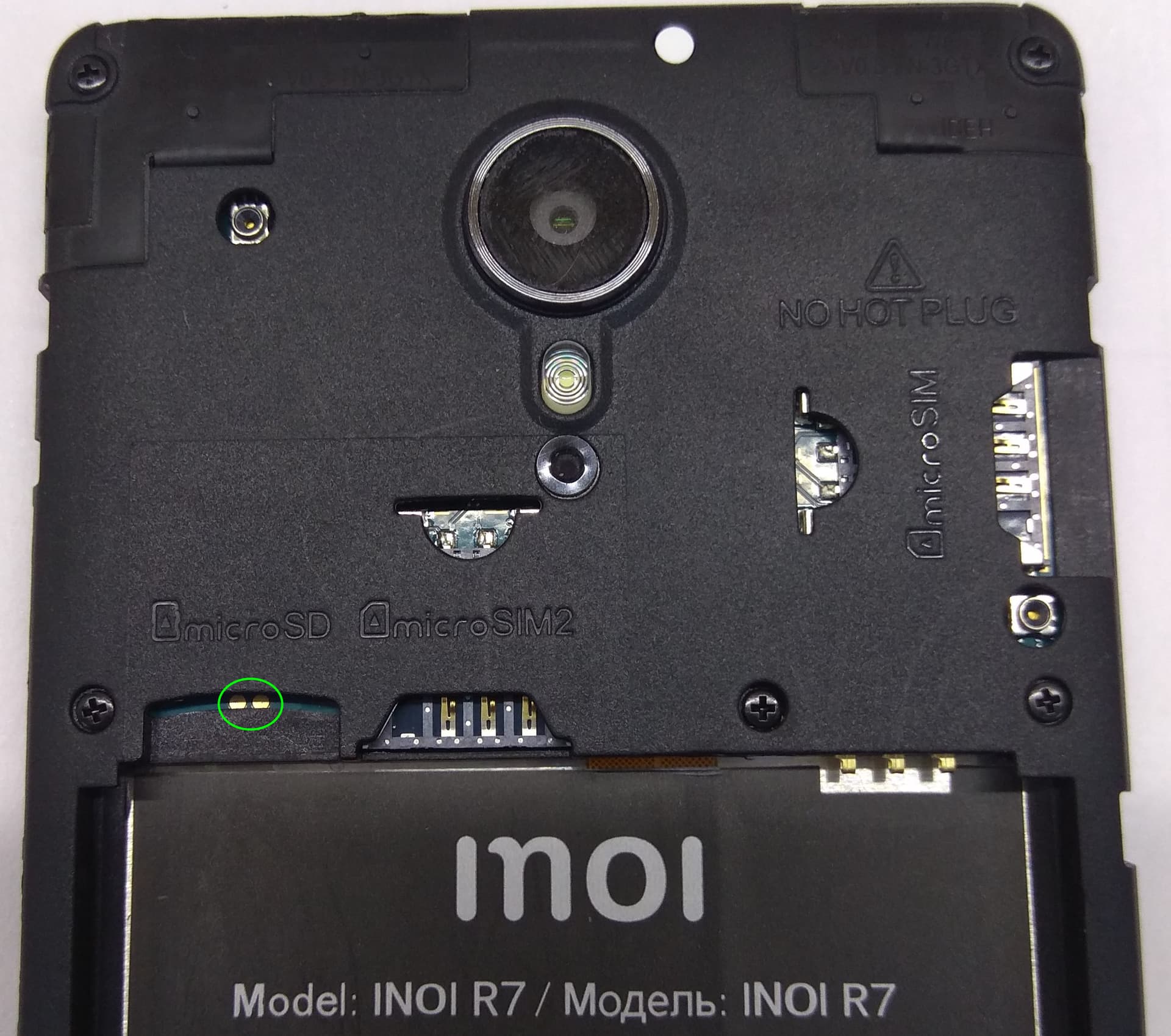
IMO two contacts are not sufficient for flashing!
Yeah, lots of them. 
Which of it is Test-Point pins?
All, respectively none of them! 
Seriously, real test-points would be labelled TPx.
What you see are five groups of pads:
- The two pads in front of the SD-card slot:
BOOTandBOOT-PWR(boot power) - Four pads to the right of the internal SIM-card slot:
GND(ground),DN(D-),DP(D+) andVBUS(bus voltage)
This is most likely a USB 2 port, if you measure betweenGNDandVBUSwith a multimeter, there should be ~ 5 volts. - Three pads in front of the camera module:
TX(transmit),RX(receive) and GND
This is a serial interface, most likely RS232-alike. The issue with serial interfaces of smartphones is, that you don’t know (without documentation), which voltage levels it is using (sure not the specified +12V / -12V, but it can be +5V / 0V, +3,3V / - 3,3V etc.), and if the signals on Rx & Tx are inverted or not. - Behind the battery connector, there are
VBAT(battery voltage),GNDandTEMP(temperature, which is connected to a PTC resistor to measure the battery’s internal temperature).
These pads are directly connected to the three pins of the battery connector. - There are three more pads slightly hidden under the flat ribbon cable in the small connector to the right: I can read
PWK, but not the other two, and have no idea what they are for.
As the device is currently under the control of an MDM (mobile device management), and you do not seem to have a way to ask it to be switched off, you are looking for a way to re-flash it. Either of the first three groups of pads (the USB-port, the serial interface and the two boot-pads) may provide a way to achieve that, but it has to be properly documented. If you are doing something wrong (e.g., applying a too high voltage to the Rx pad, but you don’t know what constitutes “too high” without documentation) you might hard-brick the device (i.e., destroy its electronics). The safest of the three is the USB interface: You may connect it to a computer and see what is there (e.g., by lsusb on Linux); still you would have to have an idea what to do with the USB-device (maybe it replies to fastboot run on an attached computer).
HTH
1 Like
I have not read the guidance in the 4pda.ru forum: Does it suggest to short-circuit BOOT and BOOT-PWR? Is that what you are talking about?
No DLOAD supported - boot into fastboot mode
If you manage to enter fastboot mode, you have achieved what you want: By fastboot boot <recovery-image> you can enter recovery mode and by fastboot flash (needs some more parameters) flash partitions on the phone. First you can check by fastboot status if then phone is locked etc. You will find the fastboot documentation with all its command somewhere.
In general you were about to start a little reverse engineering: This takes patience, a some of searching the WWW (again and again), the will to learn something, trying things systematically and endurance.
But at least you have an extra display, battery and enclosure for your other Inoi R7.
You can check that via fastboot, just to be sure that you did not miss a simple route when giving up now.
Shorting random pins is not a good idea in any case.
3 Likes
Does anyone have an idea how to reactivate my device (see Post 8)?
Have you been installing Gstreamer from openrepos?
This is good. Do not install it.
Try to run ‘broken’ app from CLI and observe an error.
1 Like
Open terminal and run jolla-settings or other not working app e.g. harbour-‘yourapp’.
2 Likes
Thank you for trying.
It seems that Jolla completely relies on an update not being offered by the GUI updater, with no other measure to prevent installing packages which do not work: This is the route of least effort for them, but not as it should be handled.
At least you now know for sure how far you can successfully upgrade SailfishOS on your Inoi R7.
How to roll it back?
This is not advisable and technically almost impossible. Jolla states it this way: SailfishOS does not support downgrading.
Please read the description of sfos-upgrade: There is no other way to upgrade SailfishOS via terminal commands.
Well, there is the “zypper dance” recommended for community ports (requires zypper to be installed by executing pkcon install zypper as root):
ssu re X.Y.Z.P && ssu ur && zypper ref && zypper dup
But technically this is also just a variation of
ssu re X.Y.Z.P && version --dup
which is executed by sfos-upgrade.