REPRODUCIBILITY: Always
OS VERSION: 5.2.0.17
HARDWARE: Jolla Phone 2026
UI LANGUAGE: EN
REGRESSION: Did not happen on SFOS 5.0 on Xperia 10 III
DESCRIPTION:
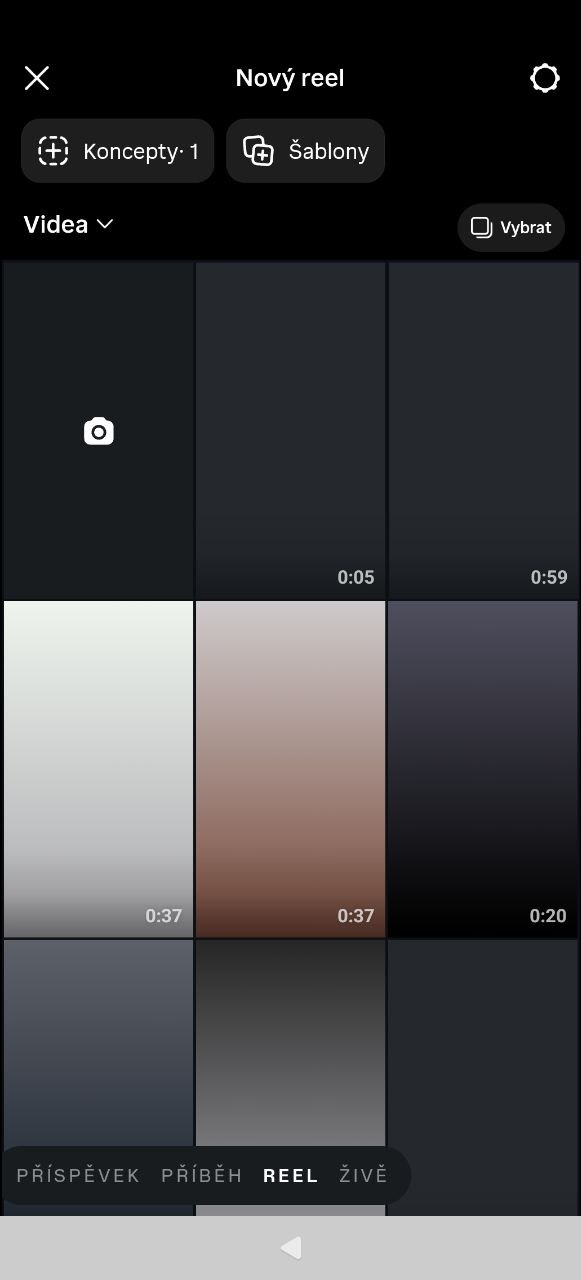
Videos on Android are black in some resolutions. Video played inside Android App Support apps (confirmed: Instagram, CapCut, YouTube Studio) shows a black screen while audio plays normally.
Note that the videos are generally available to apps but are not played. When I send the video over Telegram to someone else, just the thumbnail is not present but the video is sent ok.
The other thing is that low-resolution videos (up to 1920×1080) are played fine. Downscaling any video to this resolution also “fixes” it.
PRECONDITIONS:
Instagram accout / Youtube account / Capcut download
STEPS TO REPRODUCE:
-
Open Instagram and login
-
Click “+” to add a new reel/post
-
Videos are there but all are black
-
Try to play the video - sound is ok, video is still black
EXPECTED RESULT:
Video should play normally and show thumbnail.
ACTUAL RESULT:
Videos are there but all are black
MODIFICATIONS:
No
ADDITIONAL INFORMATION:
Additional Claude code investigation (using SSH and developer mode on my actual phone).
Symptom:
Video played inside Android App Support apps (confirmed: Instagram, CapCut, YouTube Studio) shows a black screen while audio plays normally. Native SailfishOS apps (Just Player) play the exact same files without issue.
Confirmed via controlled test:
Took a file that reproduces the issue (H.264 Baseline, 2560×1440, Level 5.0). Re-encoded only
resolution/level down to 1920×1080 / Level 4.0 (same profile family, audio untouched), copied back to the same folder on-device.
→ The downscaled file plays with visible video in Instagram. The original 2560×1440 file does not
(audio only). This isolates resolution/level as the trigger, not codec or file source (confirmed with
both an original H.264 recording and a re-encoded copy).
Root cause:
- The software Codec2 AVC decoder (c2.android.avc.decoder, declared in
/apex/com.android.media.swcodec/etc/media_codecs.xml) has a performance-tier with max size
2048x2048; a separate fast-cpu variant supports up to 4080×4080. This device’s App Support build
appears to resolve to the lower-tier variant, rejecting the 2560px-wide video. - The device’s hardware Codec2 service (media.codec process, registered as
android.hardware.media.c2.IComponentStore/default, exposing c2.mtk.avc.decoder etc.) is running
correctly and easily handles this resolution — confirmed by querying it directly via dumpsys as root,
which returns a full working codec list. - However, regular app processes (e.g. Instagram, confirmed via its own Codec2Client log: Available
Codec2 services: “software”) never see this “default” hardware store as available, even when it’s
demonstrably alive at that exact moment. SELinux is disabled in the container (getenforce →
Disabled), so this isn’t an SELinux denial, and it’s reproducible immediately after boot with the
hardware service already confirmed responsive — ruling out a startup race.
With no working fallback to hardware, any video above the software decoder’s resolution ceiling has no decode path at all, while audio (unaffected, separate codec) plays normally — matching the reported symptom exactly.
Workaround (functional, not a fix): downscale problem videos to ≤1920×1080 / H.264 Level ≤4.0 before viewing in App Support apps.
Suggested fix directions: either get this device’s App Support build correctly classified into the
fast-cpu media_codecs.xml variant, or fix app-level access to the default hardware Codec2 store so it’s used as intended.
