Please point out which (aspect of) guidance is missing in the bullet point for the Xperia 10 III of my guide, so I can be improve it.
1 Like
So is anyone using 10 III with v4a blobs? How it works?
Well, I answer myself: they do not work. V3a blobs do not work if you need camera with Android apps. v2a, preferably the latest one, is the only working blob (except the mentioned echo issue).
1 Like
Here’s my report:
- Xperia 10 III (XQ-BT52) with pre-installed A13
- SFOS 5.0.0.67, paid
- PC OS is Linux (OpenSUSE 15.6)
- did not downgrade Android
- did not turn the Internet on before turning on
OEM unlockingandUSB debugging- in fact, the original Android did not have Internet access whatsoever during its brief life (Olf, this requirement might be outdated) - turns out
fastbootdoes not require neithersudonorsuon OpenSuSE; just running it from normal user works fastboot oem unlockhung; killed it with Ctrl+C after about half a minute, tried to turn the phone on, and it showed me that the bootloader was indeed unlocked (which was followed by erasure)flash.shdoes not work withA12_4.19_v2a_lenaand shows anThe supported Sony Vendor partition image wasn't found in the current directoryerror; apparently people ITT flashed this binary by hand, but I decided to just useA11_4.19_v9a_lena- after flashing and disconnecting the USB, the phone was stuck with blue LED lit, had to use forced power off
- there was no “sine sweep sound” (this is the 5th XPeria I’m installing SFOS on and I’ve never heard it)
- completely stuck while trying to log in into Jolla account, had to use forced power off. Changed the password to just latin letters and numbers, this time logging in worked ok.
Test results:
- 4G works
- no green tint
- good audio recordings
- no echo while calling with loudspeaker (for either party)
- no disappearing sound after using GPS
- Android VM works fine and has access to the camera
3 Likes
I have a question to everyone who has repeatedly reflashed SailfishOS on top of different Android versions:
If I already have Sailfish on my Xperia 10 III and reflash Android to get a newer version, do I need to unlock the bootloader again to install SailfishOS? Or does it stay unlocked?
The Bootloader stays unlocked unless you locked it again.
Flashing and locking/unlocking are two different things.
2 Likes
Ah okay.
I thought maybe flashing with Emma relocks the bootloader
Emma do not lock bootloader it only flash android.
1 Like
Okay, thanks for the clarification!
hello there
I am newby, got Sony xperia 10 mk3 with android 13
I can confirm that installation worked fine without downgrade to A11
just follow instructions: download sailfish, download latest A11 binary and flash.
it has gone like a charm
8 Likes
I just booted into recovery mode on my Xperia 10 iii and entered the shell as dscribed but there seems to be no sda79. Output of “fdisk -l”:
/ # fdisk -l
Note: sector size is 4096 (not 512)
Disk /dev/sda: 119 GB, 127934660608 bytes, 249872384 sectors
1936 cylinders, 256 heads, 63 sectors/track
Units: sectors of 1 * 4096 = 4096 bytes
Device Boot StartCHS EndCHS StartLBA EndLBA Sectors Size Id Type
/dev/sda1 0,0,1 1023,255,63 1 4294967295 4294967295 15.9T ee EFI GPT
Note: sector size is 4096 (not 512)
Unknown value(s) for: cylinders (settable in the extra functions menu)
Disk /dev/sdb: 8 MB, 8388608 bytes, 16384 sectors
0 cylinders, 256 heads, 63 sectors/track
Units: sectors of 1 * 4096 = 4096 bytes
Device Boot StartCHS EndCHS StartLBA EndLBA Sectors Size Id Type
/dev/sdb1 0,0,1 1023,255,63 1 4294967295 4294967295 15.9T ee EFI GPT
Partition 1 has different physical/logical start (non-Linux?):
phys=(0,0,1) logical=(0,0,2)
Partition 1 has different physical/logical end:
phys=(1023,255,63) logical=(266305,4,4)
Note: sector size is 4096 (not 512)
Unknown value(s) for: cylinders (settable in the extra functions menu)
Disk /dev/sdc: 8 MB, 8388608 bytes, 16384 sectors
0 cylinders, 256 heads, 63 sectors/track
Units: sectors of 1 * 4096 = 4096 bytes
Device Boot StartCHS EndCHS StartLBA EndLBA Sectors Size Id Type
/dev/sdc1 0,0,1 1023,255,63 1 4294967295 4294967295 15.9T ee EFI GPT
Partition 1 has different physical/logical start (non-Linux?):
phys=(0,0,1) logical=(0,0,2)
Partition 1 has different physical/logical end:
phys=(1023,255,63) logical=(266305,4,4)
Note: sector size is 4096 (not 512)
Disk /dev/dm-0: 5000 MB, 5242880000 bytes, 10240000 sectors
79 cylinders, 255 heads, 63 sectors/track
Units: sectors of 1 * 4096 = 4096 bytes
Disk /dev/dm-0 doesn't contain a valid partition table
Note: sector size is 4096 (not 512)
Disk /dev/dm-1: 100 GB, 106866671616 bytes, 208723968 sectors
1624 cylinders, 255 heads, 63 sectors/track
Units: sectors of 1 * 4096 = 4096 bytes
Disk /dev/dm-1 doesn't contain a valid partition table
The device was originally installed with SailfishOS 4.4.0.64 and upgraded via the GUI (hence not skipping stop-releases) to 5.0.0.69. I’m using the original Sailfish 4.4.0.64 folder to launch hybris-recovery.
did you found a solution ?
3 days ago I just flashed 5.0.0.72 with v9a blobs on top of e/OS/ A15 which is based on LineageOS and everything looks good.Unnoticeable difference in speed between AAS/A15 with Firefox …the most used app!We really need official support from them,which is just a dream at this moment.
6 Likes
For those that wonder this again at some point, I flashed over latest Android 13 with the recommended blobs and everything seems to work smoothly so far.
3 Likes
Update here. I have had now few report that other person can hear their voice as an echo. But not in that kind of level we wouldn’t be able to have the phone conversation, but annoying non the less. So this can still occur with Android 13 while using recommended android 11 blobs.
As I wrote many times, for me the best combination has always been the following:
2 Likes
But do I remember correctly that you also didn’t have any problems with Android 13 as base with recommended android 11 blobs? If I remember correctly you had problems with Android 13 base with android 13 blobs? Have to see if I find time to flash again with android 12 base
Right, but I was using Android 13 base over a much shorter period of time,a few months at most. In 2024 my 10 III had its mainboard replaced and then I switched back to Android 12 base and blobs. So it’s been like 1,5 year on A12 (without anyone ever complaining about hearing echo) vs. a few months on A13, also without complaints, but that maybe because of much shorter period of use… The only problem is that there is no A12 firmware on Emma, so one has to flash A11 and then all the OTA updates, which takes a lot of time… But it’s definitely worth it.
This was the reason I went with the A13 road. Have to see if I do that exercise at some point but I am a little bit hesitant to go through the whole flashing face again
Well, 2 years later, with 5.0.0.73 A13 update bringing some risks wrt to patched GApps, I finally did the whole /dev/sda79 backup/restore + this topic’s Android “upgrade” flash dance while in there  Details below.
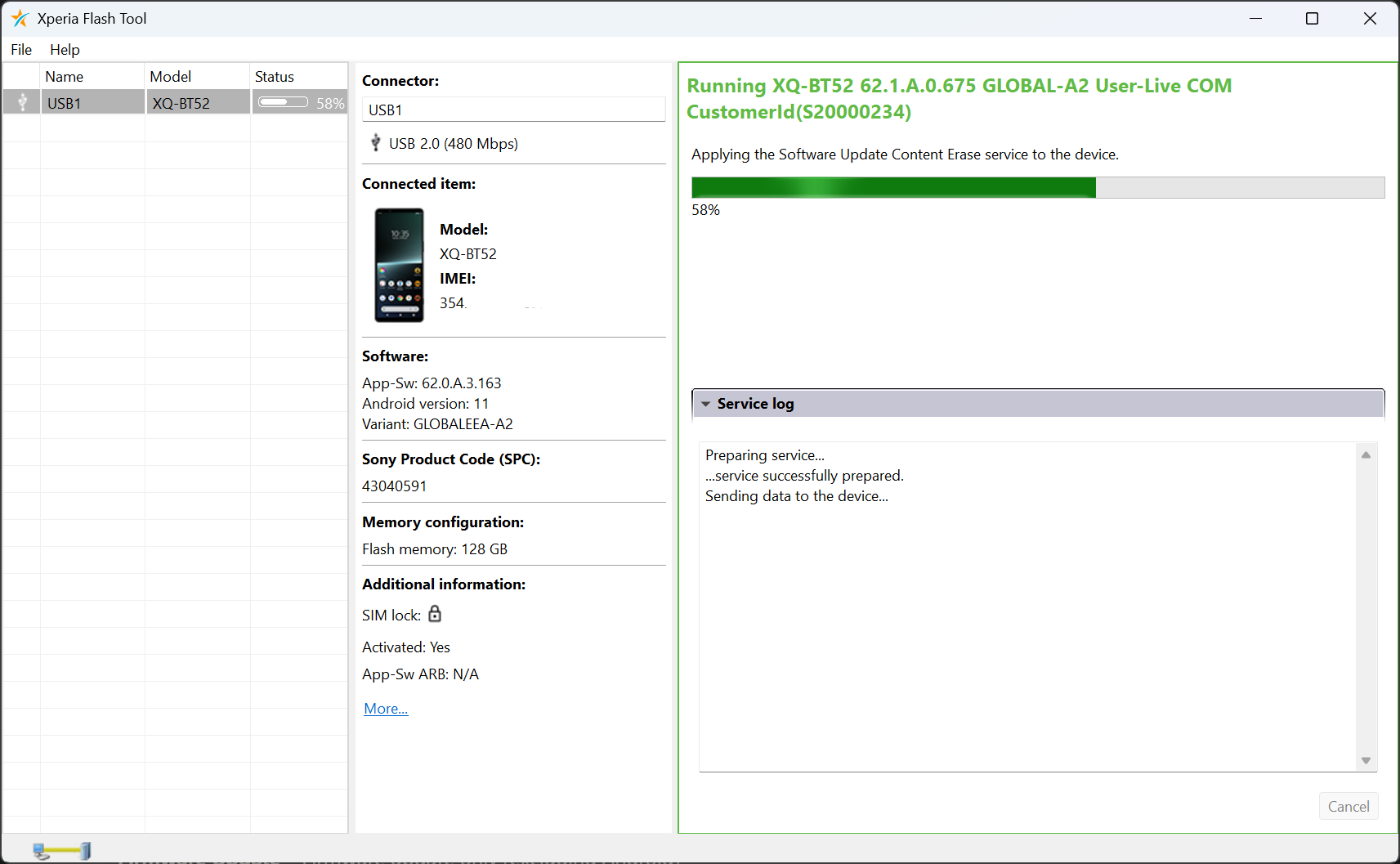
First question was: go A12, or A13? I’m not sure what’s different for @wetab73, for me A12 service was directly available in Xperia Flash Tool (ex-EMMA)  so that’s what I went with.
For SFOS re-flash, I went with v2a then. Updated flash-config.sh to SW_binaries_for_Xperia_Android_12_4.19_v2a_lena.img + bumped md5.lst.
RESULTS
My main experiment motivation was about the weird greenish paint blobs appearing below translucent elements like SFOS app cards below launcher icon grids, visible in dark room.
And… I think they’re still there! Is this “tint” issue still something else than I think it is, since nobody’s been able to screenshot (visible only on-screen), or photograph it (visible only in near-pitch-black dark room)?
I can clearly see it with these conditions:
- have multiple rows of app cards open in launcher (blobs appear around middle to lower card grid rows)
- open an app grid sub-folder with some icons in it (multiple layers of translucency)
- on A12-based SFOS install, right now I clearly still see a tinted “paint blob” around the launcher app cards due to app icon grid translucency
- it may or may not be rendering in a different shape now on A12 vs my previous A11, can’t remember such deep shape details anymore

Call echo: did a couple of test calls both on A12 and SFOS to spouse’s iPhone, everything seemed fine, no echo.
Fingerprint: worked also mostly fine on A11, other than standard OOMs crashing fpd every so often, I guess we’ll see how this goes, seems to work just as fine on A12 thus far, 1 day in.
Confirmed, this works great to backup directly to your laptop. Transfer speed matches, will take ~50 min to clone for 104 GB. I verified md5sum to be equal both on-phone and laptop, before proceeding with A12 install.
T/YdIL easiest way to get your SSH pubkey into recovery image instead of copy-pasta
ssh-copy-id ~/.ssh/id_ed25519 root@10.42.66.66
Restore cmdline for this filename is
pv -rab < sfos_backup_sda79.img | ssh root@10.42.66.66 dd of=/dev/sda79 bs=4M
Restore write goes only at 19 MB/sec, so great time to cook and eat dinner for 1,5 h or so.
I’m only now going to try booting AAS on A13 now, with patched MindTheGApps, so not sure yet about the above. But everybody here claims cameras should be working fine with A12 base + blobs.. can confirm things work fine on SFOS Camera, I’ll know about AAS soon.
One more noteworthy partition backup/restore side-effect: media indexing wasn’t able to pick up Camera saves to SD card anymore. Photos are visible swiping backwards in Camera app, but Gallery wouldn’t show them, until I used Utilities to reset media index

EDIT reset ofono also needed Android 13 and SailfishOS on Xperia 10 III - #185 by lkraav
1 Like