How’s your Bluetooth connection keeping up with your watches? My Suunto 5 drops the connection now during the night. I need to re-pair the watch to be able to connect the Bluetooth again.
No biggie, as it pairs nicely. It’s just annoying to notice that the notifications don’t get through. And weird part is that my Jolla claims that the connection is active, but the app doesn’t see it.
Could there be some kind of hourly keep-alive signal? Not sure what causes the connection drop and when. Collecting 7 to 9 hours of logs (and going through them) could be “fun”. 
This problem with steps not updating should be fixed in 1.5.4 that will be up in github in couple of minutes.
I’m actually noticing the same behaviour with my Race. The connection is lost always in the morning. Although for me it’s enough to just connect again in system bt-settings, I don’t need to re-pair the watch. I’ll have investigate that at some point.
That seems to be the case with my Suunto 9 as well. Repairing helped.
It actually still shows yesterday’s 434 steps.
I have exactly same with bt connectivity. Need to re-pair watch again.
Now I have 2 new sport events in my Suunto 5 watch but seems, that app is not seeing them, informing that all events have been synchronized.
journalctl _COMM=harbour-suuntos -f
– Logs begin at Sun 2026-10-25 10:26:25 EET. –
loka 25 10:28:12 JP2026Sami harbour-suuntosync[40323]: [D] unknown:0 - Using Wayland-EGL
loka 25 10:28:19 JP2026Sami harbour-suuntosync[40323]: [W] unknown:0 - watch session attached in 600 ms
loka 25 10:28:20 JP2026Sami harbour-suuntosync[40323]: [W] unknown:0 - watch /Info: Suunto | Monza | 2.23.20 | 0071B4 | SIM
loka 25 10:28:21 JP2026Sami harbour-suuntosync[40323]: [W] unknown:0 - Kellossa ei ole uutta - kaikki 18 harjoitusta on jo täällä.
loka 25 10:28:22 JP2026Sami harbour-suuntosync[40323]: [W] unknown:0 - Uni synkronoitu. Palautuminen epäonnistui: Sivutettu luku kohdasta 0 palautti vain 10 tavua
loka 25 10:28:22 JP2026Sami harbour-suuntosync[40323]: [W] unknown:0 - watch session released after 1977 ms
loka 25 10:28:48 JP2026Sami harbour-suuntosync[40323]: [W] unknown:0 - watch session attached in 121 ms
loka 25 10:28:48 JP2026Sami harbour-suuntosync[40323]: [W] unknown:0 - watch /Info: Suunto | Monza | 2.23.20 | 0071B4 | SIM
loka 25 10:28:49 JP2026Sami harbour-suuntosync[40323]: [W] unknown:0 - Kellossa ei ole uutta - kaikki 18 harjoitusta on jo täällä.
loka 25 10:28:49 JP2026Sami harbour-suuntosync[40323]: [W] unknown:0 - Uni synkronoitu. Palautuminen epäonnistui: Sivutettu luku kohdasta 0 palautti vain 10 tavua
loka 25 10:28:50 JP2026Sami harbour-suuntosync[40323]: [W] unknown:0 - watch session released after 1294 ms
Yep. Today remaining the pairing from settings and re-paired. Then the watch connected. No need to remove the connection from the watch, which makes things a bit less annoying.
For @jarnose, the steps seems to be stuck on 434. I can’t remove the app from the app drawer. Any tips for that?
If you have the notification-daemon installed, you need to remove uninstall from shell
devel-su pkcon remove harbour-suuntosync
Uninstalling from the app drawer can’t uninstall the system-daemon.
I edited the .spec-file for 1.5.5 so that it allows to remove the sync-app even if the daemon is still installed.
Would be good to be able to remove the daemon from the app too.
I agree it would be good, but I have wanted to have the app itself to be harbour-comparible so I have the option to submit it to the official store someday. Thats why the notifications are on separate rpm. And because it’s separatw rpm, and the app is sailjailed it can’t remove daemon. If I decide I dont ever want the app to the store, I can add the notification-daemon to the actuak app, and have it in one rpm.
Doesn’t Situations use a double package style? It has the app in Harbour, and within the app you can add the daemon/addon. And the app removes both. This is just from the top of my head, so @hhaveri should clarify how they did it - or if I’m completely off.
Situations daemon launches the background service as root. So since the service is root, the same communication that happens between UI & service can also be used to send command to uninstall the daemon via that root process.
That’s interesting. I’m trying that approach for this app.
Does the app transmit data such as weather information or GPS synchronization data? Or does it only download workout data?
If not, do you plan to make further modifications?
Under Settings, there’s options (buttons) to:
- Update GPS-data
- Let the watch fetch weather (my translation from Finnish)
- Read weather from watch (my translation from Finnish)
So, short answer: yes.
This will ofcourse depend on the supported features by the watch. I have GPS in my watch, and although the Suunto 5 is quite old, the GPS has worked remarkably well on it’s own. So, can’t confirm or deny how well the GPS sync works. And I honstly don’t know if my watch even has weather. So someone else should check that.
The app has a very simple interface. But it works—and that’s what matters most. Thanks for the great work.
The latest version in Github (OpenRepos is still read-only) have now the daemon-rpm inside the actual app, and it can be installed from settings (like the Situations-app).
Some other fixes and updates also.
For the weather and GPS
- GPS ephemeris can be downloaded and pushed to the watch from the settings menu.
- For the Weather I did several mitmproxy and bt hci captures from the official android app, and I didn’t see that the weather data was downloaded and pushed to the watch, instead the app seems to tell the watch to update weather. And by looking my firewall logs, the watch (Race) downloads the weather on wifi at 4:34 in the morning. Tested only on Race, as the watches I have are Race and 9 Baro.
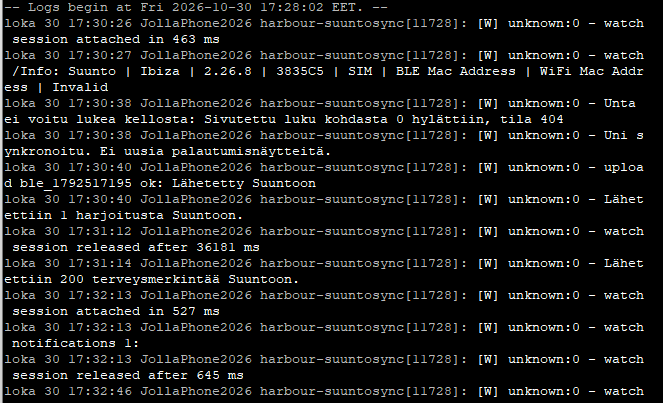
@jarnose It seems that Suunto Sync is not syncing the events from the watch Suunto 9. Suunto sync connects and messages come through from the Pair the watch (Parita kello). Only events synced with android device are updated into Suunto Sync. Here is the logfile if you have time to check it later. There is one event from today in my watch, which I tried to sync. Latest version 1.6.0-1 was used.