looks like you have to switch to :testing: repos. I don’t know now the state of 5iv in the sense if it will work with it. There was a small delay in releasing 5iv packages, but whether configs in repos are now in sync, I don’t know. @vlagged - is there some catch up to do?
1 Like
OK, so I finally got mine  It’s proper XQ-CT54 model, in pristine condition (literally no single trace of use) and still on warranty (only two weeks left though). “Bootloader unlock allowed: Yes”, everything seems to be working perfectly fine under Sony stock Android, etc. Very nice dark violet color, even the paper Sony label on the back intact, and battery capacity seems to be still in the ~98% range. It seems to have been a really good choice. I’ll further test it on stock Android one more day or so, then LOS flashing and some tests, and then SFOS
5 Likes
I did not test testing repos myself but I believe that sailfishos side there shouldn’t be any catch-up to be done between the two devices. It is just the lineage base that I am struggling to find time to resume updating.
Also @remote I do have that file, even if I didn’t update to the most recent devel version (am on 5.0.0.62):
# rpm -qf /etc/mce/60-doubletap-jolla.ini
droid-config-xqcq54-1+main.20250917191946.d5a07f8-1.59.9.bso.aarch64
it’s not about that file (I do have it, indeed), it’s about 60-doubletap.conf
Thanks for clarifying. I think you’re both right 
I had to re-trigger OBS droid-config package to include that file. However, in my particular case, zypper up did not result in updated droid-config package, I had to ssu re 5.0.0.71 and version --dup. In your case it might work with just zypper ref -r adaptation-community && zypper up -r adaptation-commuity (warn: typed commands, not pasted, might have errors)
# rpm -qf /etc/mce/60-doubletap.conf
droid-config-xqcq54-0.2.0-1.67.1.bso.aarch64
1 Like
seems like didn’t work for me - only droid-hal-version-xqcq54-1.0.0-1.4.10.bso.aarch64 was found/updated
# ssu s
Device registration status: not registered
Device model: Xperia 5 IV (xqcq54 / xqcq54)
Device UID: XXX
Release: 5.0.0.71
Domain: sales
Brand: Jolla
Will try version --dup
added: Nope. NO UPDATES FOUND. Try again later.
It is unfortunate that a such update does not trigger a package download and install. I will continue to look at the Requires/BuildRequires relationships in the repo - however, in the mean time, you could zypper se -s droid-config-xqcq54 and copy the version that is newer but not installed and zypper in it.
(That is, I am assuming the dependency chain does not work, not that the rpm install doesnt)
Thanks!
Installed with zypper install --oldpackage droid-config-xqcq54-0.2.0-1.67.1.bso.aarch64.
Also updated all other droid-config-xqcq54-* packets to 0.2.0 (droid-config-xqcq54-bluez5 droid-config-xqcq54-flashing droid-config-xqcq54-policy-settings droid-config-xqcq54-preinit-plugin droid-config-xqcq54-pulseaudio-settings)
I would expect that
zypper ref
zypper dup
would have updated it.
1 Like
Flashing LOS and SFOS on my 1 IV XQ-CT54 went just fine. Everything seems to work exceptionally well (except for mobile data in AAS).
The only issue I am facing is the following: search engines do not work in the Sailfish web browser. When I type a keyword in the browser’s address bar, instead of searching for it in the search engine chosen in browser’s settings (e.g. Google), the browser uses the keyword as part of an URL, adds .com to it and tries to open such URL, usually ending up with an error page.
Launching sailfish-browser from the Terminal reveals the following errors:
Javascript error: , line 0: uncaught exception: 2147549183

Javascript error: resource://gre/modules/SearchService.jsm,
line 1272:NS_ERROR_UNEXPECTED: SearchService initialization failed
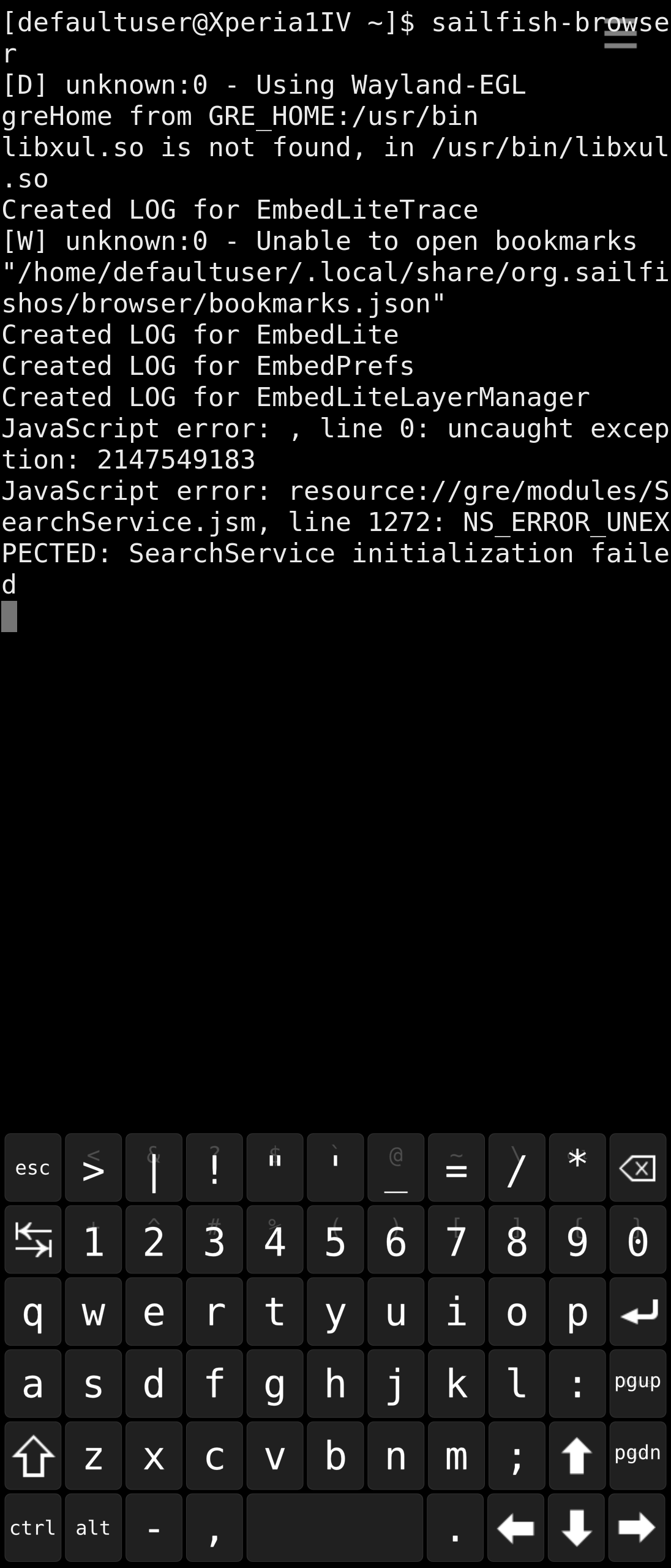
I’ve already tried: reinstalling sailfish-browser, reinstalling (and even downgrading, then reverting to the latest) embedlite-components-qt5, installing embedlite-components-search-engines, xulrunner-qt5 and more. To no avail.
Is this a common problem on the Nagara port, or am I the only one? A quick look at the forum shows me that someone reported the exact same problem on Xperia 10 II or 10 III after upgrading it to one of SFOS 5.x updates, but it was almost a year ago:
Someone can help with this, please? As long as mobile data doesn’t work in AAS, the native web browser is the only option to use away from home and this thing makes it even more troublesome to use… Thanks in advance for any suggestions!
1 Like
Use Angelfish-Browser
Actually, I already did (the Qt6 one) but - to say it mildly - I am not a huge fan of it. Besides, I would still like to fix the Sailfish browser, or at least I’d like to know if it is my unique problem or a common one. I don’t have it on any other device (XA2, 10 III, 10 V)….
3 Likes
OK, after several days of testing my 1 IV (XQ-CT54) the following are some observations (only those that I haven’t seen being reported by anyone else):
SFOS side:
- Sometimes (used to be more often in the beginning, now somehow less frequently) when restarting or freshly booting, the device sometimes restarts itself after the logo Sony and SFOS logos, before showing the home encryption password entry screen. After it restarts, it boots normally. Additionally (but one single time only) after such “double-reboot” the ambience changed by itself to the default “5” one. I can distinguish whether the device would boot normally or do such a re-boot by the notification led not lighting up after the Sony logo if there’s going to be a reboot.
- The Jolla Gallery app is unable to correctly play ANY videos. Only a few seconds play normally, then video freezes while the sound keeps playing OK. This even includes videos recorded by this device itself. The same applies to e.g. File Browser’s internal viewer. Strangely, some other apps (e.g. MpvQml) play all videos correctly.
- The aforementioned problem with Sailfish browser search function, i.e. using search keywords as URL rather than looking them up in the selected search engine. Typing e.g. “pizza” take me to “pizza.com” rather than showing results for pizza in Google (or whatever else is chosen in settings). I tried to find out if it is my unique problem or a general one, but so far I didn’t get anyone’s response.
- I paired the phone with my Bluetooth car kit, and even though all its services got correctly resolved and the whole pairing process was OK (the /var/lib/bluetooth/MAC address/info file is correct, identical with what I have on the 10 III which works perfectly fine with that car kit), the 1 IV does not send the phone book to the car kit (neither contacts nor recent calls lists). The car kit is aware of the needed profiles being supported as it shows the Phone book option in menu (whereas with phones not supporting PBAP profile it is greyed out) but if I open it it’s empty, and incoming calls are only shown as numbers. I know the PBAP profile is archaic (and so is my car kit) but it works with all other SFOS devices I own.
And separately AAS issues:
- as reported by others, mobile data doesn’t work. But it’s not just mobile data, IMO it’s actually deeper - it does not recognize the SIM card, or maybe even the modem. Everything related to cellular network is inactive.
- it’s not just videos that AAS doesn’t normally play, it’s actually any media. It doesn’t even play any audio files (MP3, AAC, M4A, OGG, whatever). The only thing I’ve tried that plays anything (and it does it entirely OK) is Amiga module music players (e.g Amiga MOD Guru, Xmp Mod Player), but I guess that it’s so because they use their own libraries for decoding mods to a stream of data sent directly to hardware sound buffer. Anything trying to use system codecs fails. It’s not even possible to watch any videos on web pages.
- EDIT: Android VLC is able to play both audio and video files without any problems. Does it use its own codecs? Even after enabling full HW accelleration in VLC settings, it still plays everything.
- With @bundyo’s fix, the camera works in Android. Even Open Camera works (but only as far as trying to take a picture, then it fails. Strangely, the “built in” Android camera app does take pictures (but doesn’t record videos - probably because it can’t encode the image or video as it even opens a file in android_storage/Movies but fails at this point)
Well, that’s it for now…. Just one remark, that while manually updating AAS to what recently came out from Jolla (5.0.0.73), some services got broken and it no longer adds upon installation (or removes upon uninstallation) any Android icons in the SFOS launcher (app grid). But not only on the 1 IV, my 10 V (where I took those updates AAS packages from) also got the same issue, even though it was updated the normal (GUI OTA) way. I can’t locate what’s causing it (does anyone know which service is responsible for updating .desktop files of Android apps on the SFOS side?), and removing and reinstalling AAS (even in the previous version) does not fix it, so I’ll probably reinstall SFOS on the 1 IV. One question: what’s better? Flash the .71 “testing” image directly, or flash the earlier .68 image and then update it (zypper dup)? What should give me better result?
3 Likes
did you try to setup search engine in browser settings?
in my case, it works perfectly. looks like car-to-car variability
2 Likes
This is what I started dealing with on my OP6, while it’s working as intended on my 10II. Same search engine set and all that jazz.
2 Likes
Yes. I also tried to switch between different search engines (from those available in Settings, including Google, Bing, DuckDuckGo, and more), and also install additional ones, to no avail. As reported earlier here, there is a Javascript error (SearchService.jsm initialization failed) displayed if I start the browser from the terminal. I reinstalled whatever came to my mind, no change.
So I’m not the only one…
I’ll test it some more. I’ll delete the pairing and try again, let’s see if it helps.
One more question:
Is there some way to tweak some dpi setting, or whatever else affects UI elements size, to make things on the 1 IV a bit smaller? Most of UI elements are proportionally much larger compared to other devices, even when using the “normal” font size. UI texts which on the 10 V or 10 III fit in one line (and even leave some free space) on 1 IV get divided into two lines, and if it is a single long word that doesn’t fit then it awfully breaks to the second line without respecting gramatic rules. For example, on security code entry screen, on the 10 III & V the Polish word “bezpieczeństwa” easily fits in one line with some additional margins, whereas on the 10 IV with normal font its so large that it doesn’t fit and gets divided into “bezpieczeństw” + “a”. Other UI elements are also unproportionally bigger than on the 10 III / V, for example, thumbnails of favorite contacts shown on top of the contacts list are so huge that only two of them fit in one line, whereas on the remaining devices three of them fit with the “normal” font size. With the screen itself additionally being physically larger, it makes everything even bigger.
So, can I tweak it somehow to bring the UI back to 10 III / V proportions?
It sounds that maybe the Patch ‘launcher combined patch’ fork can do what you want (if I understood correctly)?
Install via Patch Manager.
Not really, as this patch only affects the launcher (app grid) where you can, indeed, resize the icons and spacing between them, but it doesn’t affect anything besides that, whereas what I am talking about is the entire UI in general - sizes of texts and most of UI elements, UI-wide.
Compare e.g. the following two screenshots:
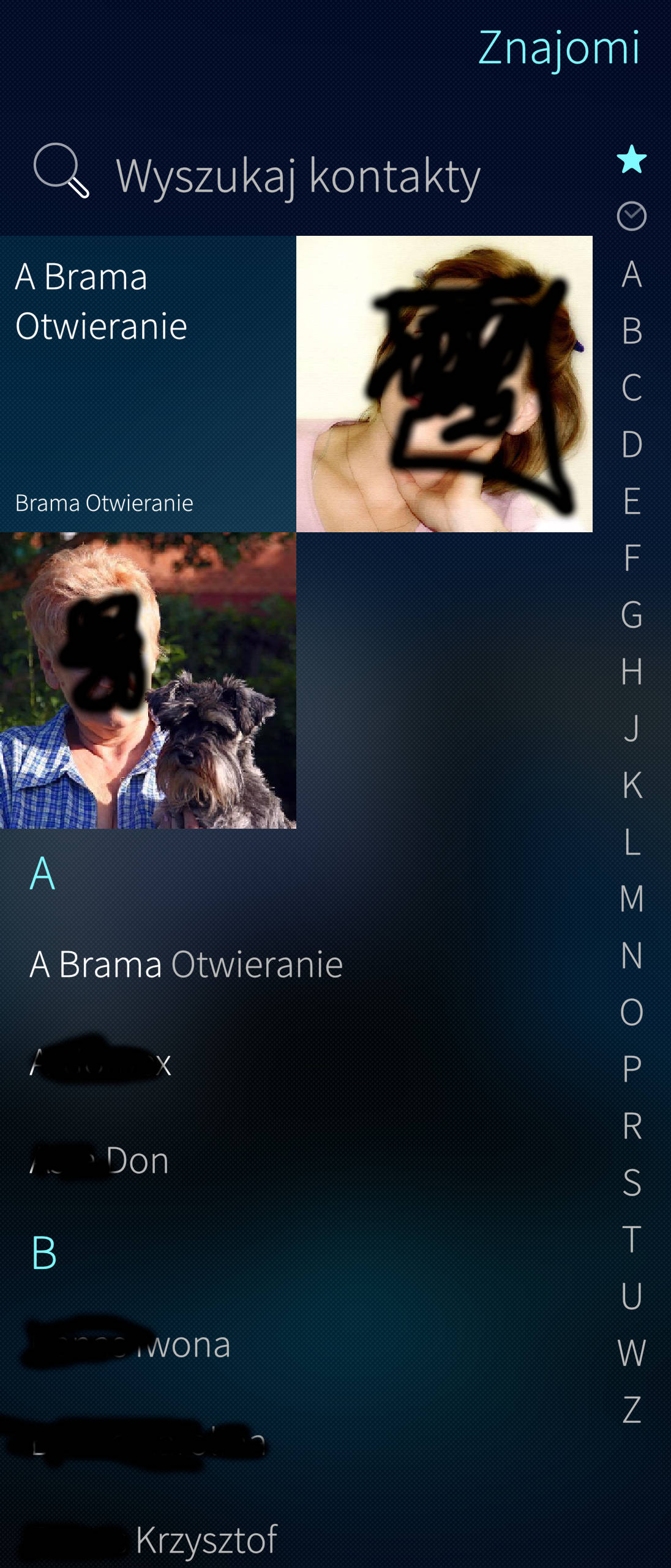
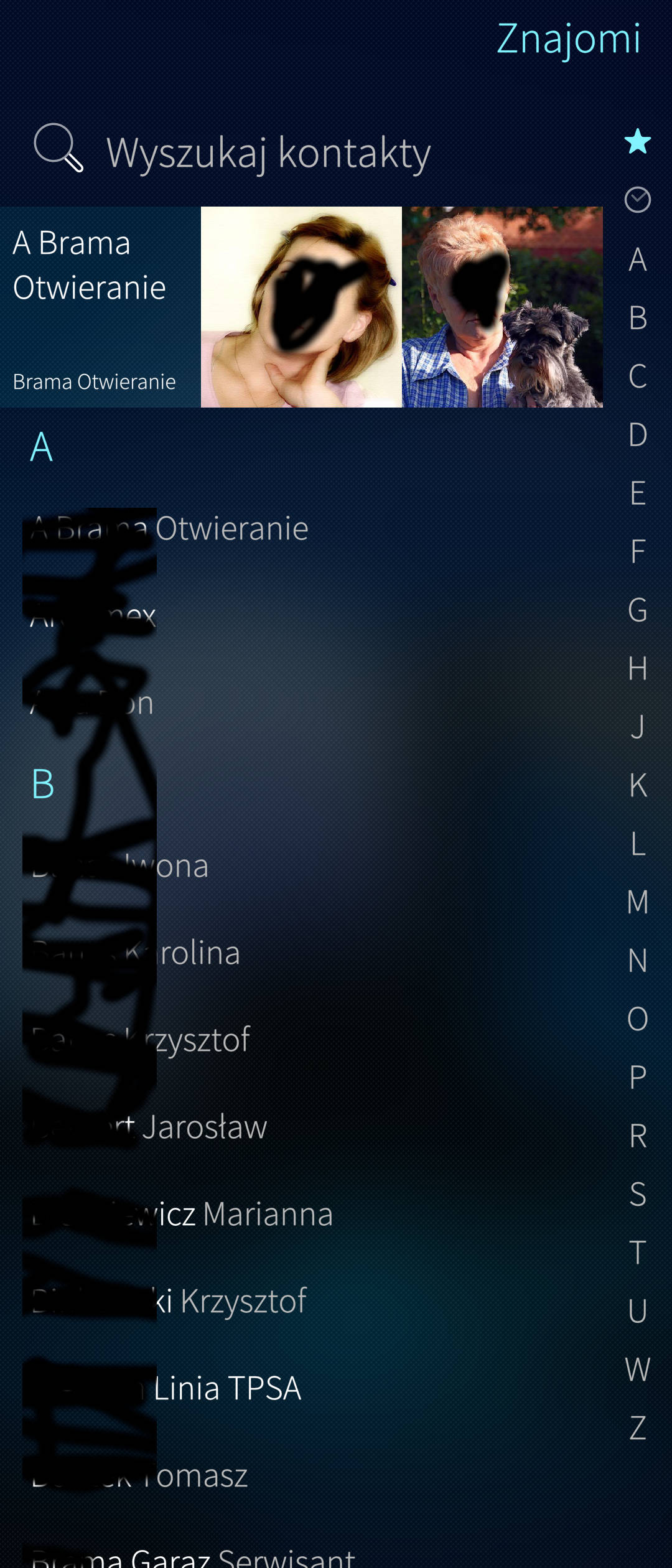
Make no mistake, it’s the first one from the 1 IV and the second one from the 10 III, both with the standard “Normal” font size. See clearly, how much bigger everything is unproportionally on the 1 IV vs. 10 III (and V, and others) and how much less things fit on the screen because of that. It’s just one of many examples, everything is that unproportionally huge. Also note that the 1 IV screen is also physically larger (which is what the above screenshots do not really show) so it makes everything even bigger. The “Normal” font setting on the 1 IV actually looks like the “Huge” (largest) setting on the 10 III or V, which I guess is for visually impaired persons.
I see, that is indeed not nice. I use a Volla Quintus with 6.7" screen, I am grateful that I do not have this problem. Unfortunately, I do not know where to tweak this global font settings.