You beat me to it! I planned on making this app.
4 Likes
You can always join forces 
2 Likes
Haha yeah, we can maintain it togerher if you want
3 Likes
Well, you beat me by at least two months, not enough time right now, but sure, later we might join forces. And maybe form a council of Dominiks.
4 Likes
Just installed Situations from the Store to check this and it looks like it’s still able to install the daemon:
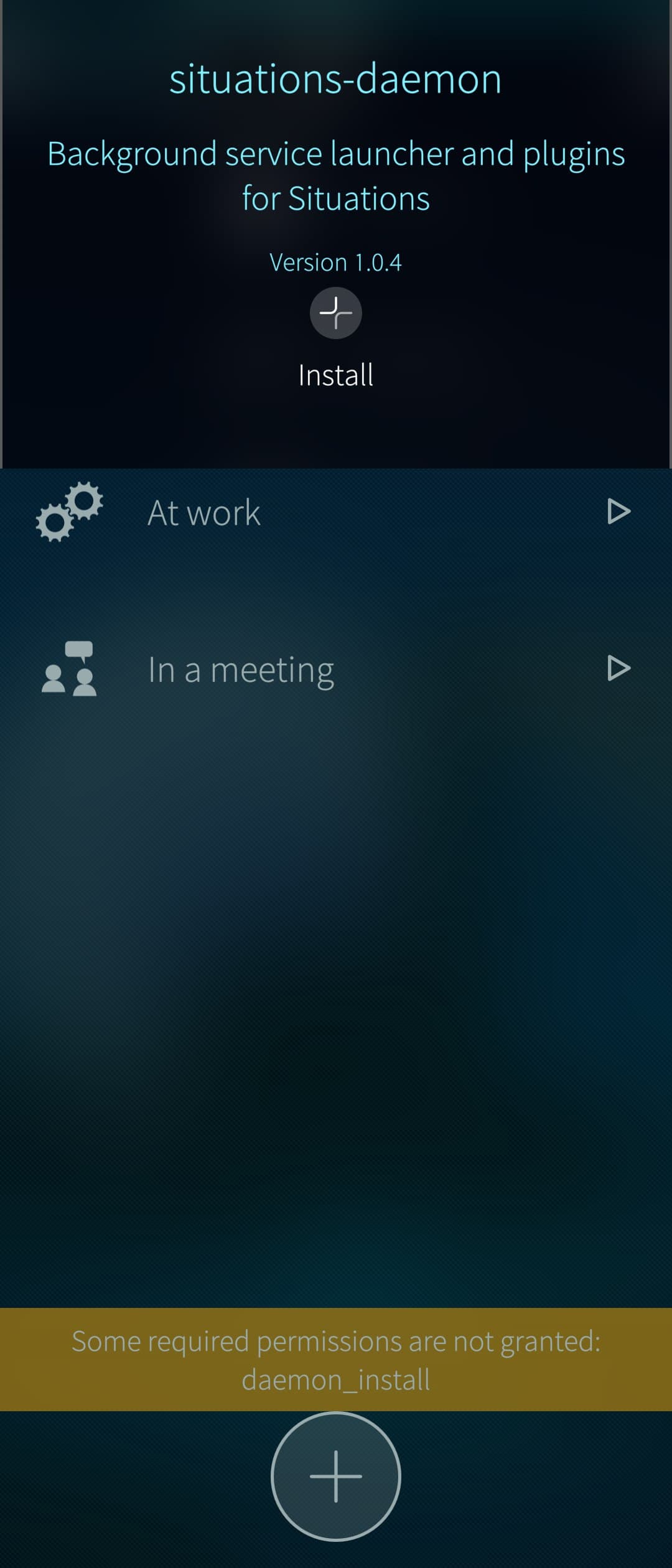
Also the FAQ still mentions installing RPMs from Store apps as allowed.
Search for “I want an ‘RPM install’ feature in my application, how can I install/sideload RPMs from a program?”
3 Likes
Not sure if I understand you right, but maybe you can try RPM Rebuild?
Note to French-speaking users: I opened a pull-request for the translation. Please have a look, comments and fixes are welcome (here as well if you don’t have a github account).
I do not have a phone with a recent SailfishOS (yet) nor do I have installed the latest SDK to test in the VM so I don’t know if some fields have strict width constraints. Do not hesitate to notify of such risks if necessary.
2 Likes
Thanks for the app. I could install it to my old Xperia X. No further testing done yet. Are you planning to publish the app in Chum?
3 Likes
Well: if you want it, you get it — i will put it on the List
4 Likes
Update on your findings:
-
camera-button and delete-button: As discussed both works. Camera was successfully re-tested by @prkl afterwards and delete-option also works - if you klick on DELETE it will open another confirmation-page. After you klicked there the command to remote device will be sent and device will check if command was enabled or disabled and sends response.
→ added some more explanation text to be clear. -
MQTT reconnect issue: Already found the issue and fixed it in feature-branch. will be part of next Version 1.1-1.
-
“Uhr” Translation - will be fixed also with next version.
2 Likes
Great to hear that the mqtt reconnect issue is now fixed, I have had to start/restart the app every time changing the network. Yes I didn’t think too much about the enabled/disabled information, of course it is in the response. The camera function works well also and send the photo via WebDAV to Nextcloud like intended. I tested both front and back camera and everythings ok. It’s a little bit scary feeling when your phone takes photos silently like that, makes me think how important it would be to be able to block the camera with privacy switch…
Are you going to make the map user-zoomable at some point? I have two devices, and the map zooms automatically to fit both phones on the map, so the farther I go, the farther the map is zoomed out.
Edit: it’s in the first post, sorry: (optional free Geoapify key needed for a zoomable map)
1 Like
Yes, map is scrollable with that api key.
To camera: Yes, thats why it’s also Important to send out Notifications, if a remote action was performed.
RELEASE 1.1-1 is available now on Radar (Find my Device) | OpenRepos.net — Community Repository System
Changelog:
- FIX: Improve MQTT connection robustness across WLAN/mobile handovers
- FIX: Add rotating file logs under /tmp/
- ADDED: Enhancement of descriptions and texts.
- ADDED: french translation provided by @EnigmaTriton
6 Likes
@DominikH thanks a lot for the app and latest update. Now I was able to install it on the Jolla 2026 phone. I would need to still test but will report here or at Openrepos.net (Storeman) and Chum repo. in future.
2 Likes
Thanks for the update! Unfortunately some mqtt problems still persists for me on Jolla Phone, going out of WLAN range left me without location updates (waiting some ~15 minutes) until restart the app. When I was outside coming home, my last location stayed out when my phone connected to WLAN before the last location update. However, once I tried to go out again without restarting the app and it continued working on mobile connection. Also sometimes on network change, listening to topic continued working but according to MQTT explorer, publish did not. On integrated map I saw the location change which didn’t get published. I found out that faster reset is going to settings and accept them, after which it alway works again.
Could you check - After the issue occured - if Logs are created and send me These (as PM or so)?
Location:
tmp/fmd-gps.log
tmp/fmd-app.log
tmp/fmd-cmd.log
Please send me also the concrete time when you faced the „App-Frozen“ issue and /or the time when you saw that publishing was Not working anymore but you could still see it on the map of the Phone
2 Likes
With help of @prkl i located the WLAN issues and we fixed it together. Thank you very much for your testing effourt here.
You can find now the updated Version 2.0-1 in openrepos with the following changes:
- CHANGED: Jolla-Store compliance refactoring (two-RPM model)
- CHANGED: App data moved to the Sailjail data dir
- FIX: MQTT publishing now survives WLAN/mobile network handovers
- FIX: TCP_USER_TIMEOUT half-open sockets
- FIX: battery use reduced
NOTE: Two Packages: App + Background Services
Since v2.0 the project ships as two RPMs (required for Jolla Store / Harbour
compliance):
- harbour-find-my-device: App itself, fully sandboxed (Sailjail). Works standalone: map, device management, foreground position updates.
- harbour-find-my-device-daemon: background services (remote commands via MQTT/SMS, background tracking, privileged helper for reboot/SMS). Not sandboxed
PLUS: I handed the current version into official Jolla-App-Store for review and publishing (i think you can estimate that it will be available in 5- 6 weeks at jolla store).
CHUM publishing is prepared, but i still need that OBS account to proceed further. i keep you updated.
10 Likes
It Is amazing that you managed to make this Harbour compliant! Can’t wait to test this
2 Likes
 … was a LOT of work
2 Likes
Can only imagine, but super grateful you managed to do it!
1 Like